Page 238 of 703
ELECTRONIC SPEED CONTROL — IF EQUIPPED
When engaged, the Electronic Speed Control takes over
accelerator operations at speeds greater than 25 mph
(40 km/h).
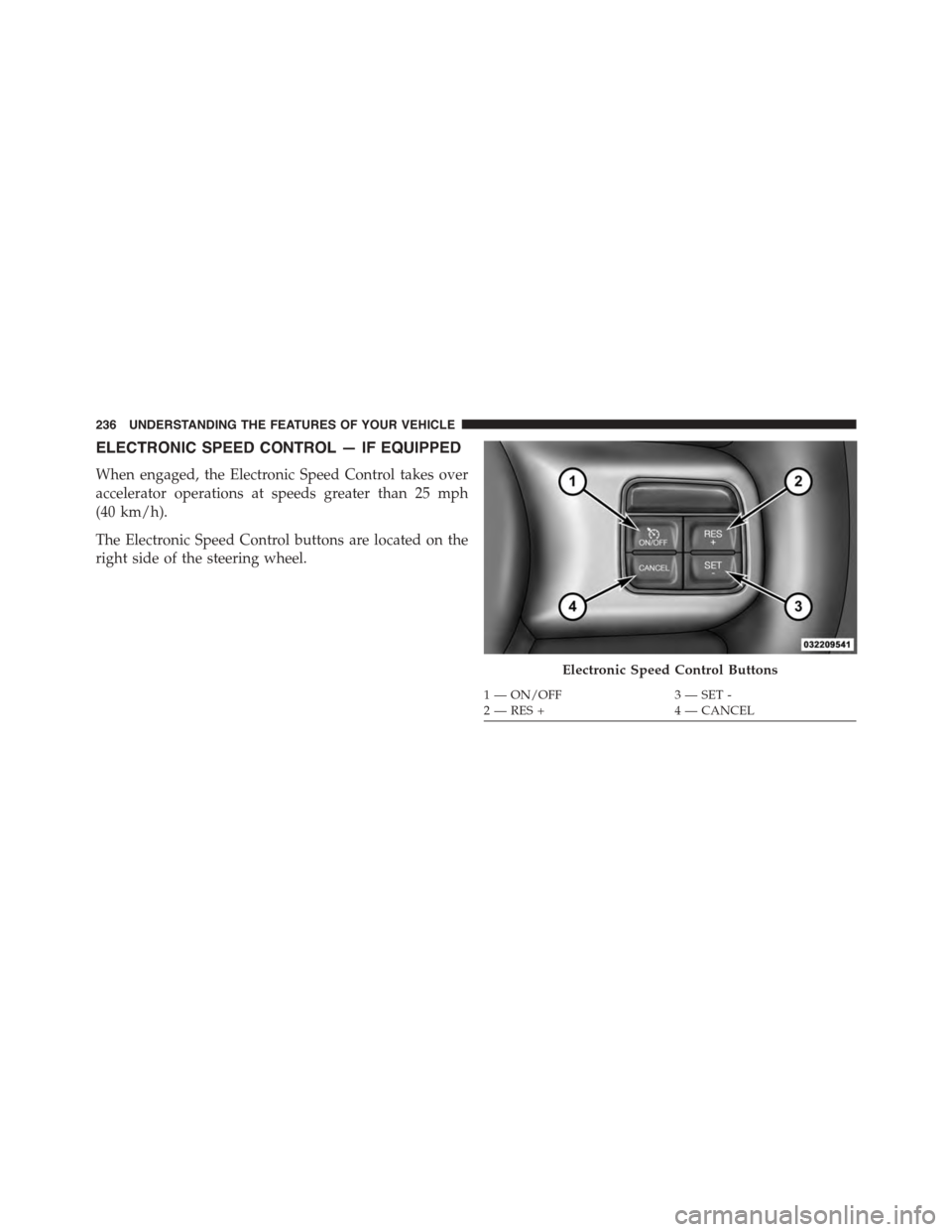
The Electronic Speed Control buttons are located on the
right side of the steering wheel.
Electronic Speed Control Buttons
1—ON/OFF3—SET-2—RES+4—CANCEL
236 UNDERSTANDING THE FEATURES OF YOUR VEHICLE
Page 308 of 703

▫Listen To An Audio Source While A Video Is
Playing.............................397
▫Important Notes For Dual Video Screen
System.............................400
▫VES™ Remote Control — If Equipped.......401
▫Blu-ray™ Player Remote Control — If
Equipped...........................403
▫Remote Control Storage.................405
▫Locking The Remote Control.............406
▫Replacing The Remote Control Batteries......406
▫Headphones Operation.................407
▫Blu-ray™ Headphones Operation..........408
▫Controls............................409
▫Replacing The Headphone Batteries.........410
▫Unwired® Stereo Headphone Lifetime Limited
Warranty...........................410
▫System Information....................411
!STEERING WHEEL AUDIO CONTROLS — IF
EQUIPPED...........................430
▫Radio Operation......................430
▫CD Player...........................431
!CD/DVD/Blu-ray™ Disc MAINTENANCE . . . .431
!RADIO OPERATION AND MOBILE PHONES . .432
▫General Information...................432
!CLIMATE CONTROLS...................432
▫Manual Heating And Air Conditioning System —
If Equipped.........................433
▫Rear Manual Climate Control — If Equipped . .438
306 UNDERSTANDING YOUR INSTRUMENT PANEL
Page 314 of 703
6. Odometer Display/Electronic Vehicle Information
Center (EVIC) — If Equipped
Odometer Display / Trip Odometer DisplayThe odom-
eter display shows the total distance the vehicle has been
driven.
U.S. Federal regulations require that upon transfer of
vehicle ownership, the seller certify to the purchaser the
correct mileage that the vehicle has been driven. If your
odometer needs to be repaired or serviced, the repair
technician should leave the odometer reading the same
as it was before the repair or service. If s/he cannot do so,
then the odometer must be set at zero, and a sticker must
be placed in the door jamb stating what the mileage was
before the repair or service. It is a good idea for you to
make a record of the odometer reading before the repair/
service, so that you can be sure that it is properly reset, or
that the door jamb sticker is accurate if the odometer
must be reset at zero.
This also displays Trip A and Trip B, DTE, MPG or
L/100km, OAT (Outside Air Temperature) information to
Base Cluster, use STEP and RESET button (on steering
wheel) to access or reset the display.
Message Display Area
When the appropriate conditions exist, the following
odometer messages will display:
door.............................Door Ajar
gATE..........................Liftgate Ajar
LoW tirE....................LowTirePressure
gASCAP......................Fuel Cap Fault
noFUSE..........................Fuse Fault
312 UNDERSTANDING YOUR INSTRUMENT PANEL
Page 315 of 703

CHAngE OIL..............OilChange Required
LoCOOL.......................LowCoolant
NOTE:Some of the above warnings will be displayed in
the Electronic Vehicle Information Center Display Area
located in the instrument cluster.
Refer to ”Electronic Vehicle Information Center (EVIC) —
If Equipped” in this section for further information.
LoW tirE
When the appropriate condition exists, the odometer
display will toggle between LoW and tirE for three
cycles.
gASCAP
If the vehicle diagnostic system determines that the fuel
filler cap is loose, improperly installed, or damaged, a
“gASCAP” message will display in the odometer display
area. Tighten the fuel filler cap properly and push the
STEP button on the steering wheel to turn off the
message. If the problem continues, the message will
appear the next time the vehicle is started.
noFUSE
If the vehicle diagnostic system determines that the
Ignition Off Draw (IOD) fuse is improperly installed, or
damaged, a “noFUSE” message will display in the odom-
eter display area. For further information on fuses and
fuse locations refer to “Fuses” in “Maintaining Your
Vehicle”.
CHAngE OIL
Your vehicle is equipped with an engine oil change
indicator system. TheCHAngE OILmessage will flash in
the instrument cluster odometer for approximately 12
seconds, after a single chime has sounded, to indicate the
next scheduled oil change interval. The engine oil change
4
UNDERSTANDING YOUR INSTRUMENT PANEL 313
Page 328 of 703
The EVIC Menu items consists of the following:
•Fuel Economy
•Vehicle Speed
•Trip Info
•Tire PSI
•Vehicle Info
•Messages
•Units
•System Setup (Personal Settings)
•Turn Menu Off
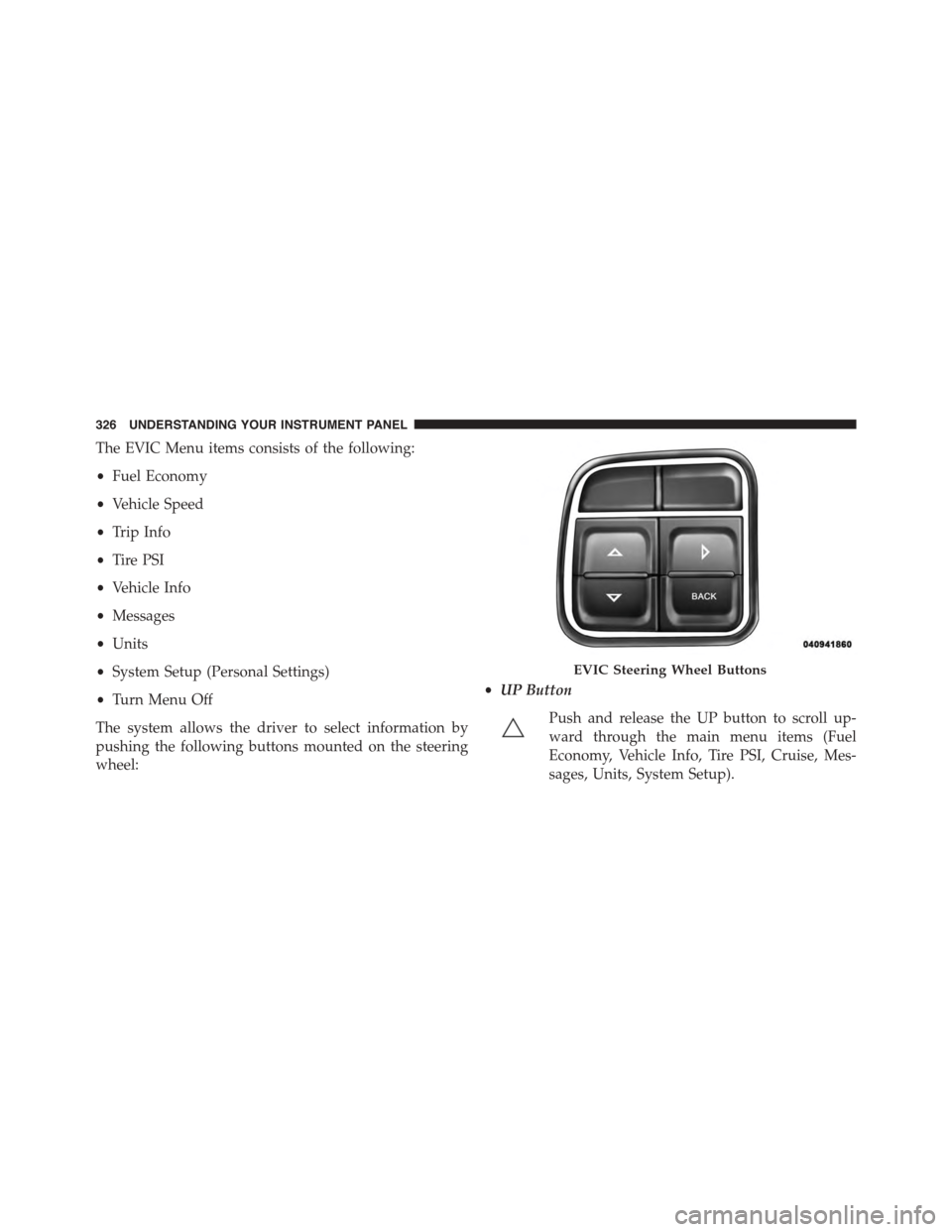
The system allows the driver to select information by
pushing the following buttons mounted on the steering
wheel:
•UP Button
Push and release the UP button to scroll up-
ward through the main menu items (Fuel
Economy, Vehicle Info, Tire PSI, Cruise, Mes-
sages, Units, System Setup).
EVIC Steering Wheel Buttons
326 UNDERSTANDING YOUR INSTRUMENT PANEL
Page 347 of 703
check-mark appears next to the feature showing the
system has been activated or the check-mark is removed
showing the system has been deactivated.
Remote Start Comfort Sys.
When this feature is selected and the remote start is
activated, the heated steering wheel and driver heated
seat features will automatically turn on in cold weather.
These features will stay on through the duration of
remote start or until the key is cycled to ON/RUN
position. To make your selection, push and release the
RIGHT arrow button until a check-mark appears next to
the feature showing the system has been activated or the
check-mark is removed showing the system has been
deactivated.
Horn With Remote Lock
When this feature is selected, a short horn sound will
occur when the RKE transmitter LOCK button is pushed.
To make your selection, push and release the RIGHT
arrow button until a check-mark appears next to the
feature showing the system has been activated or the
check-mark is removed showing the system has been
deactivated.
Flash Lamps With Lock
When selected, the front and rear turn signals will flash
when the doors are locked with the RKE transmitter. To
make your selection, push and release the RIGHT arrow
button until a check-mark appears next to the feature
showing the system has been activated or the check-mark
is removed showing the system has been deactivated.
Automatic High Beams — If Equipped
When this feature is selected, the high beam headlights
will deactivate automatically under certain conditions. To
make your selection, push and release the SELECT
button until a check-mark appears next to the feature
showing the system has been activated or the check-mark
4
UNDERSTANDING YOUR INSTRUMENT PANEL 345
Page 432 of 703
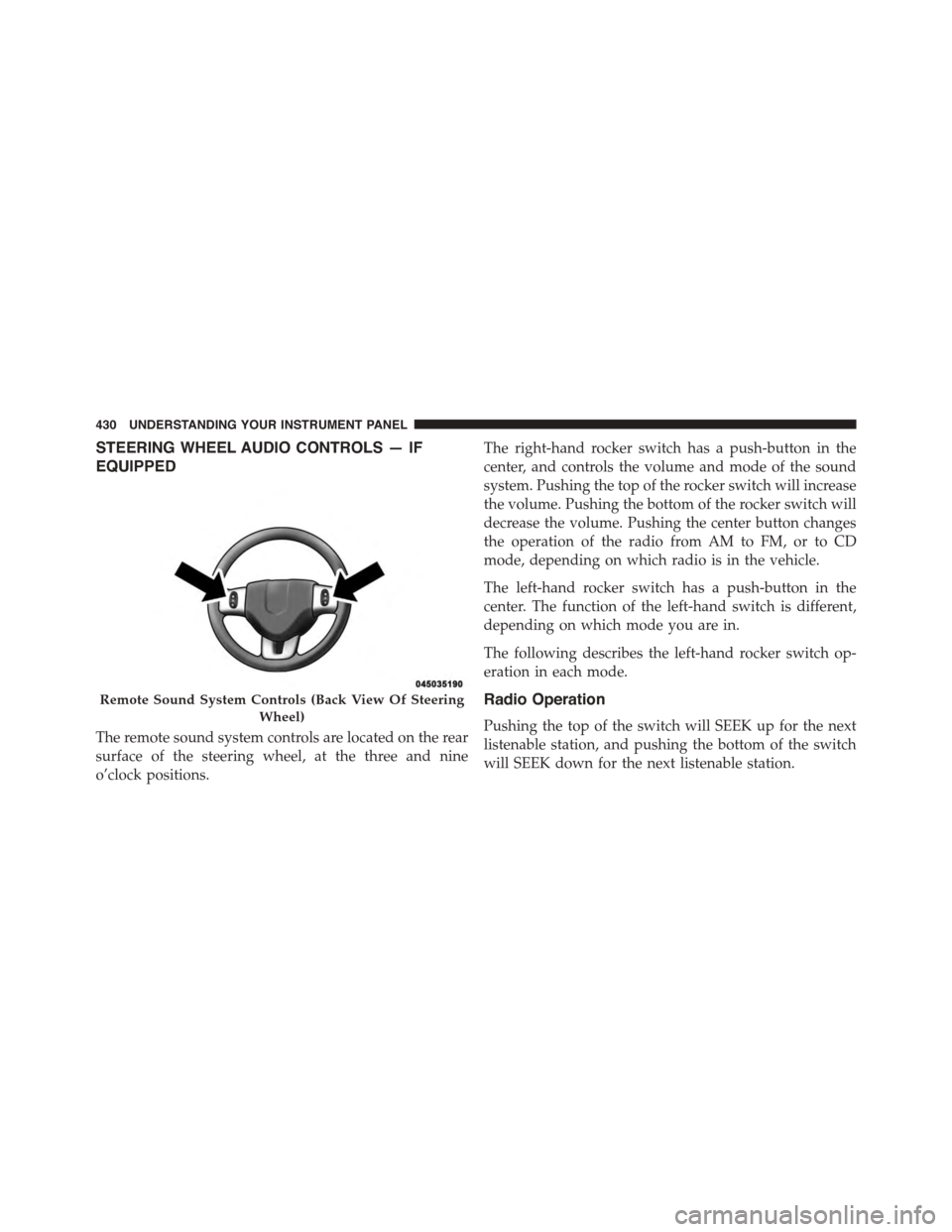
STEERING WHEEL AUDIO CONTROLS — IF
EQUIPPED
The remote sound system controls are located on the rear
surface of the steering wheel, at the three and nine
o’clock positions.
The right-hand rocker switch has a push-button in the
center, and controls the volume and mode of the sound
system. Pushing the top of the rocker switch will increase
the volume. Pushing the bottom of the rocker switch will
decrease the volume. Pushing the center button changes
the operation of the radio from AM to FM, or to CD
mode, depending on which radio is in the vehicle.
The left-hand rocker switch has a push-button in the
center. The function of the left-hand switch is different,
depending on which mode you are in.
The following describes the left-hand rocker switch op-
eration in each mode.
Radio Operation
Pushing the top of the switch will SEEK up for the next
listenable station, and pushing the bottom of the switch
will SEEK down for the next listenable station.
Remote Sound System Controls (Back View Of Steering
Wheel)
430 UNDERSTANDING YOUR INSTRUMENT PANEL
Page 458 of 703

!POWER STEERING.....................478
▫Power Steering Fluid Check..............479
!PARKING BRAKE......................480
!BRAKE SYSTEM.......................482
!ELECTRONIC BRAKE CONTROL SYSTEM . . . .483
▫Anti-Lock Brake System (ABS)............483
▫Traction Control System (TCS)............485
▫Brake Assist System (BAS)...............487
▫Electronic Stability Control (ESC)..........488
▫Trailer Sway Control (TSC)..............491
▫Hill Start Assist (HSA).................492
!TIRE SAFETY INFORMATION.............495
▫Tire Markings........................495
▫Tire Identification Number (TIN)...........499
▫Tire Terminology And Definitions..........501
▫Tire Loading And Tire Pressure...........502
!TIRES — GENERAL INFORMATION........507
▫Tire Pressure........................507
▫Tire Inflation Pressures.................508
▫Tire Pressures For High Speed Operation . . . .510
▫Radial Ply Tires......................510
▫Tire Types...........................511
▫Run Flat Tires — If Equipped.............513
▫Spare Tires — If Equipped...............513
▫Tire Spinning........................516
▫Tread Wear Indicators..................516
456 STARTING AND OPERATING