Page 509 of 638
5. After 25 miles (40 km) check the lug nut torque with a
torque wrench to ensure that all lug nuts are properly
seated against the wheel.
TIRE SERVICE KIT — IF EQUIPPED
Small punctures up to¼” (6 mm) in the tire tread can be
sealed with Tire Service Kit. Foreign objects (e.g., screws
or nails) should not be removed from the tire. Tire Service
Kit can be used in outside temperatures down to approxi-
mately -4°F (-20°C).
This kit will provide a temporary tire seal, allowing you
to drive your vehicle up to 100 miles (160 km) with a
maximum speed of 55 mph (90 km/h).
Tire Service Kit Storage
The Tire Service Kit is located in the trunk.
Tire Service Kit Location
6
WHAT TO DO IN EMERGENCIES 507
Page 520 of 638
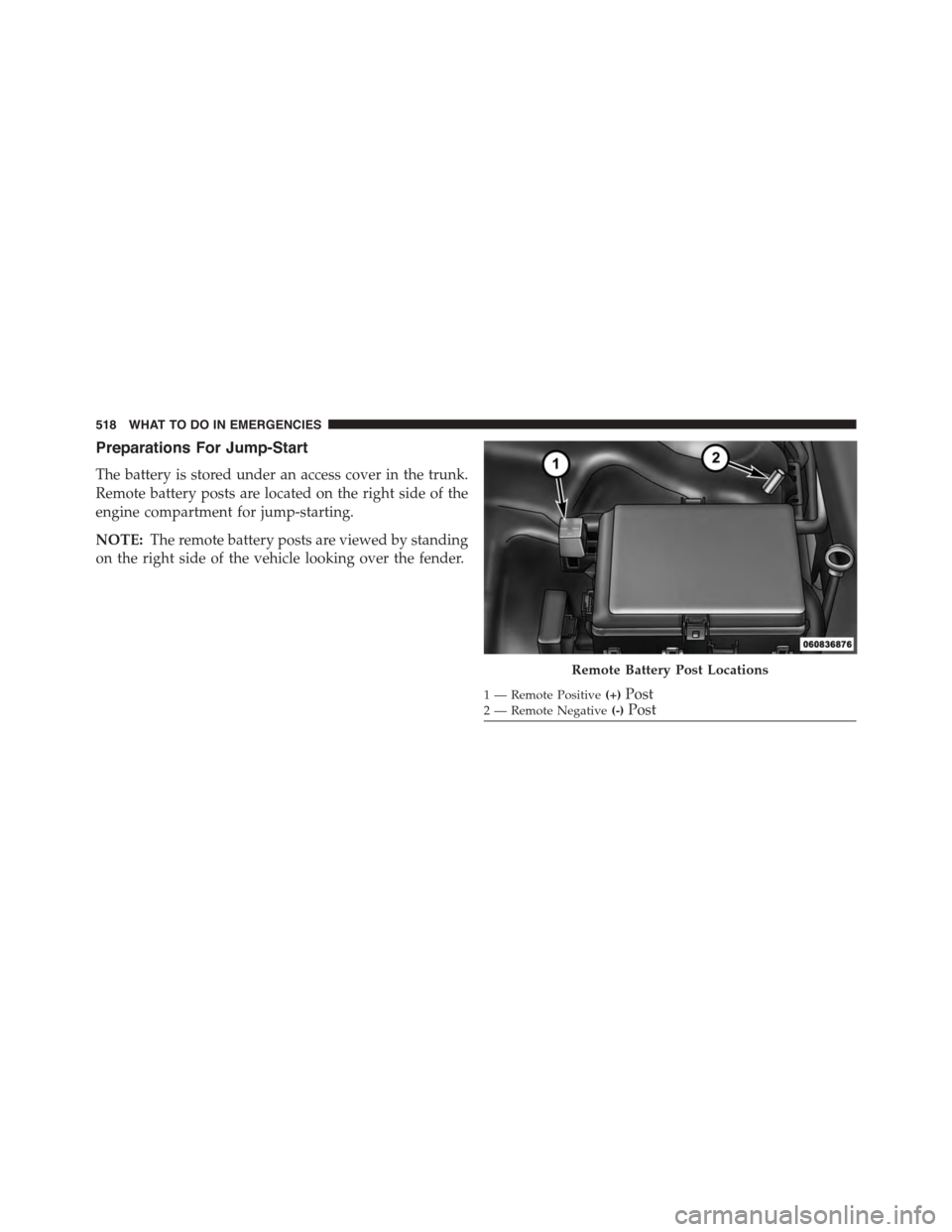
Preparations For Jump-Start
The battery is stored under an access cover in the trunk.
Remote battery posts are located on the right side of the
engine compartment for jump-starting.
NOTE:The remote battery posts are viewed by standing
on the right side of the vehicle looking over the fender.
Remote Battery Post Locations
1 — Remote Positive(+)Post2 — Remote Negative(-)Post
518 WHAT TO DO IN EMERGENCIES
Page 546 of 638
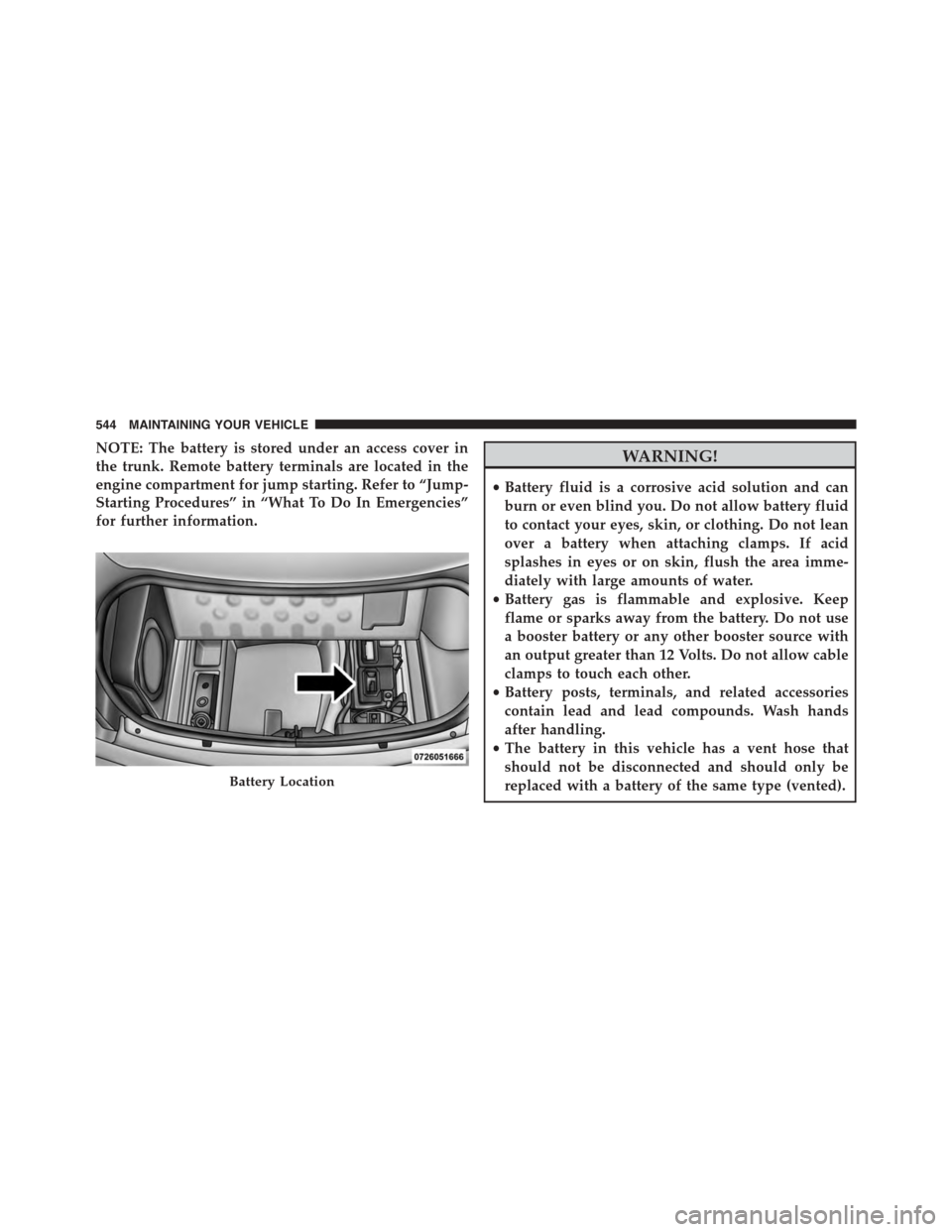
NOTE: The battery is stored under an access cover in
the trunk. Remote battery terminals are located in the
engine compartment for jump starting. Refer to “Jump-
Starting Procedures” in “What To Do In Emergencies”
for further information.
WARNING!
•Battery fluid is a corrosive acid solution and can
burn or even blind you. Do not allow battery fluid
to contact your eyes, skin, or clothing. Do not lean
over a battery when attaching clamps. If acid
splashes in eyes or on skin, flush the area imme-
diately with large amounts of water.
•Battery gas is flammable and explosive. Keep
flame or sparks away from the battery. Do not use
a booster battery or any other booster source with
an output greater than 12 Volts. Do not allow cable
clamps to touch each other.
•Battery posts, terminals, and related accessories
contain lead and lead compounds. Wash hands
after handling.
•The battery in this vehicle has a vent hose that
should not be disconnected and should only be
replaced with a battery of the same type (vented).Battery Location
544 MAINTAINING YOUR VEHICLE
Page 568 of 638
CAUTION!
•Do not use abrasive or strong cleaning materials
such as steel wool or scouring powder that will
scratch metal and painted surfaces.
•Use of power washers exceeding 1,200 psi (8 274 kPa)
can result in damage or removal of paint and decals.
Special Care
•If you drive on salted or dusty roads or if you drive
near the ocean, hose off the undercarriage at least once
a month.
•It is important that the drain holes in the lower edges
of the doors, rocker panels, and trunk be kept clear and
open.
•If you detect any stone chips or scratches in the paint,
touch them up immediately. The cost of such repairs is
considered the responsibility of the owner.
•If your vehicle is damaged due to a collision or similar
cause that destroys the paint and protective coating,
have your vehicle repaired as soon as possible. The
cost of such repairs is considered the responsibility of
the owner.
•If you carry special cargo such as chemicals, fertilizers,
de-icer salt, etc., be sure that such materials are well
packaged and sealed.
•If a lot of driving is done on gravel roads, consider
mud or stone shields behind each wheel.
•Use MOPAR® Touch Up Paint on scratches as soon as
possible. Your authorized dealer has touch up paint to
match the color of your vehicle.
566 MAINTAINING YOUR VEHICLE
Page 578 of 638
Rear Power Distribution Center (Fuses)
There is also a power distribution center located in the
trunk under the spare tire access panel. This center
contains fuses and relays.
Opening The Access Cover
Rear Power Distribution Center
576 MAINTAINING YOUR VEHICLE
Page 587 of 638
REPLACEMENT BULBS
All of the interior bulbs are glass wedge base or glass
cartridge types. Aluminum base bulbs are not approved
and should not be used for replacement.
Interior Bulbs
Bulb Number
Rear Courtesy/Reading LampsW5W
Rear Compartment (Trunk) Lamp562
Overhead Console Reading Lamp578
Visor Vanity LampsA6220
Glove Box Lamp – If Equipped194
Door Courtesy562
Shift Indicator LampJKLE14140
Center High-Mount Stop Lamp (CHMSL)LED (Serviced at Authorized Dealer)
Optional Door Map Pocket/Cup HolderLED (Serviced at Authorized Dealer)
For lighted switches, see your authorized dealer for replacement instructions.
7
MAINTAINING YOUR VEHICLE 585
Page 621 of 638

Brake Assist System.....................424
Traction Control System...................423
Electronic Power Distribution Center (Fuses)......572
Electronic Speed Control (Cruise Control)........174
Electronic Stability Control (ESC)..............425
Emergency Deck Lid Release..................45
Emergency, In Case of
Freeing Vehicle When Stuck................521
Jacking...............................498
Jump Starting..........................517
Overheating...........................495
Towing..............................526
Emergency Trunk Release....................45
Emission Control System Maintenance..........535
Engine.................................534
Air Cleaner...........................543
Block Heater..........................398
Break-In Recommendations.................96
Checking Oil Level......................538
Compartment..........................533
Compartment Identification................533
Coolant (Antifreeze).....................553
Cooling..............................552
Exhaust Gas Caution.....................98
Fails to Start...........................396
Flooded, Starting.......................396
Fuel Requirements......................464
Jump Starting..........................517
Oil . . . . . . . . . . . . . . . . . . . . . . . . . . . . . . . . ..538
Oil Filler Cap..........................541
Oil Selection...........................540
Oil Synthetic..........................542
Overheating...........................495
Starting..............................393
Temperature Gauge......................263
Engine Oil Viscosity.......................541
Engine Oil Viscosity Chart...................541
EnhancedAccident Response Feature............70
10
INDEX 619
Page 625 of 638
Interior Appearance Care....................568
Interior Lights...........................161
Intermittent Wipers (Delay Wipers).............163
Introduction..............................4
iPod®/USB/MP3 Control...................349
Jack Location............................498
Jack Operation...........................498
Jump Starting............................517
Key Fob . . . . . . . . . . . . . . . . . . . . . . . . . . . . . . . . .13
Arm The Alarm.........................19
Lock The Doors.........................22
Panic Alarm............................23
Programming Additional Key Fobs...........18
Programming Additional Transmitters.........18
Remote Keyless Entry (RKE)................21
Unlatch The Trunk.......................23
Unlock The Doors.......................22
Key-In Reminder..........................15
Keyless Enter-N-Go........................34
Keyless Enter-N-Go™.......................34
Enter The Trunk.........................23
Lock The Vehicle’s Doors..................22
Passive Entry...........................34
Passive Entry Programming.................34
Unlock From The Driver’s Side..............22
Unlock From The Passenger Side.............22
Keyless Entry System.......................21
Keyless Go...............................12
Key, Replacement..........................17
Keys...................................12
Key, Sentry (Immobilizer)....................16
Lane Change and Turn Signals................158
Lane Change Assist........................158
LaneSense..............................210
Lap/Shoulder Belts.........................49
10
INDEX 623