Page 202 of 638
Lane Changing
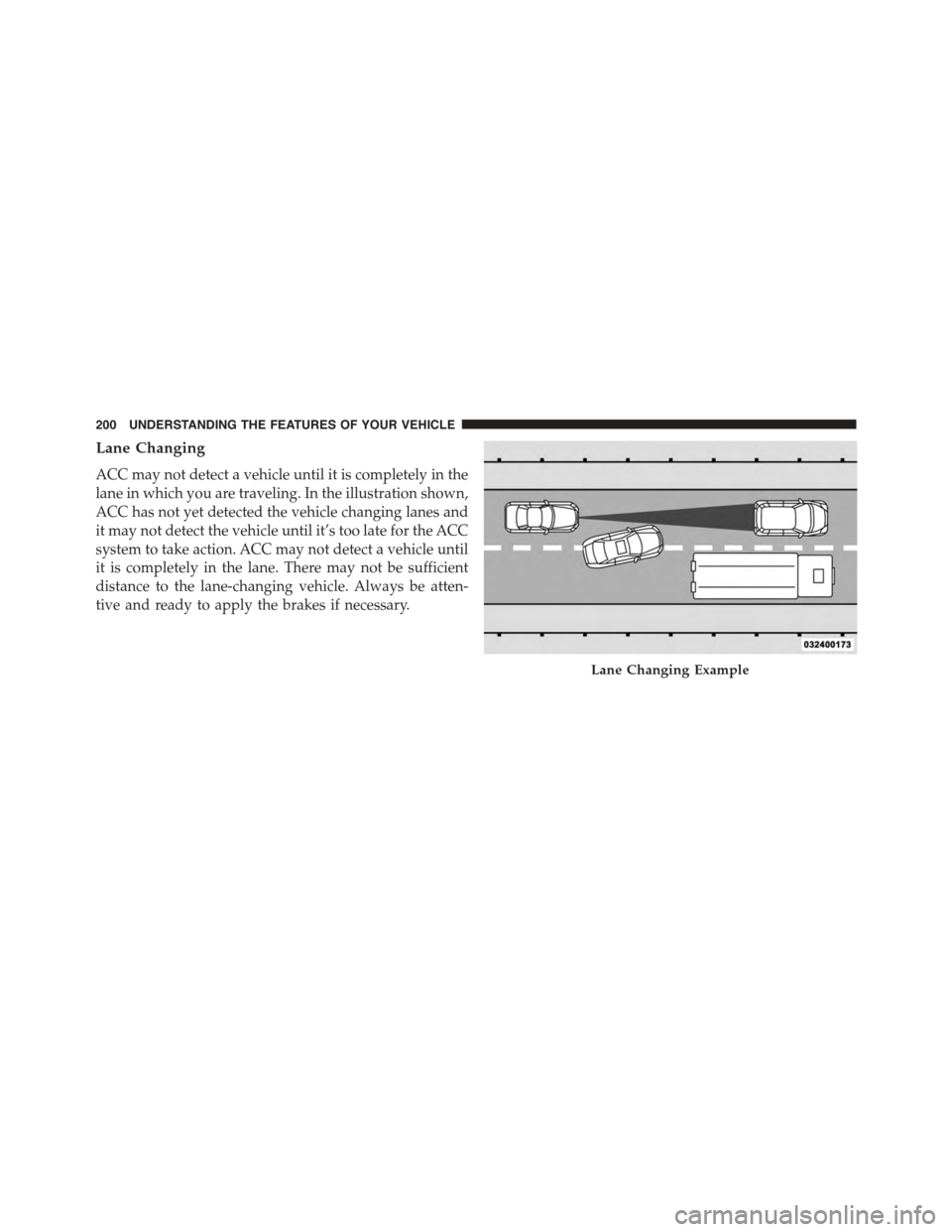
ACC may not detect a vehicle until it is completely in the
lane in which you are traveling. In the illustration shown,
ACC has not yet detected the vehicle changing lanes and
it may not detect the vehicle until it’s too late for the ACC
system to take action. ACC may not detect a vehicle until
it is completely in the lane. There may not be sufficient
distance to the lane-changing vehicle. Always be atten-
tive and ready to apply the brakes if necessary.
Lane Changing Example
200 UNDERSTANDING THE FEATURES OF YOUR VEHICLE
Page 203 of 638
Narrow Vehicles
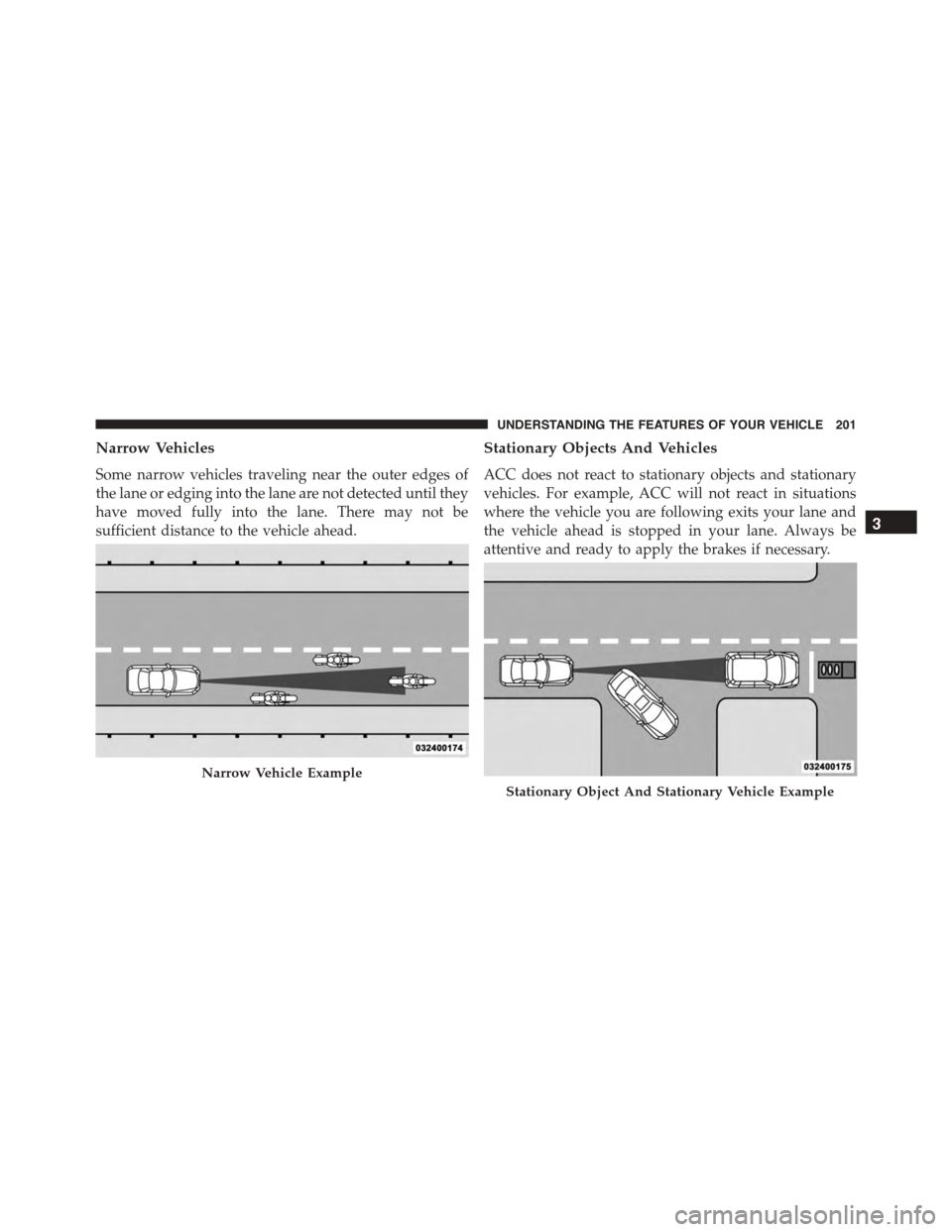
Some narrow vehicles traveling near the outer edges of
the lane or edging into the lane are not detected until they
have moved fully into the lane. There may not be
sufficient distance to the vehicle ahead.
Stationary Objects And Vehicles
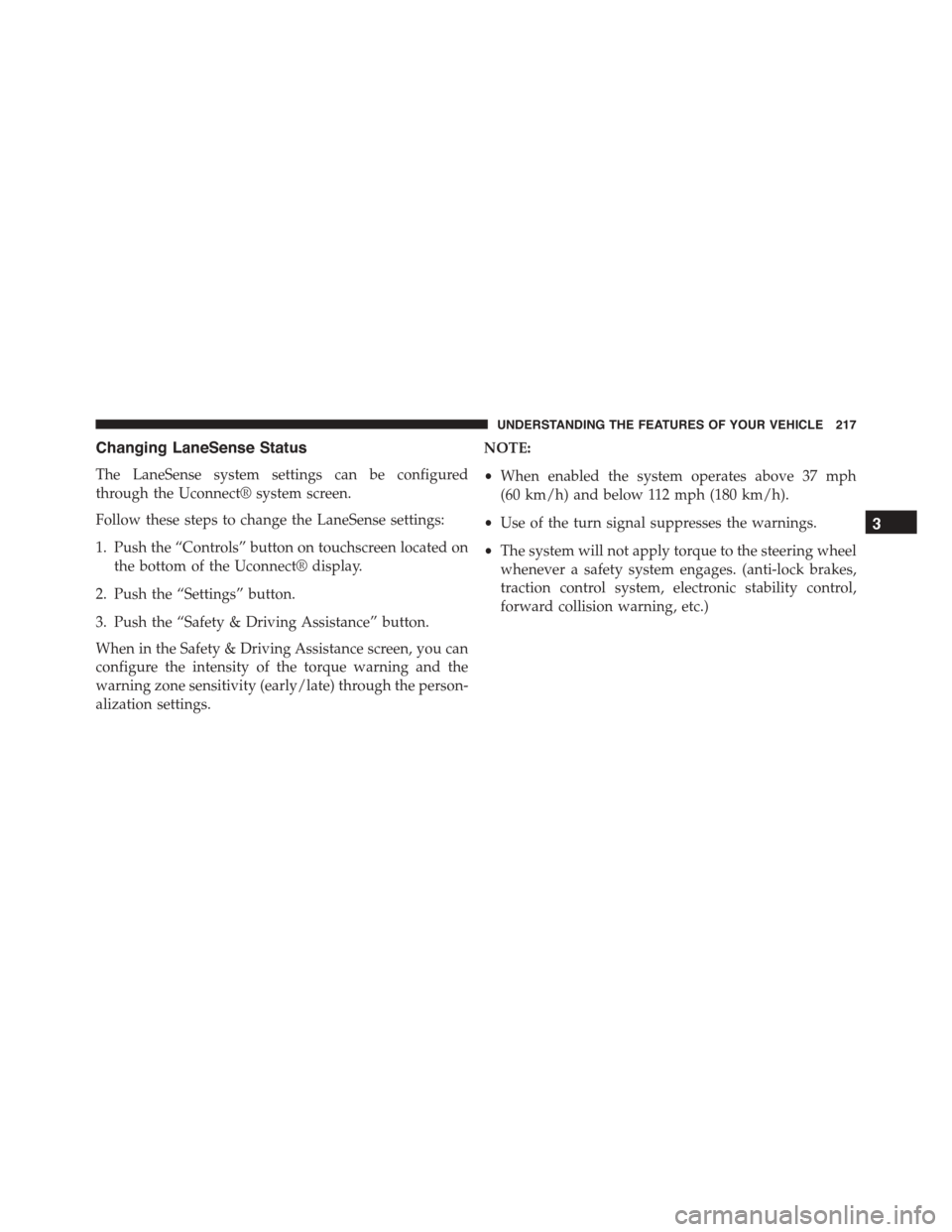
ACC does not react to stationary objects and stationary
vehicles. For example, ACC will not react in situations
where the vehicle you are following exits your lane and
the vehicle ahead is stopped in your lane. Always be
attentive and ready to apply the brakes if necessary.
Narrow Vehicle Example
Stationary Object And Stationary Vehicle Example
3
UNDERSTANDING THE FEATURES OF YOUR VEHICLE 201
Page 208 of 638

FORWARD COLLISION WARNING (FCW) WITH
MITIGATION — IF EQUIPPED
Forward Collision Warning (FCW) With Mitigation
Operation
The Forward Collision Warning (FCW) system with
mitigation provides the driver with audible warnings,
visual warnings (within the DID), and may apply a brake
jerk to warn the driver when it detects a potential frontal
collision. The warnings and limited braking are intended
to provide the driver with enough time to react, avoid or
mitigate the potential collision.
NOTE:FCW monitors the information from the forward
looking sensors as well as the Electronic Brake Controller
(EBC), to calculate the probability of a forward collision.
When the system determines that a forward collision is
probable, the driver will be provided with audible and
visual warnings and may provide a brake jerk warning. If
the driver does not take action based upon these progres-
sive warnings, then the system will provide a limited
level of active braking to help slow the vehicle and
mitigate the potential forward collision. If the driver
reacts to the warnings by braking and the system deter-
mines that the driver intends to avoid the collision by
braking but has not applied sufficient brake force, the
system will compensate and provide additional brake
force as required. If a Forward Collision Warning with
Mitigation event begins at a speed below 20 mph
(32 km/h), the system may provide the maximum or
partial braking to mitigate the potential forward colli-
sion. If the Forward Collision Warning with Mitigation
event stops the vehicle completely, the system will hold
the vehicle at standstill for two seconds and then release
the brakes.
206 UNDERSTANDING THE FEATURES OF YOUR VEHICLE
Page 219 of 638
Changing LaneSense Status
The LaneSense system settings can be configured
through the Uconnect® system screen.
Follow these steps to change the LaneSense settings:
1. Push the “Controls” button on touchscreen located on
the bottom of the Uconnect® display.
2. Push the “Settings” button.
3. Push the “Safety & Driving Assistance” button.
When in the Safety & Driving Assistance screen, you can
configure the intensity of the torque warning and the
warning zone sensitivity (early/late) through the person-
alization settings.
NOTE:
•When enabled the system operates above 37 mph
(60 km/h) and below 112 mph (180 km/h).
•Use of the turn signal suppresses the warnings.
•The system will not apply torque to the steering wheel
whenever a safety system engages. (anti-lock brakes,
traction control system, electronic stability control,
forward collision warning, etc.)
3
UNDERSTANDING THE FEATURES OF YOUR VEHICLE 217
Page 271 of 638

12. Turn Signal Indicators
The arrow will flash with the exterior turn
signal when the turn signal lever is operated.
NOTE:
•A continuous chime will sound if the vehicle is
driven more than 1 mile (1.6 km) with either turn
signal on.
•Check for an inoperative outside light bulb if either
indicator flashes at a rapid rate.
13. Anti-Lock Brake (ABS) Light
This light monitors the Anti-Lock Brake System
(ABS). The light will turn on when the ignition is
placed in the ON/RUN position and may stay on for as
long as four seconds.
If the ABS light remains on or turns on while driving,
then the Anti-Lock portion of the brake system is not
functioning and service is required. However, the con-
ventional brake system will continue to operate normally
if the BRAKE warning light is not on.
If the ABS light is on, the brake system should be serviced
as soon as possible to restore the benefits of Anti-Lock
Brakes. If the ABS light does not turn on when the
ignition is placed in the ON/RUN position, have the light
inspected by an authorized dealer.
14. Fuel Gauge
The pointer shows the level of fuel in the fuel tank when
the ignition is placed in the ON/RUN position.
15. Temperature Gauge
The temperature gauge shows engine coolant tempera-
ture. Any reading within the normal range for a fully
warm vehicle should be 200 F - 230 F which indicates that
the engine cooling system is operating satisfactorily.
4
UNDERSTANDING YOUR INSTRUMENT PANEL 269
Page 288 of 638
•To clear the vehicle’s best 1/4 mile 400 meters) run,
push and hold theOKbutton for two seconds.
Braking Distance
When selected, this screen displays the vehicle’s braking
distance, and the speed at which the brake pedal was
depressed.
•This feature will only function when applying the
brakes at speeds above 30 mph (48 km/h).
•Engaging the parking brake will disable this feature.
•The word “READY” will display when conditions are
met for the event to begin.
•The distance and speed measurements display while
the event is taking place.
•The distance measurement will be aborted if the brake
pedal is released before the vehicle comes to a com-
plete stop.
•Pushing and holding theOKbutton will clear the
current and last run values.
Current G-Force
When selected, this screen displays the current G-Force
(lateral and longitudinal) that displays the directions of
the forces.
Peak G-Force
When selected, this screen displays all four G-Force
values (two lateral and two longitudinal).
•When a force greater than zero is measured, the
display will update the value as it climbs. As the
G-Force falls, the peak forces will continue to display.
•Push and hold theOKbutton to clear the peak force
values.
286 UNDERSTANDING YOUR INSTRUMENT PANEL
Page 395 of 638
STARTING PROCEDURES
Before starting your vehicle, adjust your seat, adjust the
inside and outside mirrors, fasten your seat belt, and if
present, instruct all other occupants to buckle their seat
belts.
WARNING!
•When leaving the vehicle, always make sure the
ignition is in the OFF position, remove the Key Fob
from the vehicle, and lock the vehicle.
•Never leave children alone in a vehicle, or with
access to an unlocked vehicle. Leaving children in
a vehicle unattended is dangerous for a number of
reasons. A child or others could be seriously or
fatally injured. Children should be warned not to
touch the parking brake, brake pedal or the trans-
mission gear selector.
(Continued)
WARNING!(Continued)
•Do not leave the Key Fob in or near the vehicle (or
in a location accessible to children), and do not
leave the ignition (of a vehicle equipped with
Keyless Enter-N-Go™) in the ACC or ON/RUN
mode. A child could operate power windows, other
controls, or move the vehicle.
Automatic Transmission
The shift lever must be in the NEUTRAL or PARK
position before you can start the engine. Apply the brakes
before shifting into any driving gear.
5
STARTING AND OPERATING 393
Page 402 of 638
CAUTION!
Damage to the transmission may occur if the follow-
ing precautions are not observed:
•Shift into or out of PARK or REVERSE only after
the vehicle has come to a complete stop.
•Do not shift between PARK, REVERSE, NEU-
TRAL, or DRIVE when the engine is above idle
speed.
•Before shifting into any gear, make sure your foot
is firmly pressing the brake pedal.
NOTE:You must press and hold the brake pedal while
shifting out of PARK.
Key Ignition Park Interlock
This vehicle is equipped with a Key Ignition Park Inter-
lock which requires the transmission to be in PARK
before the engine can be turned off. This helps the driver
avoid inadvertently leaving the vehicle without placing
the transmission in PARK. This system also locks the
transmission in PARK whenever the ignition switch is in
the OFF position.
Brake/Transmission Shift Interlock System
This vehicle is equipped with a Brake Transmission Shift
Interlock system (BTSI) that holds the shift lever in PARK
unless the brakes are applied. To shift the transmission
out of PARK, the engine must be running and the brake
pedal must be pressed.
The brake pedal must also be pressed to shift from
NEUTRAL into DRIVE or REVERSE when the vehicle is
stopped or moving at low speeds.
400 STARTING AND OPERATING