Page 360 of 638
temperature settings or on the touchscreen, press and
slide the temperature bar button into the blue area for
cooler temperature settings.
NOTE:In Sync mode, this button will also automatically
adjust the passenger temperature setting at the same
time.
Climate Control Functions
A/C (Air Conditioning)
The Air Conditioning (A/C) button allows the operator
to manually activate or deactivate the air conditioning
system. When the air conditioning system is turned on,
cool dehumidified air will flow through the outlets into
the cabin. For improved fuel economy, press the A/C
button to turn off the air conditioning and manually
adjust the blower and airflow mode settings. Also, make
sure to select only Panel, Bi-Level or Floor modes.
NOTE:
•For Manual Climate Controls, if the system is in Mix,
Floor or Defrost Mode, the A/C can be turned off, but
the A/C system shall remain active to prevent fogging
of the windows.
•If fog or mist appears on the windshield or side glass,
select Defrost mode and adjust blower speed if
needed.
•If your air conditioning performance seems lower than
expected, check the front of the A/C condenser (lo-
cated in front of the radiator), for an accumulation of
dirt or insects. Clean with a gentle water spray from
behind the radiator and through the condenser. Fabric
front fascia protectors may reduce airflow to the
condenser, reducing air conditioning performance.
358 UNDERSTANDING YOUR INSTRUMENT PANEL
Page 365 of 638
8. Passenger Temperature Control Down Button
(Uconnect® 8.4 Radio Only)
Provides the passenger with independent temperature
control. Push the button on the faceplate for cooler
temperature settings or on the touchscreen, press and
slide the temperature bar button towards the blue arrow
for cooler temperature settings.
NOTE:Pressing this button while in Sync mode will
automatically exit Sync.
9. SYNC
Press the Sync button on the touchscreen to toggle the
Sync feature On/Off. The Sync indicator is illuminated
when this feature is enabled. Sync is used to synchronize
the passenger temperature setting with the driver tem-
perature setting. Changing the passenger temperature
setting while in Sync will automatically exit this feature.
10. Blower Control
Blower control is used to regulate the amount of air forced
through the climate system. There are seven blower speeds
available. Adjusting the blower will cause automatic mode
to switch to manual operation. The speeds can be selected
using either the blower control knob on the faceplate or the
buttons on the touchscreen as follows:
Blower Control Knob On The Faceplate
The blower speed increases as you turn the blower
control knob clockwise from the lowest blower setting.
The blower speed decreases as you turn the blower
control knob counterclockwise.
Button On The Touchscreen
Use the small blower icon to reduce the blower setting
and the large blower icon to increase the blower setting.
Blower can also be selected by pressing the blower bar
area between the icons.
4
UNDERSTANDING YOUR INSTRUMENT PANEL 363
Page 367 of 638
13. Driver Temperature Control Down Button
(Uconnect® 8.4 Only)
Provides the driver with independent temperature con-
trol. Push the button on the faceplate for cooler tempera-
ture settings or on the touchscreen, press and slide the
temperature bar button towards the blue arrow for cooler
temperature settings.
NOTE:In Sync mode, this button will also automatically
adjust the passenger temperature setting at the same
time.
14. Driver Temperature Control Up Button (Uconnect®
8.4 Only)
Provides the driver with independent temperature con-
trol. Push the button on the faceplate for warmer tem-
perature settings or on the touchscreen, press and slide
the temperature bar button towards the red arrow for
warmer temperature settings.
NOTE:In Sync mode, this button will also automatically
adjust the passenger temperature setting at the same time.
Climate Control Functions
A/C (Air Conditioning)
The Air Conditioning (A/C) button allows the operator
to manually activate or deactivate the air conditioning
system. When the air conditioning system is turned on,
cool dehumidified air will flow through the outlets into
the cabin. For improved fuel economy, press the A/C
button to turn off the air conditioning and manually
adjust the blower and airflow mode settings. Also, make
sure to select only Panel, Bi-Level or Floor modes.
NOTE:
•If fog or mist appears on the windshield or side glass,
select Defrost mode and increase blower speed if
needed.
4
UNDERSTANDING YOUR INSTRUMENT PANEL 365
Page 378 of 638
Media
Uconnect® offers connections via USB, SD, Bluetooth®
and auxiliary ports (If Equipped). Voice operation is only
available for connected USB and iPod® devices. (Remote
CD player optional and not available on all vehicles.)
Push the VR button. After the beep, say one of the
following commands and follow the prompts to
switch your media source or choose an artist.
•Change sourceto Bluetooth®
•Change sourceto iPod®
•Change sourceto USB
•Play artistBeethoven;Play albumGreatest Hits;Play
songMoonlight Sonata;Play genreClassical
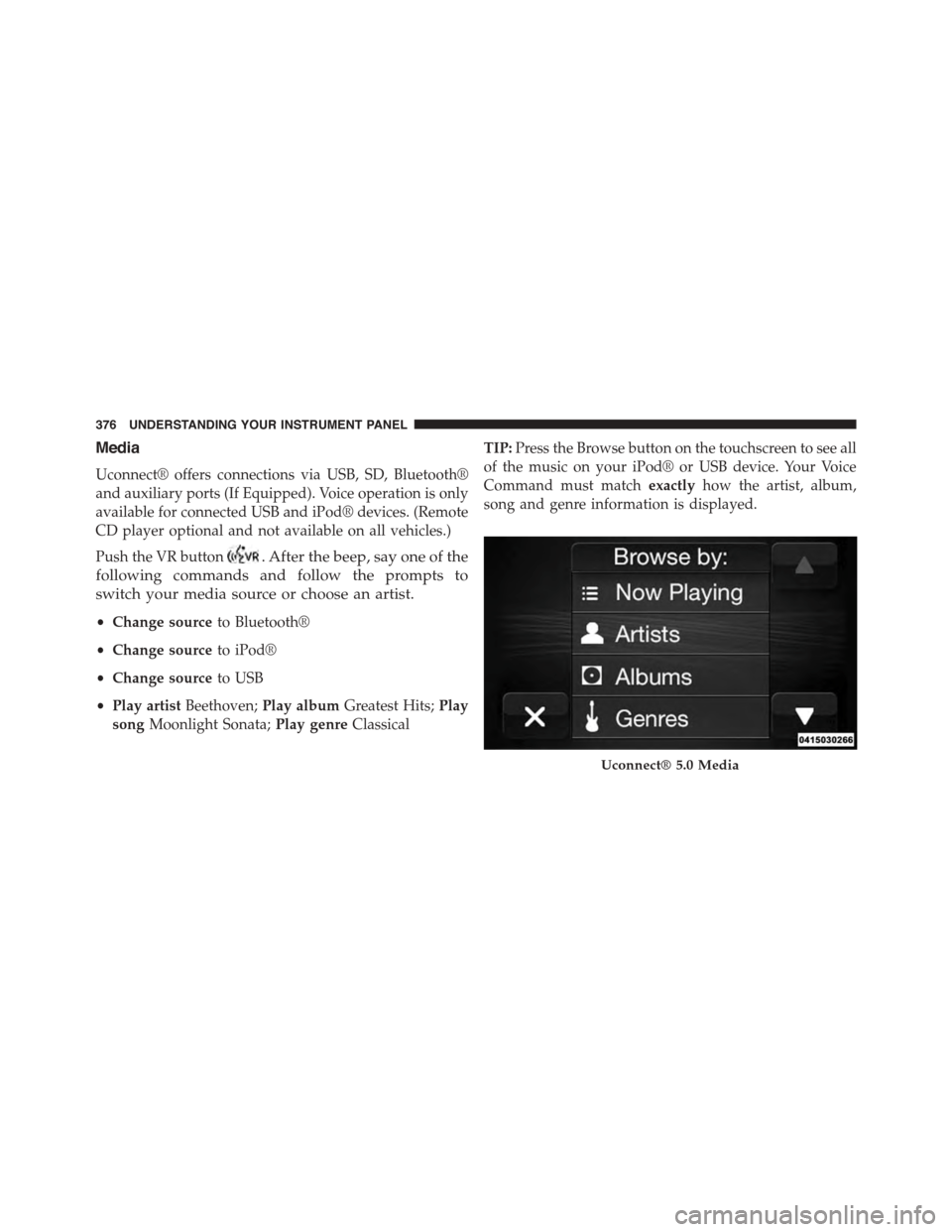
TIP:Press the Browse button on the touchscreen to see all
of the music on your iPod® or USB device. Your Voice
Command must matchexactlyhow the artist, album,
song and genre information is displayed.
Uconnect® 5.0 Media
376 UNDERSTANDING YOUR INSTRUMENT PANEL
Page 575 of 638
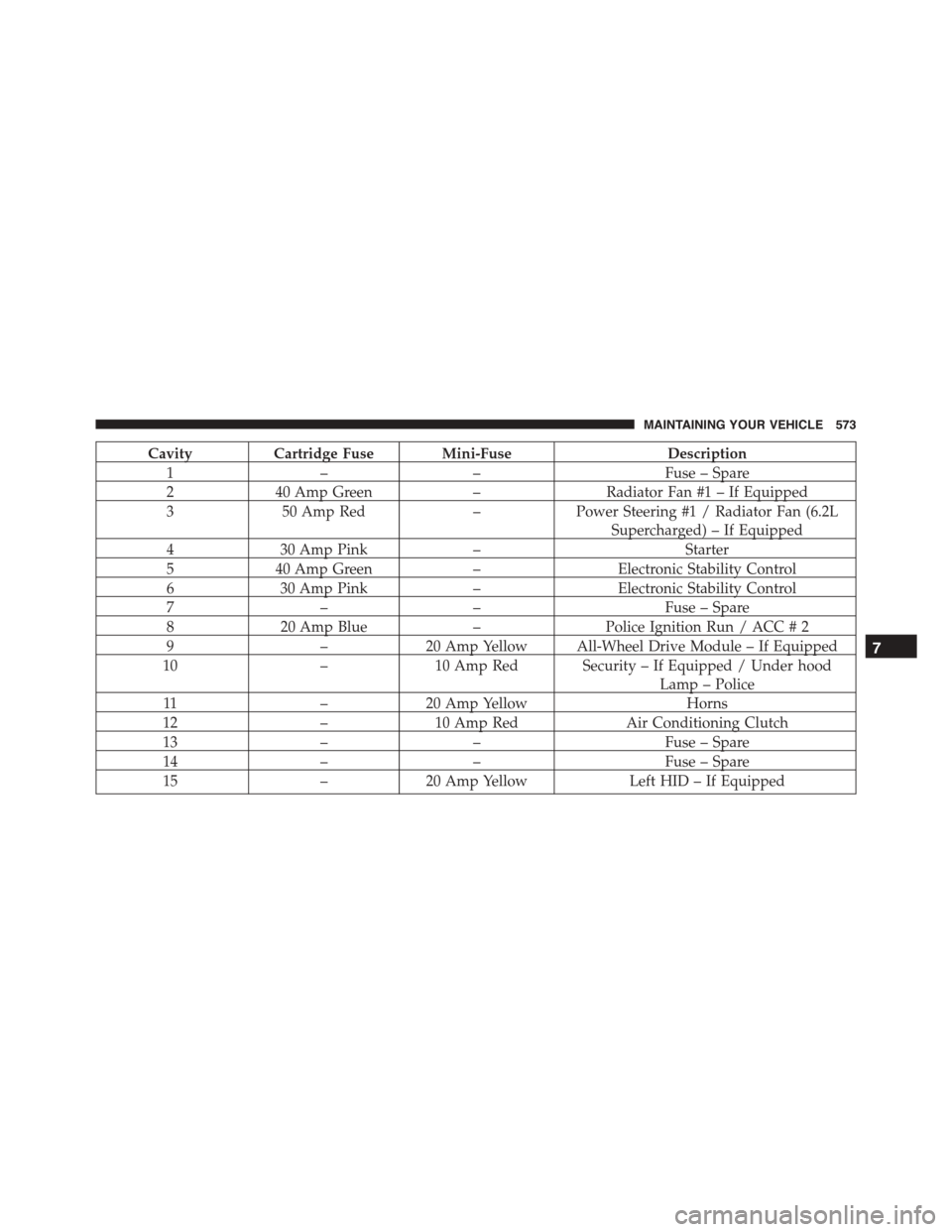
CavityCartridge Fuse Mini-FuseDescription
1––Fuse – Spare
240 Amp Green–Radiator Fan #1 – If Equipped
350 Amp Red–Power Steering #1 / Radiator Fan (6.2L
Supercharged) – If Equipped
430 Amp Pink–Starter
540 Amp Green–Electronic Stability Control
630 Amp Pink–Electronic Stability Control
7––Fuse – Spare
820 Amp Blue–Police Ignition Run / ACC # 2
9–20 Amp Yellow All-Wheel Drive Module – If Equipped
10–10 Amp Red Security – If Equipped / Under hood
Lamp – Police
11–20 Amp YellowHorns
12–10 Amp RedAir Conditioning Clutch
13––Fuse – Spare
14––Fuse – Spare
15–20 Amp YellowLeft HID – If Equipped
7
MAINTAINING YOUR VEHICLE 573
Page 576 of 638
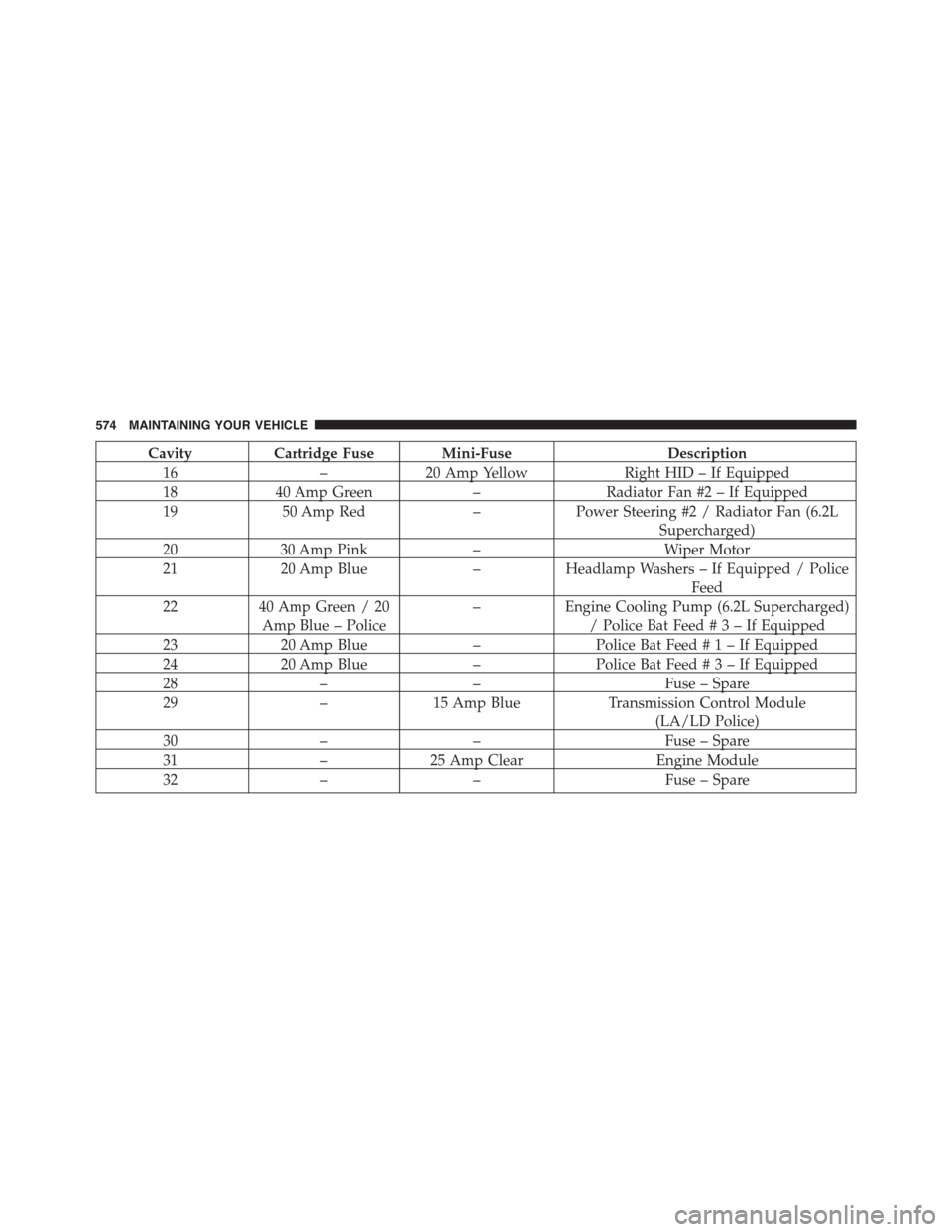
CavityCartridge Fuse Mini-FuseDescription
16–20 Amp YellowRight HID – If Equipped
1840 Amp Green–Radiator Fan #2 – If Equipped
1950 Amp Red–Power Steering #2 / Radiator Fan (6.2L
Supercharged)
2030 Amp Pink–Wiper Motor
2120 Amp Blue–Headlamp Washers – If Equipped / Police
Feed
2240 Amp Green / 20
Amp Blue – Police
–Engine Cooling Pump (6.2L Supercharged)
/ Police Bat Feed#3–IfEquipped
2320 Amp Blue–Police Bat Feed#1–IfEquipped
2420 Amp Blue–Police Bat Feed#3–IfEquipped
28––Fuse – Spare
29–15 Amp BlueTransmission Control Module
(LA/LD Police)
30––Fuse – Spare
31–25 Amp ClearEngine Module
32––Fuse – Spare
574 MAINTAINING YOUR VEHICLE
Page 580 of 638
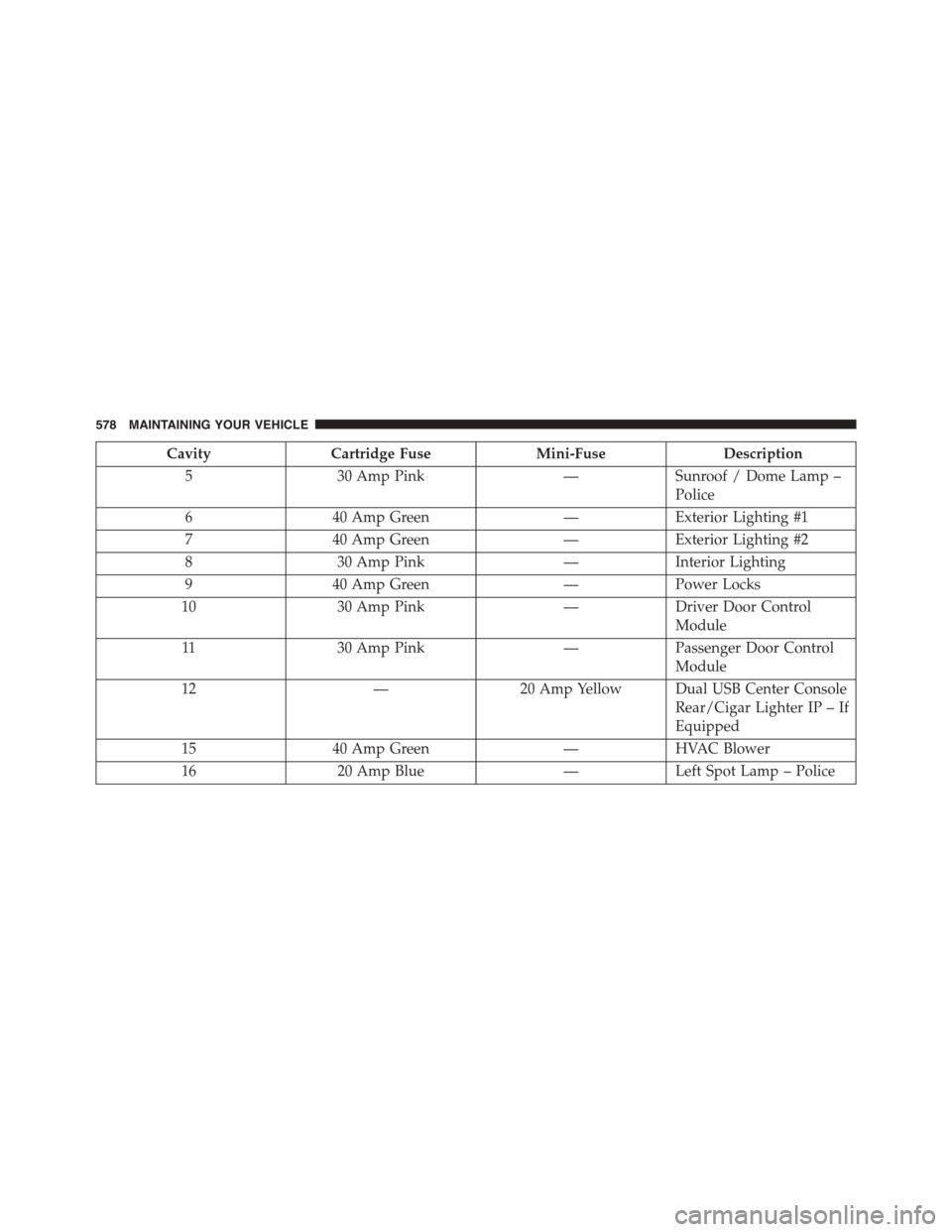
CavityCartridge FuseMini-FuseDescription
530 Amp Pink—Sunroof / Dome Lamp –
Police
640 Amp Green—Exterior Lighting #1
740 Amp Green—Exterior Lighting #2
830 Amp Pink—Interior Lighting
940 Amp Green—Power Locks
1030 Amp Pink—Driver Door Control
Module
1130 Amp Pink—Passenger Door Control
Module
12—20 Amp Yellow Dual USB Center Console
Rear/Cigar Lighter IP – If
Equipped
1540 Amp Green—HVAC Blower
1620 Amp Blue—Left Spot Lamp – Police
578 MAINTAINING YOUR VEHICLE
Page 581 of 638
CavityCartridge FuseMini-FuseDescription
17——Fuse – Spare
1830 Amp Pink—Mod Network Interface –
Police
19——Fuse — Spare
20——Fuse — Spare
2130 Amp Pink (6.2L Super-
charged)
25 Amp Clear (LD STD)
—Fuel Pump (6.2L Super-
charged)
Fuel Pump (LD STD)
22—20 Amp Yellow – Police
10 Amp Red – LA
Right Spot Lamp – Police
Integrated Center Stack –
LA
23—10 Amp Red Fuel Door/Diagnostic
Port
24—15 Amp Blue Integrated Center Stack –
LD/LX
25—10 Amp Red Tire Pressure Monitor
7
MAINTAINING YOUR VEHICLE 579