2015 Citroen NEMO RHD brake
[x] Cancel search: brakePage 35 of 193
33
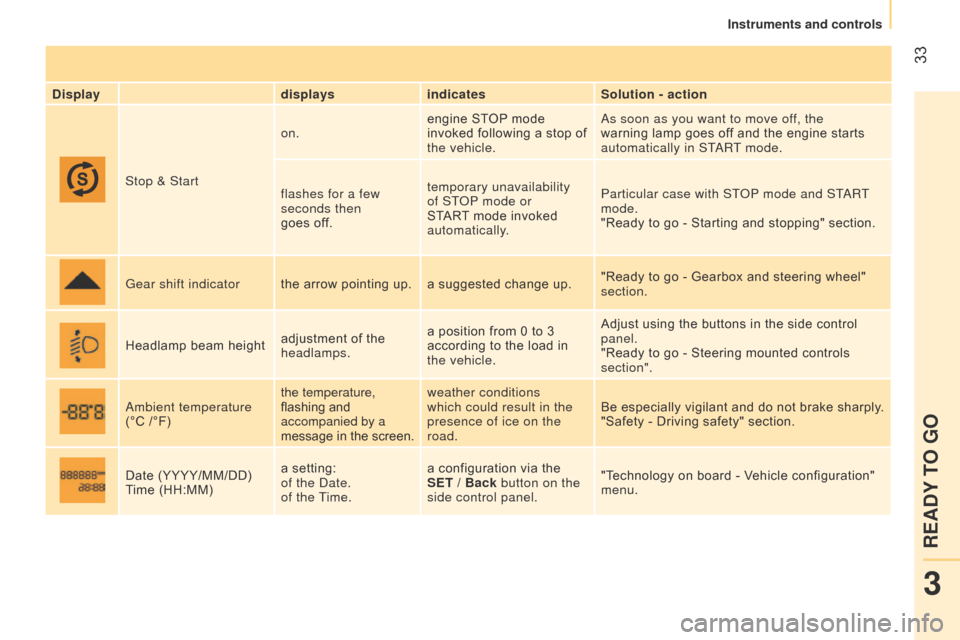
Displaydisplaysindicates Solution - action
Stop & Start on.
engine STOP mode
invoked following a stop of
the vehicle.
a
s soon as you want to move off, the
warning lamp goes off and the engine starts
automatically in ST
a
RT mode.
flashes for a few
seconds then
goes off. temporary unavailability
of ST
o
P mode or
START mode invoked
automatically. Particular case with ST
o
P mode and ST
a
RT
mode.
"Ready to go - Starting and stopping" section.
Gear shift indicator the arrow pointing up. a suggested change up. "Ready to go - Gearbox and steering wheel"
section.
Headlamp beam height adjustment of the
headlamps.a position from 0 to 3
according to the load in
the vehicle. Adjust using the buttons in the side control
panel.
"Ready to go - Steering mounted controls
section".
a
mbient temperature
(°C /°F) the temperature,
flashing and
accompanied by a
message in the screen.weather conditions
which could result in the
presence of ice on the
road.
Be especially vigilant and do not brake sharply.
"Safety - Driving safety" section.
Date (YYYY/MM/DD)
Time (HH:MM) a setting:
of the
d ate.
of the Time. a configuration via the
SET / Back button on the
side control panel.
"Technology on board - Vehicle configuration"
menu.
3
READY TO GO
Instruments and controls
Page 50 of 193

48
WIPER STALK
Windscreen wipers
Wiping is only active when the ignition key is
in the RUNNING position.
The stalk may have four different positions.
Three speeds can be selected by turning
the ring.
T
o change the blades, refer to the
"Quick help - Changing a wiper blade"
section.
Good practice
Check that the windscreen wiper blades can
operate freely when using the wipers in icy
weather.
Intermittent.
Slow continuous.
Fast continuous.
Single wipe: by pushing up.
Windscreen wash
Push the stalk down, the windscreen wash
alone is activated.
Hold the stalk down, the windscreen wash
is accompanied by a timed sweep of the
wipers. To top up the levels, refer to the
"Checks - Levels" section.
Rear wiper
This is positioned on the window
of the large rear door.
Turn the ring.
Rear screen wash
The rear screen wash is incorporated next to
the third brake lamp.
Push the stalk up, the rear screen wash
alone is activated.
Hold the stalk up, the rear screen wash is
accompanied by a timed sweep of the wiper.
Steering mounted controls
Page 51 of 193

49
Reactivation
- Press the button on the
end of the control again.
or
-
Press the accelerator pedal until a speed
close to the programmed speed.
-
Engage the gear selected when
programming the speed.
Your vehicle will return to the last
programmed speed.
When the system is activated, The "Cruise
control" warning lamp comes on in the
instrument panel.
CRUISE CONTROL
"This is the speed at which the driver wishes
to drive".
This aid to driving in free-flowing traffic
enables the vehicle to maintain the speed
programmed by the driver, without use of the
accelerator pedal.
In order for it to be programmed or
activated, the vehicle speed must be greater
than 18 mph (30 km/h) with at least second
gear engaged on the manual gearbox.
Selecting the function
- Place the ring in the
ON position. The cruise
control is selected but
is not yet active and
no speed has been
programmed.
First activation /
Programming
a speed
- Reach the chosen
speed by pressing the
accelerator.
-
Move the control up (+) for at least one
second then release it.
This programmes the reference speed. You
can release the accelerator pedal, and the
vehicle will maintain this speed.
Temporarily exceeding
of the speed
It is possible to accelerate
and drive momentarily at
a speed greater than the
programmed speed (for example to overtake
another vehicle).
When the accelerator pedal is released, the
vehicle will return to the programmed speed.
Deactivation
- Press the button on
the end of the control.
or
-
Press the brake or clutch pedal.
The cruise control is also deactivated if the
ABS or DSC system is invoked.
3
READY TO GO
Steering mounted controls
Page 56 of 193

54
ELECTRONIC GEARBOX
The five-speed electronic gearbox offers a
choice between the comfort of automated
operation or the pleasure of manual gear
changing.
This gearbox provides two driving modes:
-
an automated mode for automatic control
of the gears by the gearbox and therefore
without any action on the part of the
driver,
-
a sequential mode for manual changing
of the gears by the driver using the gear
lever.
It consists of:
1.
a gear lever
1 on the centre console
for selecting the driving mode, reverse
gear and neutral or for changing gear in
sequential mode,
2.
a button
2 to activate or deactivate the
economy programme.
Gear lever gate
All movements of the gear lever are given
from the middle position.
N : neutral.
With your foot on the brake, select this
position to start, by moving the gear lever to
the right and then forwards.
R : reverse gear.
With the vehicle stationary, keep your foot
on the brake pedal and move the gear lever
to the right and then backwards.
M +/-:
sequential mode with manual gear
changing.
Make a long push to the left on the lever to
select this mode, then:
-
push towards
+ to change up,
-
push towards
- to change down.
Displays in the instrument panel
N. neutral.
R. Reverse.
1 2 3 4 5. Gears engaged.
AUTO.
Comes on when automated mode
is selected; it goes off when changing to
sequential mode.
E.
It comes on when the economy
programme is activated; it goes off on
deactivation. A : automated mode.
Move the lever downwards to select this
mode.
E : economy programme.
Press this button to activate or deactivate it.
Gearbox and steering wheel
Page 57 of 193

55
Moving off
You must press the brake pedal.
Start the engine; the gearbox changes into
neutral automatically.
The gear lever stays in the position selected
before switching off the ignition.
"N" appears in the instrument panel screen,
accompanied by an audible signal when
you release the brake pedal, to indicate that
there is a difference between the position of
the gear lever and the gear selected in the
gearbox.
Select first gear (move the lever towards +)
or reverse (position R ).
"1" or "R" appears in the instrument panel
screen.
Release the parking brake.
Remove your foot from the brake pedal and
then accelerate away. The
a
UT
o
or sequential mode used
before switching off the ignition remains
in memory when the vehicle is restarted.Stopping - Starting on a slope
This gearbox is electronically controlled and
does not have a clutch pedal.
Do not use the accelerator pedal to hold
the vehicle on a slope, apply the parking
brake instead; failure to follow this
procedure can overheat the clutch and
damage the gearbox.
When moving off on a slope, accelerate
gradually while releasing the parking brake.
It is also possible to move of
f
in 2
nd gear on slippery surfaces
(2nd press on +).
Automated mode
once you have moved off, you can switch to
automated mode by selecting position A/M.
"AUTO" and the gear engaged
appear in the instrument panel
screen.
The gearbox then operates in auto-active
mode, without any action on the part of the
driver.
It continuously selects the most appropriate
gear depending on the:
-
vehicle speed,
-
engine speed,
-
accelerator pedal position.
T
o optimise driving comfort and obtain the
most suitable gear, avoid sharp variations in
the pressure on the accelerator pedal.
If you fully depress the accelerator pedal,
the gearbox changes down for sharper
acceleration.
By rapidly pushing the accelerator fully
down, the vehicle moves off quickly.
3
READY TO GO
Gearbox and steering wheel
Page 58 of 193

56Stopping the vehicle
To switch off the engine, with your foot on
the brake pedal, you should:
-
select first gear or reverse.
-
apply the parking brake to immobilise the
vehicle.
-
switch of
f the ignition.
Temporarily changing gear in AUTO mode
You can also request a gear change using
the gear lever.
This action does not deactivate the
automated mode, but allows temporary
use of the sequential mode functions (for
example: for overtaking another vehicle...).
"AUTO" remains displayed in the instrument
panel screen.
"ECO" economy programme
This programme works with the automated
mode to reduce fuel consumption.
Press button E
to activate the programme.
Sequential mode
After using the automated mode, you can
return to the sequential mode by selecting
position A /M again.
"E" appears in the instrument
panel screen, next to "AUTO"
and the gear selected by the
gearbox.
The gearbox then selects the best gear for
the speed of the vehicle, the engine speed
and the accelerator pedal position to reduce
fuel consumption. "AUTO" disappears and the
gears engaged appear in
succession in the instrument
panel screen.
t is not necessary to take your foot off the
accelerator pedal to change the gear.
The gear change requests are only carried
out if the engine speed permits it. The
system gives an audible signal if a gear
change is not possible.
At low speeds, when approaching a stop
or traffic lights for example, the gearbox
changes down to first gear automatically.
Release the brake pedal after the display
of the gear engaged has disappeared
from the instrument panel screen.
n
ever leave the vehicle with the
gearbox in neutral (position N ). In this
case, there is an audible signal on switching
off the ignition (ignition key in the STOP
position).
Gearbox and steering wheel
Page 59 of 193

57Reinitialisation
Turn the ignition key to the MAR position.
Within ten seconds, the gear engaged should
appear in the instrument panel screen.
Otherwise, turn the ignition key to the
STOP position and wait until the instrument
panel screen goes off.
Turn the ignition key to the MAR position
again. The illumination of this warning
lamp, accompanied by a message
in the instrument panel screen,
indicates incorrect use of the
gearbox by the driver.
With the ignition on, the flashing this warning
lamp, accompanied by an audible signal and
a message in the instrument panel screen,
indicates a fault with the gearbox.
Have it checked by a CITROËN dealer or a
qualified workshop.
If the problem persist, have the system
checked by a CITROËN dealer or a
qualified workshop.
n
ever select neutral N while the vehicle
is moving.
Only engage reverse gear R with the vehicle
immobilised and the brake pedal pressed.
You risk damaging the gearbox if you
press the accelerator and brake pedals
simultaneously.
Back-up mode - Slow move off
This procedure should be applied if pressing
the brake pedal is not recognised by the
system, or if the gearbox has fault on
starting the engine.
Press the brake pedal firmly.
Turn the ignition key to the AV V position for
at least seven seconds.
The engine starts.
The system is in back-up mode; the gearbox
will not go beyond the 3
rd gear engaged and
automated mode is not available.
If the engine does not start, have the
system checked by a CITROËN dealer
or a qualified workshop.
Operating faultIn the event of a prolonged stop with the
engine running, it is recommended that
the gearbox be put into neutral (position N ).
With the vehicle stationary, the engine
running and first, second or reverse
gear engaged, the gearbox changes to
neutral automatically, accompanied
by
an audible signal, in the following
circumstances:
-
no action on the accelerator or brake
pedals for at least 3 minutes,
-
brake pedal applied for more than
10 minutes,
-
driver's door opened and no action on the
accelerator or brake pedals for at least
1.5 seconds,
-
a gearbox fault. When towing your vehicle, ensure that
the gearbox is in neutral (position N ).
When traversing a flooded road or a
ford, drive at walking pace.
3
READY TO GO
Gearbox and steering wheel
Page 61 of 193

59
IGNITION SWITCH
STOP position: steering lock.
The ignition is off.
MAR position: ignition on.
Certain accessories can be used.
AV V position: starter.
The starter is operated.
Starting the engine
Engine immobiliser warning lamp
If this warning lamp comes on,
use another key and have the
faulty key checked by a CITROËN
dealer.
Diesel pre-heating warning lamp
With the parking brake applied
and the gearbox in neutral, turn
the key to the MAR position. Door or bonnet open warning
lamp
If this warning lamp comes on,
check that the doors and bonnet
are closed correctly.
Stopping the engine
Stop the vehicle and apply the parking
brake, then, with the engine at idle, return
the key to the STOP position.
Avoid attaching heavy objects to the
key, which would weigh down on its
blade in the ignition switch and could cause
a malfunction. In low temperatures
In mountainous and/or cold areas, it is
advisable to use a "winter" type fuel suited
to low or minus temperatures.
Wait for this warning lamp to go off then
operate the starter (AV V position) until the
engine starts.
The period of illumination of the warning
lamp depends on the climatic conditions.
With the engine hot, the warning lamp
comes on for a few moments, you can start
the engine without waiting.
As soon as the engine is running, release
the key.
If the ambient temperature is below
-23°C, the engine should be left
running at idle for four minutes, in order to
ensure the correct operation and durability
of the engine and gearbox.
3
READY TO GO
Starting and stopping