2015 Citroen DS3 RHD radio
[x] Cancel search: radioPage 301 of 387
1
1
20
5
4
2
7
299
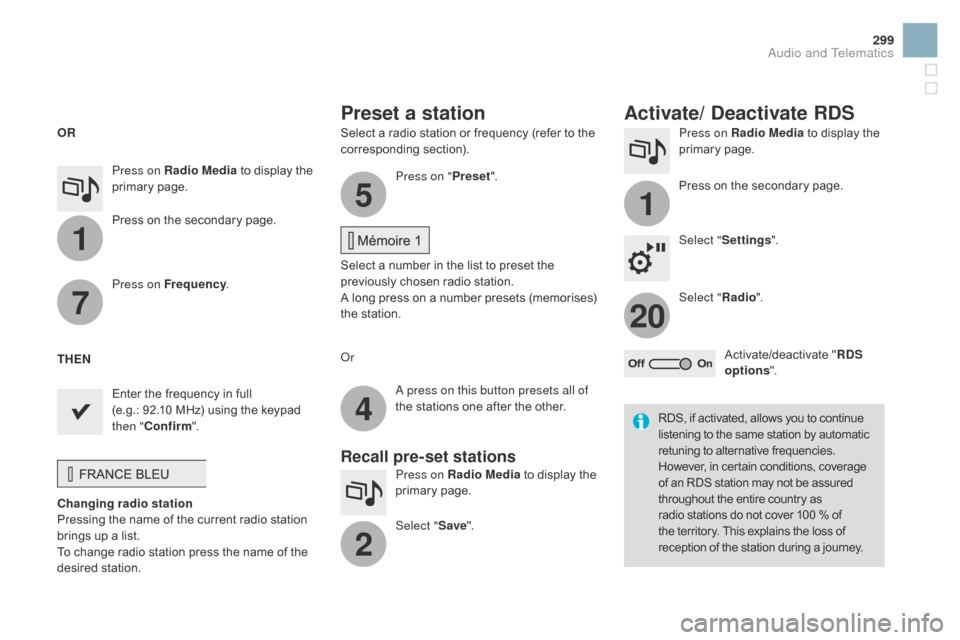
Select a radio station or frequency (refer to the corresponding s ection). Press on Radio Media
to display the p
rimary pag e.
Press
on the secondary page.
Select " Settings ".
Select " Radio".
Activate/deactivate
" RdS
opt
ions".
Press on Radio Media
to
display
the
p
rimary
pag
e.
Press
on
the
secondary
page. Press on "
Preset".
Select
a number in the list to preset the
p
reviously chosen radio station.
A
long press on a number presets (memorises)
t
he station.
Press on Frequency
.
Enter
the
frequency
in
full
(e.g.:
92.10
MHz)
using
the
keypad
t
hen " Confirm ".
Changing radio station
Pressing
the
name
of
the
current
radio
station
b
rings
up
a
list.
To
change
radio
station
press
the
name
of
the
de
sired
s
tation. Or
Press on Radio Media
to display the
p
rimary
pag
e.
Select " Save".
Preset a station Activate/ de activate RdS
OR
THE
n
A p
ress on this button presets all of
the
stations one after the other.
Recall pre-set stations
RDS, if activated, allows you to continue listening to the same station by automatic r
etuning to alternative frequencies.
H
owever, in certain conditions, coverage
o
f an RDS station may not be assured
t
hroughout the entire country as
r
adio stations do not cover 100 % of
t
he territory. This explains the loss of
r
eception of the station during a journey.
Audio and Telematics
Page 302 of 387

Display of options:
i f active but not available, the display will be greyed out,
if
active and available, the display will be blank. Display
of "Radiotext" for
t
he current station.
Manage the Jukebox.
Display current action.
Select the audio source.
Display the "DAB" band.
Display
of
the name of the
c
urrent
station.
Short-cut: access to the choice of audio
s
ource and the list of stations (or titles,
d
epending on the source).
Select the radio station.
Any
thumbnail
broadcast
by
t
he
station.
Preset stations, buttons 1
to 15
Short
press:
select
the
p
reset
radio
station.
Long
press:
preset
a
radio
s
tation. Next
"
Multiplex".
Next radio station.
Secondary p
age.
Display
the
name
and
n
umber
of
the
multiplex
ser
vice
b
eing
u
sed.
Previous
"
Multiplex".
Previous
radio
station.
DAB (Digital Audio Broadcasting) radio
If the "DAB" radio station being listened to is not a
vailable on "FM", the "DAB FM" option is greyed out.
Journaline® is a text-based information service designed for digital radio systems.
I
t
provides
text-based information structured around topics and sub-topics.
This
service is available from the "LIST OF DAB STATIONS" page.
Page 303 of 387

31
20
301
Select change of source.
P ress on Radio Media
to display the
p
rimary
pag
e.
Select "
d
AB Radio ".
Select " List"
in the primary page.
Select
the radio station from the list offered.Press on Radio Media
to display the
p
rimary
pag
e.
Press on the secondary page.
Select " Settings ".
Select " RA
d
IO".
Select "
di
gital/FM auto
tracking " then "Confirm ".
dAB / FM auto trackingdi
gital radio
"DAB" does not cover 100% of the t
e r r i to r y.
When
the digital radio signal is poor,
"
DAB / FM auto tracking" allows you to
c
ontinue listening to the same station,
b
y automatically switching to the
c
orresponding "FM" analogue station
(
if there is one). If
"DAB / FM auto tracking" is activated, t
here is a difference of a few seconds
w
hen the system switches to "FM"
a
nalogue radio with sometimes a
v
ariation in volume.
When
the digital signal is restored,
the
system automatically changes back
t
o "DAB".
Digital
radio
provides
higher
quality
r
eception
and
also
the
graphical
display o
f
current
information
on
the
radio
s
tation
being
listened
to.
Select
"List"
in
t
he
primary
page.
The
range
of
multiplexes
available
is
d
isplayed
in
alphabetical
order. If
the "DAB" station being listened to
i
s not available on "FM" ("
d
AB/FM"
option
greyed out), or "DAB / FM auto
t
racking" is not activated, the sound
w
ill cut out while the digital signal is too
w
eak.
or
Select " Radio list "
in
the
secondary
pag
e.
Audio and Telematics
Page 332 of 387

Radio
QUESTIOnAnSWERSOLUTIOn
T
he
quality of reception of
t
he
radio station listened
t
o
gradually deteriorates
o
r
the
stored stations do
n
ot
function (no sound,
87
.5 Mhz is displayed...). The
vehicle is too far from the transmitter used by the station
l
istened to or there is no transmitter in the geographical area
t
hrough which the vehicle is travelling.Activate
the "RDS" function by means of the
s
hort-cut menu to enable the system to check
w
hether there is a more power ful transmitter in
t
he geographical area.
The
environment (hills, buildings, tunnels, basement car parks...)
b
lock reception, including in RDS mode.This
phenomenon is normal and does not
i
ndicate a fault with the audio system.
The
aerial is absent or has been damaged (for example when going
t
hrough a car wash or into an underground car park).Have
the aerial checked by a CITROËN dealer.
I
cannot find some radio
s
tations in the list of
stations
r
eceived. The
station is not received or its name has changed in the list.
Some
radio stations send other information in place of their name
(
the title of the song for example).
The
system interprets this information as the name of the station.
The
name of the radio
s
tation
c
hanges.
Page 335 of 387

333
QUESTIOnAnSWERSOLUTIOn
T
here
is a difference in
s
ound
quality between the
d
ifferent audio sources. For
optimum sound quality, the audio settings for Volume, Bass,
T
reble, Equalizer and Loudness can be adapted to the different
s
ound sources, which may result in audible differences when
c
hanging
s
ource. Check
that the audio settings for (Volume, Bass,
T
reble, Equalizer, Loudness) are adapted to the
s
ources listened to. It is advisable to set the
a
udio functions (Bass, Treble, Fr-Re balance,
L
e-Ri balance) to the middle position, select the
"
Linear", musical ambience and set the loudness
c
orrection to the "Inactive" position in radio
m
ode.
With
the engine off, the
s
ystem
switches off after a
f
ew
minutes of use. When
the engine is switched off, the system's operating time
d
epends on the state of charge of the battery.
The
switch-off is normal: the system switches to economy mode
a
nd switches off to prevent discharging of the vehicle's battery.Start
the vehicle's engine to increase the battery
c
harge.
Audio and Telematics
Page 337 of 387

335
Audio system
Audio system / Bluetooth®
Contents
First
steps
3 36
Steering
mounted
controls
3
37
Menus
3
38
Radio
3
38
Media
3
40
Telephone
3
44
Screen
menu
map(s)
3
46
Frequently
asked
questions
3
50
Your
Audio
system
is
coded
in
such
a
way
that
it
will
only
operate
i
n
your
vehicle. As
a
safety
measure,
the
driver
must
only
carry
out
operations
w
hich
require
prolonged
attention
while
the
vehicle
is
stationary.
When
the
engine
is
switched
off
and
to
prevent
discharging
of the
b
attery,
the
audio
equipment
may
switch
off
after
a
few
minutes.
Audio and Telematics
Page 338 of 387

First steps
* Available according to version.
O n / Off, volume setting.
Select
s
ource:
Radio; USB; AUX; CD; Streaming.
Display the list of local stations.
Long
p
ress:
C
D
t
racks
o
r
M
P3
f
olders
(
CD / USB). Select the screen display mode:
Date, audio functions, trip computer,
t
elephone.
Audio
se
ttings:
Front /rear fader, left /right balance,
b
ass/treble, loudness, audio
am
biences.
The DARK button changes the
s
creen display for improved driving
c
omfort at night.
1
st press: upper bar only illuminated.
2nd press: black screen.
3rd press: return to standard display. S elect next frequency down/up.
Select previous/next MP3 folder.
Select previous/next folder / genre /
a
rtist / playlist (USB).
Abandon the current operation. Confirm. Buttons 1 to 6
Select a pre-set radio station.
Long press: pre-set a station.
Automatic frequency search down/up.
Select previous/next CD, MP3 or
U
SB track.
Eject CD.
Display
main menu. TA
(Traffic Announcements) on/off.
Long press: PT Y* (radio Programme
T
Yp e).
Selection
of AM / FM wavebands.
Page 339 of 387

337
Steering mounted controls
Radio: select the previous/next pre-
s et station.
USB:
select genre / artist / folder
f
rom the classification list.
Select
the previous/next item in
a m
enu.
Volume
decrease.
Radio:
automatic search for a higher
f
requency.
CD
/ MP3 / USB: selection of the next
t
rack.
CD
/ USB: continuous press: fast
fo
rward.
Move
in the list. Mute:
press the volume increase and
d
ecrease
b
uttons
s
imultaneously.
The
sound is restored by pressing
o
ne of the two volume buttons.
Radio:
automatic search for a lower f
requency.
CD
/ MP3 / USB: selection of the
p
revious track.
CD
/ USB: continuous press: fast
b
ack.
Move
in the list.
Change
audio source.
Confirm
a selection.
Call/end
call on the telephone.
Press
for more than 2 seconds:
t
elephone main menu. Volume
increase.
Audio and Telematics