Page 248 of 324

246
display of options:
if active but not available, the display will be greyed out,
if active and available, the display will be blank.
di
splay of "Radiotext" for
the current station.
Manage the Jukebox.
di
splay current action.
Select the audio source.
di
splay the "
d
ab
" b
and.
di
splay of the name of the
current station. Short-cut: access to the choice of audio
source and the list of stations (or titles,
depending on the source).
Select the radio station.
an
y thumbnail broadcast by
the station.
Preset stations, buttons 1
to 15.
Short press: select the
preset radio station.
Long press: preset a radio
station.
n
ext "Multiplex".
ne
xt radio station.
Secondary page.
di
splay the name and
number of the multiplex
service being used. Previous "Multiplex".
Previous radio station.
dab (digital au dio br oadcasting) radio
If the "dab" radio station being listened to is not
available on "FM", the "d ab FM" option is greyed out.
Journaline® is a text-based information service designed for digital radio systems.
I
t provides text-based information structured around topics and sub-topics.
This service is available from the "LIST
o
F
dab ST
aT
I
o
n
S
" page.
audio and Telematics
Page 249 of 324
247
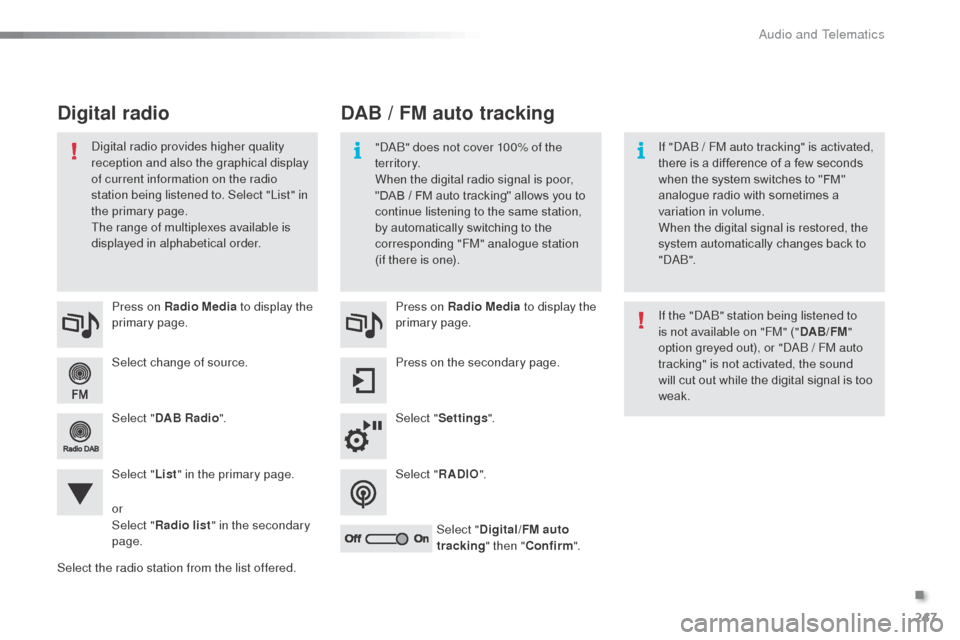
Select change of source. Press on Radio Media to display the
primary page.
Select " DAB Radio ".
Select " List" in the primary page.
Select the radio station from the list offered. Press on Radio Media
to display the
primary page.
Press on the secondary page.
Select " Settings ".
Select " RADIO".
Select " Digital/FM auto
tracking " then "Confirm ".
DAB / FM auto tracking
Digital radio
"dab" does not cover 100% of the
te r r i to r y.
When the digital radio signal is poor,
"DAB
/ FM auto tracking" allows you to
continue listening to the same station,
by automatically switching to the
corresponding "FM" analogue station
(if there is one). If "d
ab / FM auto tracking" is activated,
there is a difference of a few seconds
when the system switches to "FM"
analogue radio with sometimes a
variation in volume.
When the digital signal is restored, the
system automatically changes back to
"
d
a b
".
di
gital radio provides higher quality
reception and also the graphical display
of current information on the radio
station being listened to. Select "List" in
the primary page.
The range of multiplexes available is
displayed in alphabetical order.
If the "
d
ab
" s
tation being listened to
is not available on "FM" (" DAB/FM"
option greyed out), or "
d
ab / FM auto
tracking" is not activated, the sound
will cut out while the digital signal is too
weak.
or
Select " Radio list " in the secondary
page.
.
audio and Telematics
Page 278 of 324

276
Radio
QUESTIONANSWER SOLUTION
The quality of reception of
the radio station listened
to gradually deteriorates
or the stored stations do
not function (no sound,
87.5
Mhz is displayed...). The vehicle is too far from the transmitter used by the station
listened to or there is no transmitter in the geographical area
through which the vehicle is travelling.
ac
tivate the "R
dS
" function by means of the
short-cut menu to enable the system to check
whether there is a more power ful transmitter in
the geographical area.
The environment (hills, buildings, tunnels, basement car parks...)
block reception, including in R
dS m
ode.This phenomenon is normal and does not
indicate a fault with the audio system.
The aerial is absent or has been damaged (for example when going
through a car wash or into an underground car park). Have the aerial checked by a CITR
oËn
dealer.
I cannot find some radio
stations in the list of
stations received. The station is not received or its name has changed in the list.
Some radio stations send other information in place of their name
(the title of the song for example).
The system interprets this information as the name of the station.
The name of the radio
station changes.
Audio and Telematics
Page 281 of 324

279
QUESTIONANSWER SOLUTION
There is a difference in
sound quality between the
different audio sources. For optimum sound quality, the audio settings for Volume,
b
a
ss,
Treble, Equalizer and Loudness can be adapted to the different
sound sources, which may result in audible differences when
changing source. Check that the audio settings for (Volume,
b
a
ss,
Treble, Equalizer, Loudness) are adapted to the
sources listened to. It is advisable to set the
audio functions (
ba
ss, Treble, Fr-Re balance,
Le-Ri balance) to the middle position, select the
"Linear", musical ambience and set the loudness
correction to the "Inactive" position in radio
mode.
With the engine off, the
system switches off after a
few minutes of use. When the engine is switched off, the system's operating time
depends on the state of charge of the battery.
The switch-off is normal: the system switches to economy mode
and switches off to prevent discharging of the vehicle's battery. Start the vehicle's engine to increase the battery
charge.
.
Audio and Telematics
Page 283 of 324
281
audio system
Audio system / Bluetooth®
Contents
First steps
2 82
Steering mounted controls
2
83
Menus
28
4
Radio
2
84
Media
286
Telephone
290
Screen menu map(s)
2
92
Frequently asked questions
2
96
Your Audio system is coded in such a way that it will only operate
in your vehicle.
as a s
afety measure, the driver must only carry out operations
which require prolonged attention while the vehicle is stationary.
When the engine is switched off and to prevent discharging of the
battery, the audio equipment may switch off after a few minutes.
.
audio and Telematics
Page 284 of 324

282
First steps
* available according to version.
on /
o
f
f, volume setting.
Select source:
Radio; USB; AUX; CD; Streaming.
di
splay the list of local stations.
Long press: CD tracks or MP3 folders
(C
d
/ US
b)
. Select the screen display mode:
da
te, audio functions, trip computer,
telephone.
aud
io settings:
Front/rear fader, left/right balance,
bass/treble, loudness, audio
ambiences. The da
Rk
button changes the
screen display for improved driving
comfort at night.
1
st press: upper bar only illuminated.
2nd press: black screen.
3rd press: return to standard display. Select next frequency down/up.
Select previous/next MP3 folder.
Select previous/next folder / genre /
artist / playlist (US
b)
.
ab
andon the current operation. Confirm.
bu
ttons 1 to 6
Select a pre-set radio station.
Long press: pre-set a station.
Automatic frequency search down/
up.
Select previous/next CD, MP3 or
US
b
track.
Eject C
d
.
di
splay main menu. Ta
(Traffic an nouncements) on/off.
Long press: PT Y* (radio Programme
T Yp e).
Selection of AM / FM wavebands.
audio and Telematics
Page 285 of 324
283
Steering mounted controls
Radio: select the previous/next pre-
set station.
US
b: s
elect genre / artist / folder
from the classification list.
Select the previous/next item in a
menu.
Volume decrease.
Radio: automatic search for a higher
frequency.
CD / MP3 / USB: selection of the next
track.
C
d
/ US
b: c
ontinuous press: fast
forward.
Move in the list.
Mute: press the volume increase and
decrease buttons simultaneously.
The sound is restored by pressing
one of the two volume buttons. Radio: automatic search for a lower
frequency.
CD / MP3 / USB: selection of the
previous track.
C
d
/ US
b: c
ontinuous press: fast
back.
Move in the list.
Change audio source.
Confirm a selection.
Call/end call on the telephone.
Press for more than 2 seconds:
telephone main menu. Volume increase.
.
audio and Telematics
Page 286 of 324
284
Menus
Screen C
Audio functions
Radio; CD; USB; AUX.
Trip computer
Enter distances; Alerts: Status of
functions.
Bluetooth
®: Telephone - Audio
Pairing; Hands-free kit; Streaming.
Personalisation-configuration
Vehicle parameters; Display;
Languages. For an overview of the menus available,
refer to the "Screen menu map"
section.
Screen A
Radio
Selecting a station
Press the SOURCE
button several
times in succession and select the
radio.
Press the BAND AST button to
select a waveband.
br
iefly press one of the buttons to
carry out an automatic search of the
radio stations.
Press one of the buttons to carry out
a manual search up / down for radio
frequencies.
Press the LIST REFRESH button to
display the list of stations received
locally (30 stations maximum).
To update this list, press for more
than two seconds.
audio and Telematics


