Page 192 of 324
190
Fuse N°Rating Functions
F8 20 AMultifunction screen, audio system, navigation radio, instrument
panel with clock, alarm control unit, alarm siren, audio system
(after-market), portable navigation system carrier supply.
F9 30 AMultifunction screen, audio system, navigation audio unit,
instrument pnael with clock, alarm control unit, alarm siren,
audio system (after-market), 12 V socket, portable navigation
support supply, locking.
F10 15 ASteering mounted controls.
F11 15 AIgnition, diagnostic socket, automatic gearbox control unit.
F12 15 ARain / sunshine sensor, trailer relay unit, driving school module.
F13 5 AMain stop switch, engine relay unit, electronic gearbox gear
l eve r.
F14 15 AParking sensors control unit, airbag control unit, instrument
panel, automatic air conditioning, US
b
b
o
x, HiFi amplifier,
reversing camera.
F15 30 ALocking.
F16 -
no
t used.
F17 40 ARear screen and door mirrors demisting/defrosting.
SH -P
aR
C shunt.
Practical information
Page 221 of 324
219
7-inch touch screen tablet
GPS satellite navigation - Multimedia audio - Bluetooth® telephone
Contents
First steps
2 20
Steering mounted controls
2
22
Menus
2
23
Navigation
2
24
Navigation - Guidance
2
32
Traffic
23
6
Radio Media
2
38
Radio
2
44
DAB (Digital Audio Broadcasting) radio
2
46
Media
2
48
Settings
2
52
Internet
260
Internet browser
2
61
MirrorLink
® 26 4
Telephone
266
Frequently asked questions
2
74
The system is protected in such a way that it will only operate in
your vehicle.
as a s
afety measure, the driver should only carry out operations
which require prolonged attention while the vehicle is stationary.
The display of the energy economy mode message signals
that the system is about to go into standby. Refer to the Energy
economy (mode) section.
.
Audio and Telematics
Page 225 of 324
223
Menus
Settings
Radio Media
Navigation
Driving
Internet Telephone
Set the sounds and brightness for the
instruments and controls.
Select radio, the different music sources and
view photos.
Enter navigation settings and choose a
destination.
ac
cess the trip computer, activate, deactivate
or enter settings for certain vehicle functions.
Connect using the "Internet browser".
op
erate certain applications on your
smartphone via "MirrorLink". Connect a telephone by
b
l
uetooth
®.
(
dep
ending on equipment)
(
dep
ending on equipment)
.
audio and Telematics
Page 241 of 324
239
Level 1Level 2 Comments
Radio Media
List List of FM stations
Press on a radio station to select it.
Radio Media Source FM Radio
Select change of source.
DAB Radio
AM Radio
Jukebox
USB
MirrorLink
iPod
Bluetooth
AUX
Radio Media
Preset Press an empty location to Preset it.
.
Audio and Telematics
Page 266 of 324
264
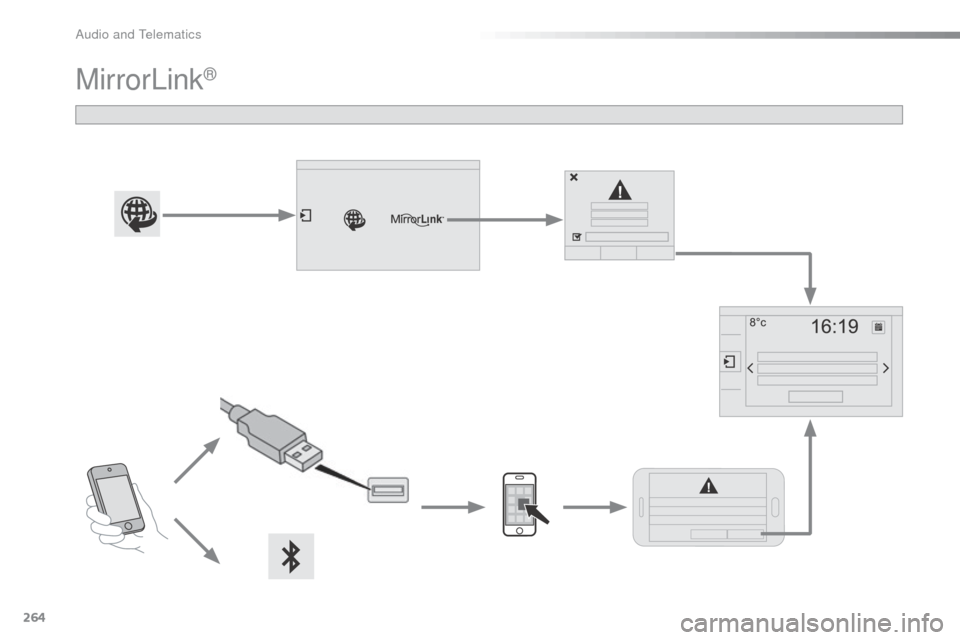
MirrorLink®
audio and Telematics
Page 267 of 324

265
as a safety measure and because it
requires sustained attention by the
driver, using a smartphone when
driving is prohibited.
All operations must be done with the
vehicle stationary.
The synchronisation of a personal
smartphone allows applications on a
smartphone that are adapted to the
MirrorLink
® technology to be displayed
i
n the vehicle's screen.
The principles and standards are
constantly evolving; for information
on supported smartphones, go to the
CITROËN website for your country.
Select MyCITR
oËn if
present. Please note:
-
i
f your mobile is supported, to make
it "MirrorLink
®" compatible, some
phone manufacturers nevertheless
invite you to first download a
dedicated application.
-
iPhone
® is not supported yet; an apple® application, "CarPlay®", is
being developed.
When connecting a smartphone to
the system, it is recommended that
b
luetooth
® be started on the smartphone
Start the application on the
smartphone.
Go to the home page to return to the
" MirrorLink
®" display.
du
ring the procedure, a page
showing the conditions for use is
displayed.
ac
cept to start and end the
connection.
a US
b
cable is connected. The
smartphone charges when
connected by a US
b
cable. Press "
MirrorLink
®" to start
the application in the system.
The " Audio source " and "Telephone "
functions remain available in the margin of the
MirrorLink
® display.
MirrorLink® smartphone
connection
Press the end of the lighting control stalk to
start voice recognition of your smartphone via
the system.
Voice recognition requires a compatible
telephone connected to the vehicle by
b
luetooth.
Voice recognition
as a safety measure, applications
can only be viewed with the vehicle
stationary; display is interrupted once
the vehicle is moving.
and From the system, press " Internet" to
display the primary page.
.
audio and Telematics
Page 302 of 324
300
Remote control key 63 - 65, 121-123
- locking/unlocking
-
battery
-
a
nti-theft protection
-
starting
Exterior
Lighting controls 7 5 -79
Headlamp adjustment 7 9
Changing bulbs
1
81-184
-
f
ront lamps
-
foglamps
-
d
irection indicator repeaters
Door mirrors
5
7
D o o r s
71
-73
-
opening/closing
-
c
entral locking
-
em
ergency control
Alarm
6
7-68
Electric child lock
1
05
Electric windows
6
9 -70
ac
cessories
6
1-62
Wiper controls
8
0 - 82
Changing a wiper blade
195
Boot
7
4
Temporary puncture repair kit
1
44-148
Changing a wheel
1
74-180
- tools
-
removing/refittinga
dblu e additive,
topping-up 1 59 -165, 166 -168
Changing bulbs
1
85-186
-
r
ear lamps
-
3rd brake lamp
-
n
umber plate lamps
Rear parking sensors
1
43 -144
Reversing camera
1
45
Towbar
20
3-204
Towing
20
1-202
Hill start assist
1
38
br
aking assistance
1
12
Trajectory control
1
13
Tyre pressures
2
16
Fuel tank
15
5 -15 6
Misfuel prevention
1
57
Visual search
Page 304 of 324

302
Instrument panels 10-11
Warning lamps 1 2-23
Gauges and indicators
2
4-27
a
djustment buttons
2
8-29
-
t
rip distance recorder /clock
-
l
ighting dimmer / black panel
Instruments and controls
Lighting controls 7 5 -79
Headlamp adjustment 7 9
Speed limiter
1
39 -140
Cruise control
1
41-142
da
shboard fuses
1
88-190
Opening the bonnet
1
47Rear view mirror
5
8
Zenith windscreen blind
8
6
Sun visor
87
W
iper controls
8
0 - 82
Trip computer
3
0 -33
Stop & Start
1
35 -137
au
dio system
2
81-299
Setting the date/time
3
5, 39
Touch screen tablet
2
19 -280
Setting the date/time
4
4
Emergency or assistance call
1
07, 217-218
Ventilation / Heating
4
5 - 49
Manual air conditioning
4
7- 48
di
gital air conditioning
5
0-51
Rear screen demist/
defrost
52
Interior mood lighting
8
4 Steering wheel adjustment
5
8
Horn
10
7
Scented air freshener
5
3
Manual gearbox
1
24
Electronic gearbox(ETG)
1
25-129
Automatic gearbox
1
30 -133
Gear efficiency indic ator
13
4
Parking brake
1
24Door mirrors
5
7
Electric windows
6
9 -70
Multifunction screens
3
4-39
Touch screen tablet
4
0 - 44
Hazard warning lamps
1
06
Visual search