2015 Citroen C3 change time
[x] Cancel search: change timePage 152 of 401

150
according to your version of instrument panel, the
start of saturation of the particle filter is indicated by:
- fixed illumination of the particle filter warning lamp, accompanied
by an audible signal,
or
-
t
emporary illumination of
the service warning lamp,
accompanied by an audible signal
and a message that there is a risk
of blockage of the particle filter.
as s
oon as the traffic conditions permit, regenerate
the filter by driving at a speed of at least 40
mph
(60
km/h) until the warning lamp goes off.
If the warning lamp stays on, refer to the "Additive
level" section.
Checks
12 V battery
The battery does not require any maintenance.
However, check that the terminals are clean
and correctly tightened, particularly in summer
and winter.
The presence of this label, in particular with
the Stop & Start system, indicates the use of
a specific 12
V lead-acid battery with special
technology and specification. The involvement
of a CITROËN dealer or a qualified workshop
is essential when replacing or disconnecting
the battery. When carrying out work on the battery, refer
to the "12 V battery" section for details of the
precautions to be taken before disconnecting
the battery and following its reconnection. Unless other wise indicated, check these components in accordance with the manufacturer's
service schedule and according to your engine.
Other wise, have them checked by a CITROËN dealer or a qualified workshop.
On a new vehicle, the first operations of
regeneration of the particle filter may be
accompanied by the smell of "burning",
which is per fectly normal.
Following prolonged operation of the
vehicle at very low speed or at idle,
you may, in exceptional circumstances,
notice the emission of water vapour at
the exhaust on acceleration. This does
not affect the behaviour of the vehicle
or the environment.
Particle filter (Diesel)
Air filter and passenger compartment filter
Refer to the manufacturer's
service schedule for details of the
replacement intervals for these
components.
Depending on the environment (e.g. dusty
atmosphere) and the use of the vehicle
(e.g.
city driving), replace them twice as often
if necessary .
a c
logged passenger compartment filter may
have an adverse effect on the per formance
of the air conditioning system and generate
undesirable odours.
Replace the oil filter each time the
engine oil is changed.
Refer to the manufacturer's
service schedule for details of
the replacement interval for this
component.
Oil filter
Checks
Page 247 of 401

245
Select change of source. Press on Radio Media to display the
primary page.
Select " DAB Radio ".
Select " List" in the primary page.
Select the radio station from the list offered. Press on Radio Media
to display the
primary page.
Press on the secondary page.
Select " Settings ".
Select " RADIO".
Select " Digital/FM auto
tracking " then "Confirm ".
DAB / FM auto tracking
Digital radio
"DAB" does not cover 100% of the
te r r i to r y.
When the digital radio signal is poor,
"DAB
/ FM auto tracking" allows you to
continue listening to the same station,
by automatically switching to the
corresponding "FM" analogue station
(if there is one). If "d
ab / FM auto tracking" is activated,
there is a difference of a few seconds
when the system switches to "FM"
analogue radio with sometimes a
variation in volume.
When the digital signal is restored, the
system automatically changes back to
"
d
a b
".
di
gital radio provides higher quality
reception and also the graphical display
of current information on the radio
station being listened to. Select "List" in
the primary page.
The range of multiplexes available is
displayed in alphabetical order.
If the "
d
ab
" s
tation being listened to
is not available on "FM" (" DAB/FM"
option greyed out), or "DAB / FM auto
tracking" is not activated, the sound
will cut out while the digital signal is too
weak.
or
Select " Radio list " in the secondary
page.
.
audio and Telematics
Page 248 of 401

246
Media
USB playerSelection of source
The steering mounted SRC (source)
button can be used to go to the next
media source, available if the source
is active. Select change of source. Press on Media to display the
primary page.
The system builds playlists (in temporary
memory), an operation which can take from
a few seconds to several minutes at the first
connection.
Reduce the number of non-music files and the
number of folders to reduce the waiting time.
The playlists are updated every time the
ignition is switched off or connection of a USB
memory stick. The lists are memorised: if they
are not modified, the subsequent loading time
will be shorter. Insert the US
b
memory stick into the US
b
port
or connect the US
b
device to the US
b
port
using a suitable cable (not supplied).
Auxiliary socket (AUX)
Connect the portable device (MP3 player…) to
the auxiliary Jack socket using an audio cable
(not supplied).
First adjust the volume of your portable device
(to a high level). Then adjust the volume of your
audio system.
di
splay and management of the controls are
via the portable device. Choose the source.
audio and Telematics
Page 259 of 401

257
Press on Settings to display the
primary page. Press on "
Settings" to display the
primary page.
Press on Settings
to display the
primary page.
Press on the secondary page. Press on the secondary page
Press on the secondary page.
Select " System Settings ". Select "Time/Date " to change the
time zone, synchronisation with GPS,
the time and its format, then the date.
Select "
Screen settings ".
Select " Units" to change the units
of distance, fuel consumption and
temperature. Select "
Languages " to change
language.
ac
tivate or deactivate "Activate
automatic text scrolling" and
"Activate animations"
Select " Delete data " to delete the
list of recent destinations, personal
points of interest, contacts in the list. Select "
Calculator " to display a
calculator.
Choose the item then select " Delete". Select "
Calendar " to display a
calendar.
Select " Factory settings " to return
to the original settings.
Modifying system settings
.
audio and Telematics
Page 286 of 401

284
C3_en_Chap13c_RD45_ed01-2015
Media
USB player
This unit consists of a USb port
and an auxiliary Jack socket,
depending on model.
Insert a US
b
memory stick into the US
b
port
or connect a US
b
peripheral device to the US
b
port using a suitable cable (not supplied).
The system creates playlists
(temporary memory), which can take
from a few seconds to several minutes
on the first connection.
Reducing the number of non-music
files and the number of folders reduces
this waiting time. Playlists are updated
every time the ignition is switched off or
a US
b
memory stick is connected.
The lists are memorised: if the lists are
not changed, the subsequent loading
time is reduced. Press and hold REFRESH LIST
to
display the different classifications.
Select by " Folder" / "Artist " /
" Genre " / "Playlist ".
Press OK to select the classification
required, then press OK again to
confirm. Press REFRESH LIST
briefly to
display the previously selected
classification.
na
vigate through the list using the
left /right and up/down buttons.
Confirm the selection by
pressing
OK.
Press one of these buttons to gain
access to the previous / next track in
the list.
Press and hold one of the buttons for
fast for ward or back.
Press one of these buttons to
gain access to the previous / next
" Folder " / "Artist " / "Genre " /
" Playlist " in the list
audio and Telematics
Page 306 of 401
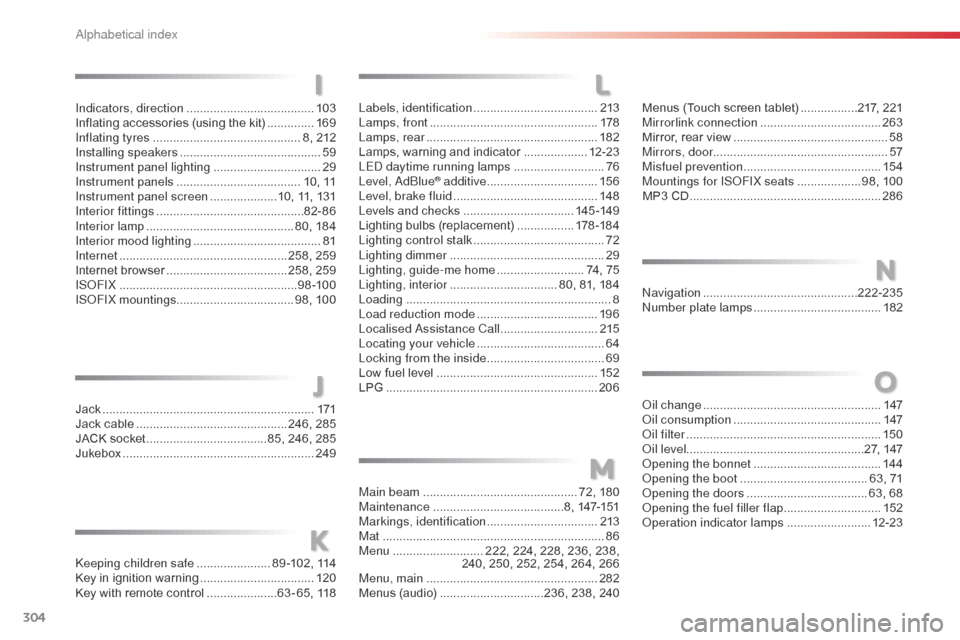
304
C3_en_Chap14_Recherche-visuel-Index-Alpha_ed01-2015
Labels, identification .....................................2 13
Lamps, front .................................................. 178
Lamps, rear
................................................... 182
Lamps, warning and indicator
...................12-23
LE
d da
ytime running lamps
...........................76
Level,
a d
blu
e
® additive ................................. 15 6
Level, brake fluid ........................................... 14
8
Levels and checks
................................. 145 -149
Lighting bulbs (replacement)
.................17
8 -18 4
Lighting control stalk
....................................... 72
Lighting dimmer
..............................
................29
Lighting, guide-me home
.......................... 74, 75
Lighting, interior
................................ 80, 81, 184
Loading
............................................................. 8
Load reduction mode
.................................... 19 6
Localised
a
s
sistance Call
............................. 2
15
Locating your vehicle
...................................... 64
L
ocking from the inside
................................... 69
L
ow fuel level
................................................ 152
LPG
.......
........................................................ 206
Jack
........
....................................................... 171
Jack cable
............................................. 246, 285
JACK socket
.................................... 85, 246, 285
Jukebox
......................................................... 249
ke
eping children safe
...................... 8
9 -102, 114
Key in ignition warning
.................................. 120
Key with remote control
..................... 63 - 65, 118
LI
J
K
M
Main beam .............................................. 72, 180
Maintenance ....................................... 8, 147-151
Markings, identification
.................................213
Mat
.................................................................. 86
Menu
........................... 222, 224, 228, 236, 238,
240, 250, 252, 254, 264, 266
Menu, main
................................................... 282
Menus (audio)
............................... 236, 238, 240Menus (Touch screen tablet)
.................
217, 221
Mirrorlink connection
....................................
263
Mirror, rear view ..............................................
58
Mirrors, door .................................................... 57
Misfuel prevention
...............................
..........
15 4
Mountings for IS
oF
IX seats
...................
98, 100
MP3 CD .........................................................
286
N
O
navigation .............................................. 222-235nu
mber plate lamps ...................................... 18
2
oi
l change
..................................................... 147
oi
l consumption
............................................ 147
oil
filter
...............
........................................... 150
oi
l level ..................................................... 27, 147
op
ening the bonnet
...................................... 14
4
op
ening the boot
..............................
........63, 71
op
ening the doors
...............................
.....63, 68
op
ening the fuel filler flap
.............................15
2
op
eration indicator lamps
.........................12-23
Indicators, direction
......................................
103
Inflating accessories (using the kit)
..............
169
Inflating tyres
............................................
8, 212
Installing speakers
..........................................
59
Instrument panel lighting
................................ 29
In
strument panels
.....................................
10, 11
Instrument panel screen
.................... 1
0, 11, 131
Interior fittings
............................................
82- 86
Interior lamp
............................................
80, 184
Interior mood lighting
......................................
81
Internet
..................................................
258, 259
Internet browser
....................................
258, 259
ISoFI
X
.....................................................
9 8 -10 0
ISoF
IX mountings ................................... 98, 100
alphabetical index
Page 365 of 401

37
C3-additif_en_Chap13b_SMEGplus_ed01-2015
Select change of source. Press on Radio Media to display the
primary page.
Select " DAB Radio ".
Select " List" in the primary page.
Select the radio station from the list offered. Press on Radio Media
to display the
primary page.
Press on the secondary page.
Select " Settings ".
Select " Radio".
Select " Digital/FM auto
tracking " then "Confirm ".
DAB / FM auto tracking
Digital radio
"DAB" does not cover 100% of the
te r r i to r y.
When the digital radio signal is poor,
"DAB/FM station tracking" allows you to
continue listening to the same station,
by automatically switching to the
corresponding "FM" analogue station
(if there is one). If "DAB/FM station tracking" is
activated, there is a difference of a
few
seconds when the system switches
to "FM" analogue radio with sometimes
a variation in volume.
When the digital signal is restored,
the
system automatically changes back
to " DA B ".
Digital radio provides higher quality
reception and also the graphical display
of current information on the radio
station being listened to. Select "List" in
the primary page.
The range of multiplexes available is
displayed in alphabetical order.
If the "DAB" station being listened to
is not available on "FM" ("DAB/FM"
option greyed out), or "DAB/FM station
tracking" is not activated, the sound
will cut out while the digital signal is
too
weak.
or
Select " Radio list " in the secondary
page.
.
Audio and Telematics
Page 366 of 401

38
C3-additif_en_Chap13b_SMEGplus_ed01-2015
The audio system will only play audio files
with ".wma, .aac, .flac, .ogg and .mp3" file
extensions and with a bit rate of between
32 Kbps and 320 Kbps.
It also supports VBR (Variable Bit Rate) mode.
No other type of file (.mp4, ...) can be played.
".wma" files must be of the standard wma 9 type.
The sampling rates supported are 32, 44 and
48 KHz.
Information and advice
Media
USB port
Selection of source
The steering mounted SRC (s o u r c e)
button can be used to go to the next
media source, available if the source
is active.
Select change of source. Press on Radio Media to display the
primary page.
The system builds playlists (in temporary
memory), an operation which can take from
a few seconds to several minutes at the first
connection.
Reduce the number of non-music files and the
number of folders to reduce the waiting time.
The playlists are updated every time the
ignition is switched off or on connection of a
USB memory stick. The lists are memorised: if
they are not modified, the subsequent loading
time will be shorter. Insert the USB memory stick into the USB port
or connect the USB device to the USB port
using a suitable cable (not supplied).
Auxiliary socket (AUX)
Connect the portable device (MP3 player…) to
the auxiliary Jack socket using an audio cable
(not supplied). This source is only available if the "Auxiliary
socket" option has been activated in the
"Media" settings.
First adjust the volume of your portable device
(to a high level). Then adjust the volume of your
audio system.
Display and management of the controls are
via the portable device. Choose the source.
To protect the system, do not use a
USB hub.
Audio and Telematics