2015 Citroen C3 reset
[x] Cancel search: resetPage 238 of 401

236
Radio Media
Level 1Level 2
List of FM stations
Preset
audio and Telematics
Page 239 of 401

237
Level 1Level 2 Comments
Radio Media
List List of FM stations
Press on a radio station to select it.
Radio Media Source FM Radio
Select change of source.
DAB Radio
AM Radio
Jukebox
USB
MirrorLink
iPod
Bluetooth
AUX
Radio Media
Preset Press an empty location to Preset it.
.
Audio and Telematics
Page 241 of 401

239
Level 1Level 2 Level 3 Comments
Radio Media
Secondary page Radio list Preset
Press a radio station to select it.
Update list Update the list of stations received.
Frequency Enter the desired radio frequency.
Confirm Save the settings.
Radio Media
Secondary page Photos Home screen
di
splay the selected photo in the home page.
Rotate Rotate the photo 90°.
Select all Select all the photos in the list.
Press again to deselect.
Slideshow Previous photo.
di
splay the photos in sequence, full screen.
The system supports the following image
formats: .gif, .jpg, .bmp, .png.
Pause / Play.
Next photo.
Full screen
dis
play the selected photo full-screen.
Radio Media
Secondary page
Manage Jukebox Sor t by folder
Choose a selection mode.
Sor t by album
Select all
Copy Copy files to the Jukebox.
Magnifying glass Create folder
Choose the desired function.
Rename
de
lete
Select all
Confirm Save the settings.
.
Audio and Telematics
Page 244 of 401
242
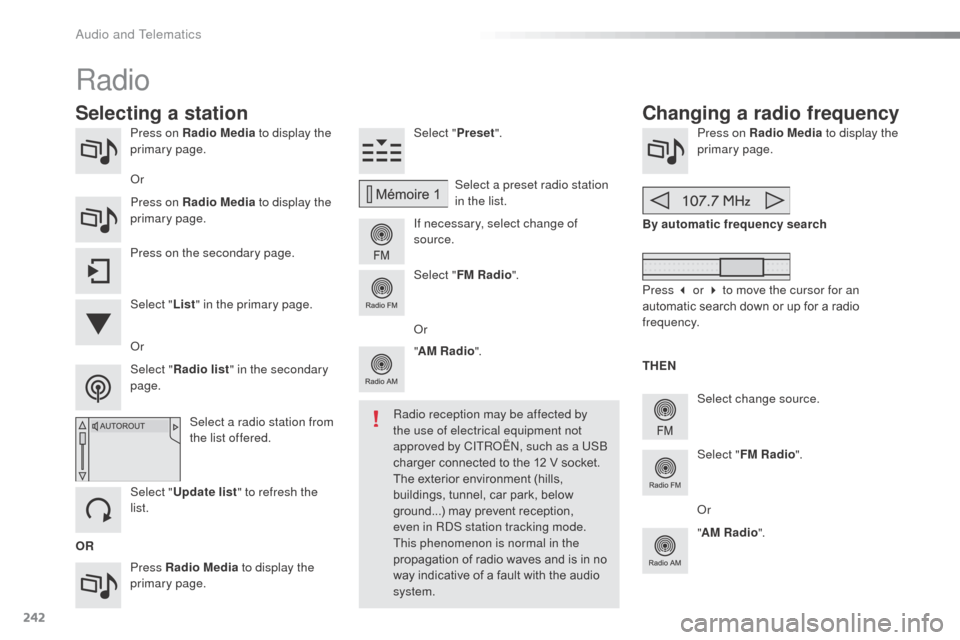
Press on Radio Media to display the
primary page.
Press Radio Media to display the
primary page. Select "
Preset".
If necessary, select change of
source. Press on Radio Media
to display the
primary page.
Select change source.
"
AM Radio ". By automatic frequency search
Select "FM Radio ".
" AM Radio ".
Press on the secondary page.
Select a preset radio station
in the list.
Select " FM Radio ".
Select a radio station from
the list offered.
Select " Update list " to refresh the
list. Select " List" in the primary page.
o
r
Press on Radio Media
to display the
primary page.
Radio
Changing a radio frequency
Selecting a station
OR THEN
Radio reception may be affected by
the use of electrical equipment not
approved by CITR
oËn, s
uch as a US
b
charger connected to the 12 V socket.
The exterior environment (hills,
buildings, tunnel, car park, below
ground...) may prevent reception,
even in R
dS s
tation tracking mode.
This phenomenon is normal in the
propagation of radio waves and is in no
way indicative of a fault with the audio
system.
o
r
Select " Radio list " in the secondary
page.
o
r
Press 3 or 4 to move the cursor for an
automatic search down or up for a radio
frequency.
o
r
audio and Telematics
Page 245 of 401

243
Select a radio station or frequency (refer to the
corresponding section).Press on Radio Media
to display the
primary page.
Press on the secondary page.
Select " Settings ".
Select " Radio".
ac
tivate/deactivate "RDS
options ".
Press on Radio Media
to display the
primary page.
Press on the secondary page. Press on "
Preset".
Select a number in the list to preset the
previously chosen radio station.
A long press on a number presets (memorises)
the station.
Press on Frequency
.
Enter the frequency in full (e.g.:
92.10 MHz) using the keypad then
" Confirm ".
Changing radio station
Pressing the name of the current radio station
brings up a list.
To change radio station press the name of the
desired station.
o
r Press on Radio Media to display the
primary page.
Select " Save".
Preset a station Activate/ Deactivate RDS
OR
THEN
a
press on this button presets all of
the stations one after the other.
Recall pre-set stations
RDS, if activated, allows you to continue
listening to the same station by automatic
retuning to alternative frequencies.
However, in certain conditions, coverage
of an R
dS s
tation may not be assured
throughout the entire country as radio
stations do not cover 100 % of the
territory. This explains the loss of
reception of the station during a journey.
.
audio and Telematics
Page 246 of 401

244
display of options:
if active but not available, the display will be greyed out,
if active and available, the display will be blank.Display of "Radiotext" for
the current station.
Manage the Jukebox.
di
splay current action.
Select the audio source.
di
splay the "
d
ab
" b
and.
di
splay of the name of the
current station. Short-cut: access to the choice of audio
source and the list of stations (or titles,
depending on the source).
Select the radio station.
an
y thumbnail broadcast by
the station.
Preset stations, buttons 1
to 15.
Short press: select the
preset radio station.
Long press: preset a radio
station. Next "Multiplex".
Next radio station.
Secondary page.
di
splay the name and
number of the multiplex
service being used. Previous "Multiplex".
Previous radio station.
DAB (Digital Audio Broadcasting) radio
If the "dab" r adio station being listened to is not
available on "FM", the "d ab FM" option is greyed out.
Journaline® is a text-based information service designed for digital radio systems.
I
t provides text-based information structured around topics and sub-topics.
This service is available from the "LIST
o
F
dab ST
aT
I
o
n
S
" page.
audio and Telematics
Page 263 of 401

261
Level 1Level 2 Level 3 Comments
Internet
Secondary page Bluetooth
Connection Search
Start the search for a device to connect.
Connect / Disconnect Start or end the
b
l
uetooth connection to the
selected device.
Update Import contacts from the selected telephone to
save them in the audio system.
Delete
del
ete the selected telephone.
Confirm Save the settings.
Internet
Secondary page Transfer rate Reset
Reset the usage monitor, them confirm.
Confirm
Internet
Secondary page WiFi connection All
Display all Wi-Fi networks.
Secure Display secure Wi-Fi networks.
Stored Memorise the selected Wi-Fi network(s).
Add Add a new Wi-Fi network.
Activate / Deactivate Activate or deactivate a Wi-Fi network.
Connect Select a Wi-Fi network found by the system and
connect to it.
.
Audio and Telematics
Page 307 of 401

305
C3_en_Chap14_Recherche-visuel-Index-Alpha_ed01-2015
P
Radio ..................................................... 236, 282
Radio pre-equipment ...................................... 59
RdS
....................................................... 243, 283
Rear foglamp ................................................. 182
Rear screen (demisting)
..................................52
Recharging the battery
................................. 19
4
Reduction of electrical load
..........................19 6
Regeneration of the particle filter
...................................... 150
Reinitialising the electric windows
..................67
Reinitialising the remote control
..................... 64
R
emote control
.......................................... 63
-65
Removing a wheel
........................................ 174
Removing the mat
........................................... 86
Replacing bulbs
..................................... 178 -18 4
R
S
Safety for children ............................8 9 -102, 114
Scented air freshener ..................................... 53
S
creen menu
....................... 222, 224, 228, 236,
238, 240, 250, 252, 254, 264, 266
Screen menu map
...............222, 224, 228, 236,
238, 240, 250, 252, 254, 264, 266, 290, 291
Screen, monochrome
.......34, 37, 282, 290, 291
Screenwash
.................................................... 78
Screenwash reservoir
...................................149
SCR (Selective Catalytic Reduction)
.................................................. 15
6
Seat adjustment
...............................
...............54Seat belts
.........................................
9
5, 111, 112
Seats, rear
.......................................................
56
Serial number, vehicle
.................................. 2
13
Service indicator
.............................................
24
Service warning lamp .....................................
17
Servicing
...............................
............................
8
Settings (Menus)
.................
34, 37, 42, 250, 290
Setting the clock ...........................
28, 35, 39, 44
Sidelamps
.......................................
72, 180, 182
Side repeater
..............................
..................
180
Snow chains
..................................................
19
7
Spare wheel
...............................
...................
171
Speakers (fitting)
.............................................
59
Speed limiter
.................................................
13 6
Speedometer
............................................
10, 11
Starting the engine
.......................................
118
Steering mounted controls, audio
...................................................
220, 281
Stop & Start
......................................
33, 52, 132,
144, 150, 152, 193
Storage
......................................................
82, 84
Storage box ..................................................... 88
St orage drawer ...............................................
86
Stowing rings ..................................................87
Sun visor
.........................................................84
Switching off the engine
...............................11
8
Synchronising the remote control
...................64
System settings
.............................................257
Paint colour code
..........................................
213
Parcel shelf, rear
............................................. 88
P
arking brake
.........................................
121, 151
Parking sensors, rear .................................... 140
Particle filter
..........................................
149, 150
Passenger compartment filter
......................
150
Player, CD MP3
.....................................
285, 286
Port, US
b
........................................
8
5, 246, 284
Preheater,
d
i
esel
............................................
13
Priming the fuel system
................................
155
Protecting children
...........................
89 -102, 114
Puncture
........................................................
166Replacing fuses
..............................
.......
18 5 -191
Replacing the air filter
...................................
150
Replacing the oil filter
................................... 15
0
Replacing the passenger compartment filter
......................................
150
Replacing wiper blades ...........................79, 192
Resetting the service indicator
.......................
26
Resetting the trip recorder
..............................
28
Rev counter
...............................................
10, 11
Reversing camera
.........................................
142
Reversing lamp
............................................. 18
2
Risk areas (update) .......................................
233
Routine checks
.....................................
150, 151
Running out of fuel (Diesel)
..........................
15
5
.
alphabetical index