2015 Citroen C1 audio
[x] Cancel search: audioPage 252 of 271

250
Main beam ..............................................93, 150
Maintenance .............................. ....................... 8
Manual mode
.................................................. 75
M
at
.......
........................................................... 64
Menus (audio)
.............. 1
88, 190, 200, 206, 208
Menus (Touch screen tablet)
........................18
7
Mirrorlink connection
............................. 21
4 -216
Mirror, rear view
.............................................. 50
M
irrors, door .................................................... 49
Mountings for ISOFIX seats
.................13
0, 13 3
Number plate lamps
...................................... 15
3Parcel shelf, rear
.............................................
65
P
arking brake
.......................................... 7
4, 178
Passenger compartment filter
...................... 17
7
Pedal, clutch .................................................. 17 7
Port, USB ..................................6 1, 63, 196, 233
Power steering
................................................ 17
P
rotecting children
.................. 1
15, 117, 121-135
Puncture
................
........................................13 8
M
N
P
Levels and checks .............................. ...173 -178
Lighting bulbs (replacement) .................1
4 9 -15 3
Lighting control stalk
.................................9
3 -97
Lighting dimmer
..............................
................26
Lighting, guide-me home
................................97
L
ighting on reminder
....................................... 95
Lo
ading
..............................
............................... 8
Locating your vehicle
...................................... 31
L
ocking/unlocking a door from the inside....... 37
Low fuel level
..............................
............ 25, 136Oil filter ...............
...........................................
17 7
Oil level .......................................................... 174
Opening the bonnet
......................................17
2
Opening the boot
..............................
........33, 38
Opening the doors
...............................
...........33
Operation indicator lamps
.........................14
-24
O
Removing and fitting a fuse ...................1 5 4 -16 2
Removing a wheel .............................. ..........145
Removing the mat
...............................
............64
Replacing bulbs
..............................
.......14 9 -15 3
Replacing the air filter
...................................17
7
Replacing the oil filter
................................... 17
7
Replacing the passenger
compartment filter
...................................... 17
7
Replacing wiper blades................................. 166
Reversing camera
...............................
............90
Reversing lamps
........................................... 15
2
Roof bars
....................................................... 16
8
Roof, electric fabric
......................................... 41
R
outine checks
..................................... 17
7, 178
Screen menu
................ 1
88, 190, 200, 206, 208
Screenwash
..............................
....................10 0
Screenwash reservoir
................................... 17
6
Seat adjustment
...............................
......... 45, 47
Seat belts
..................................4
7, 113 -115, 127
Seat, rear, folding backrest
...............................
.........................47
Seats, rear
................................................. 4
6, 47
Servicing
...............................
............................ 8
Setting the clock
.......................................2
8, 29
Sidelamps
...............................................9
3, 150
Side repeater
..............................
..................153
Snow chains
.................................................. 14
8
Spare wheel
...............................
...................143
Speed limiter
...............................
..............84, 87
Speedometer
..............................
..............1 0 , 11
Starting the vehicle
.......................6
9, 70, 72, 75
S
Radio .....................................................192, 230
RDS ................ .......................................193, 230
Rear demisting
................................................ 60
R
ear foglamp ...........................................95, 152
Rear quarter panel windows
...........................40
R
ear screen (demisting)
.................................. 60
R
echarging the battery
.................................16
5
Remote control
.......................................... 3
1, 36
R
Alphabetical index
Page 253 of 271

251
Starting using another battery ......................16 4
Steering mounted controls, audio
...............
....................................186, 229
Steering wheel adjustment
.............................50
S
topping the vehicle
.....................6
9, 70, 72, 75
Stop & Start
................................. 2
7, 81, 83, 163
Storage
................
...................................... 61, 62
Sun visor
................................................... 6
1, 62
U
Under floor storage .........................................67
U nder-inflation (detection) ............................ 10
2
Unlocking
..............................
.................... 31, 33
USB
........
....................................... 196, 197, 233
Vanity mirror
.................................................... 62
V
entilation
..............................
............. 51, 53, 54
V
Warning lamps ...........................................14 -24
Weights ............... .......................................... 180
Wheel, changing
...............................
............143
Wheel traction control (TRC)
.... 1
6, 23, 105 -107
Window controls
............................................. 40
W
iper control stalk
.......................................... 99
W
ipers
............................................................. 99
W
Tables of fuses ..............................................15 4
Telephone .............................................2 02, 235
Temperature adjustment
...........................5
3, 56
Temporary puncture
repair kit
...............
................................. 67, 138
Three flashes function (direction indicators)
................................... 10
1
Third brake lamp
........................................... 15
3
Time
...............
................................................. 28
To o l s
................
.............................................. 143
Touch screen ......................................... 183, 18 4
Touch screen tablet ( M e nu s)
...............................
........................187
Towing eye
...................................................... 67
T
raffic information (TA)
.................................2
31
TRC (traction control)
............... 1
6, 23, 105 -107
Trip computer
............................................2
6, 27
Trip distance recorder
..............................
..........................25
Tyre pressures
..............................
........ 142, 182
Ty r e s
..............................................................
.... 8
Tyre under-inflation detection
...............
................. 18, 102-104, 142
T
.
Alphabetical index
Page 261 of 271
17/08/15
14:48
68
km/h
25m
Audio and Telematics
2
c1-108-post-it-web_en_chap12a_complementnav_toyota_tactile-1_ed01-2015
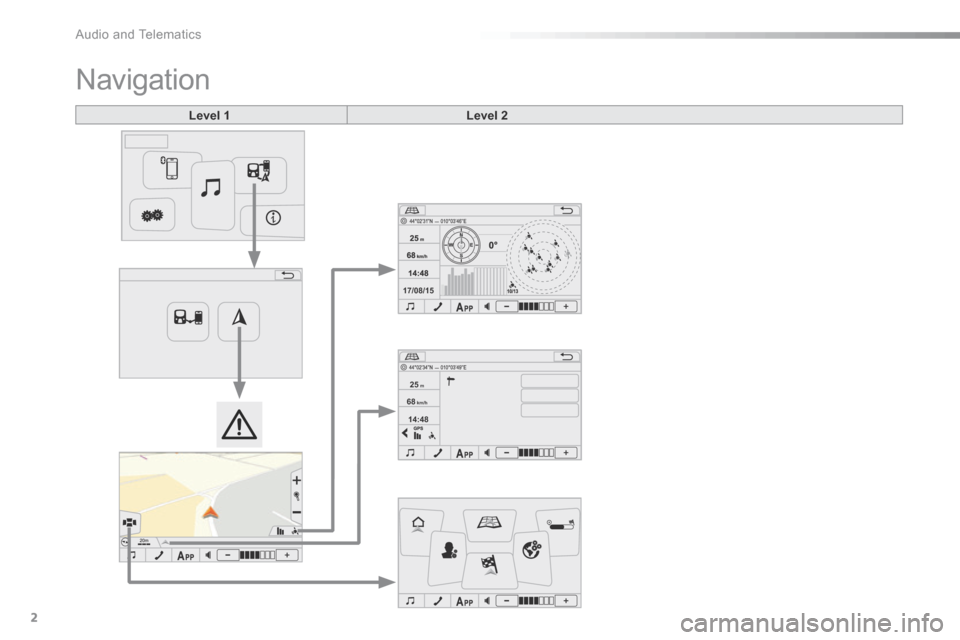
Navigation
Level 1Level 2
Page 262 of 271

.
Audio and Telematics 3
c1-108-post-it-web_en_chap12a_complementnav_toyota_tactile-1_ed01-2015
Level 1Level 2Comments
Connection
GPS
The compass is available only with a fixed position.
The direction is available only with a fixed position.
The representation of the sky is facing north, as for the compass.
The satellite icons are represented in yellow for a weak signal and in green for a strong signal.
The satellite signal levels are represented in yellow for a weak signal and in green for a strong signal.
Connection
Page info
Search for POI nearby
Display the information on your current position and select the desired settings.
Add to favourites
Set as home
GPS
Connection
Navigation
Return home Create a route to a place set as "Home".
Map Go directly to the map page.
Route overview Display an overview of your route.
User settings Display the system preferences (language, units, ...).
Go to Search for and set a destination.
Map settings Display the route and map display preferences.
Page 263 of 271

17/08/15
14:48
68
km/h
25m
Audio and Telematics
4
c1-108-post-it-web_en_chap12a_complementnav_toyota_tactile-1_ed01-2015
Level 1Level 2Level 3
Page 264 of 271

.
Audio and Telematics 5
c1-108-post-it-web_en_chap12a_complementnav_toyota_tactile-1_ed01-2015
Level 1Level 2Level 3Comments
Navigation
Return home
Press the change of direction indicator to open the list of changes of direction.
Press the time information area to alternate the information displayed: estimated time of arrival / remaining time.
Press the distance information area to alternate the information displayed: remaining distance / distance travelled.
Navigation
Map
Go directly to the navigation menu.
Map orientation and scale.
Press to zoom in.
Press to zoom out.
Indicates the strength of the GPS signal.
Search for POIs nearby
Display the information on your current position and select the desired settings. Add to favourites
Set as home
Navigation
Route overview
Point of departure
Display the distance and information on the duration of the journey.
Display the total distance and information on the total duration of the journey.
Point of arrival.
Departure time.
Distance travelled.
Estimated time of arrival.
Page 265 of 271

Audio and Telematics
6
c1-108-post-it-web_en_chap12a_complementnav_toyota_tactile-1_ed01-2015
Level 1Level 2
Page 266 of 271

.
Audio and Telematics 7
c1-108-post-it-web_en_chap12a_complementnav_toyota_tactile-1_ed01-2015
Level 1Level 2Comments
Navigation
User settings
Language Display the list of text languages available.
Time zone Display the list of time zones.
Volume Set the volume for voice instructions, with "Test" and "Mute" (off) buttons.
Units Change between metric and imperial units for distance and altitude.
Date and time format dd/mm/yyyy or mm/dd/yyyy 12.00 (midday) + 12.00 (midnight) or 24.00.
Regarding Display information on the navigation system: mapping software version.
Delete recent items Delete recent destinations.
Reinitialisation Return the navigation system to the default settings. This does not affect your list of "Favourites".
Navigation
Map settings
Route settings Route calculation options: this allows certain types of roads to be avoided, such as toll roads or pedestrianised areas.
Map display Display options: north up in 2D, vehicle direction up in 2D or 3D.
Icons on the map Hide or display icons for POIs on the map.
Colours Map colour options: daylight or night view.
Automatic zoom Activate or deactivate the automatic zoom option.
Speed check Activate or deactivate the speed check alert.