Page 59 of 266

57
Berlingo-2-VU_en_Chap04_Ergonomie_ed01-2015
Guide-me-home lighting
Keeping the dipped beam headlamps
on temporarily with the ignition off,
makes the driver's exit easier when the
light is poor.
HEADLAMP BEAM
The beam setting must be adjusted to
suit the load in the vehicle.
0 - No load.
1 - Partial load.
2 - Average load.
3 - Maximum authorised load.
Manual operation
-
With the ignition of
f, "flash" the
headlamps within one minute after
switching off the ignition.
The guide-me-home lighting switches
off automatically after a set time.
Automatic operation
Refer to chapter 10, "Screen
menu map" section.
a
ctivate the function via the
vehicle configuration menu.
Initial setting is position 0.
CORnERInG LIGHTInG
With dipped or main beam headlamps,
this function makes use of the beam
from a front foglamp to illuminate the
inside of a bend, when the vehicle
speed is below 25 mph (approximately
40 km/h) (urban driving, winding road,
intersections, parking manouevres...).
Switching on
This function starts:
-
when the corresponding direction
indicator is switched on,
or
-
from a certain angle of rotation
of the steering wheel.
Switching off
The system does not operate:
-
below a certain angle of rotation
of the steering wheel,
-
above 25 mph (40 km/h),
-
when reverse gear is engaged,
Programming
The system is activated or deactivated
in the vehicle configuration menu.
The system is activated by default. T
ravelling abroad
If using your vehicle in a country
that drives on the other side of the
road, the headlamps must be adjusted
to avoid dazzling on-coming drivers.
Contact a CITROËN dealer or a
qualified workshop.
Steering mounted controls
EASE OF USE and COMFORT
4
Page 71 of 266

69
Berlingo-2-VU_en_Chap04_Ergonomie_ed01-2015Berlingo-2-VU_en_Chap04_Ergonomie_ed01-2015
Good practice
For maximum cooling or heating of the
passenger compartment, it is possible
to exceed the value 15 by turning until
LO is displayed or the value 27 by
turning until HI is displayed.
On entering the vehicle, the inside
temperature may be much colder (or
warmer) than is comfortable. There is
no advantage in changing the value
displayed in order to quickly reach the
level of comfort required. The system
will use its maximum performance to
reach the comfort value set.
DIGITAL AIR CO n DITIO n I n G
Automatic operation
AUTO comfort programme
This is the normal air conditioning
system operating mode. Driver or passenger side comfort
value
The value indicated in the screen
corresponds to a level of comfort and
not a temperature in degrees Celsius
or Fahrenheit.
Turn this control to the left
or to the right to decrease or
increase the value. A setting
around the value 21 provides
optimum comfort. However,
depending on your requirements, a
setting between 18 and 24 is usual.
d
o not cover the sunshine sensor
located on the dashboard.
Press this button, the AUTO
symbol is displayed.
In accordance with the
comfort value selected,
the system controls the
distribution, the flow and the intake
of air to guarantee comfort and a
sufficient circulation of air in the
passenger compartment. No further
action on your part is required. When the engine is cold, to prevent
an excessive diffusion of cold air, the
air diffuser will reach its optimum level
gradually.
For your comfort, the settings are
stored when the ignition is switched off
and are reinstated the next time the
vehicle is started.
The automatic function will no longer
be maintained if you change a setting
manually (AUTO is cleared).
SEPARATE SETTInGS FOR DRIVER A
n D PASSE n GER
EASE OF USE and COMFORT
4
Ventilation
Page 72 of 266

70
Berlingo-2-VU_en_Chap04_Ergonomie_ed01-2015Berlingo-2-VU_en_Chap04_Ergonomie_ed01-2015
Manual operation
You can, according to your
requirements, make a different
selection from that offered by the
system by changing a setting. The
other functions will still be controlled
automatically. Pressing the AUTO
button restores fully automatic
operation.Air distribution
Pressing this button several
times in succession directs
the air flow towards:
-
the windscreen,
-
the windscreen and footwells,
-
the footwells,
-
the side vents, central vents and
footwells,
-
the side vents and central vents. Air flow
Press the
small fan button to
reduce the flow or the large
fan button to increase the
flow.
On the display, the blades of the fan fill
when the flow is increased.
Switching the air
conditioning On / Off
Press this button, the A/C
symbol is displayed and the
air conditioning is activated.
Deactivating the system
Press the air flow small fan
button until the fan symbol
disappears from the display.
This action deactivates all
of the system's functions, with the
exception of the air recirculation and
rear screen demisting (if fitted on your
vehicle). Your comfort setting is no
longer maintained and is switched off. Intake of exterior air /
Recirculation of interior air
Press this button to
recirculate the interior air.
The recirculation symbol is
displayed.
For your comfort, do not
deactivate the system for
long periods. Pressing the
large fan button or the AUTO
button reactivates the system
with the values set before it was
deactivated. Recirculation prevents exterior
odours and smoke from entering
the passenger compartment. Avoid
prolonged operation in interior
air recirculation mode (risk of
condensation, odour and humidity).
Pressing this button again activates the
intake of exterior air.
Pressing this button again switches off
the air conditioning.
The ventilation outlet, located
in the glove box, diffuses cool
air (if the air conditioning is
on) regardless of the reference
temperature requested in the
passenger compartment and
regardless of the exterior temperature.
Ventilation
Page 102 of 266
100
BERLInGO-2-VU_En_CHAP05_SECURITE_ED01-2015
Deactivation
The system is deactivated in the
vehicle configuration menu, accessible
with the ignition on.
Its state is memorised when the
ignition is switched off.When the system is deactivated, a
message is displayed every time
the ignition is switched on, to warn
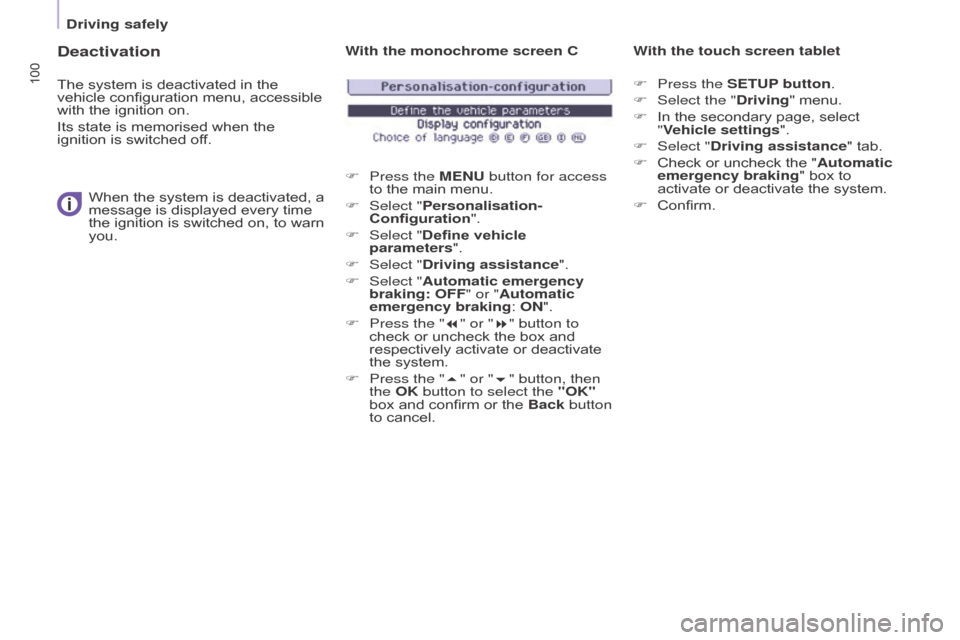
you. With the monochrome screen C
F
Press the
ME n U button for access
to the main menu.
F
Select "
Personalisation-
Configuration".
F
Select "
Define vehicle
parameters".
F
Select "
Driving assistance".
F
Select "
Automatic emergency
braking: OFF" or "Automatic
emergency braking: O
n ".
F
Press the "
7" or "8" button to
check or uncheck the box and
respectively activate or deactivate
the system.
F
Press the "
5" or "6" button, then
the OK button to select the "OK"
box and confirm or the Back button
to cancel. With the touch screen tablet
F
Press the SETUP button.
F Select the " Driving" menu.
F
In the secondary page, select
"
Vehicle settings".
F
Select "
Driving assistance" tab.
F
Check or uncheck the "
Automatic
emergency braking" box to
activate or deactivate the system.
F
Confirm.
Driving safely
Page 171 of 266
169
Berlingo-2-VU_en_Chap10a_SMEGplus_ed01-2015
7-inch touch screen tablet
GPS satellite navigation - Multimedia audio - Bluetooth® telephone
Contents
First steps
1 70
Steering mounted controls
1
72
M e n u s
17
3
Navigation
1
74
Navigation - Guidance
1
82
Tr a f fi c
1
8 6
Radio Media
1
88
Radio
19
4
DAB (Digital Audio Broadcasting) radio
1
96
Media
19
8
Settings
2
02
Internet
2
10
Internet browser
2
11
MirrorLink
® 2 14
Telephone
2
16
Frequently asked questions
2
24
The system is protected in such a way that it will only operate in
your vehicle. As a safety measure, the driver should only carry out operations
which require prolonged attention while the vehicle is stationary.
The display of the energy economy mode message signals
that the system is about to go into standby. Refer to the Energy
Economy (Mode) section.
Audio and Telematics
TECHnOLOGY on BOARD
10
Page 177 of 266
175
Berlingo-2-VU_en_Chap10a_SMEGplus_ed01-2015
Level 1Level 2 Level 3 Comments
na
vigation
Settings
na
vigation Enter destination
Display recent destinations.
Calculatory criteria Fastest
Choose the navigation criteria.
The map displays the route chosen according to
these criteria.
Shortest
Time/distance
Ecological
To l l s
Ferries
Tr a f f i c
Strict - Close
Show route on map Display the map and start navigation.
Confirm
Save the options.
Save current location Save the current address.
Stop navigation Delete the navigation information.
Voice synthesis Choose the volume for voice and announcement
of street names.
Diversion Detour from your initial route by a determined
distance.
na
vigation Display in text mode.
Zoom in.
Zoom out.
Display in full screen mode.
Use the arrows to move the map.
Switch to 2D map.
Audio and Telematics
TECHnOLOGY on BOARD
10
Page 184 of 266
182
Berlingo-2-VU_en_Chap10a_SMEGplus_ed01-2015
Navigation - Guidance
Choosing a new destination
Select "Enter destination ". Select "
Save" to save the address
entered as a contact entry.
The system allows up to 200 entries.
Select " Confirm ".
Press " Show route on map " to start
navigation.
Select "
Address ".
Select the "Country:" from
the list offered, then in the
same way the " City:" or its
post code, the " Road:", the
"
n°: ".
C
onfirm each time. Select "n
avigate to
".
Choose the restriction criteria:
" Include tollroads ", "Include
ferries ", "Tr a f f i c ", "Strict ", "Close ".
Choose the navigation criteria:
"
Fastest " or "Shortest " or "Time/
distance " or "Ecological". To delete navigation information,
press "
Settings ".
Press " Stop navigation ".
To resume navigation press
" Settings ".
Press " Resume navigation ".
Press on
n
a
vigation
to display the
primary page.
Press on the secondary page.
Towards a new destination
or
Audio and Telematics
Page 188 of 266
186
Berlingo-2-VU_en_Chap10a_SMEGplus_ed01-2015
Hazard zone / Danger zone
alert settings
Press on navigation to display the
primary page.
Press on the secondary page.
Select " Settings ".
Select " Alarm!".
It is then possible to activate Risk Areas alerts
then:
-
"
Audible warning"
-
"
Alert only when navigating"
-
"
Alert only for overspeed"
-
"
Display speed limits"
-
T
iming: the choice of timing allows the
time before giving a Risk Area alert to be
defined.
Select " Confirm ". This series of alerts and displays is
only available if Risk Areas have first
been downloaded and installed on the
system.
Tr a f fi c
Traffic information
Display of messages
Press on na
vigation to display the
primary page.
Press on the secondary page.
Select " Traffic messages ".
Set the: "On the route ",
" Around ",
"
ne
ar destination ", filters to fine-
tune the list of messages.
Press again to remove the filter.
Audio and Telematics


