Page 143 of 266
141
Berlingo-2-VU_en_Chap08_Aide rapide_ed01-2015
ECOnOMY MODE
After the engine has stopped, with
the key in the ignition position, certain
functions (windscreen wiper, electric
windows, courtesy lamps, audio
equipment, etc.) can only be used for a
cumulative duration of thirty minutes, to
prevent discharging of the battery.
Once the thirty minutes are over, the
active functions are put on standby
and the battery warning lamp flashes
accompanied by a message in the
screen.
To resume the use of these functions
immediately, start the engine and let it
run for a few minutes.
The time available will then be double
the time for which the engine was left
running. However, this time will always
be between five and thirty minutes.
A flat battery will prevent the
engine from starting.
Battery
QUICK HELP
8
Page 157 of 266
155
Berlingo-2-VU_en_Chap08_Aide rapide_ed01-2015Berlingo-2-VU_en_Chap08_Aide rapide_ed01-2015
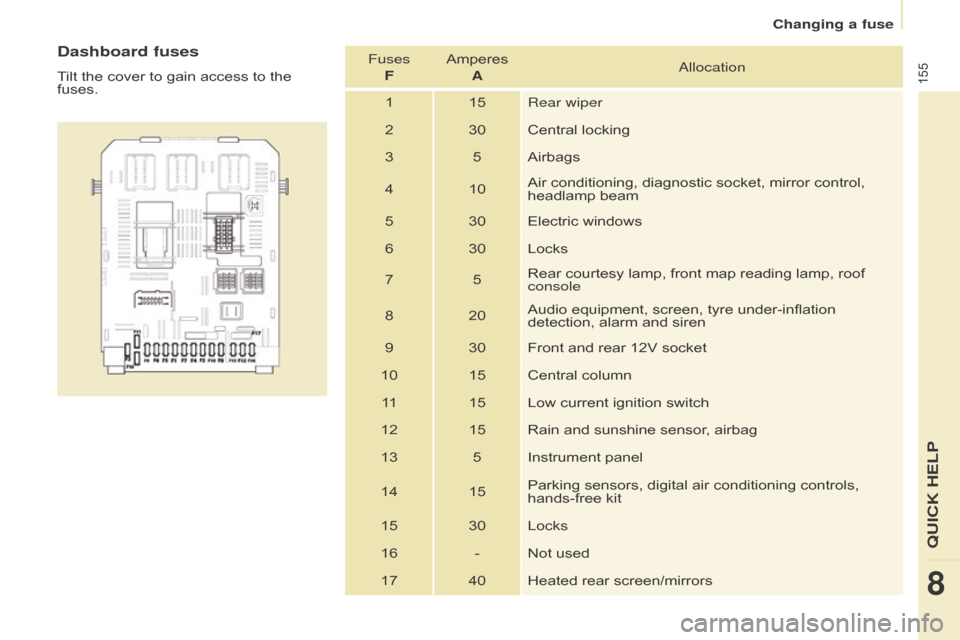
Dashboard fuses
Tilt the cover to gain access to the
fuses.Fuses
F Amperes
Aa llocation
1 15 Rear wiper
2 30 Central locking
3 5 Airbags
4 10 Air conditioning, diagnostic socket, mirror control,
headlamp beam
5 30 Electric windows
6 30 Locks
7 5Rear courtesy lamp, front map reading lamp, roof
console
8 20 Audio equipment, screen, tyre under-inflation
detection, alarm and siren
9 30 Front and rear 12V socket
10 15 Central column 11 15 Low current ignition switch
12 15 Rain and sunshine sensor, airbag
13 5 Instrument panel
14 15 Parking sensors, digital air conditioning controls,
hands-free kit
15 30 Locks
16 - Not used 17 40 Heated rear screen/mirrors
QUICK HELP
8
Changing a fuse
Page 171 of 266
169
Berlingo-2-VU_en_Chap10a_SMEGplus_ed01-2015
7-inch touch screen tablet
GPS satellite navigation - Multimedia audio - Bluetooth® telephone
Contents
First steps
1 70
Steering mounted controls
1
72
M e n u s
17
3
Navigation
1
74
Navigation - Guidance
1
82
Tr a f fi c
1
8 6
Radio Media
1
88
Radio
19
4
DAB (Digital Audio Broadcasting) radio
1
96
Media
19
8
Settings
2
02
Internet
2
10
Internet browser
2
11
MirrorLink
® 2 14
Telephone
2
16
Frequently asked questions
2
24
The system is protected in such a way that it will only operate in
your vehicle. As a safety measure, the driver should only carry out operations
which require prolonged attention while the vehicle is stationary.
The display of the energy economy mode message signals
that the system is about to go into standby. Refer to the Energy
Economy (Mode) section.
Audio and Telematics
TECHnOLOGY on BOARD
10
Page 172 of 266
170
Berlingo-2-VU_en_Chap10a_SMEGplus_ed01-2015
First steps
Use the buttons above the touch screen tablet
for access to the menu carousel, then press the
virtual buttons in the touch screen tablet.
Each menu is displayed in one or two pages
(primary page and secondary page).Secondary page
Primary page In very hot conditions, the system may
go into stand-by (screen and sound
completely off) for a minimum period of
5 minutes.
audio and Telematics
Page 173 of 266

171
Berlingo-2-VU_en_Chap10a_SMEGplus_ed01-2015
Volume adjustment (each source is
independent, including traffic announcements
(TA) and navigation instructions).Press Menu
to display the menu
carousel.
Increase volume.
Reduce volume.
Selecting the audio source (depending on
version):
-
"
FM" / "AM" / "DAB"* stations.
-
"
USB" memory stick.
-
J
ukebox*, after first copying audio files to
the internal memory of the system.
-
T
elephone connected by Bluetooth* and
audio streaming Bluetooth* (streaming).
-
M
edia player connected to the auxiliary
socket ( jack, cable not supplied).
* Depending on equipment.
Short-cuts: using the touch buttons in the upper
band of the touch screen tablet, it is possible
to go directly to the selection of audio source,
the list of stations (or titles, depending on the
s o u r c e).
The screen is of the "resistive" type, it
is necessary to press firmly, particularly
for "flick" gestures (scrolling through a
list, moving the map...). A simple wipe
will not be enough. pressing with more
than one finger is not recognised.
The screen can be used when wearing
gloves. This technology allows use at
all temperatures.
Following prolonged operation in very
high temperatures, the volume may be
limited to protect the system. The return to
normal takes place when the temperature
in the passenger compartment drops. To clean the screen, use a soft
non-abrasive cloth (spectacles cloth)
without any additional product.
Do not use pointed objects on the
screen.
do n
ot touch the screen with wet
hands.
audio and Telematics
TECHnoLoGY on boaRd
10
Page 174 of 266
172
Berlingo-2-VU_en_Chap10a_SMEGplus_ed01-2015
Steering mounted controls
Radio: select the previous/next
preset station.
Media: select a genre / artist / folder
from the list.
Select the previous/next entry in a
menu.Decrease volume.
Radio: automatic search for a higher
frequency.
Media: Select next track.
Media, press and hold: fats for ward.
Jump in the list.
Mute: cut the sound by pressing
the volume increase and decrease
buttons simultaneously.
Restore the sound by pressing one of
the two volume buttons. Radio: change to the previous radio
station in the list.
Long press: automatic search for a
lower frequency.
Media, press and hold: fast back.
Jump in the list.
Change the audio source.
Confirm a selection.
Call/end call on the telephone.
Press for more than 2 seconds:
access to the telephone menu. Increase volume.
A
Page 175 of 266
173
Berlingo-2-VU_en_Chap10a_SMEGplus_ed01-2015
Menus
Settings
Radio Mediana
vigation
Driving
Internet Telephone
Set the sounds and brightness for the
instruments and controls.
Select radio, the different music sources and
view photos.
Enter navigation settings and choose a
destination.
Access the trip computer, activate, deactivate
or enter settings for certain vehicle functions.
Connect using the "Internet browser".
op
erate certain application on your
smartphone via "Mirrorlink". Connect a telephone by
b
l
uetooth
®.
(Depending on equipment)
(Depending on equipment)
audio and Telematics
TECHnoLoGY on boaRd
10
Page 176 of 266
174
Berlingo-2-VU_en_Chap10a_SMEGplus_ed01-2015
Level 1Level 2Level 3
Navigation
navigationRoute settings
Audio and Telematics