Page 95 of 726
SABICs may help reduce the risk of head injury to front
and rear seat outboard occupants. SABICs may reduce
the risk of injuries in certain side impact and vehicle
rollover events, in addition to the injury reduction poten-
tial provided by the seat belts and body structure.
The SABICs deploy downward, covering the side win-
dows. An inflating SABIC pushes the outside edge of the
trim out of the way and covers the window. The SABICs
inflate with enough force to injure you if you are not
belted and seated properly, or if items are positioned in
the area where the SABICs inflate. Children are at an
even greater risk of injury from a deploying air bag.
The SABICs may help reduce the risk of partial or
complete ejection of vehicle occupants through side
windows in certain rollover or side impact events.
WARNING!
•Your vehicle is equipped with left and right
Supplemental Side Air Bag Inflatable Curtains
(SABICs). Do not stack luggage or other cargo up
high enough to block the deployment of the
SABICs. The trim covering above the side win-
dows where the SABIC and its deployment path
are located should remain free from any obstruc-
tions.
•Your vehicle is equipped with SABICs. In order for
the SABICs to work as intended, do not install any
accessory items in your vehicle which could alter
the roof. Do not add an aftermarket sunroof to your
vehicle. Do not add roof racks that require perma-
nent attachments (bolts or screws) for installation
on the vehicle roof. Do not drill into the roof of the
vehicle for any reason.
2
THINGS TO KNOW BEFORE STARTING YOUR VEHICLE 93
Page 96 of 726
The SABICs and SABs (“Side Air Bags”) are designed to
activate in certain side impacts and certain rollover
events. The Occupant Restraint Controller (“ORC”) de-
termines whether the deployment of the Side Air Bags in
a particular side impact or rollover event is appropriate,
based on the severity and type of collision. Vehicle
damage by itself is not a good indicator of whether or not
Side Air Bags should have deployed.
Side Air Bags are a supplement to the seat belt restraint
system. Side Air Bags deploy in less time than it takes to
blink your eyes. Occupants, including children, who are
up against or very close to Side Air Bags can be seriously
injured or killed. Occupants, including children, should
never lean on or sleep against the door, side windows, or
area where the Side Air Bags inflate, even if they are in an
infant or child restraint.
Seat belts (and child restraints where appropriate) are
necessary for your protection in all collisions. They also
help keep you in position, away from inflating Side Air
Bags. To get the best protection from the Side Air Bags,
occupants must wear their seat belts properly and sit
upright with their backs against the seats. Children must
be properly restrained in a child restraint or booster seat
that is appropriate for the size of the child.
WARNING!
•Side Air Bags need room to inflate. Do not lean
against the door or window. Sit upright in the
center of the seat.
•Being too close to the Side Air Bags during deploy-
ment could cause you to be severely injured or
killed.
(Continued)
94 THINGS TO KNOW BEFORE STARTING YOUR VEHICLE
Page 130 of 726
WARNING!(Continued)
eventually poison you. To avoid breathing (CO),
follow these safety tips:
•Do not run the engine in a closed garage or in
confined areas any longer than needed to move
your vehicle in or out of the area.
•If you are required to drive with the trunk/liftgate/
rear doors open, make sure that all windows are
closed and the climate control BLOWER switch is
set at high speed. DO NOT use the recirculation
mode.
•If it is necessary to sit in a parked vehicle with the
engine running, adjust your heating or cooling
controls to force outside air into the vehicle. Set the
blower at high speed.
The best protection against carbon monoxide entry into
the vehicle body is a properly maintained engine exhaust
system.
Whenever a change is noticed in the sound of the exhaust
system, when exhaust fumes can be detected inside the
vehicle, or when the underside or rear of the vehicle is
damaged, have a competent mechanic inspect the com-
plete exhaust system and adjacent body areas for broken,
damaged, deteriorated, or mispositioned parts. Open
seams or loose connections could permit exhaust fumes
to seep into the passenger compartment. In addition,
inspect the exhaust system each time the vehicle is raised
for lubrication or oil change. Replace as required.
Safety Checks You Should Make Inside The
Vehicle
Seat Belts
Inspect the seat belt system periodically, checking for
cuts, frays, and loose parts. Damaged parts must be
replaced immediately. Do not disassemble or modify the
system.
128 THINGS TO KNOW BEFORE STARTING YOUR VEHICLE
Page 140 of 726
!ELECTRICAL POWER OUTLETS — IF
EQUIPPED...........................281
!POWER INVERTER — IF EQUIPPED.........286
!CUPHOLDERS........................287
▫Instrument Panel Cupholders.............288
▫Super Console — If Equipped.............288
▫Premium Console Cupholders — If Equipped. . .289
▫Interior Bottle Holders..................290
▫Smoker’s Package Kit — If Equipped.......291
!STORAGE............................291
▫Glove Compartments..................291
▫Door Trim Panel Storage................292
▫Driver Seatback Storage — If Equipped......293
▫Umbrella Holder.....................293
▫Second Row Floor Storage Bins............294
▫Storage Bin Safety Warning...............295
▫Center And Rear Overhead Console Storage — If
Equipped...........................297
▫Coat Hooks.........................298
▫Cargo Area Storage....................298
!CONSOLE FEATURES...................299
▫Basic Console........................299
▫Premium Console — If Equipped..........300
▫Super Console — If Equipped.............304
!REAR WINDOW FEATURES..............306
▫Rear Window Defroster.................306
138 UNDERSTANDING THE FEATURES OF YOUR VEHICLE
Page 142 of 726
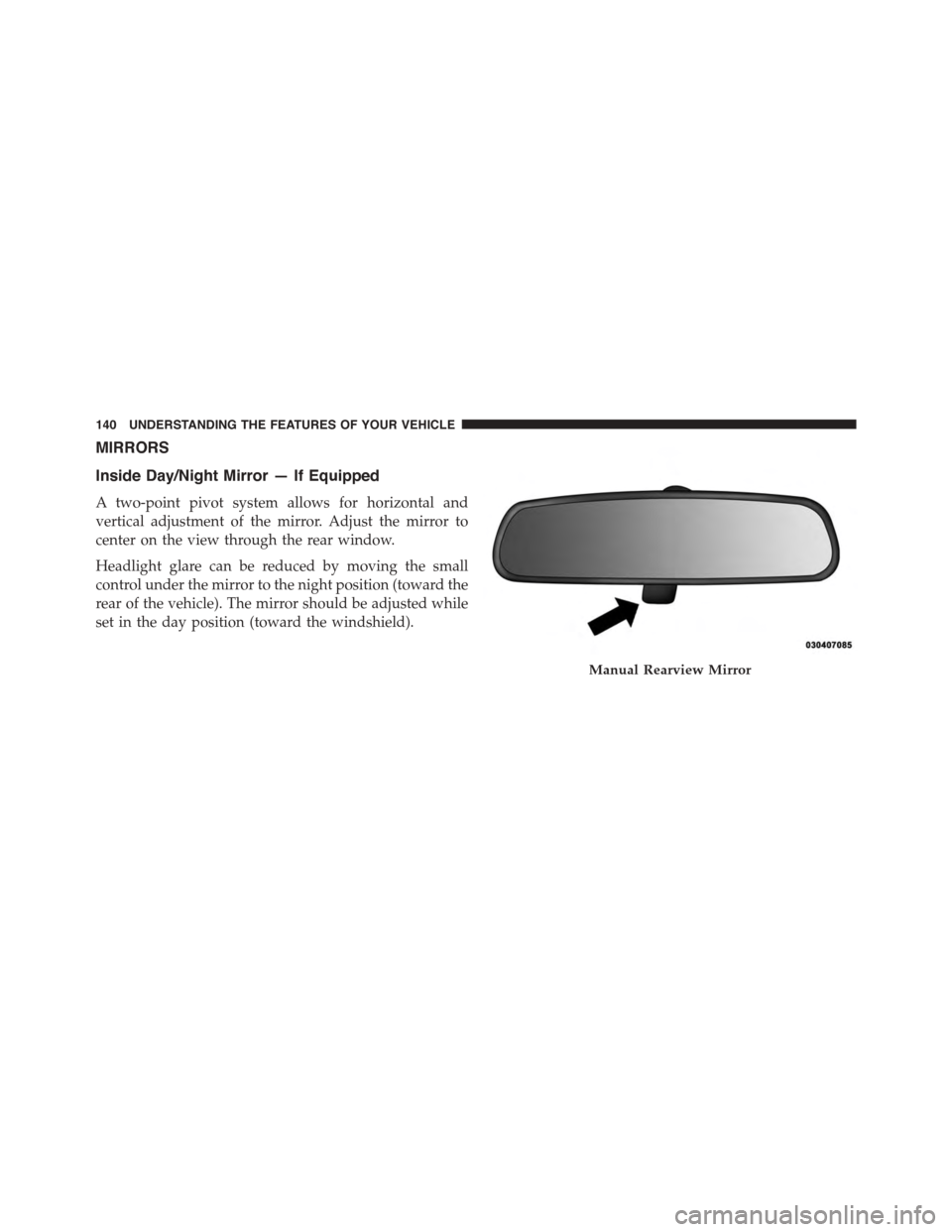
MIRRORS
Inside Day/Night Mirror — If Equipped
A two-point pivot system allows for horizontal and
vertical adjustment of the mirror. Adjust the mirror to
center on the view through the rear window.
Headlight glare can be reduced by moving the small
control under the mirror to the night position (toward the
rear of the vehicle). The mirror should be adjusted while
set in the day position (toward the windshield).
Manual Rearview Mirror
140 UNDERSTANDING THE FEATURES OF YOUR VEHICLE
Page 146 of 726
Heated Mirrors — If Equipped
These mirrors are heated to melt frost or ice. This
feature can be activated whenever you turn on the
rear window defroster (if equipped). Refer to “Rear
Window Features” in “Understanding The Features Of
Your Vehicle” for further information.
Tilt Mirrors In Reverse (Available With Memory
Seat Only) — If Equipped
Tilt Mirrors in Reverse provides automatic outside mirror
positioning which will aid the drivers view of the ground
rearward of the front doors. The driver’s outside mirror
will move slightly downward from the present position
when the vehicle is shifted into REVERSE. The driver’s
outside mirror will then return to the original position
when the vehicle is shifted out of REVERSE position.
Each stored memory setting will have an associated Tilt
Mirrors in Reverse position.
NOTE:The Tilt Mirrors in Reverse feature is not enabled
when delivered from the factory. The Tilt Mirrors in
Reverse feature can be enabled or disabled in the Elec-
tronic Vehicle Information Center (EVIC). Refer to “Elec-
tronic Vehicle Information Center (EVIC)/Customer-
Programmable Features” in “Understanding Your
Instrument Panel” for further information.
Power Folding Mirrors — If Equipped
The switch for the power folding mirrors is located
between the power mirror switches L (left) and R (right).
Press the switch once and the mirrors will fold in,
pressing the switch a second time will return the mirrors
to the normal driving position.
144 UNDERSTANDING THE FEATURES OF YOUR VEHICLE
Page 177 of 726
3. At the next prompt, say “Delete” and follow the
prompts.
•You can also push the Phonebutton at any time
while the list is being played, and choose the
phone you wish to delete.
Things You Should Know About Your Uconnect®
Phone
Uconnect® Phone Tutorial
To hear a brief tutorial of the system features, push the
Phonebutton and say “Uconnect® Tutorial.”
Voice Training
For users experiencing difficulty with the system recog-
nizing their voice commands or numbers, the Uconnect®
Phone Voice Training feature may be used. To enter this
training mode, follow one of the two following proce-
dures:
•From outside the Uconnect® Phone mode (e.g., from
radio mode), push and hold the Voice Command
button for five seconds until the session begins,
or,
•Push the Voice Commandbutton and say the
“Voice Training,” “System Training,” or “Start Voice
Training” command.
You can either push the Uconnect® Phone button to
restore the factory setting or repeat the words and
phrases when prompted by the Uconnect® Phone. For
best results, the Voice Training session should be com-
pleted when the vehicle is parked with the engine
running, all windows closed, and the blower fan
switched off.
This procedure may be repeated with a new user. The
system will adapt to the last trained voice only.
3
UNDERSTANDING THE FEATURES OF YOUR VEHICLE 175
Page 178 of 726
Reset
To Reset all settings using Voice Command:
1. Push the Phonebutton.
2. After the “Ready” prompt and the following beep, say
“Setup,” then “Reset.”
•This will delete all phone pairing, phone book en-
tries, and other settings in all language modes. The
System will prompt you before resetting to factory
settings.
Voice Command
For best performance:
•Adjust the rearview mirror to provide at least½inch
(1 cm) gap between the overhead console (if equipped)
and the mirror.
•Always wait for the beep before speaking.
•Speak normally without pausing, just as you would
speak to a person sitting a few feet/meters away from
you.
•Make sure that no one other than you is speaking
during a Voice Command period.
Performance is maximized under:
•Low-to-medium blower setting
•Low-to-medium vehicle speed
•Low road noise
•Smooth road surface
•Fully closed windows
•Dry weather condition
176 UNDERSTANDING THE FEATURES OF YOUR VEHICLE