Page 237 of 726
NOTE:The ignition must be cycled to the OFF position
for this feature to operate.
Interior Lighting Off
Rotate the left dimmer control to the off position (extreme
bottom). The interior lights will remain off when the
doors or liftgate are open.
Parade Mode (Daytime Brightness Feature)
Rotate the left dimmer control to the first detent. This
feature brightens the odometer, radio and overhead
displays when the parking lights or headlights are on.
Halo Lights — If Equipped
Halo lights are strategically placed soft lighting that help
to illuminate specific areas to aid the occupants in
locating specific features while driving at night.
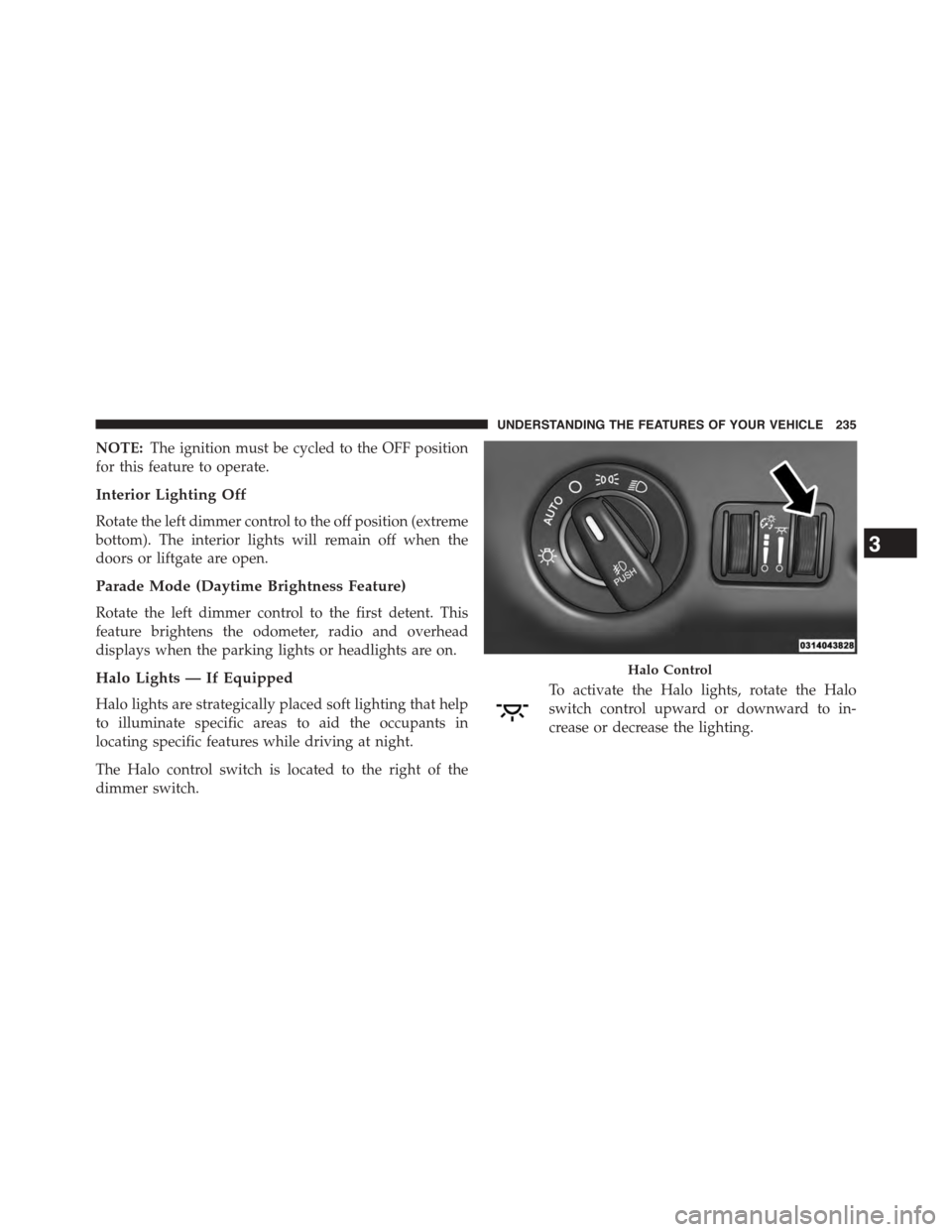
The Halo control switch is located to the right of the
dimmer switch.
To activate the Halo lights, rotate the Halo
switch control upward or downward to in-
crease or decrease the lighting.
Halo Control
3
UNDERSTANDING THE FEATURES OF YOUR VEHICLE 235
Page 259 of 726
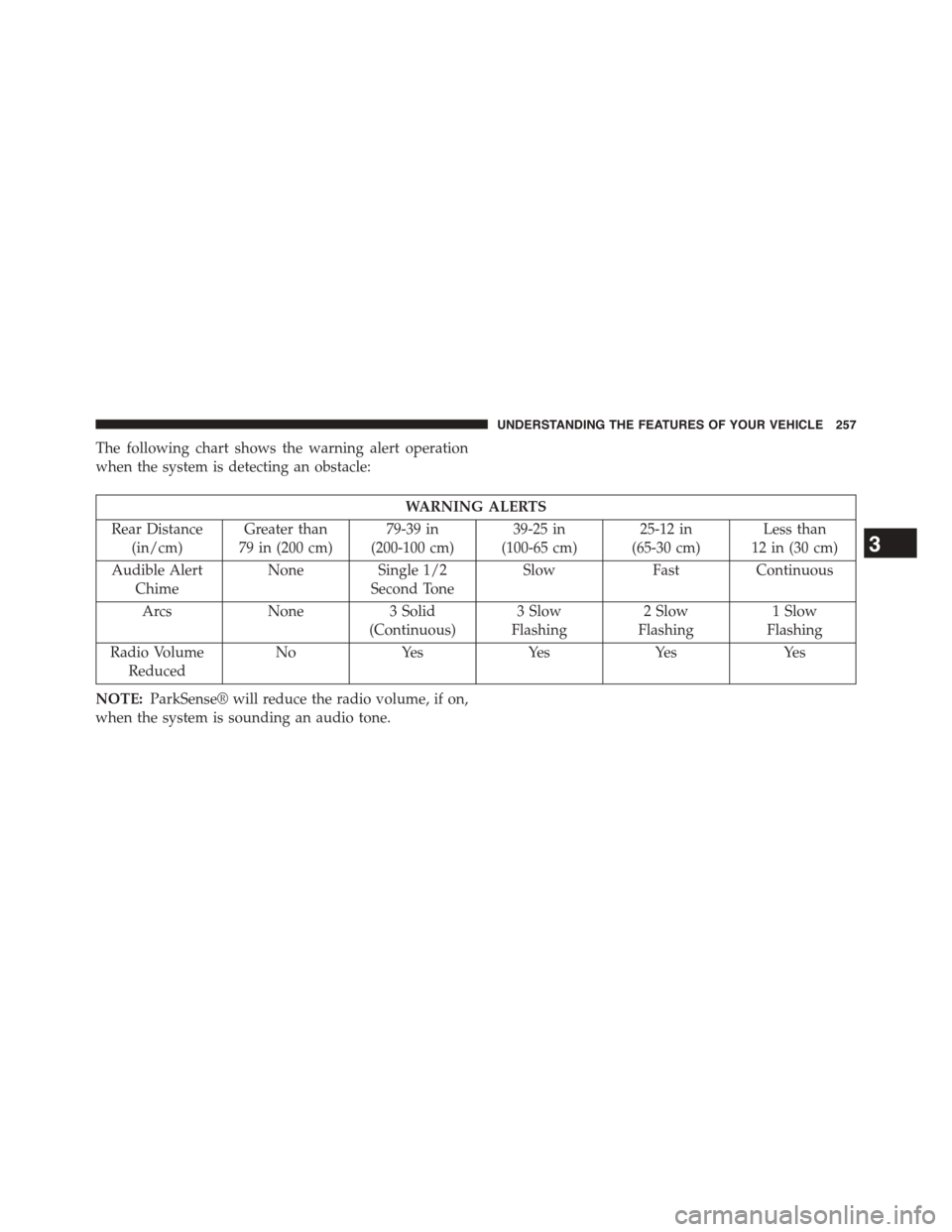
The following chart shows the warning alert operation
when the system is detecting an obstacle:
WARNING ALERTS
Rear Distance
(in/cm)
Greater than
79 in (200 cm)
79-39 in
(200-100 cm)
39-25 in
(100-65 cm)
25-12 in
(65-30 cm)
Less than
12 in (30 cm)
Audible Alert
Chime
NoneSingle 1/2
Second Tone
SlowFastContinuous
ArcsNone3 Solid
(Continuous)
3 Slow
Flashing
2 Slow
Flashing
1 Slow
Flashing
Radio Volume
Reduced
NoYesYesYesYes
NOTE:ParkSense® will reduce the radio volume, if on,
when the system is sounding an audio tone.
3
UNDERSTANDING THE FEATURES OF YOUR VEHICLE 257
Page 261 of 726
Cleaning The ParkSense® System
Clean the ParkSense® sensors with water, car wash soap
and a soft cloth. Do not use rough or hard cloths. Do not
scratch or poke the sensors. Otherwise, you could dam-
age the sensors.
ParkSense® System Usage Precautions
NOTE:
•Ensure that the rear bumper is free of snow, ice, mud,
dirt and debris to keep the ParkSense® system oper-
ating properly.
•Jackhammers, large trucks, and other vibrations could
affect the performance of ParkSense®.
•When you turn ParkSense® OFF, the instrument clus-
ter will display “PARK ASSIST SYSTEM OFF.” Fur-
thermore, once you turn ParkSense® off, it remains off
until you turn it on again, even if you cycle the ignition
key.
•When you move the shift lever to the REVERSE
position and ParkSense® is turned OFF, the EVIC will
display “PARK ASSIST SYSTEM OFF” message for as
long as the vehicle is in REVERSE.
•ParkSense®, when on, will reduce the radio volume
when it is sounding a tone.
3
UNDERSTANDING THE FEATURES OF YOUR VEHICLE 259
Page 272 of 726
Before You Begin Programming HomeLink®
Be sure that your vehicle is parked outside of the garage
before you begin programming.
For more efficient programming and accurate transmis-
sion of the radio-frequency signal it is recommended that
a new battery be placed in the hand-held transmitter of
the device that is being programmed to the HomeLink®
system.
To erase the channels place the ignition in the ON/RUN
position and push and hold the two outside HomeLink®
buttons (I and III) for up 20 seconds or until the red
indicator flashes.
NOTE:
•Erasing all channels should only be performed when
programming HomeLink® for the first time. Do not
erase channels when programming additional buttons.
•If you have any problems, or require assistance, please
call toll-free 1-800-355-3515 or, on the Internet at
HomeLink.com for information or assistance.
Programming A Rolling Code
For programming garage door openers that were manu-
factured after 1995. These garage door openers can be
identified by the “LEARN” or “TRAIN” button located
where the hanging antenna is attached to the garage door
opener. It is NOT the button that is normally used to
open and close the door. The name and color of the
button may vary by manufacturer.
270 UNDERSTANDING THE FEATURES OF YOUR VEHICLE
Page 276 of 726
Canadian/Gate Operator Programming
For programming transmitters in Canada/United States
that require the transmitter signals to “time-out” after
several seconds of transmission.
Canadian radio frequency laws require transmitter sig-
nals to time-out (or quit) after several seconds of trans-
mission – which may not be long enough for HomeLink®
to pick up the signal during programming. Similar to this
Canadian law, some U.S. gate operators are designed to
time-out in the same manner.
It may be helpful to unplug the device during the cycling
process to prevent possible overheating of the garage
door or gate motor.
1. Cycle the ignition to the ON/RUN position.
2. Place the hand-held transmitter 1 to 3 inches (3 to
8 cm) away from the HomeLink® button you wish to
program while keeping the HomeLink® indicator
light in view.
3. Continue to push and hold the HomeLink® button,
while you push and release (“cycle”) your hand-held
transmitter every two seconds until HomeLink® has
successfully accepted the frequency signal. The indi-
cator light will flash slowly and then rapidly when
fully trained.
4. Watch for the HomeLink® indicator to change flash
rates. When it changes, it is programmed. It may take
up to 30 seconds or longer in rare cases. The garage
door may open and close while you are programming.
5. Push and hold the programmed HomeLink® button
and observe the indicator light.
274 UNDERSTANDING THE FEATURES OF YOUR VEHICLE
Page 318 of 726
▫Units..............................350
▫Vehicle Info (Customer Information Features) . .350
▫Messages #..........................351
▫Keyless Enter-N-Go™ Display — If Equipped . .351
▫Compass / Temperature Display..........352
▫Compass Variance.....................354
▫TURN MENU OFF....................354
▫Customer-Programmable Features
(System Setup).......................354
!Uconnect® 730N/430/430N CD/DVD/HDD/NAV
— IF EQUIPPED.......................362
▫Operating Instructions (Voice Command System) —
If Equipped..........................362
▫Operating Instructions (Uconnect® Phone) — If
Equipped...........................362
!Uconnect® 130........................362
▫Operating Instructions — Radio Mode......363
▫Operation Instructions — CD MODE For CD And
MP3 Audio Play......................366
▫Notes On Playing MP3 Files.............368
▫Operation Instructions — Auxiliary Mode . . . .371
!Uconnect® 130 WITH SATELLITE RADIO.....372
▫Operating Instructions — Radio Mode.......372
▫Operation Instructions — CD MODE For CD And
MP3 Audio Play......................378
▫Notes On Playing MP3 Files.............380
▫LIST Button — CD Mode For MP3 Play......383
316 UNDERSTANDING YOUR INSTRUMENT PANEL
Page 319 of 726
▫INFO Button — CD Mode For MP3 Play.....383
▫Uconnect® (Satellite Radio) — If Equipped . . .384
▫Operating Instructions (Uconnect® Phone) — If
Equipped...........................389
!SETTING THE ANALOG CLOCK...........389
!iPod®/USB/MP3 CONTROL — IF EQUIPPED . .390
▫Connecting The iPod® Or External USB
Device.............................391
▫Using This Feature.....................392
▫Controlling The iPod® Or External USB Device
Using Radio Buttons...................392
▫Play Mode..........................392
▫List Or Browse Mode...................394
▫Bluetooth® Streaming Audio (BTSA).......396
!Uconnect® MULTIMEDIA — VIDEO
ENTERTAINMENT SYSTEM (VES™) — IF
EQUIPPED...........................397
▫Getting Started.......................397
▫Blu-ray™ Disc Player...................398
▫Play Video Games.....................400
▫Listen To An Audio Source On Channel 2 While A
Video Is Playing On Channel 1............403
▫Dual Video Screen.....................405
▫Play A DVD Using The Touchscreen Radio . . .405
▫Play A DVD Using The VES™ Player — If
Equipped...........................408
▫Play A Blu-ray™ Disc Using The Blu-ray™
Player — If Equipped..................412
4
UNDERSTANDING YOUR INSTRUMENT PANEL 317
Page 321 of 726
!STEERING WHEEL AUDIO CONTROLS — IF
EQUIPPED...........................447
▫Radio Operation......................447
▫CD Player...........................448
!CD/DVD/Blu-ray™ Disc MAINTENANCE . . . .448
!RADIO OPERATION AND MOBILE PHONES . .449
▫General Information...................449
!CLIMATE CONTROLS...................449
▫Manual Heating And Air Conditioning
System — If Equipped.................450
▫Rear Manual Climate Control — If Equipped . .455
▫Automatic Temperature Control (ATC) — If
Equipped...........................457
▫Operating Tips.......................4694
UNDERSTANDING YOUR INSTRUMENT PANEL 319