Page 241 of 574

movement. The sunroof and sunshade will remain in a
partially opened condition until the switch is pushed and
held rearward again.
Closing Sunroof — Express
Push the switch forward and release it within one-half
second and the sunroof will close automatically from any
position. The sunroof will close fully and stop automati-
cally. This is called “Express Close”. During Express
Close operation, any movement of the switch will stop
the sunroof.
Closing Sunroof — Manual Mode
To close the sunroof, push and hold the switch in the
forward position. Any release of the switch will stop the
movement and the sunroof will remain in a partially
closed condition until the switch is pushed and held
forward again.
Opening Power Shade — Express
Push the shade switch rearward and release it within
one-half second and the shade will automatically open to
the halfway position and stop automatically. Push the
switch a second time from the halfway position and the
shade will automatically open to the full open position
and stop automatically. This is called “Express Open”.
During Express Open operation, any movement of the
shade switch will stop the shade.
Opening Power Shade — Manual Mode
To open the shade, push and hold the switch rearward.
The shade will open and stop automatically at the
half-open position. Push and hold the shade switch
rearward again and the shade will open automatically to
the full-open position. Any release of the switch will stop
the movement and the shade will remain in a partially
opened condition until the switch is pushed and held
rearward again.
3
UNDERSTANDING THE FEATURES OF YOUR VEHICLE 239
Page 242 of 574

Closing Power Shade — Express
Push the switch forward and release it within one-half
second and the shade will close automatically from any
position. If the sunroof is completely closed the shade
will close fully and stop automatically. This is called
“Express Close”. During Express Close operation, any
movement of the switch will stop the shade.
NOTE:If the sunroof is open, the shade will close to the
half-open position. Pushing the shade close button again
will automatically close both the sunroof and shade
completely.
Closing Power Shade — Manual Mode
To close the shade, push and hold the switch in the
forward position. Any release of the switch will stop the
movement and the shade will remain in a partially closed
condition until the switch is pushed and held forward
again.
Venting Sunroof — Express
Push and release the#Vent#button within one-half sec-
ond and the sunroof will open to the vent position. This
is called “Express Vent”, and it will occur regardless of
sunroof position. During Express Vent operation, any
movement of the switch will stop the sunroof.
NOTE:If the sunshade is in the closed position when the
vent switch is pushed, the sunshade will automatically
cycle to the halfway open position prior to the sunroof
opening to the Vent position.
Pinch Protect Feature
This feature will detect an obstruction in the opening of
the sunroof during Express Close operation. If an ob-
struction in the path of the sunroof is detected, the
sunroof will automatically retract. Remove the obstruc-
tion if this occurs. Next, push the switch forward and
release to Express Close.
240 UNDERSTANDING THE FEATURES OF YOUR VEHICLE
Page 243 of 574

NOTE:If three consecutive sunroof close attempts result
in Pinch Protect reversals, the fourth close attempt will be
a Manual Close movement with Pinch Protect disabled.
Wind Buffeting
Wind buffeting can be described as the perception of
pressure on the ears or a helicopter-type sound in the
ears. Your vehicle may exhibit wind buffeting with the
windows down, or the sunroof (if equipped) in certain
open or partially open positions. This is a normal occur-
rence and can be minimized. If the buffeting occurs with
the rear windows open, open the front and rear windows
together to minimize the buffeting. If the buffeting occurs
with the sunroof open, adjust the sunroof opening to
minimize the buffeting or open any window.
Sunroof Maintenance
Use only a non-abrasive cleaner and a soft cloth to clean
the glass panel.
Ignition OFF Operation
The power sunroof switch will remain active for up to
approximately ten minutes after the ignition switch is
turned to the LOCK position. Opening either front door
will cancel this feature.
NOTE:Ignition Off time is programmable through the
Uconnect® System. Refer to “Uconnect® Settings/
Customer Programmable Features” in “Understanding
Your Instrument Panel” for further information.
ELECTRICAL POWER OUTLETS
Your vehicle is equipped with one 12 Volt (13 Amp)
power outlet on the instrument panel and one 12 Volt (10
Amp) power outlet in the center console that can be used
to power cellular phones, small electronics and other low
powered electrical accessories. The power outlets are
labeled with either a “key” or a “battery” symbol to
indicate how the outlet is powered. Power outlets labeled
3
UNDERSTANDING THE FEATURES OF YOUR VEHICLE 241
Page 297 of 574

Vehicle Start” button to select from “Off,” “Remote Start”
or “All Starts” until a check-mark appears next to setting,
showing that setting has been selected. Press the back
arrow button on the touchscreen to return to the previous
menu.
Engine Off Options
After pressing the “Engine Off Options” button on the
touchscreen the following settings will be available:
•Easy Exit Seat — If Equipped
When this feature is selected, the Driver ’s seat will
automatically move rearward once the engine is shut off.
To make your selection, press the “Easy Exit Seat” button
on the touchscreen, until a check-mark appears next to
setting, showing that setting has been selected. Press the
back arrow button on the touchscreen to return to the
previous menu.
•Engine Off Power Delay
When this feature is selected, the power window
switches, radio, Uconnect® Phone system (if equipped),
DVD video system (if equipped), power sunroof (if
equipped), and power outlets will remain active for up to
10 minutes after the ignition is cycled to OFF. Opening
either front door will cancel this feature. To change the
Engine Off Power Delay setting, press the “+” or “-”
button on the touchscreen to select your desired time
interval, and choose from “0 seconds,” “45 seconds,” “5
minutes” or “10 minutes.” Press the back arrow button
on the touchscreen to return to the previous menu.
•Headlight Off Delay
When this feature is selected, the driver can choose to have
the headlights remain on for 0, 30, 60, or 90 seconds when
exiting the vehicle. To change the Headlight Off Delay status
4
UNDERSTANDING YOUR INSTRUMENT PANEL 295
Page 517 of 574
CavityCartridge FuseMini-FuseDescription
460 Amp Yellow—Front PDC Feed #2
530 Amp Pink—Sunroof / Dome Lamp – Police
640 Amp Green—Exterior Lighting #1
740 Amp Green—Exterior Lighting #2
830 Amp Pink—Interior Lighting
940 Amp Green—Power Locks
1030 Amp Pink—Driver Door Control Module
1130 Amp Pink—Passenger Door Control Module
12—20 Amp YellowDual USB Center Console Rear/
Cigar Lighter IP – If Equipped
1540 Amp Green—HVAC Blower
1620 Amp Blue—Left Spot Lamp – Police
17——Fuse – Spare
1830 Amp Pink—Mod Network Interface – Police
19——Fuse — Spare
7
MAINTAINING YOUR VEHICLE 515
Page 522 of 574
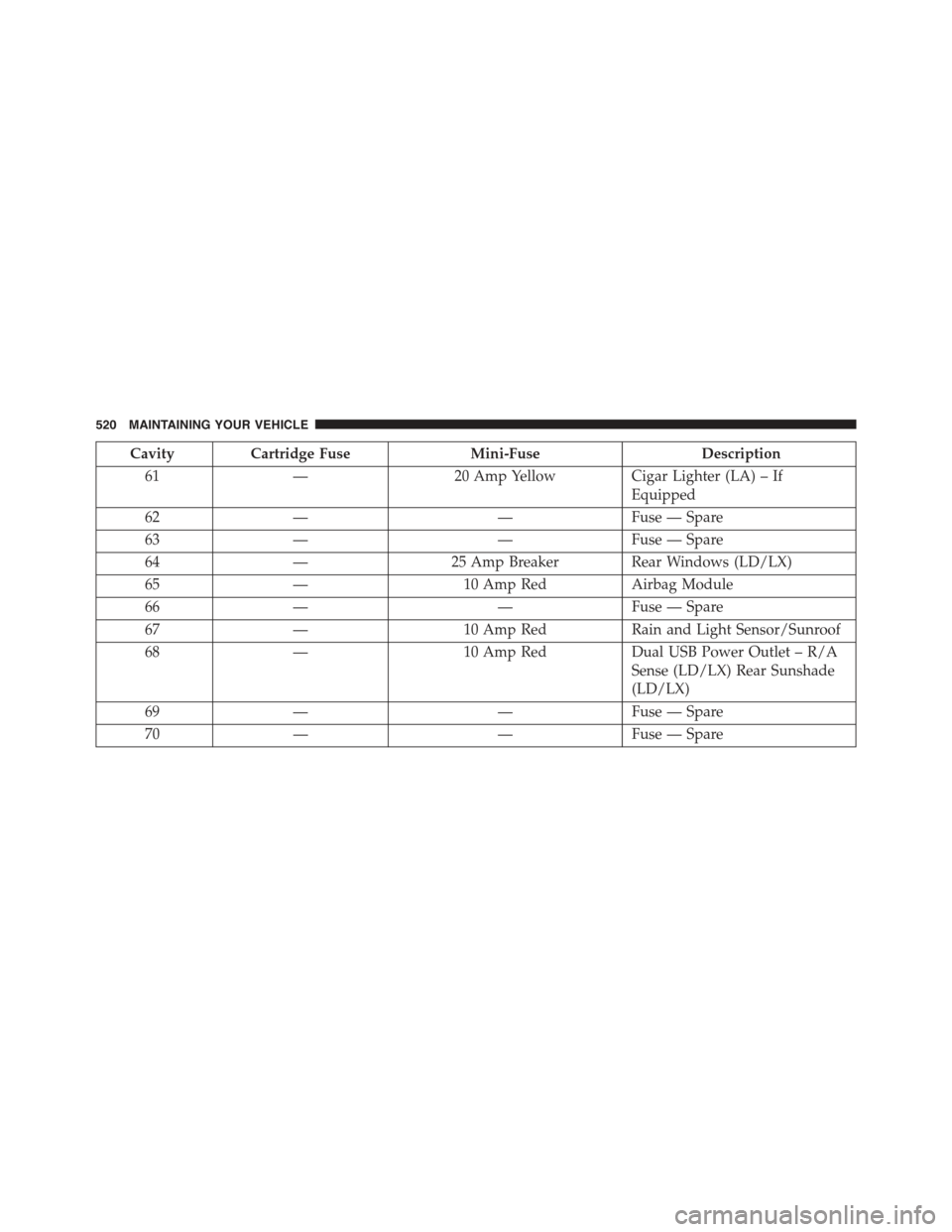
CavityCartridge FuseMini-FuseDescription
61—20 Amp YellowCigar Lighter (LA) – If
Equipped
62——Fuse — Spare
63——Fuse — Spare
64—25 Amp Breaker Rear Windows (LD/LX)
65—10 Amp RedAirbag Module
66——Fuse — Spare
67—10 Amp RedRain and Light Sensor/Sunroof
68—10 Amp RedDual USB Power Outlet – R/A
Sense (LD/LX) Rear Sunshade
(LD/LX)
69——Fuse — Spare
70——Fuse — Spare
520 MAINTAINING YOUR VEHICLE
Page 565 of 574

Panic Alarm..............................22
Parking Brake............................361
ParkSense® System, Rear....................209
Passing Light............................152
Passive Entry.............................32
Pedals, Adjustable.........................166
Pets....................................93
Placard, Tire And Loading Information..........383
Power
Brakes...............................363
Deck Lid Release........................40
Distribution Center (Fuses)................513
Door Locks............................29
Mirrors..............................114
Outlet (Auxiliary Electrical Outlet)...........241
Seats................................127
Sunroof..............................237
Tilt/Telescoping Steering Column............163
Windows..............................37
Pregnant Women And Seat Belts...............52
Preparation For Jacking.....................448
Pretensioners
Seat Belts..............................52
Programmable Features.....................277
Programming Transmitters (Remote Keyless Entry) . .19
Radial Ply Tires..........................390
Radiator Cap (Coolant Pressure Cap)...........494
Radio Operation..........................303
Radio Remote Controls.....................301
Radio (Sound Systems).....................299
Rain Sensitive Wiper System.................160
Rear Axle (Differential).....................501
Rear Camera............................223
Rear Cupholder..........................247
Rear ParkSense System.....................209
Rear Seat, Folding.........................138
Rear Window Defroster.....................255
10
INDEX 563