Page 100 of 574

WARNING!(Continued)
•Always make sure that objects cannot fall into the
driver footwell while the vehicle is moving. Ob-
jects can become trapped under the brake pedal
and accelerator pedal causing a loss of vehicle
control.
•If required, mounting posts must be properly in-
stalled, if not equipped from the factory.
Failure to properly follow floor mat installation or
mounting can cause interference with the brake
pedal and accelerator pedal operation causing loss of
control of the vehicle.
Periodic Safety Checks You Should Make Outside
The Vehicle
Tires
Examine tires for excessive tread wear and uneven wear
patterns. Check for stones, nails, glass, or other objects
lodged in the tread or sidewall. Inspect the tread for cuts
and cracks. Inspect sidewalls for cuts, cracks, and bulges.
Check the wheel nuts for tightness. Check the tires
(including spare) for proper cold inflation pressure.
Lights
Have someone observe the operation of brake lights and
exterior lights while you work the controls. Check turn
signal and high beam indicator lights on the instrument
panel.
Door Latches
Check for proper closing, latching, and locking.
Fluid Leaks
Check area under vehicle after overnight parking for fuel,
engine coolant, oil, or other fluid leaks. Also, if gasoline
fumes are detected or if fuel, power steering fluid (if
equipped), or brake fluid leaks are suspected, the cause
should be located and corrected immediately.
98 THINGS TO KNOW BEFORE STARTING YOUR VEHICLE
Page 103 of 574

▫Multifunction Lever...................151
▫Turn Signals.........................151
▫Lane Change Assist...................152
▫High/Low Beam Switch................152
▫Flash-To-Pass........................152
▫Front Map/Reading Lights — If Equipped . . .153
▫Courtesy Lights.......................154
▫Ambient Light — If Equipped............154
▫Interior Lights.......................155
!WINDSHIELD WIPERS AND WASHERS......157
▫Intermittent Wiper System...............158
▫Wiper Operation......................158
▫Mist Feature.........................159
▫Windshield Washers...................159
▫Headlights On With Wipers (Available With
Automatic Headlights Only).............160
▫Rain Sensing Wipers...................160
!TILT/TELESCOPING STEERING COLUMN . . .162
!POWER TILT/TELESCOPING STEERING
COLUMN — IF EQUIPPED...............163
!HEATED STEERING WHEEL — IF EQUIPPED . .164
!ADJUSTABLE PEDALS — IF EQUIPPED......166
!ELECTRONIC SPEED CONTROL — IF
EQUIPPED...........................168
▫To Activate..........................169
▫To Set A Desired Speed.................169
▫To Deactivate........................170
3
UNDERSTANDING THE FEATURES OF YOUR VEHICLE 101
Page 143 of 574

Programming The Memory Feature
To create a new memory profile, perform the following:
1. Place the ignition into the RUN position.
2. Adjust all memory profile settings to desired prefer-
ences (i.e., seat, side mirror, adjustable pedals [if
equipped], power tilt and telescopic steering column
[if equipped], and radio station presets).
3. Push and release the S (Set) button on the memory
switch.
4. Within five seconds, push and release either of the
memory buttons (1) or (2). The Driver Information
Display (DID) will display which memory position
has been set.
NOTE:Memory profiles can be set without the vehicle
in PARK, but the vehicle must be in PARK to recall a
memory profile.
Linking And Unlinking The Remote Keyless Entry
Transmitter To Memory
Your RKE transmitters can be programmed to recall one
of two pre-programmed memory profiles by pushing the
UNLOCK button on the RKE transmitter.
NOTE:Before programming your RKE transmitters you
must select the “Memory To FOB” feature through the
Uconnect® system screen. Refer to “Uconnect® Settings”
in “Understanding Your Instrument Panel” for further
information.
To program your RKE transmitters, perform the follow-
ing:
1. Cycle the vehicles ignition to the Off position.
2. Select desired memory profile (1) or (2). The system
will recall any stored settings for this profile. Wait for
the system to complete the memory recall before
continuing to Step 3.
3
UNDERSTANDING THE FEATURES OF YOUR VEHICLE 141
Page 151 of 574

To Deactivate
1. Pull the multifunction lever toward you (or rearward
in car) to manually deactivate the system (normal
operation of low beams).
2. Push back on the multifunction lever to reactivate the
system.
Adaptive Bi-Xenon High Intensity Discharge
Headlights — If Equipped
This system automatically swivels the headlight beam
pattern horizontally to provide increased illumination in
the direction the vehicle is steering.
NOTE:
•Each time the Adaptive Headlight System is turned on,
the headlights will initialize by performing a brief
sequence of rotations.
•The Adaptive Headlight System is active only when
the vehicle is moving forward.
The Adaptive Headlight System can be turned On or Off
using the Uconnect® System, refer to “Uconnect® Set-
tings” in “Understanding Your Instrument Panel” for
further information.
Daytime Running Lights (DRL)
The LED Daytime Running Lights will come on when the
engine starts, headlights are off, and the parking brake is
off. The headlight switch must be used for normal
nighttime driving.
NOTE:If allowed by law in the country in which the
vehicle was purchased the Daytime Running Lights can
be turned on and off using the Uconnect® System, refer
to “Uconnect® Settings” in “Understanding Your Instru-
ment Panel” for further information.
3
UNDERSTANDING THE FEATURES OF YOUR VEHICLE 149
Page 153 of 574
NOTE:The fog lights will operate with the low beam
headlights or parking lights on. However, selecting the
high beam headlights will turn off the fog lights.
Multifunction Lever
The multifunction lever controls the operation of the turn
signals, headlight beam selection and passing lights. The
multifunction lever is located on the left side of the
steering column.
Turn Signals
Move the multifunction lever up or down and the arrows
on each side of the instrument cluster flash to show
proper operation of the front and rear turn signal lights.
Multifunction Lever
3
UNDERSTANDING THE FEATURES OF YOUR VEHICLE 151
Page 159 of 574
Dome Light Position
Rotate the left dimmer control completely upward to the
second detent to turn on the interior lights. The interior
lights will remain on when the dimmer control is in this
position.
Interior Light Defeat (OFF)
Rotate the left dimmer control to the extreme bottom
“OFF” position. The interior lights will remain off when
the doors are open.
Parade Mode (Daytime Brightness Feature)
Rotate the instrument panel dimmer control upward to
the first detent. This feature brightens all text displays
such as the odometer, Driver Information Display (DID),
and radio when the position lights or headlights are on.
WINDSHIELD WIPERS AND WASHERS
The multifunction lever operates the windshield wipers
and washer when the ignition is placed in the ON/RUN
or ACC position. The multifunction lever is located on
the left side of the steering column.
Windshield Wiper/Washer Control
3
UNDERSTANDING THE FEATURES OF YOUR VEHICLE 157
Page 161 of 574

Mist Feature
Rotate the end of the lever downward to the Mist
position to activate a single wipe cycle to clear off road
mist or spray from a passing vehicle. The wipers will
continue to operate until you release the multifunction
lever.
NOTE:The mist feature does not activate the washer
pump; therefore, no washer fluid will be sprayed on the
windshield. The wash function must be used in order to
spray the windshield with washer fluid.
Windshield Washers
To use the washer, push the multifunction lever inward
(toward the steering column) and hold it for as long as
washer spray is desired.
If you activate the washer while the windshield wiper
control is in the delay range, the wipers will operate for
two wipe cycles after releasing the lever and then resume
the intermittent interval previously selected.
If you activate the washer while the windshield wiper is
turned off, the wipers will operate for three wipe cycles
and then turn off.
WARNING!
Sudden loss of visibility through the windshield
could lead to a collision. You might not see other
vehicles or other obstacles. To avoid sudden icing of
the windshield during freezing weather, warm the
windshield with the defroster before and during
windshield washer use.
3
UNDERSTANDING THE FEATURES OF YOUR VEHICLE 159
Page 164 of 574
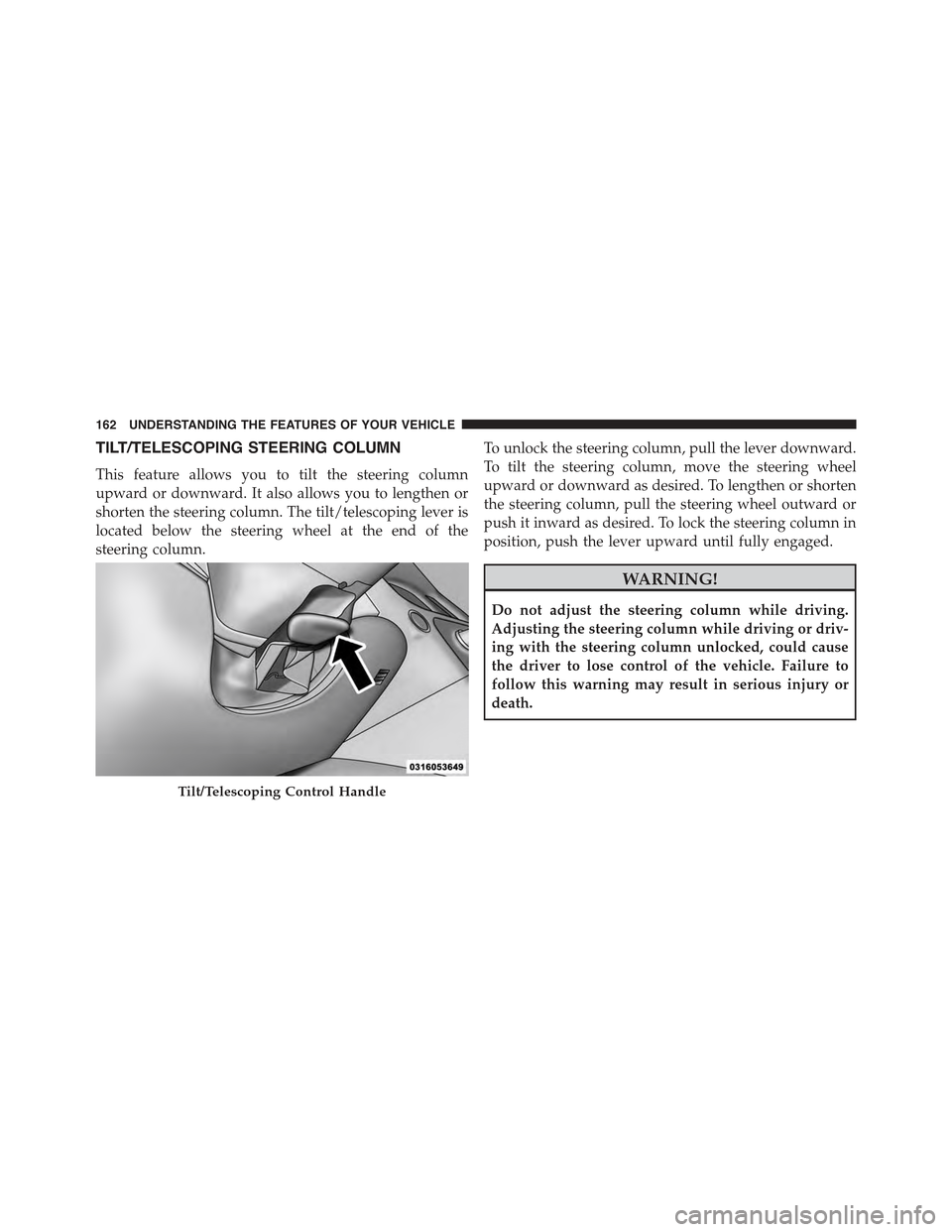
TILT/TELESCOPING STEERING COLUMN
This feature allows you to tilt the steering column
upward or downward. It also allows you to lengthen or
shorten the steering column. The tilt/telescoping lever is
located below the steering wheel at the end of the
steering column.
To unlock the steering column, pull the lever downward.
To tilt the steering column, move the steering wheel
upward or downward as desired. To lengthen or shorten
the steering column, pull the steering wheel outward or
push it inward as desired. To lock the steering column in
position, push the lever upward until fully engaged.
WARNING!
Do not adjust the steering column while driving.
Adjusting the steering column while driving or driv-
ing with the steering column unlocked, could cause
the driver to lose control of the vehicle. Failure to
follow this warning may result in serious injury or
death.
Tilt/Telescoping Control Handle
162 UNDERSTANDING THE FEATURES OF YOUR VEHICLE