2015 CHEVROLET VOLT wheel
[x] Cancel search: wheelPage 114 of 387

Black plate (5,1)Chevrolet VOLT Owner Manual (GMNA-Localizing-U.S./Canada-7695131) -
2015 - crc - 4/25/14
Instruments and Controls 5-5
Controls
Steering Wheel
Adjustment
To adjust the steering wheel:
1. Pull the lever down.
2. Move the steering wheel upor down.
3. Pull or push the steering wheel closer or away from you.
4. Pull the lever up to lock the steering wheel in place. Do not adjust the steering wheel
while driving.
Steering Wheel Controls
The infotainment system can be
operated by using the steering
wheel controls. See "Steering
Wheel Controls" in the infotainment
manual.
Horn
Pressaon the steering wheel pad
to sound the horn.
The pedestrian friendly alert
provides momentary soft-note horn
sound. See Pedestrian Friendly
Alert on page 5-5 for more
information.
Pedestrian Friendly Alert
Use this feature to alert people who
may not hear your vehicle
approaching. The pedestrian friendly alert is only
available when the vehicle is not in
P (Park).
To use the pedestrian friendly alert:
Momentarily push the
Pbutton on
the end of the turn signal lever, and
a soft-note alert will momentarily
sound.
Repeat for additional activations of
the pedestrian friendly alert.
Page 120 of 387
Black plate (11,1)Chevrolet VOLT Owner Manual (GMNA-Localizing-U.S./Canada-7695131) -
2015 - crc - 4/25/14
Instruments and Controls 5-11
35.Tire Pressure Light on
page 5-23.
Instrument Cluster Display
Configurations
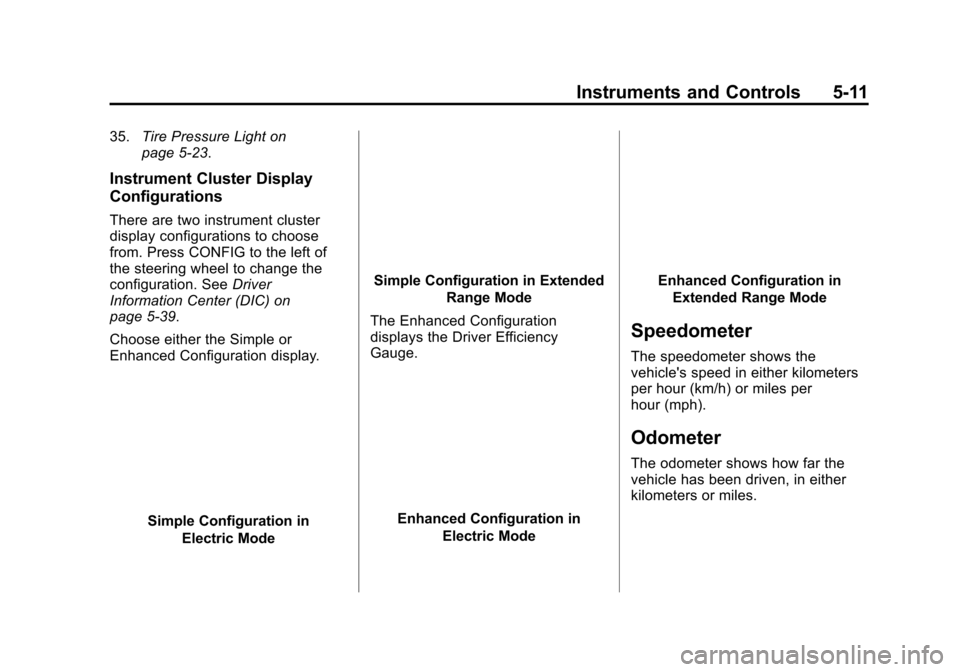
There are two instrument cluster
display configurations to choose
from. Press CONFIG to the left of
the steering wheel to change the
configuration. See Driver
Information Center (DIC) on
page 5-39.
Choose either the Simple or
Enhanced Configuration display.
Simple Configuration in
Electric Mode
Simple Configuration in Extended Range Mode
The Enhanced Configuration
displays the Driver Efficiency
Gauge.
Enhanced Configuration in Electric Mode
Enhanced Configuration inExtended Range Mode
Speedometer
The speedometer shows the
vehicle's speed in either kilometers
per hour (km/h) or miles per
hour (mph).
Odometer
The odometer shows how far the
vehicle has been driven, in either
kilometers or miles.
Page 127 of 387

Black plate (18,1)Chevrolet VOLT Owner Manual (GMNA-Localizing-U.S./Canada-7695131) -
2015 - crc - 4/25/14
5-18 Instruments and Controls
begins to flash again, follow the
previous steps and see your dealer
for service as soon as possible.
Light On Steady:An emission
control system malfunction has
been detected on the vehicle.
Diagnosis and service might be
required.
The following may correct an
emission control system
malfunction:
.Check that the fuel cap is fully
installed. The diagnostic system
can determine if the fuel cap has
been left off or improperly
installed. A loose or missing fuel
cap allows fuel to evaporate into
the atmosphere. A few driving
trips with the cap properly
installed should turn the light off.
.Check that good quality fuel is
used. Poor fuel quality causes
the engine not to run as
efficiently as designed and may
cause stalling after start-up or
misfiring. These conditions might
go away once the engine is
warmed up.
If one or more of these
conditions occurs, change the
fuel brand used. It may require
at least one full tank of the
proper fuel to turn the light off.
If none of the above have made the
light turn off, your dealer can check
the vehicle. The dealer has the
proper test equipment and
diagnostic tools to fix any
mechanical or electrical problems
that might have developed.
Emissions Inspection and
Maintenance Programs
Depending on where you live, your
vehicle may be required to
participate in an emission control
system inspection and maintenance
program. For the inspection, the emission system test equipment will
likely connect to the vehicle's Data
Link Connector (DLC).
The DLC is under the instrument
panel to the left of the steering
wheel. See your dealer if assistance
is needed.
The vehicle may not pass
inspection if:
.The malfunction indicator lamp is
on while the vehicle is in ON/
RUN, or if the vehicle is placed
in Service Only Mode and the
malfunction indicator lamp does
not come on. See your dealer for
assistance in verifying proper
operation of the malfunction
indicator lamp.
Page 131 of 387

Black plate (22,1)Chevrolet VOLT Owner Manual (GMNA-Localizing-U.S./Canada-7695131) -
2015 - crc - 4/25/14
5-22 Instruments and Controls
Forward Collision Alert
(FCA) Warning Light
If equipped, the red forward collision
alert comes on when a vehicle is
being approached too rapidly.
SeeForward Collision Alert (FCA)
System on page 9-37.
Vehicle Ahead Indicator
If equipped, this indicator will
display green when a vehicle is
detected ahead and amber when
you are following a vehicle ahead
much too closely.
See Forward Collision Alert (FCA)
System on page 9-37.
Traction Off Light
This light comes on briefly while
starting the engine. If it does not,
have the vehicle serviced by your
dealer. If the system is working
normally, the indicator light then
turns off.
The traction off light comes on when
the Traction Control System (TCS)
has been turned off by pressing and
releasing the TCS/ESC button. This light and the StabiliTrak OFF
light come on when StabiliTrak is
turned off.
If the TCS is off, wheel spin is not
limited. Adjust driving accordingly.
StabiliTrak®OFF Light
This light comes on briefly while
starting the engine. If it does not,
have the vehicle serviced by your
dealer.
This light comes on when the
StabiliTrak system is turned off.
If StabiliTrak is off, Traction Control
System (TCS) is also off.
If the TCS is off, the system does
not assist in controlling the vehicle.
Turn on the TCS and the StabiliTrak
systems and the warning light
turns off.
Page 132 of 387

Black plate (23,1)Chevrolet VOLT Owner Manual (GMNA-Localizing-U.S./Canada-7695131) -
2015 - crc - 4/25/14
Instruments and Controls 5-23
Traction Control System
(TCS)/StabiliTrak®Light
This light comes on briefly while
starting the vehicle.
If it does not, have the vehicle
serviced by your dealer. If the
system is working normally the
indicator light then goes off.
If the light comes on and stays on
while driving, there could be a
problem with the TCS/StabiliTrak
system and the vehicle might need
service. When this warning light is
on, the TCS/StabiliTrak system is off
and does not limit wheel spin.
The light flashes if the system is
active and is working to assist the
driver with directional control of the
vehicle in difficult driving conditions.
Engine Coolant
Temperature Warning
Light
The engine coolant temperature
warning light comes on briefly when
the vehicle is started.
If it does not, have the vehicle
serviced by your dealer. If the
system is working normally, the
indicator light then goes off.
If the light comes on and stays on
while driving, the vehicle may have
a problem with the cooling system.
Stop and turn off the vehicle to
avoid damage to the engine.
A warning chime sounds when this
light is on.
SeeEngine Overheating on
page 10-19 for more information.
Tire Pressure Light
For vehicles with the Tire Pressure
Monitor System (TPMS), this light
comes on briefly when the vehicle is
in ON/RUN. It provides information
about tire pressures and the TPMS.
When the Light is On Steady
This indicates that one or more of
the tires are significantly
underinflated.
A message in the Driver Information
Center (DIC) may also display. See
Tire Messages on page 5-49. Stop
as soon as possible, and inflate the
tires to the pressure value shown on
the Tire and Loading Information
label. SeeTires on page 10-40.
Page 136 of 387
Black plate (27,1)Chevrolet VOLT Owner Manual (GMNA-Localizing-U.S./Canada-7695131) -
2015 - crc - 4/25/14
Instruments and Controls 5-27
finger tip to minimize response time.
If the controls are not responding,
remove the gloves.
To view the Power Flow, Charging,
and Energy Information, press the
[button on the center stack.
Power Flows
To view the Power Flow screens,
press the
[button on the center
stack and then press the Power
Flow button at the top of the touch
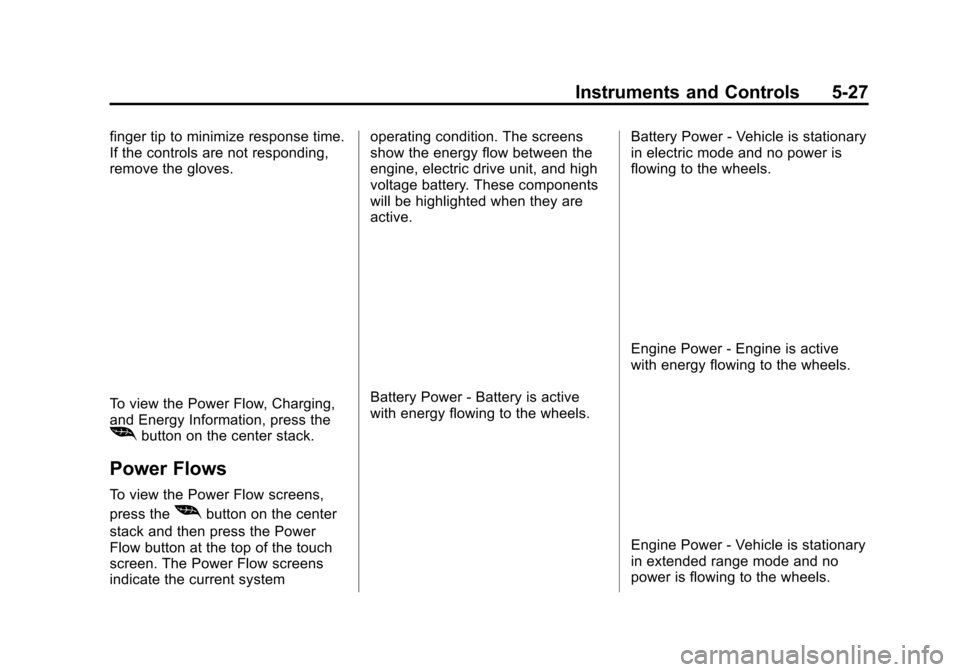
screen. The Power Flow screens
indicate the current system operating condition. The screens
show the energy flow between the
engine, electric drive unit, and high
voltage battery. These components
will be highlighted when they are
active.
Battery Power - Battery is active
with energy flowing to the wheels.
Battery Power - Vehicle is stationary
in electric mode and no power is
flowing to the wheels.
Engine Power - Engine is active
with energy flowing to the wheels.
Engine Power - Vehicle is stationary
in extended range mode and no
power is flowing to the wheels.
Page 137 of 387

Black plate (28,1)Chevrolet VOLT Owner Manual (GMNA-Localizing-U.S./Canada-7695131) -
2015 - crc - 4/25/14
5-28 Instruments and Controls
Engine and Battery Power - Both
the engine and battery are active
with energy flowing to the wheels.
Regen Power Recovery - Engine is
active. Power from the wheels
returns to the battery during
regenerative braking or coasting.
Regen Power Recovery - Power
from the wheels returns to the
battery during regenerative braking
or coasting.
Power Off - No power is flowing to
the wheels.
Programmable Charging
Important Information About
Portable Electric Vehicle Charging
.Charging an electric vehicle can
stress a building’s electrical
system more than a typical
household appliance.
.Before you plug in to any
electrical outlet, have a qualified
electrician inspect and verify the
electrical system (electrical
outlet, wiring, junctions, and
protection devices) for
heavy-duty service at a 12 amp
continuous load.
.Electrical outlets may wear out
with normal usage or be
damaged over time, making
them unsuitable for electric
vehicle charging.
.Check the electrical outlet/plug
while charging and discontinue
use if the electrical outlet/plug is
hot, then have the electrical
outlet serviced by a qualified
electrician.
Page 149 of 387

Black plate (40,1)Chevrolet VOLT Owner Manual (GMNA-Localizing-U.S./Canada-7695131) -
2015 - crc - 4/25/14
5-40 Instruments and Controls
DIC Operation and Displays
View the DIC displays by pressing
the DIC buttons to the left of the
steering wheel. The DIC displays
trip, fuel, and warning messages if a
system problem is detected.
DIC Controls
CONFIG:Press to select either the
Simple or Enhanced instrument
cluster configuration display.
}BACK: Press to return to the
previous screen, exit a screen,
or return to the main menu. Press
}
BACK to minimize the DIC menu
display.
SELECT: Press the center of the
knob to select the highlighted item.
Turn the knob to scroll through the
menu items.
DIC Menu Items
At the main DIC menu:
1. Turn the SELECT knob to scroll
through the possible DIC menus.
2. Press the center of the SELECT knob when a menu item is
highlighted to enter that menu.
3. Continue to turn and press the SELECT knob to scroll through
and select the available menu
items:
}:Trip A
x:Trip B
::Oil Life
v:Tire Pressure
{:Vehicle Messages
z:Units
y: Tutorial Mode
{:Power Gauge
3: Following Distance Indication
u:Turn-by-Turn
Trip A and Trip B
The trip displays show fuel used,
average fuel economy, and distance
traveled since the last trip reset.
Reset the trip data by pressing and
holding the SELECT button when
either Trip A or Trip B is displayed.
Oil Life
This displays the percentage of
remaining oil life. The lower
the percentage, the closer the
vehicle is to needing an oil change.
When the oil life is depleted, the
CHANGE ENGINE OIL SOON
message displays. Change the oil
as soon as possible. Additional
maintenance is also recommended