2015 CHEVROLET SONIC radio controls
[x] Cancel search: radio controlsPage 196 of 403
Black plate (49,1)Chevrolet Sonic Owner Manual (GMNA-Localizing-U.S./Canada-7707487) -
2015 - crc - 10/31/14
Infotainment System 7-49
Smartphone Link
(Stitcher)
Some images and explanations may
vary by phone operating systems,
versions, and/or application (App)
versions.
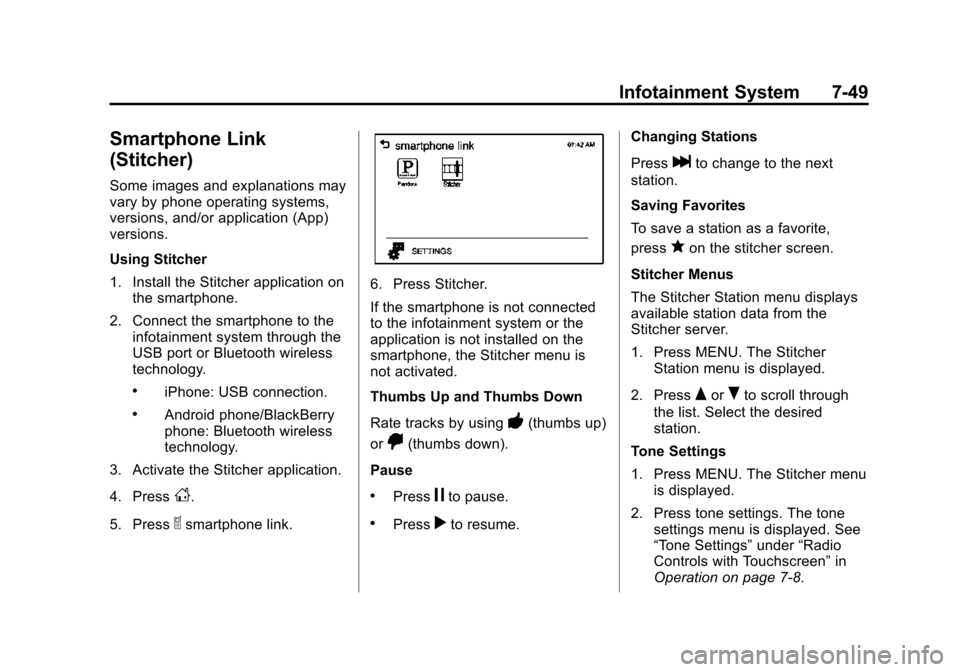
Using Stitcher
1. Install the Stitcher application onthe smartphone.
2. Connect the smartphone to the infotainment system through the
USB port or Bluetooth wireless
technology.
.iPhone: USB connection.
.Android phone/BlackBerry
phone: Bluetooth wireless
technology.
3. Activate the Stitcher application.
4. Press
D.
5. Press
^smartphone link.
6. Press Stitcher.
If the smartphone is not connected
to the infotainment system or the
application is not installed on the
smartphone, the Stitcher menu is
not activated.
Thumbs Up and Thumbs Down
Rate tracks by using
-(thumbs up)
or
,(thumbs down).
Pause
.Pressjto pause.
.Pressrto resume. Changing Stations
Press
lto change to the next
station.
Saving Favorites
To save a station as a favorite,
press
qon the stitcher screen.
Stitcher Menus
The Stitcher Station menu displays
available station data from the
Stitcher server.
1. Press MENU. The Stitcher Station menu is displayed.
2. Press
QorRto scroll through
the list. Select the desired
station.
Tone Settings
1. Press MENU. The Stitcher menu is displayed.
2. Press tone settings. The tone settings menu is displayed. See
“Tone Settings” under“Radio
Controls with Touchscreen” in
Operation on page 7-8.
Page 200 of 403
Black plate (53,1)Chevrolet Sonic Owner Manual (GMNA-Localizing-U.S./Canada-7707487) -
2015 - crc - 10/31/14
Infotainment System 7-53
.OFF: Returns to normal
playback.
Viewing Information on the
Currently Playing File
Press the title during playback to
display information about the current
file playing.
.The information displayed
includes the title, file name,
folder name, and artist/album
saved with the song.
.Incorrect information cannot be
modified or corrected on the
infotainment system.
.The information for songs
expressed in special symbols or
in unavailable languages may be
displayed as “
u.”
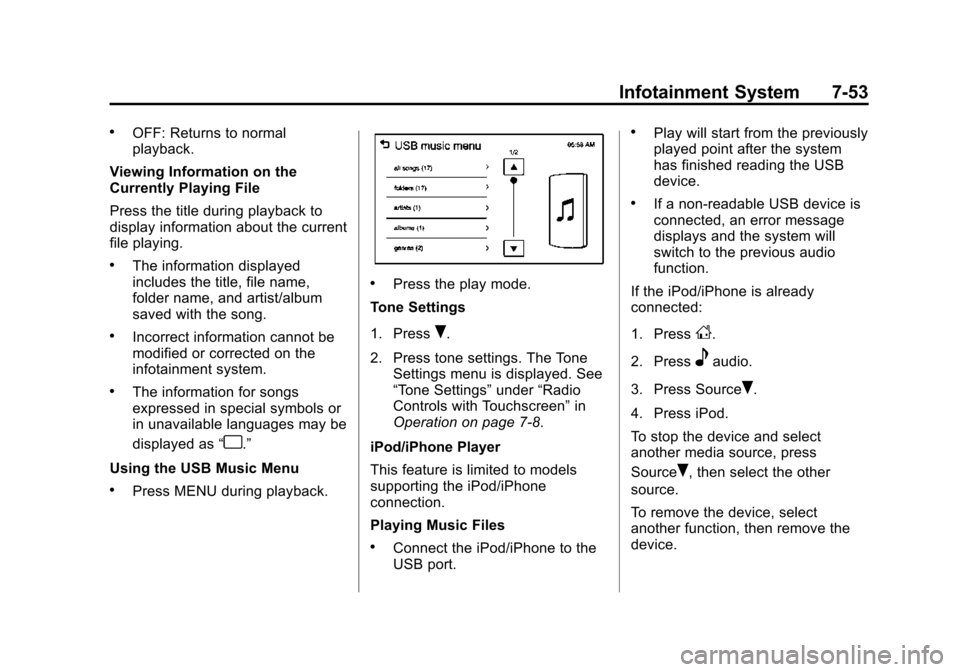
Using the USB Music Menu
.Press MENU during playback.
.Press the play mode.
Tone Settings
1. Press
R.
2. Press tone settings. The Tone Settings menu is displayed. See
“Tone Settings” under“Radio
Controls with Touchscreen” in
Operation on page 7-8.
iPod/iPhone Player
This feature is limited to models
supporting the iPod/iPhone
connection.
Playing Music Files
.Connect the iPod/iPhone to the
USB port.
.Play will start from the previously
played point after the system
has finished reading the USB
device.
.If a non-readable USB device is
connected, an error message
displays and the system will
switch to the previous audio
function.
If the iPod/iPhone is already
connected:
1. Press
D.
2. Press
eaudio.
3. Press Source
R.
4. Press iPod.
To stop the device and select
another media source, press
Source
R, then select the other
source.
To remove the device, select
another function, then remove the
device.
Page 201 of 403
Black plate (54,1)Chevrolet Sonic Owner Manual (GMNA-Localizing-U.S./Canada-7707487) -
2015 - crc - 10/31/14
7-54 Infotainment System
Pause
.Pressjto pause.
.Pressrto resume.
Changing to Next/Previous Song
.Presslto change to the
next song.
.Pressgwithin two seconds of
the playback time to play the
previous file.
Returning to the Beginning of the
Current File
Press
gafter two seconds of the
playback time.
Scanning Forward or Backward
Press and hold
gorlduring
playback to rewind or fast forward.
Release the button to resume
playback at normal speed. Playing a File Repeatedly
Press
vduring playback.
.1: Plays the current file
repeatedly.
.ALL: Plays all files repeatedly.
.OFF: Returns to normal
playback.
Playing a File Randomly
Press
uduring playback.
.NO: Plays all files randomly.
.OFF: Returns to normal
playback.
Viewing Information on the
Currently Playing Song
Press the title during playback to
display information about the current
song playing.
.The information displayed
includes the title, file name,
folder name, and artist/album
saved with the song.
.Incorrect information cannot be
modified or corrected on the
infotainment system.
.The information for songs
expressed in special symbols or
in unavailable languages may be
displayed as “
u.”
Using the iPod Menu
.Press MENU during playback.
.Press the appropriate
play mode.
Tone Settings
1. Press
Ron the iPod menu.
2. Press tone settings. The tone settings menu is displayed. See
“Tone Settings” under“Radio
Controls with Touchscreen” in
Operation on page 7-8.
Page 204 of 403

Black plate (57,1)Chevrolet Sonic Owner Manual (GMNA-Localizing-U.S./Canada-7707487) -
2015 - crc - 10/31/14
Infotainment System 7-57
If the USB device is already
connected:
1. Press
D.
2. Press
Gpicture & movie.
3. Press Source
R.
4. Press USB movie.
Movie is not available while driving.
Viewing a Slide Show
From the picture screen, press
z.
.The slide show will start to play.
.Press the screen to cancel the
slide show during the slide show
playback.
.The last played audio source will
play as background music
during the slide show playback.
Pause
.Pressjto pause.
.Pressrto resume. Changing to Next/Previous Movie
.Pressuto change to the
next file.
.Presstwithin five seconds of
the playback time to play the
previous file.
Returning to the Beginning of the
Current Movie
Press
tafter five seconds of the
playback time.
Scanning Forward or Backward
Press and hold
toruduring
playback to rewind or fast forward.
Release the button to resume
playback at normal speed.
Viewing Full Screen
Press
tfrom the movie screen.
Press
tagain to return to the
previous screen.
Using the USB Movie Menu
1. Press MENU from the movie screen.
2. Press the appropriate menu:
.movie file list: lists all movie
files.
.clock/temp display: allows
selection of On or Off to
show the clock and
temperature on the full
screen.
.display settings: adjusts for
Brightness and Contrast.
.tone settings: shows the
sound setup. See “Tone
Settings” under“Radio
Controls with Touchscreen”
in Operation on page 7-8.
3. Press
4to exit.
Page 395 of 403

Black plate (4,1)Chevrolet Sonic Owner Manual (GMNA-Localizing-U.S./Canada-7707487) -
2015 - crc - 10/31/14
i-4 INDEX
Driving (cont'd)Hill and Mountain Roads . . . . . . . 9-6
If the Vehicle is Stuck . . . . . . . . . . 9-8
Loss of Control . . . . . . . . . . . . . . . . 9-4
Off-Road Recovery . . . . . . . . . . . . 9-4
Vehicle Load Limits . . . . . . . . . . . . 9-9
Wet Roads . . . . . . . . . . . . . . . . . . . . 9-5
Winter . . . . . . . . . . . . . . . . . . . . . . . . . 9-7
E
Electrical Equipment,
Add-On . . . . . . . . . . . . . . . . . . . . . . 9-42
Electrical System Engine CompartmentFuse Block . . . . . . . . . . . . . . . . 10-34
Fuses and Circuit
Breakers . . . . . . . . . . . . . . . . . . 10-33
Instrument Panel Fuse Block . . . . . . . . . . . . . . . . . . . . . . 10-38
Overload . . . . . . . . . . . . . . . . . . . 10-33
Emergency OnStar
®. . . . . . . . . . . . . . . . . . . . . . 14-2 Engine
Air Cleaner/Filter . . . . . . . . . . . 10-14
Check and Service Engine
Soon Light . . . . . . . . . . . . . . . . . . 5-13
Compartment Overview . . . . . . . 10-6
Coolant . . . . . . . . . . . . . . . . . . . . . 10-16
Coolant Temperature Warning Light . . . . . . . . . . . . . . . 5-20
Cooling System . . . . . . . . . . . . . 10-15
Drive Belt Routing . . . . . . . . . . . . 12-4
Exhaust . . . . . . . . . . . . . . . . . . . . . . 9-20
Heater . . . . . . . . . . . . . . . . . . . . . . . . 9-16
Oil Life System . . . . . . . . . . . . . 10-12
Oil Messages . . . . . . . . . . . . . . . . . 5-26
Overheating . . . . . . . . . . . . . . . . 10-20
Pressure Light . . . . . . . . . . . . . . . . 5-21
Reduced Power Light . . . . . . . . . 5-22
Running While Parked . . . . . . . . 9-21
Starting . . . . . . . . . . . . . . . . . . 1-4, 9-15
Entry Lighting . . . . . . . . . . . . . . . . . . . 6-6
Event Data Recorders . . . . . . . . 13-14
Exit Lighting . . . . . . . . . . . . . . . . . . . . 6-6
Extender, Safety Belt . . . . . . . . . . 3-16
Exterior Lamp Controls . . . . . . . . . 6-1
Exterior Lighting Battery Saver . . . . . . . . . . . . . . . . . . . . . . . . . 6-8
F
Filter,Engine Air Cleaner . . . . . . . . . 10-14
Flash-to-Pass . . . . . . . . . . . . . . . . . . . 6-2
Flashers, Hazard Warning . . . . . . 6-4
Flat Tire . . . . . . . . . . . . . . . . . . . . . . 10-60 Changing . . . . . . . . . . . . . . . . . . . 10-70
Floor Mats . . . . . . . . . . . . . . . . . . . . 10-89
Fluid Automatic Transmission . . . . 10-13
Brakes . . . . . . . . . . . . . . . . . . . . . . 10-22
Washer . . . . . . . . . . . . . . . . . . . . . 10-21
Fog Lamps . . . . . . . . . . . . . . . . . . . . . 6-5 Bulb Replacement . . . . . . . . . . 10-30
Folding Mirrors . . . . . . . . . . . . . . . . 2-16
Forward Collision Alert (FCA) System . . . . . . . . . . . . . . . . 9-32
Forward Collision Alert (FCA) Warning Light . . . . . . . . . 5-18
Frequency Statement
Radio . . . . . . . . . . . . . . . . . . . . . . . 13-12
Front Fog Lamp Light . . . . . . . . . . . . . . . . . . . . . . . . . . 5-23
Front Seat Armrest . . . . . . . . . . . . . 3-5