2015 CHEVROLET SILVERADO door lock
[x] Cancel search: door lockPage 338 of 543

Black plate (71,1)Chevrolet 2015i Silverado Owner Manual (GMNA-Localizing-U.S./Canada/
Mexico-8425172) - 2015 - crc - 2/9/15
Driving and Operating 9-71
Warning (Continued)
.Fuel can spray out if the fuel
cap is opened too quickly.
This spray can happen if the
tank is nearly full, and is
more likely in hot weather.
Open the fuel cap slowly and
wait for any hiss noise to stop
then unscrew the cap all
the way.
The fuel cap is behind a hinged fuel
door on the driver side of the
vehicle. Vehicles that have a
FlexFuel badge and a yellow fuel
cap can use either unleaded
gasoline or ethanol fuel containing
up to 85% ethanol (E85). SeeE85
or FlexFuel on page 9-69.
To remove the fuel cap, turn it
slowly counterclockwise.
If the vehicle is a dual fuel tank
chassis cab model, and it runs out
of fuel, refuel the front fuel tank first
to ensure a quick restart.
{Warning
Overfilling the fuel tank by more
than three clicks of a standard fill
nozzle may cause:
.Vehicle performance issues,
including engine stalling and
damage to the fuel system.
.Fuel spills.
.Potential fuel fires. Be careful not to spill fuel. Do not
top off or overfill the tank and wait a
few seconds after you have finished
pumping before removing the
nozzle. Clean fuel from painted
surfaces as soon as possible. See
Exterior Care on page 10-101.
When replacing the fuel cap, turn it
clockwise until it clicks. It will require
more effort to turn the fuel cap on
the last turn as you tighten it. Make
sure the cap is fully installed. The
diagnostic system can determine if
the fuel cap has been left off or
improperly installed. This would
allow fuel to evaporate into the
atmosphere. See
Malfunction
Indicator Lamp on page 5-21.
The TIGHTEN GAS CAP message
displays on the Driver Information
Center (DIC) if the fuel cap is not
properly installed. See Fuel System
Messages on page 5-37 for more
information.
Page 420 of 543
Black plate (49,1)Chevrolet 2015i Silverado Owner Manual (GMNA-Localizing-U.S./Canada/
Mexico-8425172) - 2015 - crc - 2/6/15
Vehicle Care 10-49
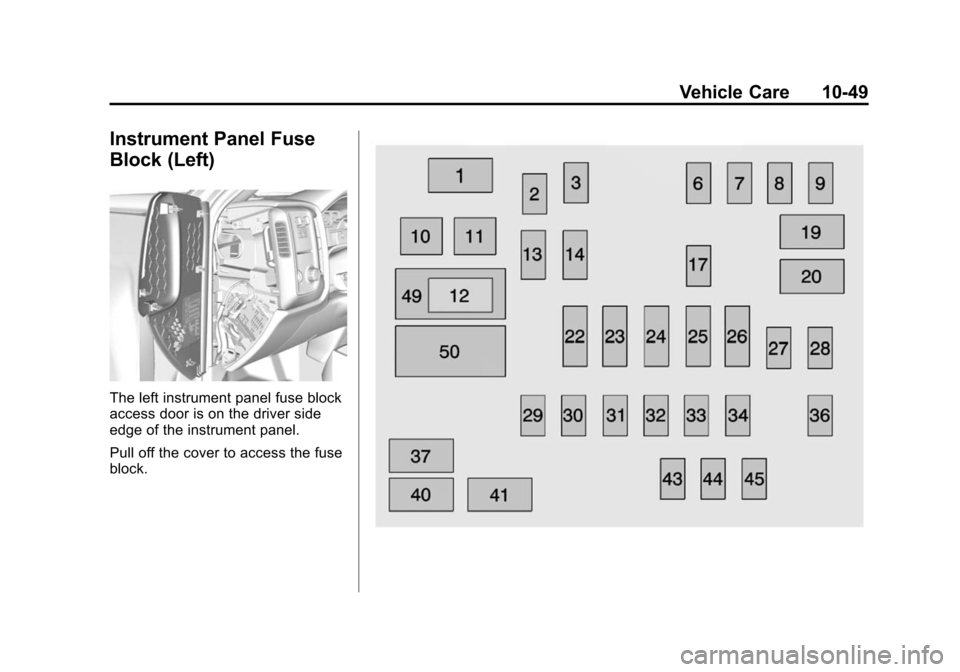
Instrument Panel Fuse
Block (Left)
The left instrument panel fuse block
access door is on the driver side
edge of the instrument panel.
Pull off the cover to access the fuse
block.
Page 422 of 543

Black plate (51,1)Chevrolet 2015i Silverado Owner Manual (GMNA-Localizing-U.S./Canada/
Mexico-8425172) - 2015 - crc - 2/6/15
Vehicle Care 10-51
Number Usage43 Left Front Heated/ Cooled Seat
44 Right Front Heated/ Cooled Seats
45 Spare
49 Retained Accessory Power/Accessory
50 Run/CrankInstrument Panel Fuse
Block (Right)
The right instrument panel fuse
block access door is on the
passenger side edge of the
instrument panel.
Pull off the cover to access the fuse
block.
Page 476 of 543
Black plate (105,1)Chevrolet 2015i Silverado Owner Manual (GMNA-Localizing-U.S./Canada/
Mexico-8425172) - 2015 - crc - 2/6/15
Vehicle Care 10-105
Caution (Continued)
automatic car wash that uses
silicone carbide tire cleaning
brushes. Damage could occur
and the repairs would not be
covered by the vehicle warranty.
Brake System
Visually inspect brake lines and
hoses for proper hook-up, binding,
leaks, cracks, chafing, etc. Inspect
disc brake pads for wear and rotors
for surface condition. Inspect drum
brake linings/shoes for wear or
cracks. Inspect other brake parts,
including drums, wheel cylinders,
calipers, parking brake, master
cylinder, brake fluid reservoir,
vacuum pipes, electric vacuum
pump including bracket and vent
hose, if equipped.
Steering, Suspension, and
Chassis Components
Visually inspect steering,
suspension, and chassis
components for damaged, loose,
or missing parts or signs of wear at
least once a year.
Inspect power steering for proper
hook-up, binding, leaks, cracks,
chafing, etc.
Visually check constant velocity joint
boots and axle seals for leaks.
1500 Series vehicles, at least every
other oil change lubricate the outer
tie rod ends.
2500/3500 Series vehicles, at least
every other engine oil change
lubricate the upper and lower
control arm ball joints. Control arm
ball joints on 1500 series vehicles
are maintenance-free.
2500/3500 Series vehicles equipped
with steering linkage, at least every
other engine oil change lubricate thetie rod ball joints, idler arm pivot
shaft bearings, idler arm socket, and
pitman arm socket.
{Caution
Lubrication of applicable Steering/
Suspension points should not be
done unless temperature is -12°C
(10°F) or higher, or damage could
result.
Body Component Lubrication
Lubricate all key lock cylinders,
hood hinges, liftgate hinges, and the
steel fuel door hinge unless the
components are plastic. Applying
silicone grease on weatherstrips
with a clean cloth will make them
last longer, seal better, and not stick
or squeak.
Underbody Maintenance
At least twice a year, spring and fall,
use plain water to flush dirt and
debris from the vehicle's underbody.
Your dealer or an underbody car
Page 495 of 543

Black plate (14,1)Chevrolet 2015i Silverado Owner Manual (GMNA-Localizing-U.S./Canada/
Mexico-8425172) - 2015 - crc - 2/6/15
11-14 Service and Maintenance
UsageFluid/Lubricant
Rear Driveline Center Spline (Two-Piece Driveshaft) Chassis Lubricant (GM Part No. 12377985, in Canada 88901242) or
lubricant meeting requirements of NLGI #2, Category LB or GC-LB.
Key Lock Cylinders, Hood Hinges, Body Door Hinge Pins, Tailgate
Hinge and Linkage, Fuel Door Hinge,
Tailgate Handle Pivot Points, Hinges, Latch Bolt, and Linkage Multi-Purpose Lubricant, Superlube (GM Part No. 12346241, in
Canada 10953474).
Weatherstrip Conditioning Weatherstrip Lubricant (GM Part No. 3634770, in Canada 10953518) or Dielectric Silicone Grease (GM Part No. 12345579, in Canada 10953481).
Weatherstrip Squeaks Synthetic Grease with Teflon, Superlube (GM Part No. 12371287, in Canada 10953437).
Page 522 of 543
Black plate (3,1)Chevrolet 2015i Silverado Owner Manual (GMNA-Localizing-U.S./Canada/
Mexico-8425172) - 2015 - crc - 2/6/15
OnStar 14-3
Security
OnStar provides services including
Stolen Vehicle Assistance, Remote
Ignition Block, and Roadside
Assistance, if equipped. OnStar can
unlock the vehicle doors remotely,
if equipped with automatic door
locks, and can help police locate the
vehicle if it is stolen.
Navigation
OnStar navigation requires a
specific OnStar subscription plan.
Press
Qto receive directions or
have them sent to the vehicle
navigation screen, if equipped.
Destinations can also be forwarded
to the vehicle from MapQuest.com.
Turn-by-Turn Navigation
1. PressQto connect to a live
Advisor.
2. Request directions.
3. Directions are downloaded to the vehicle. 4. Follow the voice-guided
commands.
Using Voice Commands
During a Planned Route
Cancel Route
1. Press
=. System responds:
“OnStar ready,” then a tone. Say
“Cancel route.” System
responds: “Do you want to
cancel directions?”
2. Say “Yes.”System responds:
“OK, request completed, thank
you, goodbye.”
Route Preview
1. Press
=. System responds:
“OnStar ready,” then a tone.
2. Say “Route preview.” System
responds with the next three
maneuvers.
Repeat
1. Press
=. System responds:
“OnStar ready,” then a tone. 2. Say
“Repeat.” System responds
with the last direction given, then
responds with “OnStar ready,”
then a tone.
Get My Destination
1. Press
=. System responds:
“OnStar ready,” then a tone.
2. Say “Get my destination.”
System responds with the
address and the distance to the
destination, then responds with
“OnStar ready,” then a tone.
Other Navigation Services
Available from OnStar
OnStar eNav:Subscribers can
send destinations from
MapQuest.com to the vehicle
Turn-by-Turn Navigation or
screen-based navigation system (if
equipped). When ready, the
directions will be downloaded to the
vehicle.
Destination Download: Press
Q,
then request the Advisor to
download directions to the
Page 523 of 543

Black plate (4,1)Chevrolet 2015i Silverado Owner Manual (GMNA-Localizing-U.S./Canada/
Mexico-8425172) - 2015 - crc - 2/6/15
14-4 OnStar
navigation system in the vehicle (if
equipped). After the call ends, press
the“Go” button on the navigation
screen to begin driving directions.
If directions are downloaded to the
navigation system, the route can
only be canceled through the
navigation system.
Destinations can also be
downloaded on the go. For
information about eNav or
Destination Download, see
www.onstar.com (U.S.) or
www.onstar.ca (Canada).
Connections
The required specific Onstar
subscription plan includes the
services that follow to help
customers stay connected.
For coverage maps, see
www.onstar.com (U.S.) or
www.onstar.ca (Canada). WiFi Connectivity (If Equipped)
The vehicle has a WiFi hotspot that
provides a high-speed, wireless
Internet connection to connect
multiple mobile devices (data plan
required).
1. To retrieve WiFi hotspot
information, press
=and select
or say “WiFi settings.”
2. The WiFi settings will display the WiFi network name/SSID,
passphrase, and level of
encryption.
3. To change the SSID or passphrase, press
Qor call
1-888-4-ONSTAR to connect
with an Advisor.
OnStar RemoteLink
®Mobile App
(If Equipped)
Download the OnStar RemoteLink
mobile app to select Apple
®,
Android™, and BlackBerry®or
Windows 7 or 8 mobile devices.
From the mobile device, check the
vehicle’s fuel level, oil life, or tire pressure (if the vehicle is equipped
with the tire pressure monitoring
system); or activate remote horn
and lights. Also remote start the
vehicle (if factory equipped) or
unlock the doors from anywhere
with a wireless connection (if
equipped with automatic locks).
With a required specific OnStar
subscription plan, a destination can
be sent to the vehicle. For OnStar
RemoteLink information and
compatibility, see www.onstar.com
(U.S.) or www.onstar.ca (Canada).
OnStar RemoteLink
®Key Fob
Services
This feature is included for five
years and allows for remote door
lock/unlock (if equipped with
automatic locks), remote start (if
factory equipped), or activation of
horn and lights from anywhere with
a wireless signal. Download the app
and start using it any time during the
trial period to get started.
Page 525 of 543

Black plate (6,1)Chevrolet 2015i Silverado Owner Manual (GMNA-Localizing-U.S./Canada/
Mexico-8425172) - 2015 - crc - 2/6/15
14-6 OnStar
Vehicle Diagnostics
OnStar Vehicle Diagnostics can
perform a vehicle check every
month. It will check the engine,
transmission, antilock brakes, and
other major vehicle systems. It also
checks the tire pressures, if the
vehicle is equipped with the Tire
Pressure Monitoring System. If an
On-Demand Diagnostics check is
needed, press
Q, and an Advisor
can run a check.
OnStar Additional
Information
Transferring Service
PressQto request account transfer
eligibility information. The Advisor
can assist in canceling or removing
account information.
Selling/Transferring the
Vehicle
Call 1-888-4-ONSTAR immediately
to terminate your OnStar services if
the vehicle is disposed of, sold,
transferred, or if the lease ends.
Reactivation for Subsequent
Owners
PressQand follow the prompts to
speak to an Advisor as soon as
possible. The Advisor will update
vehicle records and explain the
OnStar service options available.
How OnStar Service Works
Automatic Crash Response,
Emergency Services, Crisis Assist,
Stolen Vehicle Assistance, Vehicle
Diagnostics, Remote Door Unlock,
Roadside Assistance, Turn-by-Turn
Navigation, and Hands-Free Calling
are available on most vehicles. Not
all OnStar services are available
everywhere or on all vehicles. For
more information, a full description
of OnStar services, system
limitations, and OnStar terms and
conditions:
.Call 1-888-4-ONSTAR
(1-888-466-7827).
.See www.onstar.com (U.S.).
.See www.onstar.ca (Canada).
.Call TTY 1-877-248-2080.
.PressQto speak with an
Advisor.
OnStar services cannot work unless
the vehicle is in a place where
OnStar has an agreement with a
wireless service provider for service