2015 CHEVROLET SILVERADO radio
[x] Cancel search: radioPage 135 of 543
Black plate (4,1)Chevrolet 2015i Silverado Owner Manual (GMNA-Localizing-U.S./Canada/
Mexico-8425172) - 2015 - crc - 2/6/15
4-4 Storage
9. Auxiliary Input Jack
10. Latch
11. Rear Seat Audio (RSA)
Press the latch (10) and lift the
armrest to access the main storage
compartment.
There is an open storage
compartment on the rear of the
center console.
SeeCupholders on page 4-2, Power
Outlets on page 5-6, USB Port on
page 7-17, Auxiliary Jack on
page 7-20, and SD Card Reader on
page 7-20. If equipped with the
uplevel radio, see “Audio Players”in
the infotainment manual.Floor Console Storage
If equipped with front seat floor
console storage, unlock with the
ignition key, press the button, and
lift to open.
Additional Storage
Features
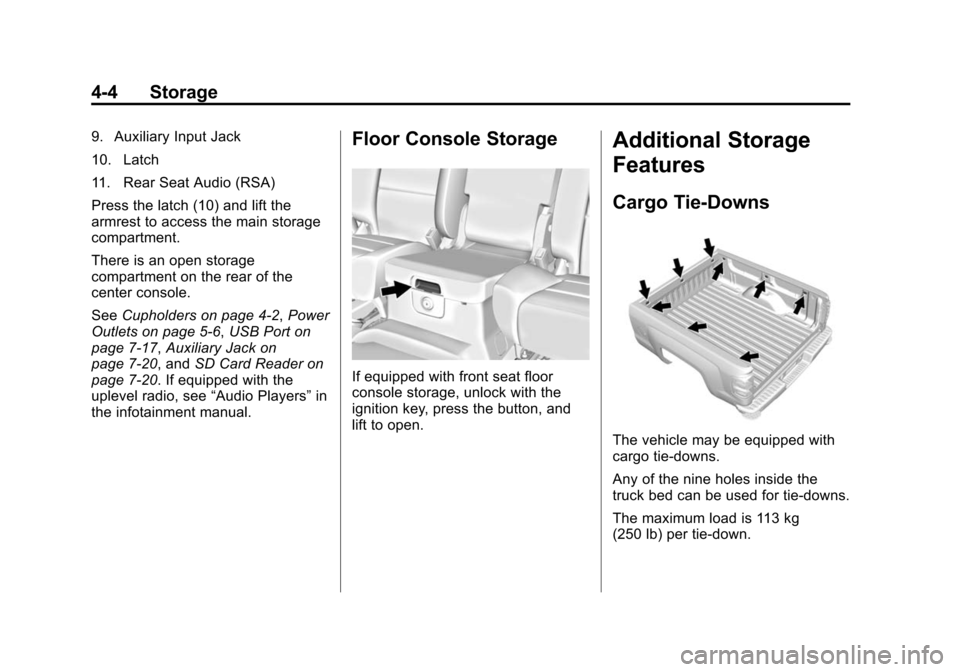
Cargo Tie-Downs
The vehicle may be equipped with
cargo tie-downs.
Any of the nine holes inside the
truck bed can be used for tie-downs.
The maximum load is 113 kg
(250 lb) per tie-down.
Page 140 of 543

Black plate (3,1)Chevrolet 2015i Silverado Owner Manual (GMNA-Localizing-U.S./Canada/
Mexico-8425172) - 2015 - crc - 2/6/15
Instruments and Controls 5-3
2. Pull the lever (2) toward you tomove the steering wheel up or
down, then release the lever to
lock the wheel in place.
Do not adjust the steering wheel
while driving.
Steering Wheel Controls
If equipped, some audio controls
can be adjusted at the steering
wheel.
g(Talk): For vehicles with OnStar®
or a Bluetooth®system, press to
interact with those systems. See
OnStar Overview on page 14-1,
Bluetooth (Overview) on page 7-30
or Bluetooth (Infotainment Controls -
Base Connected Radio) on
page 7-41 orBluetooth (Voice
Recognition - Base Connected
Radio) on page 7-46 orBluetooth
(Infotainment Controls - Base
Radio) on page 7-32 orBluetooth
(Voice Recognition - Base Radio) on
page 7-36, or “Bluetooth
(Overview)” in the infotainment
manual.
i(Phone/Mute): Press to reject
an incoming call or end a current
call. Press to mute or unmute the
infotainment system when not on
a call.
oorp(Previous/Next Menu):
Press to go to the previous or next
menu option.
worx(Next/Previous
Selection): Press to go to the next
or previous selection.
@(Select): Press to select a
highlighted menu option.
The favorite and volume switches
are on the back of the steering
wheel.
1. Favorite: When on a radio source, press to select the next
or previous favorite. When on a
media source, press to select
the next or previous track.
2. Volume: Press to increase or decrease the volume.
Page 153 of 543

Black plate (16,1)Chevrolet 2015i Silverado Owner Manual (GMNA-Localizing-U.S./Canada/
Mexico-8425172) - 2015 - crc - 2/6/15
5-16 Instruments and Controls
English
This gauge measures the
temperature of the vehicle's engine
coolant.
While driving under normal
operating conditions, if the needle
moves into the red warning area,
the engine is too hot. Pull off the
road, stop the vehicle, and turn off
the engine as soon as possible.
Voltmeter Gauge
When the ignition is on, this gauge
indicates the battery voltage.
When the engine is running, this
gauge shows the condition of the
charging system. The gauge can
transition from a higher to lower or a
lower to higher reading. This is
normal. If the vehicle is operating
outside the normal operating range,
the charging system light comes on.
See Charging System Light on
page 5-21 for more information. The voltmeter gauge may also read
lower when in fuel economy mode.
This is normal.
Readings outside the normal
operating range can also occur
when a large number of electrical
accessories are operating in the
vehicle and the engine is left idling
for an extended period. This
condition is normal since the
charging system is not able to
provide full power at engine idle. As
engine speeds are increased, this
condition should correct itself as
higher engine speeds allow the
charging system to create maximum
power.
The vehicle can only be driven for a
short time with the readings outside
the normal operating range. If the
vehicle must be driven, turn off all
accessories, such as the radio and
air conditioner.
Page 158 of 543

Black plate (21,1)Chevrolet 2015i Silverado Owner Manual (GMNA-Localizing-U.S./Canada/
Mexico-8425172) - 2015 - crc - 2/6/15
Instruments and Controls 5-21
Warning (Continued)
Light on page 5-17for more
information, including important
safety information.
Charging System Light
The charging system light comes on
briefly when the ignition is turned
on, but the engine is not running, as
a check to show the light is working.
It should go out when the engine is
started.
If the light stays on, or comes on
while driving, there may be a
problem with the electrical charging
system. Have it checked by your
dealer. Driving while this light is on
could drain the battery. When this light comes on, or is
flashing, the Driver Information
Center (DIC) also displays a
message.
See
Battery Voltage and Charging
Messages on page 5-34.
If a short distance must be driven
with the light on, be sure to turn off
all accessories, such as the radio
and air conditioner.
Malfunction
Indicator Lamp
A computer system called OBD II
(On-Board Diagnostics-Second
Generation) monitors the operation
of the vehicle to ensure emissions
are at acceptable levels, helping to
maintain a clean environment. The
malfunction indicator lamp comes
on when the vehicle is placed in
ON/RUN, as a check to show it is
working. If it does not, have the
vehicle serviced by your dealer. See
Ignition Positions on page 9-24.
If the malfunction indicator lamp
comes on while the engine is
running, this indicates that the OBD
II system has detected a problem
and diagnosis and service might be
required.
Malfunctions often are indicated by
the system before any problem is
apparent. Being aware of the light
can prevent more serious damage
to the vehicle. This system also
assists the service technician in
correctly diagnosing any
malfunction.
{Caution
If the vehicle is continually driven
with this light on, the emission
controls might not work as well,
(Continued)
Page 182 of 543

Black plate (45,1)Chevrolet 2015i Silverado Owner Manual (GMNA-Localizing-U.S./Canada/
Mexico-8425172) - 2015 - crc - 2/6/15
Instruments and Controls 5-45
Vehicle
Personalization
Use the audio system controls to
access the personalization menus
for customizing vehicle features.
The following are all possible
personalization features. Depending
on the vehicle, some may not be
available.
Base Radio Audio System
Controls
MENU:Press the center of the
knob to enter menus and select
menu items. Turn the knob to scroll
through the menus.
oBACK: Press to return to the
previous menu or exit.
Uplevel Radio Audio System
Controls
1. Press the desired feature to
display a list of available
options.
2. Press to select the desired feature setting. 3. Press
oBACK on the faceplate
or the
0screen button to return
to the previous menu or exit.
Turn the vehicle to ON/RUN to
access the Settings menu, then
select SETTINGS from the Home
page on the infotainment system
display.
Personalization Menus
The following list of menu items may
be available:
.Time and Date
.Language (Language)
.Valet Mode
.Teen Driver
.Radio
.Vehicle
.Bluetooth
.Voice
.Display
.Rear Camera
.Return to Factory Settings
.Software Information
Detailed information for each menu
follows.
Time and Date
Manually set the time and date. See
Clock on page 5-5.
Language (Language)
Select Language, then select from
the available language(s).
The selected language will display
on the system, and voice
recognition will reflect the selected
language.
Valet Mode (If Equipped)
This will lock the infotainment
system and steering wheel controls.
It may also limit top speed, power,
and access to vehicle storage
locations (if equipped).
To enable valet mode:
1. Enter a four-digit code on the keypad.
Page 183 of 543

Black plate (46,1)Chevrolet 2015i Silverado Owner Manual (GMNA-Localizing-U.S./Canada/
Mexico-8425172) - 2015 - crc - 2/6/15
5-46 Instruments and Controls
2. Press Enter to go to theconfirmation screen.
3. Re-enter the four-digit code.
Press LOCK or UNLOCK to lock or
unlock the system. Press Back to go
back to the previous menu.
Teen Driver (If Equipped)
Press and the following may
display:
.View Report Card
.Manage Settings
.Change PIN
.Key Registration
.Clear All Teen Keys/PIN
View Report Card
This allows the driver ’s driving
habits to be viewed. See Teen
Driver on page 7-47.
Manage Settings
Press and the following may
display:
.Audio Volume Limit
.Teen Driver Speed Limiter
.Teen Driver Speed Warning
Audio Volume Limit
This allows a maximum radio
volume to be set.
Select Off or On.
Teen Driver Speed Limiter
If equipped, this allows the
maximum speed limit of the vehicle
to be set.
Select Off or On.
Teen Driver Speed Warning
This allows a warning to be set
when a certain speed is exceeded.
Select Off or On.
Change PIN
This allows the Personal
Identification Number (PIN) to be
changed. See Teen Driver on
page 7-47. Key Registration
This allows the key to be registered.
See
“Register or Unregister a Key”
in Teen Driver on page 7-47.
Clear All Teen Keys/PIN
This allows all Teen Driver keys and
PIN to be cleared.
Select Continue or Cancel.
Radio
Press to display the Radio menu
and the following may display:
.Manage Favorites
.Number of Favorites Shown
.Audible Touch Feedback
.Auto Volume
.Maximum Startup Volume
.Audio Cue Volume
Manage Favorites
This allows favorites to be edited.
See “Manage Favorites” in“Radio
Setup” underHome Page on
Page 184 of 543

Black plate (47,1)Chevrolet 2015i Silverado Owner Manual (GMNA-Localizing-U.S./Canada/
Mexico-8425172) - 2015 - crc - 2/6/15
Instruments and Controls 5-47
page 7-5or“Manage Favorites” in
“Settings” under“Radio” in the
infotainment manual.
Number of Favorites Shown
Press to set the number of favorites
to display.
Select the desired number or select
Auto and the infotainment system
will automatically adjust the number
of favorites shown.
Audible Touch Feedback
This allows Audible Touch
Feedback to be turned on or off.
Select Off or On.
Auto Volume
This feature adjusts the volume
based on vehicle speed and
ambient noise.
Select Off, Low, Medium-Low,
Medium, Medium-High, or High. Maximum Startup Volume
This feature sets the maximum
startup volume. If the vehicle is
started and the volume is greater
than this level, the volume is
adjusted to this level. To set the
maximum startup volume, turn the
MENU knob or press + or
−to
increase or decrease.
Audio Cue Volume
This feature sets the volume of
audio files played at system startup
and shutdown.
Select On, then press + or −to
increase or decrease the volume.
Vehicle
Select and the following may
display:
.Climate and Air Quality
.Collision/Detection Systems
.Comfort and Convenience
.Lighting
.Power Door Locks
.Remote Lock, Unlock, Start
Climate and Air Quality
Select and the following may
display:
.Auto Fan Max Speed
Auto Fan Max Speed
This feature will set the maximum
auto fan speed.
Select Low, Medium, or High.
Collision/Detection Systems
Select and the following may
display:
.Alert Type
.Park Assist
Alert Type
This feature will set crash alerts to
beeps or seat vibrations. This
setting affects all crash alerts
including Forward Collision, Lane
Departure Warning, and Park Assist
alerts.
Select Beeps or Safety Alert Seat.
Page 187 of 543

Black plate (50,1)Chevrolet 2015i Silverado Owner Manual (GMNA-Localizing-U.S./Canada/
Mexico-8425172) - 2015 - crc - 2/6/15
5-50 Instruments and Controls
Select Off or On.
Remote Window Operation
This feature the window to open by
using the RKE transmitter. See
Remote Keyless Entry (RKE)
System Operation on page 2-4.
Select Off or On.
Passive Door Lock
This feature can be turned on or off,
or can be used to select feedback
when using the button on the driver
door to lock the vehicle. See
Remote Keyless Entry (RKE)
System Operation on page 2-4.
Select Off, On with Horn
Chirp, or On.
Remote Left in Vehicle Alert
This feature sounds an alert when
the RKE transmitter is left in the
vehicle.
Select Off or On.Bluetooth
Select and the following may
display:
.Pair New Device
.Device Management
.Ringtones
.Voice Mail Numbers
Pair New Device
Select to pair a new device. See
“Pairing” in“Infotainment Controls”
under Bluetooth (Overview) on
page 7-30 orBluetooth
(Infotainment Controls - Base
Connected Radio) on page 7-41 or
Bluetooth (Voice Recognition - Base
Connected Radio) on page 7-46 or
Bluetooth (Infotainment Controls -
Base Radio) on page 7-32 or
Bluetooth (Voice Recognition - Base
Radio) on page 7-36 or“Pairing” in
“Infotainment Controls” under
“Bluetooth” in the infotainment
manual. Device Management
Select to connect to a different
phone source, disconnect a phone,
or delete a phone.
Ringtones
Press to change the ring tone for
the specific phone. The phone does
not need to be connected to change
the ring tones.
Voice Mail Numbers
This feature displays the voice mail
number for all connected phones.
To change the voice mail number,
select EDIT or press the EDIT
button. Type a new number, then
select SAVE or press the SAVE
button.
Voice
Select and the following may
display:
.Prompt Length
.Audio Feedback Speed