2015 CHEVROLET MALIBU AUX
[x] Cancel search: AUXPage 175 of 399
Black plate (18,1)Chevrolet Malibu Owner Manual (GMNA-Localizing-U.S./Canada/Mexico-
7575972) - 2015 - crc - 4/1/14
7-18 Infotainment System
To select the Bluetooth Music Setup
menu when a device is not attached
to the USB port, or when a device is
attached to the USB port but not
active:
1. Press the CD/AUX button untilAUX is the active source.
2. Turn the TUNE/MENU knob.
3. Select Bluetooth Music Setup.
To select the Bluetooth Music Setup
menu when a Bluetooth device is
connected and active:
1. Turn the TUNE/MENU knob.
2. Select Bluetooth Music Setup.
Pairing a Device
1. Select Connect To New Device from the Bluetooth Music
Setup menu.
2. The system asks a series of Yes/No questions to determine
what type of device is being
paired. 3. After the system determines
what type of Bluetooth device is
being paired, the Bluetooth
device will need to be put into
discovery mode.
4. Some devices may require a Personal Identification Number
(PIN) in order to complete the
pairing process. Locate the
device named “GMusicConnect”
in the list on the Bluetooth
device and follow the
instructions on the device to
enter the four-digit PIN provided
by the infotainment system.
Connecting to a Device
Once a device is paired to the
infotainment system, it can be
connected to the infotainment
system.
To connect a paired device when no
other device is connected to the
infotainment system:
1. Select the Select Device option from the Bluetooth Music
Setup menu. 2. Select the new device.
To connect a paired device when
another device is connected to the
infotainment system:
1. Select the Select Device option
from the Bluetooth Music
Setup menu.
2. Select the new device.
3. The active device is disconnected from the system
and the new device is
connected.
Removing a Device
1. Select Remove Device from the Bluetooth Music Setup menu.
2. Select the device.
3. The device is removed from the system.
Before connecting to the removed
device again, it will need to paired
to the infotainment system.
Page 272 of 399
Black plate (21,1)Chevrolet Malibu Owner Manual (GMNA-Localizing-U.S./Canada/Mexico-
7575972) - 2015 - crc - 4/1/14
Vehicle Care 10-21
{Warning
With the wrong kind of fluid in the
brake hydraulic system, the
brakes might not work well. This
could cause a crash. Always use
the proper brake fluid.
{Caution
.Using the wrong fluid can
badly damage brake
hydraulic system parts. For
example, just a few drops of
mineral-based oil, such as
engine oil, in the brake
hydraulic system can damage
brake hydraulic system parts
so badly that they will have to
be replaced. Do not let
someone put in the wrong
kind of fluid.(Continued)
Caution (Continued)
.If brake fluid is spilled on the
vehicle's painted surfaces,
the paint finish can be
damaged. Be careful not to
spill brake fluid on the
vehicle. If you do, wash it off
immediately.
Battery
This vehicle has a standard 12-volt
battery under the hood. See Engine
Compartment Overview on
page 10-5.
Refer to the replacement number
shown on the original battery label
when a new 12-volt battery is
needed. The vehicle has an
Absorbed Glass Mat (AGM) 12-volt
battery. Installation of a standard
12-volt battery will result in reduced
12-volt battery life.
When using a 12-volt battery
charger on the 12-volt AGM battery,
some chargers have an AGM battery setting on the charger.
If available, use the AGM setting on
the charger, to limit charge voltage
to 14.8 volts.
Stop/Start System
If equipped with the 2.5L L4 Engine,
the vehicle has a stop/start system
to shut off the engine to help
conserve fuel. See
Starting the
Engine on page 9-18.
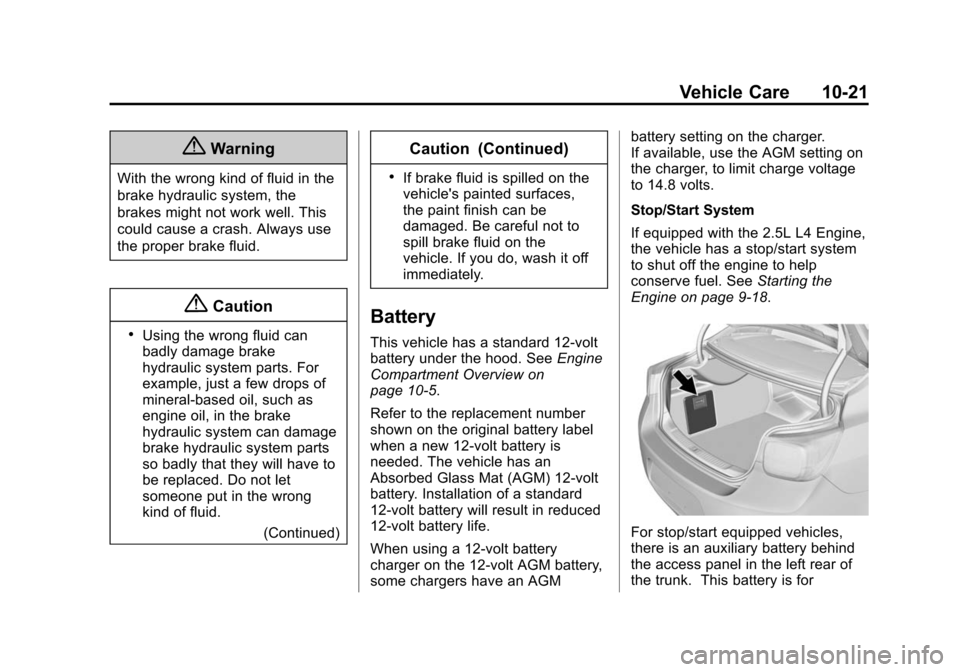
For stop/start equipped vehicles,
there is an auxiliary battery behind
the access panel in the left rear of
the trunk. This battery is for
Page 273 of 399
Black plate (22,1)Chevrolet Malibu Owner Manual (GMNA-Localizing-U.S./Canada/Mexico-
7575972) - 2015 - crc - 4/1/14
10-22 Vehicle Care
managing the stop/start auxiliary
loads and is not to be used for any
other purpose. See your dealer if
the auxiliary battery needs service.
{Warning
Battery posts, terminals, and
related accessories contain lead
and lead compounds, chemicals
known to the State of California to
cause cancer and reproductive
harm. Wash hands after handling.
Vehicle Storage
{Warning
Batteries have acid that can burn
you and gas that can explode.
You can be badly hurt if you are
not careful. SeeJump Starting on
page 10-76 for tips on working
around a battery without
getting hurt. Infrequent Usage: Remove the
12-volt battery black, negative (−)
cable from the battery to keep the
battery from running down.
Extended Storage: Remove the
12-volt battery black, negative (−)
cable from the battery or use a
battery trickle charger.
Remember to reconnect the battery
when ready to drive the vehicle.
Starter Switch Check
{Warning
When you are doing this
inspection, the vehicle could
move suddenly. If the vehicle
moves, you or others could be
injured.
1. Before starting this check, be sure there is enough room
around the vehicle. 2. Apply both the parking brake
and the regular brake.
Do not use the accelerator
pedal, and be ready to turn off
the engine immediately if it
starts.
3. Try to start the engine in each gear. The vehicle should start
only in P (Park) or N (Neutral).
If the vehicle starts in any other
position, contact your dealer for
service.
Page 287 of 399
Black plate (36,1)Chevrolet Malibu Owner Manual (GMNA-Localizing-U.S./Canada/Mexico-
7575972) - 2015 - crc - 4/1/14
10-36 Vehicle Care
The vehicle may not be equipped
with all of the fuses, relays, and
features shown.Mini
Fuses Usage
1 Transmission Control Module Battery
2 Engine Control Module Battery (LTG)/
Air Conditioning
Compressor
Clutch (LKW)
3 Air Conditioning Compressor
Clutch (LTG)
4 Air Conditioning Compressor
Clutch (LTG)
5 Engine Control Module Battery (LKW)
7 Engine Control Module Ignition (LKW)
8 Spare
9 Ignition Coils Mini
Fuses Usage
10 Engine Control Module
11 Emissions
13 Transmission Module Ignition
14 Cabin Heater Coolant Pump
15 Spare
16 Aero Shutter
17 Spare
18 R/C Dual Battery Isolator Module
20 Transmission Auxiliary Oil
Pump (LKW)
23 Spare (LKW)
29 Left Seat Power Lumber Control
30 Right Seat Power Lumber Control Mini
Fuses Usage
31 Chassis Control Module
32 Back-Up Lamps/ Interior Lamps
33 Front Heated Seats
34 Antilock Brake System Valve
35 Amplifier
37 Right High Beam
38 Left High Beam
46 Cooling Fan
47 Emissions
48 Foglamp
49 Low Beam HID Headlamp Right
50 Low Beam HID Headlamp Left
51 Horn/Dual Horn
52 Cluster Ignition
Page 289 of 399
Black plate (38,1)Chevrolet Malibu Owner Manual (GMNA-Localizing-U.S./Canada/Mexico-
7575972) - 2015 - crc - 4/1/14
10-38 Vehicle Care
Micro
Relays Usage
6 Spare
8 Transmission Auxiliary Oil
Pump (LKW)
10 Cooling Fan K3 11 Starter 2 Solenoid (LKW)
14 Headlamp Low Beam/DRLInstrument Panel Fuse
Block
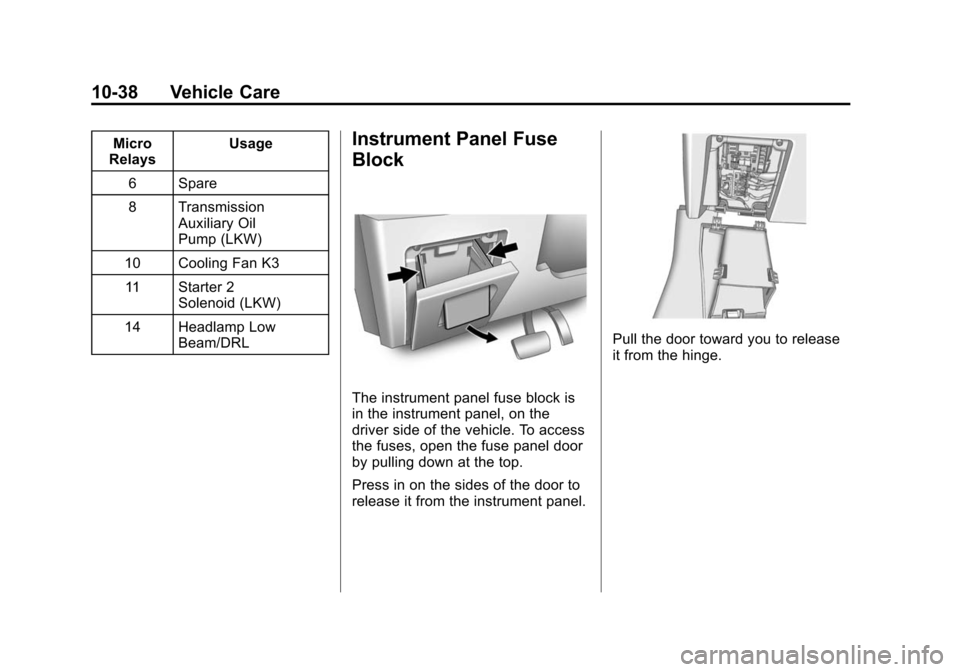
The instrument panel fuse block is
in the instrument panel, on the
driver side of the vehicle. To access
the fuses, open the fuse panel door
by pulling down at the top.
Press in on the sides of the door to
release it from the instrument panel.
Pull the door toward you to release
it from the hinge.
Page 388 of 399

Black plate (1,1)Chevrolet Malibu Owner Manual (GMNA-Localizing-U.S./Canada/Mexico-
7575972) - 2015 - crc - 4/1/14
INDEX i-1
A
Accessories andModifications . . . . . . . . . . . . . . . . . 10-3
Accessory Power . . . . . . . . . . . . . . 9-21
Add-On Electrical Equipment . . . . . . . . . . . . . . . . . . . 9-53
Additional Information
OnStar
®. . . . . . . . . . . . . . . . . . . . . . 14-6
Additional Maintenance and Care . . . . . . . . . . . . . . . . . . . . . 11-8
Adjustments
Lumbar, Front Seats . . . . . . . . . . . 3-4
Air Cleaner/Filter, Engine . . . . . 10-11
Air Filter, Passenger Compartment . . . . . . . . . . . . . . . . . 8-9
Air Vents . . . . . . . . . . . . . . . . . . . . . . . 8-8
Airbag System
Check . . . . . . . . . . . . . . . . . . . . . . . . 3-30
How Does an AirbagRestrain? . . . . . . . . . . . . . . . . . . . 3-22
Passenger Sensing System . . . . . . . . . . . . . . . . . . . . . . 3-24
What Makes an Airbag Inflate? . . . . . . . . . . . . . . . . . . . . . . 3-22 Airbag System (cont'd)
What Will You See after an
Airbag Inflates? . . . . . . . . . . . . . 3-23
When Should an Airbag
Inflate? . . . . . . . . . . . . . . . . . . . . . . 3-21
Where Are the Airbags? . . . . . . 3-20
Airbags Adding Equipment to theVehicle . . . . . . . . . . . . . . . . . . . . . . 3-29
Passenger Status Indicator . . . 5-11
Readiness Light . . . . . . . . . . . . . . 5-11
Servicing Airbag-Equipped Vehicles . . . . . . . . . . . . . . . . . . . . . 3-29
System Check . . . . . . . . . . . . . . . . 3-18
Alarm Vehicle Security . . . . . . . . . . . . . . 2-15
Alert Side Blind Zone (SBZA) . . . . . . 9-37
All-Season Tires . . . . . . . . . . . . . . 10-41
AM-FM Radio . . . . . . . . . . . . . . . . . . . 7-8
Antenna Multi-band . . . . . . . . . . . . . . . . . . . . 7-12
Antilock Brake
System (ABS) . . . . . . . . . . . . . . . . 9-27
Warning Light . . . . . . . . . . . . . . . . . 5-16 Appearance Care
Exterior . . . . . . . . . . . . . . . . . . . . . 10-82
Interior . . . . . . . . . . . . . . . . . . . . . . 10-86
Armrest Rear Seat . . . . . . . . . . . . . . . . . . . . 3-10
Assistance Program, Roadside . . . . . . . . . . . . . . . . . . . . . 13-5
Audio Players . . . . . . . . . . . . . . . . . 7-13 CD . . . . . . . . . . . . . . . . . . . . . . . . . . . 7-13
Audio System Backglass Antenna . . . . . . . . . . . 7-12
Radio Reception . . . . . . . . . . . . . . 7-11
Theft-Deterrent Feature . . . . . . . . 7-2
Automatic Door Locks . . . . . . . . . . . . . . . . . . . 2-12
Headlamp System . . . . . . . . . . . . . 6-3
Transmission . . . . . . . . . . . . . . . . . 9-25
Transmission Fluid . . . . . . . . . .10-11
Automatic Transmission Manual Mode . . . . . . . . . . . . . . . . . 9-26
Shift Lock ControlFunction Check . . . . . . . . . . . 10-23
Auxiliary Devices . . . . . . . . . . . . . . . . . . . . . . . 7-14
Page 390 of 399

Black plate (3,1)Chevrolet Malibu Owner Manual (GMNA-Localizing-U.S./Canada/Mexico-
7575972) - 2015 - crc - 4/1/14
INDEX i-3
CleaningExterior Care . . . . . . . . . . . . . . . 10-82
Interior Care . . . . . . . . . . . . . . . . 10-86
Climate Control Systems . . . . . . . 8-1 Air Conditioning . . . . . . . . . . . . . . . 8-1
Dual Automatic . . . . . . . . . . . . . . . . 8-4
Heating . . . . . . . . . . . . . . . . . . . . . . . . 8-1
Clock . . . . . . . . . . . . . . . . . . . . . . . . . . . 5-4
Cluster, Instrument . . . . . . . . . . . . . 5-8
Collision Damage Repair . . . . . . 13-8
Compact Spare Tire . . . . . . . . . . 10-75
Compartments Storage . . . . . . . . . . . . . . . . . . . . . . . . 4-1
Compass . . . . . . . . . . . . . . . . . . . . . . . 5-4 Messages . . . . . . . . . . . . . . . . . . . . 5-25
Compressor Kit, Tire
Sealant . . . . . . . . . . . . . . . . . . . . . . 10-63
Connections OnStar
®. . . . . . . . . . . . . . . . . . . . . . 14-4
Control Traction and Electronic
Stability . . . . . . . . . . . . . . . . . . . . . 9-29
Control of a Vehicle . . . . . . . . . . . . . 9-3
Convenience Net . . . . . . . . . . . . . . . 4-2
Convex Mirrors . . . . . . . . . . . . . . . . 2-18 Coolant
Engine . . . . . . . . . . . . . . . . . . . . . . 10-14
Engine Temperature
Gauge . . . . . . . . . . . . . . . . . . . . . . 5-10
Cooling System . . . . . . . . . . . . . . . 10-13 Engine Messages . . . . . . . . . . . . 5-26
Courtesy Lamps . . . . . . . . . . . . . . . . 6-5
Courtesy Transportation
Program . . . . . . . . . . . . . . . . . . . . . . 13-7
Cruise Control . . . . . . . . . . . . . . . . . 9-31 Light . . . . . . . . . . . . . . . . . . . . . . . . . . 5-20
Messages . . . . . . . . . . . . . . . . . . . . 5-25
Cupholders . . . . . . . . . . . . . . . . . . . . . 4-2
Customer Assistance . . . . . . . . . . 13-4 Offices . . . . . . . . . . . . . . . . . . . . . . . . 13-3
Text Telephone (TTY)Users . . . . . . . . . . . . . . . . . . . . . . . 13-4
Customer Information Service PublicationsOrdering Information . . . . . . .13-11
Customer Satisfaction
Procedure . . . . . . . . . . . . . . . . . . . . 13-1
D
Damage Repair, Collision . . . . . . 13-8
Danger, Warnings, andCautions . . . . . . . . . . . . . . . . . . . . . . . . iv
Data Recorders, Event . . . . . . . 13-14
Daytime Running Lamps (DRL) . . . . . . . . . . . . . . . . . . 6-2
Defensive Driving . . . . . . . . . . . . . . . 9-3
Delayed Locking . . . . . . . . . . . . . . . 2-12
Devices Auxiliary . . . . . . . . . . . . . . . . . . . . . . 7-14
Display Center Stack . . . . . . . . . . . . . . . . . 5-21
Distracted Driving . . . . . . . . . . . . . . . 9-2
Dome Lamps . . . . . . . . . . . . . . . . . . . 6-5
Door Ajar Light . . . . . . . . . . . . . . . . . . . . . 5-20
Ajar Messages . . . . . . . . . . . . . . . 5-25
Delayed Locking . . . . . . . . . . . . . . 2-12
Locks . . . . . . . . . . . . . . . . . . . . . . . . . 2-11
Power Locks . . . . . . . . . . . . . . . . . . 2-12
Drive Belt Routing, Engine . . . . . 12-3
Driver Information Center (DIC) . . . . . . . . . . . . . . . . . 5-21