2015 CHEVROLET IMPALA climate settings
[x] Cancel search: climate settingsPage 42 of 413
Black plate (9,1)Chevrolet Impala Owner Manual (GMNA-Localizing-U.S./Canada-7576026) -
2015 - crc 2nd edition - 8/21/14
Keys, Doors, and Windows 2-9
Battery Replacement
Replace the battery if the DIC
indicates that battery replacement is
necessary. SeeKey and Lock
Messages on page 5-31.
{Caution
When replacing the battery, do
not touch any of the circuitry on
the transmitter. Static from your
body could damage the
transmitter.
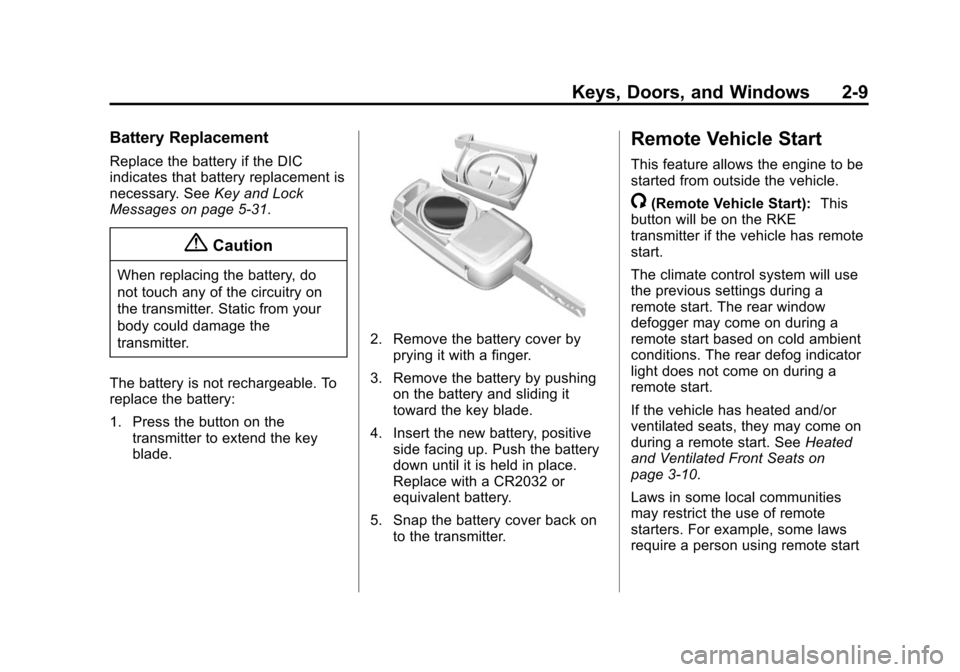
The battery is not rechargeable. To
replace the battery:
1. Press the button on the transmitter to extend the key
blade.
2. Remove the battery cover byprying it with a finger.
3. Remove the battery by pushing on the battery and sliding it
toward the key blade.
4. Insert the new battery, positive side facing up. Push the battery
down until it is held in place.
Replace with a CR2032 or
equivalent battery.
5. Snap the battery cover back on to the transmitter.
Remote Vehicle Start
This feature allows the engine to be
started from outside the vehicle.
/(Remote Vehicle Start): This
button will be on the RKE
transmitter if the vehicle has remote
start.
The climate control system will use
the previous settings during a
remote start. The rear window
defogger may come on during a
remote start based on cold ambient
conditions. The rear defog indicator
light does not come on during a
remote start.
If the vehicle has heated and/or
ventilated seats, they may come on
during a remote start. See Heated
and Ventilated Front Seats on
page 3-10.
Laws in some local communities
may restrict the use of remote
starters. For example, some laws
require a person using remote start
Page 121 of 413
Black plate (6,1)Chevrolet Impala Owner Manual (GMNA-Localizing-U.S./Canada-7576026) -
2015 - crc 2nd edition - 8/21/14
5-6 Instruments and Controls
PressqBACK to go to the last
menu and save the changes.
Clock (Uplevel Radio)
Setting the Time and Date
To set the time or date:
1. Select Settings from the Home Page, then select Time and Date
Settings.
2. Select the desired function.
To set the time or date, press
«or
ªto change the hour, minutes,
AM, or PM.
To change the 12-24Hr setting,
press the 12-24Hr button.
To turn Auto Set on and off, press
the Auto Set screen button.
Auto Set requires an OnStar
subscription.
If Auto Set is on, the time displayed
on the clock may not update
immediately when driving into a new
time zone. Press
qBACK to go to the last
menu and save the changes or
{to
return to the Home Page.
Power Outlets
The accessory power outlets can be
used to plug in electrical equipment,
such as a cell phone or MP3 player.
There are three accessory power
outlets:
.Inside the front storage area
below the climate control
system.
.Inside the center console.
.On the rear of the center
console.
The outlet is powered when the
ignition is in ON/RUN or ACC/
ACCESSORY, or until the driver
door is opened within 10 minutes of
turning off the vehicle. See Retained
Accessory Power (RAP) on
page 9-22.
Open the protective cover to use the
accessory power outlet. Certain electrical accessories may
not be compatible with the
accessory power outlets and could
overload vehicle or adapter fuses.
If there is a problem, see your
dealer.
When adding electrical equipment,
be sure to follow the installation
instructions included with the
equipment. See
Add-On Electrical
Equipment on page 9-63.
{Caution
Hanging heavy equipment from
the power outlet can cause
damage not covered by the
vehicle warranty. The power
outlets are designed for
accessory power plugs only, such
as cell phone charge cords.
Always unplug electrical equipment
when not in use and do not plug in
equipment that exceeds the
maximum 20 amps rating.
Page 206 of 413
Black plate (3,1)Chevrolet Impala Owner Manual (GMNA-Localizing-U.S./Canada-7576026) -
2015 - crc 2nd edition - 8/21/14
Climate Controls 8-3
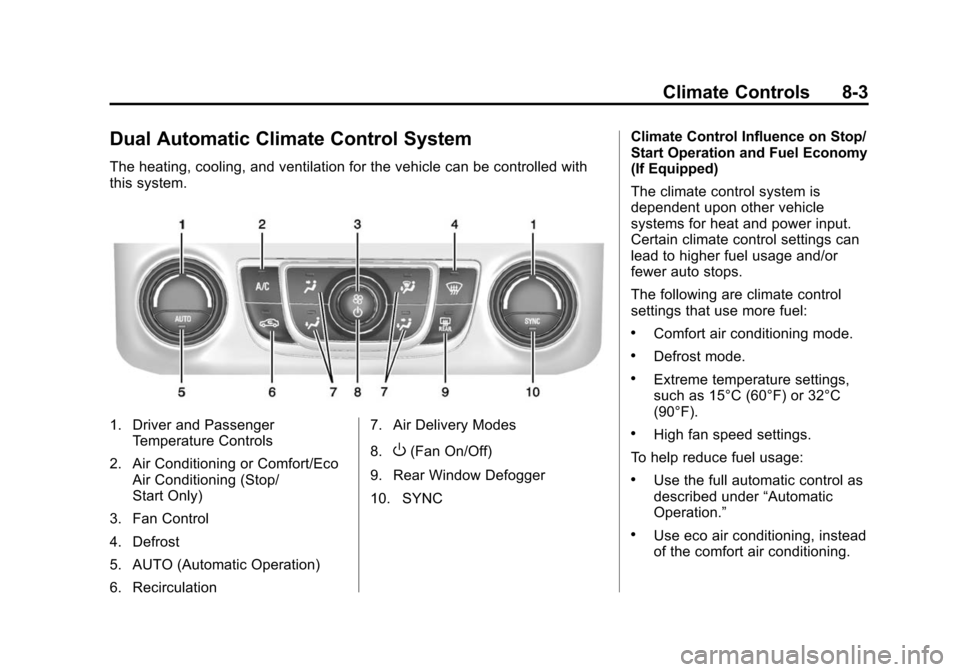
Dual Automatic Climate Control System
The heating, cooling, and ventilation for the vehicle can be controlled with
this system.
1. Driver and PassengerTemperature Controls
2. Air Conditioning or Comfort/Eco Air Conditioning (Stop/
Start Only)
3. Fan Control
4. Defrost
5. AUTO (Automatic Operation)
6. Recirculation 7. Air Delivery Modes
8.
O(Fan On/Off)
9. Rear Window Defogger
10. SYNC Climate Control Influence on Stop/
Start Operation and Fuel Economy
(If Equipped)
The climate control system is
dependent upon other vehicle
systems for heat and power input.
Certain climate control settings can
lead to higher fuel usage and/or
fewer auto stops.
The following are climate control
settings that use more fuel:
.Comfort air conditioning mode.
.Defrost mode.
.Extreme temperature settings,
such as 15°C (60°F) or 32°C
(90°F).
.High fan speed settings.
To help reduce fuel usage:
.Use the full automatic control as
described under “Automatic
Operation.”
.Use eco air conditioning, instead
of the comfort air conditioning.
Page 207 of 413
Black plate (4,1)Chevrolet Impala Owner Manual (GMNA-Localizing-U.S./Canada-7576026) -
2015 - crc 2nd edition - 8/21/14
8-4 Climate Controls
.Select a temperature setting that
is higher in hot weather and
lower in cold weather.
.Turn off the air conditioning
when it is not needed.
.Only use defrost when needed
to clear the windows.
Automatic Operation
The system automatically controls
the fan speed, air delivery, air
conditioning, and recirculation in
order to heat or cool the vehicle to
the desired temperature.
When the indicator light is on, the
system is in full automatic operation.
If the air delivery mode or fan
setting is manually adjusted, the
auto indicator turns off and displays
will show the selected settings.
To place the system in
automatic mode:
1. Press AUTO. 2. Set the temperature. Allow the
system time to stabilize. Then
adjust the temperature as
needed for best comfort.
To improve fuel efficiency and to
cool the vehicle faster, recirculation
may be automatically selected in
warm weather.
The recirculation light will not come
on when automatically controlled.
Press
hto manually select
recirculation; press it again to select
outside air.
Manual Operation
Driver and Passenger
Temperature Control: The
temperature can be adjusted
separately for the driver and
passenger.
Turn the knob clockwise or
counterclockwise to increase or
decrease the driver or passenger
temperature setting.
SYNC: Press to link all climate
zone settings to the driver settings.
The SYNC indicator light will turn on. When the passenger settings
are adjusted, the SYNC indicator
light is off.
O(Fan On/Off):
Press the knob to
turn the fan on or off.
Fan Control: Turn the knob
clockwise or counterclockwise to
increase or decrease the fan speed.
Press AUTO to return to automatic
operation.
Air Delivery Modes: Press
Y,\,
[, or-to change the direction of
the airflow. An indicator light comes
on in the selected mode button.
Changing the mode cancels the
automatic operation and the system
goes into manual mode. Press
AUTO to return to automatic
operation.
Y(Vent): Air is directed to the
instrument panel outlets.
\(Bi-Level): Air is directed to the
instrument panel outlets and the
floor outlets.
Page 209 of 413

Black plate (6,1)Chevrolet Impala Owner Manual (GMNA-Localizing-U.S./Canada-7576026) -
2015 - crc 2nd edition - 8/21/14
8-6 Climate Controls
Auto Defog:The climate control
system may have a sensor to
automatically detect high humidity
inside the vehicle. When high
humidity is detected, the climate
control system may adjust to
outside air supply and turn on the
air conditioner. The fan speed may
slightly increase to help prevent
fogging. If the climate control
system does not detect possible
window fogging, it returns to normal
operation. To turn Auto Defog off or
on, see “Climate and Air Quality”
under Vehicle Personalization on
page 5-37.
Rear Window Defogger
K(Rear Window Defogger):
Press to turn the rear window
defogger on or off.
The rear window defogger turns off
automatically after about
10 minutes. If turned on again, it
runs for about five minutes before
turning off. At higher speeds, the
rear window defogger may stay on
continuously. The upper region of gridlines on the
rear window are antenna lines and
are not intended to heat when the
defogger is activated.
If equipped with heated outside
rearview mirrors, they turn on with
the rear window defogger and help
to clear fog or frost from the surface
of the mirror. See
Heated Mirrors on
page 2-20.
{Caution
Using a razor blade or sharp
object on the inside rear window
can damage the antenna or
defogger. Repairs would not be
covered by the vehicle warranty.
Do not stick anything to the rear
window.
Remote Start Climate Control
Operation (If Equipped):
If equipped with remote start, the
climate control system may run
when the vehicle is started remotely.
The system uses the driver ’s previous settings to heat or cool the
inside of the vehicle. The rear defog
may come on during remote start
based on cold ambient conditions.
The rear defog indicator light may
not come on during a remote start.
The front heated seats may turn on
if it is cold outside. The heated seat
indicator lights may not come on
during a remote start. See
Remote
Vehicle Start on page 2-9 and
Heated and Ventilated Seats on
page 1-10 (if equipped).Sensors
Page 213 of 413
Black plate (2,1)Chevrolet Impala Owner Manual (GMNA-Localizing-U.S./Canada-7576026) -
2015 - crc 2nd edition - 8/21/14
9-2 Driving and Operating
E85 or FlexFuel . . . . . . . . . . . . . . 9-55
Filling the Tank . . . . . . . . . . . . . . 9-56
Filling a Portable FuelContainer . . . . . . . . . . . . . . . . . . . 9-57
Towing
General TowingInformation . . . . . . . . . . . . . . . . . 9-58
Driving Characteristics and Towing Tips . . . . . . . . . . . . . . . . 9-58
Trailer Towing (Bi-Fuel) . . . . . . 9-61
Trailer Towing (All except Bi-Fuel) . . . . . . . . . . . . . . . . . . . . 9-61
Towing Equipment . . . . . . . . . . . 9-62
Conversions and Add-Ons
Add-On Electrical Equipment . . . . . . . . . . . . . . . . . 9-63
Driving Information
Distracted Driving
Distraction comes in many forms
and can take your focus from the
task of driving. Exercise good
judgment and do not let other
activities divert your attention away
from the road. Many local
governments have enacted laws
regarding driver distraction. Become
familiar with the local laws in
your area.
To avoid distracted driving, always
keep your eyes on the road, hands
on the wheel, and mind on the drive.
.Do not use a phone in
demanding driving situations.
Use a hands-free method to
place or receive necessary
phone calls.
.Watch the road. Do not read,
take notes, or look up
information on phones or other
electronic devices.
.Designate a front seat
passenger to handle potential
distractions.
.Become familiar with vehicle
features before driving, such as
programming favorite radio
stations and adjusting climate
control and seat settings.
Program all trip information into
any navigation device prior to
driving.
.Wait until the vehicle is parked
to retrieve items that have fallen
to the floor.
.Stop or park the vehicle to tend
to children.
.Keep pets in an appropriate
carrier or restraint.
.Avoid stressful conversations
while driving, whether with a
passenger or on a cell phone.
Page 231 of 413
Black plate (20,1)Chevrolet Impala Owner Manual (GMNA-Localizing-U.S./Canada-7576026) -
2015 - crc 2nd edition - 8/21/14
9-20 Driving and Operating
vehicle starts briefly but then
stops again, do the same thing.
This clears the extra gasoline
from the engine. Do not race the
engine immediately after starting
it. Operate the engine and
transmission gently until the oil
warms up and lubricates all
moving parts.
Stop/Start System
{Warning
Exiting the vehicle without first
shifting into P (Park) may cause
the vehicle to move. You or others
may be injured. Because the
vehicle has the auto engine stop/
start feature, the vehicle's engine
might seem to be shut off;
however, once the brake pedal is
released, the engine will start up
again.
Shift to P (Park) and turn the
ignition to LOCK/OFF, before
exiting the vehicle.If equipped with the 2.5L L4 Engine,
the vehicle has a fuel saving stop/
start system to shut off the engine to
help conserve fuel.
Auto Engine Stop/Start
When the brakes are applied and
the vehicle is at a complete stop,
the engine may turn off. When
stopped, the tachometer displays
AUTO STOP. See
Tachometer on
page 5-12. When the brake pedal is
released or the accelerator pedal
pushed, the engine will restart.
Auto stop may be deactivated if:
.A minimum vehicle speed is not
reached.
.The engine or transmission is
not at the required operating
temperature.
.The outside temperature is not
in the required operating range,
typically below -10°C (14°F) or
above 50°C (122°F).
.The shift lever is in any gear
other than D (Drive).
.The battery charge is low.
.The interior comfort level has not
reached the required level for
the climate control system or
defog settings. Use the eco
(green indicator on) air
conditioning mode for better
efficiency. See Dual Automatic
Climate Control System on
page 8-3.
.The auto stop time is greater
than two minutes.
Engine Heater
The engine coolant heater,
if equipped, can help in cold
weather conditions at or below −18°
C (0°F) for easier starting and better
fuel economy during engine
warm-up. Plug in the coolant heater
at least four hours before starting
the vehicle. An internal thermostat
in the plug end of the cord will
prevent engine coolant heater
operation at temperatures above
−18°C (0°F).