2015 CHEVROLET IMPALA trunk
[x] Cancel search: trunkPage 297 of 413

Black plate (22,1)Chevrolet Impala Owner Manual (GMNA-Localizing-U.S./Canada-7576026) -
2015 - crc 2nd edition - 8/21/14
10-22 Vehicle Care
What to Add
Use only new DOT 3 brake fluid
from a sealed container. See
Recommended Fluids and
Lubricants on page 11-11.
Always clean the brake fluid
reservoir cap and the area around
the cap before removing it. This
helps keep dirt from entering the
reservoir.
{Warning
With the wrong kind of fluid in the
brake hydraulic system, the
brakes might not work well. This
could cause a crash. Always use
the proper brake fluid.
{Caution
.Using the wrong fluid can
badly damage brake
hydraulic system parts. For(Continued)
Caution (Continued)
example, just a few drops of
mineral-based oil, such as
engine oil, in the brake
hydraulic system can damage
brake hydraulic system parts
so badly that they will have to
be replaced. Do not let
someone put in the wrong
kind of fluid.
.If brake fluid is spilled on the
vehicle's painted surfaces,
the paint finish can be
damaged. Be careful not to
spill brake fluid on the
vehicle. If you do, wash it off
immediately.
Battery
The original equipment battery is
maintenance free. Do not remove
the cap and do not add fluid.
This vehicle has a standard 12-volt
battery under the hood. See Engine
Compartment Overview on page 10-5. Refer to the replacement
number shown on the original
battery label when a new 12-volt
battery is needed.
Stop/Start System
If equipped with the 2.5L L4 Engine,
the vehicle has a stop/start system
to shut off the engine to help
conserve fuel. See
Starting the
Engine on page 9-18.
Vehicles with Stop/Start have an
Absorbed Glass Mat (AGM) 12-volt
underhood battery. Installation of a
standard 12-volt battery will result in
reduced 12-volt battery life.
There is also an auxiliary AGM
battery behind the access panel in
the left rear of the trunk. This
battery is for managing the stop/
start auxiliary loads and is not to be
used for any other purpose. See
your dealer if the auxiliary battery
needs service.
When using a 12-volt battery
charger on the 12-volt AGM battery,
some chargers have an AGM
Page 303 of 413
Black plate (28,1)Chevrolet Impala Owner Manual (GMNA-Localizing-U.S./Canada-7576026) -
2015 - crc 2nd edition - 8/21/14
10-28 Vehicle Care
3. Remove the bulb from thesocket.
4. Replace the bulb in the bulb socket.
5. Install the bulb socket in the headlamp assembly by turning it
clockwise.
6. For the driver side, reinstall the windshield washer bottle filler
neck by firmly pushing it straight
into the bottle. Ensure that the
filler neck clip engages into the
underhood electrical center
retainer.
Taillamps, Turn Signal,
Stoplamps, and Back-Up
Lamps
Trunk Deck Inboard Taillamp
1. Open the trunk. See Trunk on
page 2-15.
2. Remove the push pins and pull back the trunk deck trim.
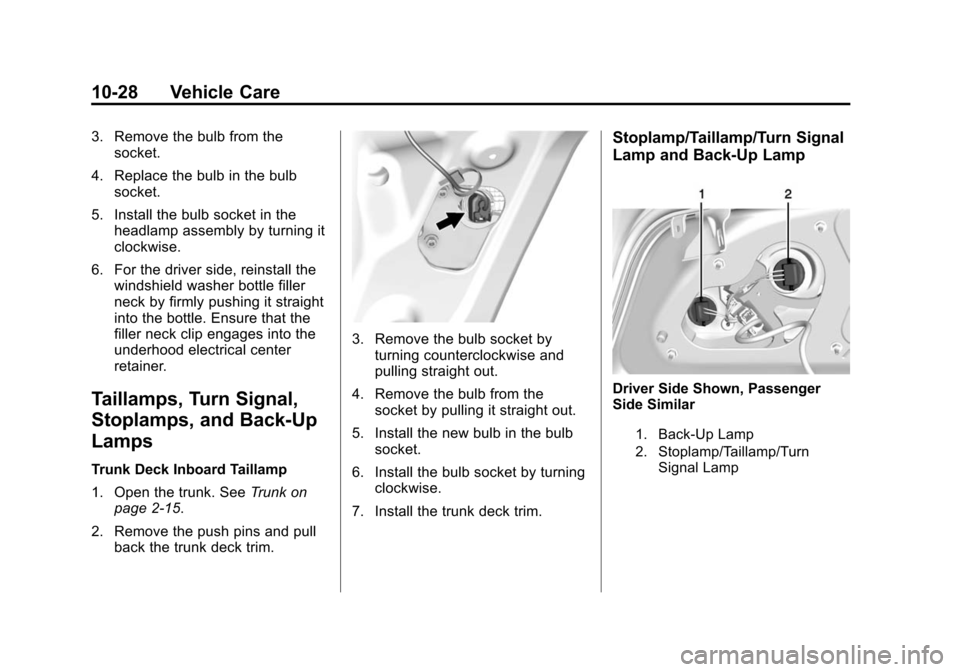
3. Remove the bulb socket by
turning counterclockwise and
pulling straight out.
4. Remove the bulb from the socket by pulling it straight out.
5. Install the new bulb in the bulb socket.
6. Install the bulb socket by turning clockwise.
7. Install the trunk deck trim.
Stoplamp/Taillamp/Turn Signal
Lamp and Back-Up Lamp
Driver Side Shown, Passenger
Side Similar
1. Back-Up Lamp
2. Stoplamp/Taillamp/Turn Signal Lamp
Page 304 of 413
Black plate (29,1)Chevrolet Impala Owner Manual (GMNA-Localizing-U.S./Canada-7576026) -
2015 - crc 2nd edition - 8/21/14
Vehicle Care 10-29
{Caution
Improper lamp assembly removal
and installation can cause leaks
and water intrusion which may
cause damage to the taillamp. Do
not remove the taillamp assembly
to replace a bulb. Use the trunk
opening to access the bulb.
To replace one of these bulbs:
1. Open the trunk. See Trunk on
page 2-15.
2. Remove the push pins and pull the trunk trim away from the
taillamp assembly.
3. Remove the bulb socket from the taillamp assembly by turning
it counterclockwise.
4. Remove the bulb from the socket by turning the bulb
counterclockwise one-quarter
turn and pulling it straight out.
5. Install a new bulb into the socket. 6. Install the bulb socket into the
taillamp assembly by turning it
clockwise.
7. Install the trunk trim and push pins.
License Plate Lamp
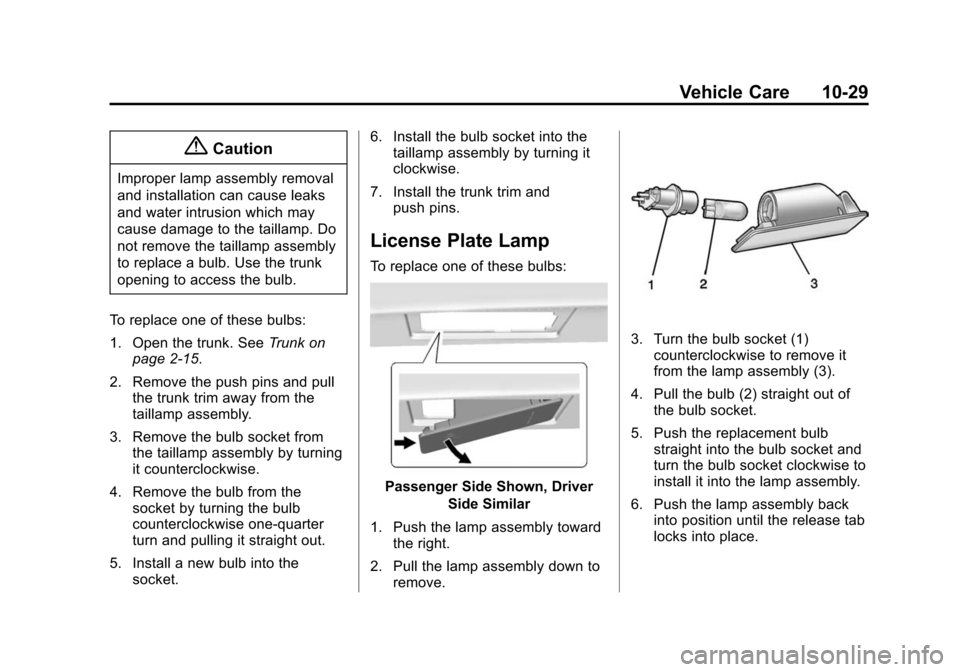
To replace one of these bulbs:
Passenger Side Shown, Driver
Side Similar
1. Push the lamp assembly toward the right.
2. Pull the lamp assembly down to remove.
3. Turn the bulb socket (1)counterclockwise to remove it
from the lamp assembly (3).
4. Pull the bulb (2) straight out of the bulb socket.
5. Push the replacement bulb straight into the bulb socket and
turn the bulb socket clockwise to
install it into the lamp assembly.
6. Push the lamp assembly back into position until the release tab
locks into place.
Page 309 of 413

Black plate (34,1)Chevrolet Impala Owner Manual (GMNA-Localizing-U.S./Canada-7576026) -
2015 - crc 2nd edition - 8/21/14
10-34 Vehicle Care
Mini
Fuses Usage
53 Inside Rearview Mirror/Rear Camera
54 Reflected LED Display, Console LED
Display, Heating,
Ventilation and Air
Conditioning Module
55 Outside Rearview Mirror
56 Windshield Washer
60 Heated Mirror
62 Rear Camera/Park Assist/Side Blind
Zone Alert
66 Trunk Release
67 Chassis Control Module
69 Battery Voltage Sensor
70 Not Used
71 Memory Seat Midi
Fuses Usage
5 Accessory Power Module
J-Case Fuses Usage
6 Front Wiper
12 Starter
21 Rear Power Window
22 Sunroof
24 Front Power Window
25 Accessory Relay
26 Antilock Brake System Pump
27 Electric Parking Brake
28 Rear Defogger
41 Vacuum Pump
42 Cooling Fan K2
44 Not Used
45 Cooling Fan K1 J-Case
Fuses Usage
59 Air Pump Emissions
Mini
Relays Usage
7 Powertrain
9 Cooling Fan K2
13 Cooling Fan K1
15 Run/Crank
16 Air Pump Emissions
17 Window/Mirror Defogger
Micro
Relays Usage
1 Air Conditioning Compressor Clutch
2 Starter Solenoid
4 Front Wiper Speed
5 Front Wiper Control
Page 311 of 413
Black plate (36,1)Chevrolet Impala Owner Manual (GMNA-Localizing-U.S./Canada-7576026) -
2015 - crc 2nd edition - 8/21/14
10-36 Vehicle Care
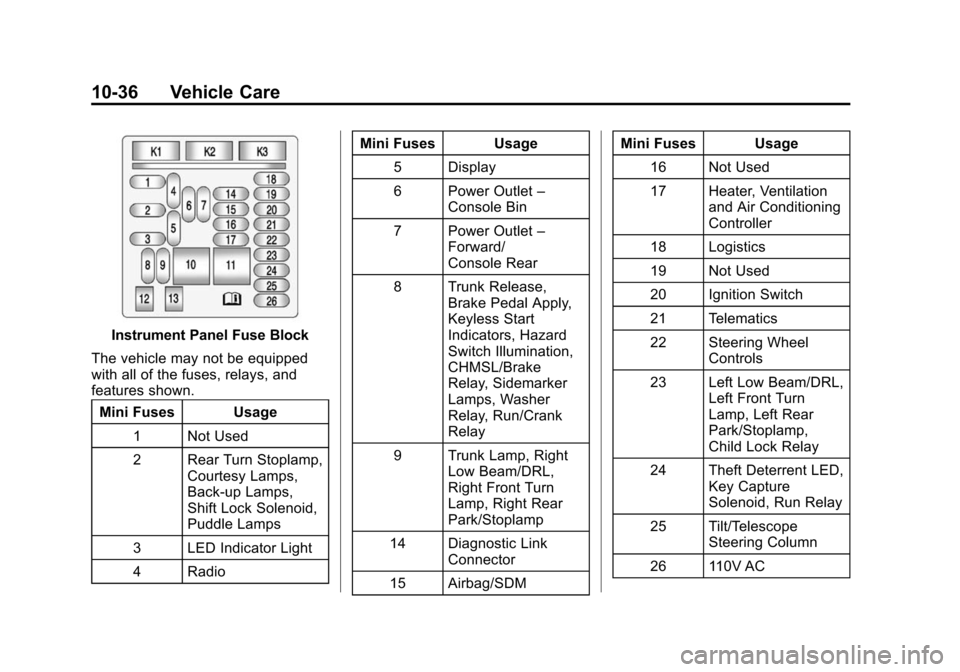
Instrument Panel Fuse Block
The vehicle may not be equipped
with all of the fuses, relays, and
features shown. Mini Fuses Usage
1 Not Used
2 Rear Turn Stoplamp, Courtesy Lamps,
Back-up Lamps,
Shift Lock Solenoid,
Puddle Lamps
3 LED Indicator Light
4 Radio Mini Fuses Usage
5 Display
6 Power Outlet –
Console Bin
7 Power Outlet –
Forward/
Console Rear
8 Trunk Release, Brake Pedal Apply,
Keyless Start
Indicators, Hazard
Switch Illumination,
CHMSL/Brake
Relay, Sidemarker
Lamps, Washer
Relay, Run/Crank
Relay
9 Trunk Lamp, Right Low Beam/DRL,
Right Front Turn
Lamp, Right Rear
Park/Stoplamp
14 Diagnostic Link Connector
15 Airbag/SDM Mini Fuses Usage
16 Not Used
17 Heater, Ventilation and Air Conditioning
Controller
18 Logistics
19 Not Used
20 Ignition Switch
21 Telematics
22 Steering Wheel Controls
23 Left Low Beam/DRL, Left Front Turn
Lamp, Left Rear
Park/Stoplamp,
Child Lock Relay
24 Theft Deterrent LED, Key Capture
Solenoid, Run Relay
25 Tilt/Telescope Steering Column
26 110V AC
Page 335 of 413
Black plate (60,1)Chevrolet Impala Owner Manual (GMNA-Localizing-U.S./Canada-7576026) -
2015 - crc 2nd edition - 8/21/14
10-60 Vehicle Care
Tire Changing
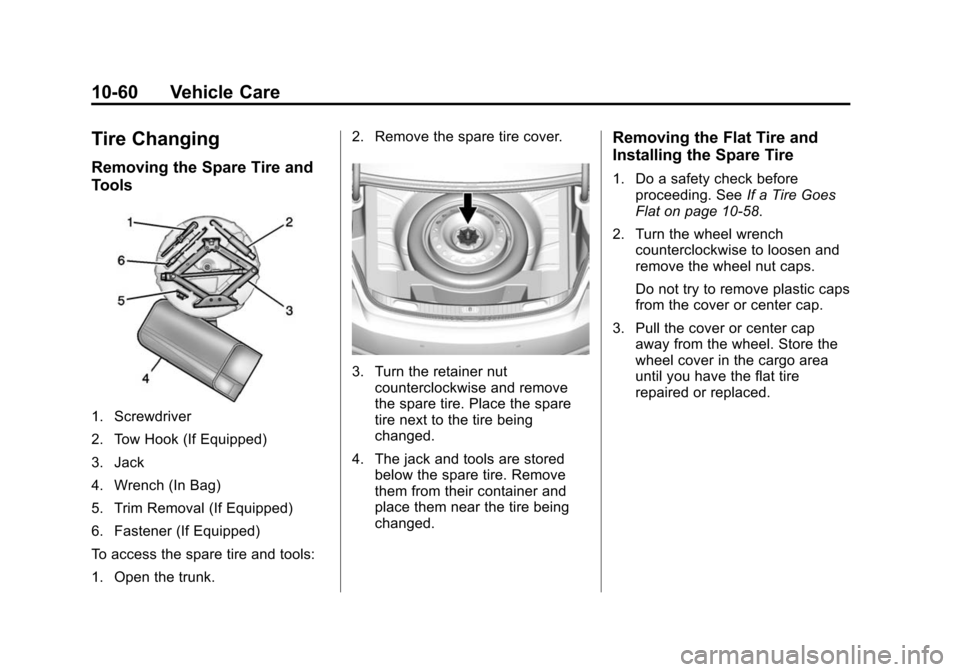
Removing the Spare Tire and
Tools
1. Screwdriver
2. Tow Hook (If Equipped)
3. Jack
4. Wrench (In Bag)
5. Trim Removal (If Equipped)
6. Fastener (If Equipped)
To access the spare tire and tools:
1. Open the trunk.2. Remove the spare tire cover.
3. Turn the retainer nut
counterclockwise and remove
the spare tire. Place the spare
tire next to the tire being
changed.
4. The jack and tools are stored below the spare tire. Remove
them from their container and
place them near the tire being
changed.
Removing the Flat Tire and
Installing the Spare Tire
1. Do a safety check before
proceeding. See If a Tire Goes
Flat on page 10-58.
2. Turn the wheel wrench counterclockwise to loosen and
remove the wheel nut caps.
Do not try to remove plastic caps
from the cover or center cap.
3. Pull the cover or center cap away from the wheel. Store the
wheel cover in the cargo area
until you have the flat tire
repaired or replaced.
Page 370 of 413
Black plate (1,1)Chevrolet Impala Owner Manual (GMNA-Localizing-U.S./Canada-7576026) -
2015 - crc 2nd edition - 8/21/14
Technical Data 12-1
Technical Data
Vehicle Identification
Vehicle IdentificationNumber (VIN) . . . . . . . . . . . . . . 12-1
Service Parts Identification Label . . . . . . . . . . . . . . . . . . . . . . . 12-1
Vehicle Data
Capacities andSpecifications . . . . . . . . . . . . . . 12-2
Engine Drive Belt Routing . . . 12-4
Vehicle Identification
Vehicle Identification
Number (VIN)
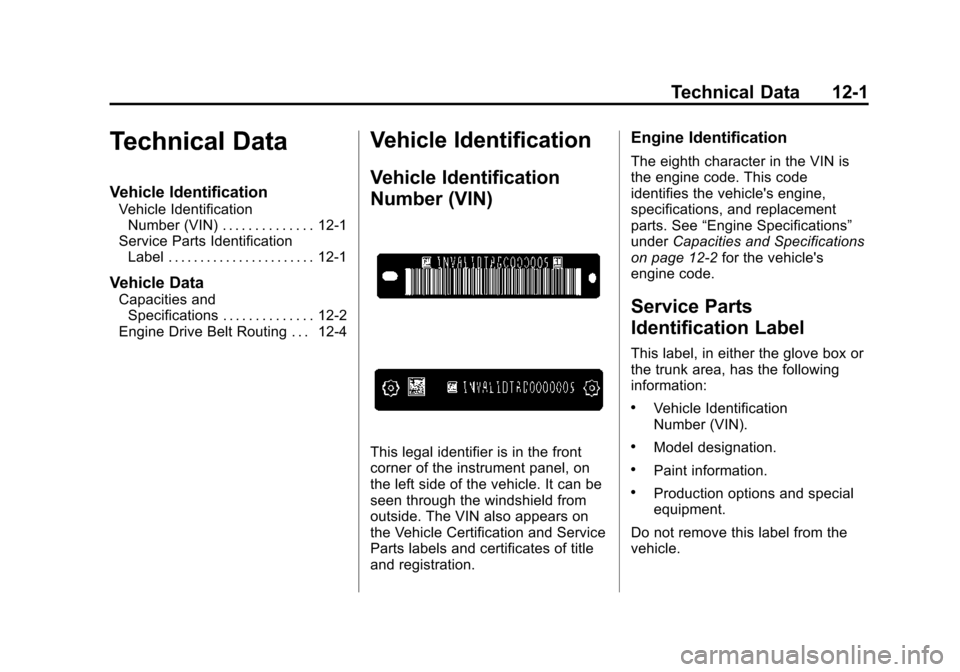
This legal identifier is in the front
corner of the instrument panel, on
the left side of the vehicle. It can be
seen through the windshield from
outside. The VIN also appears on
the Vehicle Certification and Service
Parts labels and certificates of title
and registration.
Engine Identification
The eighth character in the VIN is
the engine code. This code
identifies the vehicle's engine,
specifications, and replacement
parts. See “Engine Specifications”
under Capacities and Specifications
on page 12-2 for the vehicle's
engine code.
Service Parts
Identification Label
This label, in either the glove box or
the trunk area, has the following
information:
.Vehicle Identification
Number (VIN).
.Model designation.
.Paint information.
.Production options and special
equipment.
Do not remove this label from the
vehicle.
Page 401 of 413

Black plate (2,1)Chevrolet Impala Owner Manual (GMNA-Localizing-U.S./Canada-7576026) -
2015 - crc 2nd edition - 8/21/14
i-2 INDEX
Automatic TransmissionManual Mode . . . . . . . . . . . . . . . . . 9-27
Shift Lock Control
Function Check . . . . . . . . . . . 10-23
Auxiliary Jack . . . . . . . . . . . . . . . . . . 7-17
B
Battery . . . . . . . . . . . . . . . . . . . . . . . 10-22 Jump Starting . . . . . . . . . . . . . . . 10-66
Load Management . . . . . . . . . . . . . 6-6
Voltage and Charging
Messages . . . . . . . . . . . . . . . . . . . 5-28
Blade Replacement, Wiper . . . 10-24
Bluetooth
Overview . . . . . . . . . 7-19, 7-21, 7-25
Brake System Warning Light . . . . . . . . 5-20
Brakes . . . . . . . . . . . . . . . . . . . . . . . . 10-20
Antilock . . . . . . . . . . . . . . . . . . . . . . . 9-28
Assist . . . . . . . . . . . . . . . . . . . . . . . . . 9-30
Fluid . . . . . . . . . . . . . . . . . . . . . . . . 10-21
Parking . . . . . . . . . . . . . . . . . . . . . . . 9-29
System Messages . . . . . . . . . . . . 5-28
Braking . . . . . . . . . . . . . . . . . . . . . . . . . 9-3
Braking System Active Emergency . . . . . . . . . . . . 1-21 Break-In, New Vehicle . . . . . . . . . 9-14
Bulb Replacement . . . . . . . . . . . . 10-30
Halogen Bulbs . . . . . . . . . . . . . . 10-26
Headlamp Aiming . . . . . . . . . . . 10-25
Headlamps . . . . . . . . . . . . . . . . . 10-26
Headlamps, Front TurnSignal, Sidemarker, and
Parking Lamps . . . . . . . . . . . . 10-26
High Intensity Discharge (HID) Lighting . . . . . . . . . . . . . 10-26
License Plate Lamps . . . . . . . 10-29
Taillamps, Turn Signal,
Stoplamps, and
Back-up Lamps . . . . . . . . . . . 10-28
Buying New Tires . . . . . . . . . . . . . 10-53
C
Calibration . . . . . . . . . . . . . . . . . . . . . . 5-5
California Fuel Requirements . . . . . . . . . . . 9-55
Perchlorate MaterialsRequirements . . . . . . . . . . . . . . . 10-3
Warning . . . . . . . . . . . . . . . . . . . . . . 10-2
Canadian Vehicle Owners . . . . . . . . iii
Capacities and Specifications . . . . . . . . . . . . . . . . 12-2 Carbon Monoxide
Engine Exhaust . . . . . . . . . . . . . . . 9-24
Trunk . . . . . . . . . . . . . . . . . . . . . . . . . 2-15
Winter Driving . . . . . . . . . . . . . . . . . 9-8
Card Reader SD . . . . . . . . . . . . . . . . . . . . . . . . . . . . 7-17
Cargo
Management System . . . . . . . . . . 4-3
Cautions, Danger, and Warnings . . . . . . . . . . . . . . . . . . . . . . . . iv
CD Player . . . . . . . . . . . . . . . . . . . . . 7-11
Center Console Storage . . . . . . . . 4-2
Chains, Tire . . . . . . . . . . . . . . . . . . 10-57
Charging System Light . . . . . . . . 5-17
Check Engine Light . . . . . . . . . . . . . . . . . . 5-17
Ignition
Transmission Lock . . . . . . . . 10-24
Child Restraints Infants and YoungChildren . . . . . . . . . . . . . . . . . . . . . 3-35
Lower Anchors and Tethers for Children . . . . . . . . . 3-41
Older Children . . . . . . . . . . . . . . . . 3-33
Securing . . . . . . . . . . . . . . . . 3-47, 3-49
Systems . . . . . . . . . . . . . . . . . . . . . . 3-38