2015 CHEVROLET IMPALA mirror
[x] Cancel search: mirrorPage 53 of 413
Black plate (20,1)Chevrolet Impala Owner Manual (GMNA-Localizing-U.S./Canada-7576026) -
2015 - crc 2nd edition - 8/21/14
2-20 Keys, Doors, and Windows
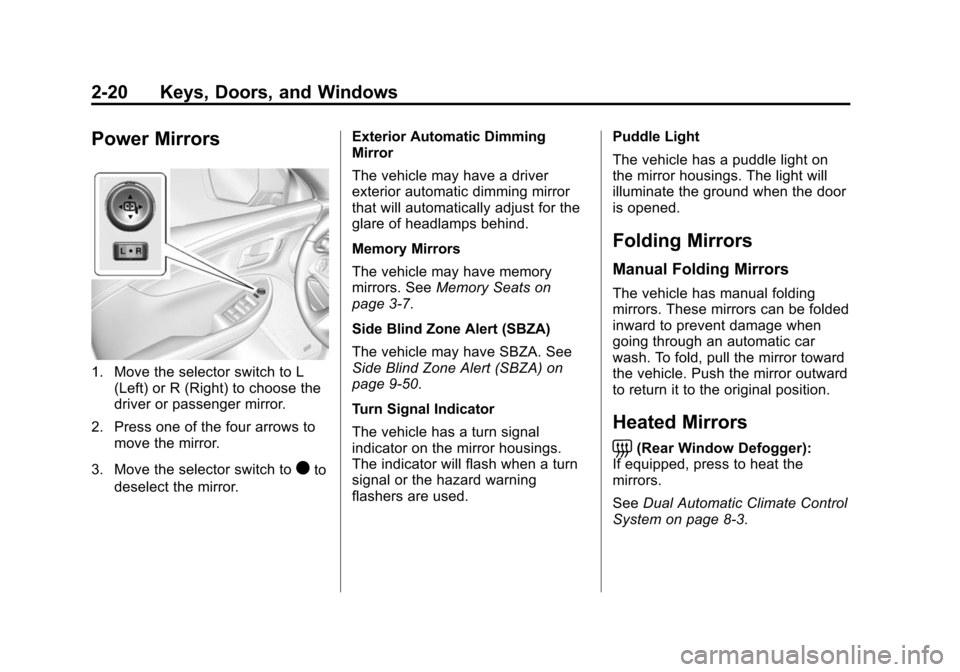
Power Mirrors
1. Move the selector switch to L(Left) or R (Right) to choose the
driver or passenger mirror.
2. Press one of the four arrows to move the mirror.
3. Move the selector switch to
)to
deselect the mirror. Exterior Automatic Dimming
Mirror
The vehicle may have a driver
exterior automatic dimming mirror
that will automatically adjust for the
glare of headlamps behind.
Memory Mirrors
The vehicle may have memory
mirrors. See
Memory Seats on
page 3-7.
Side Blind Zone Alert (SBZA)
The vehicle may have SBZA. See
Side Blind Zone Alert (SBZA) on
page 9-50.
Turn Signal Indicator
The vehicle has a turn signal
indicator on the mirror housings.
The indicator will flash when a turn
signal or the hazard warning
flashers are used. Puddle Light
The vehicle has a puddle light on
the mirror housings. The light will
illuminate the ground when the door
is opened.
Folding Mirrors
Manual Folding Mirrors
The vehicle has manual folding
mirrors. These mirrors can be folded
inward to prevent damage when
going through an automatic car
wash. To fold, pull the mirror toward
the vehicle. Push the mirror outward
to return it to the original position.
Heated Mirrors
=
(Rear Window Defogger):
If equipped, press to heat the
mirrors.
See Dual Automatic Climate Control
System on page 8-3.
Page 54 of 413
Black plate (21,1)Chevrolet Impala Owner Manual (GMNA-Localizing-U.S./Canada-7576026) -
2015 - crc 2nd edition - 8/21/14
Keys, Doors, and Windows 2-21
Reverse Tilt Mirrors
If equipped with memory seats, the
passenger and/or driver mirror tilts
to a preselected position when the
vehicle is in R (Reverse). This
allows the curb to be seen when
parallel parking.
The mirror(s) return to the original
position when:
.The vehicle is shifted out of
R (Reverse), or remains in
R (Reverse) for about
30 seconds.
.The ignition is turned off.
.The vehicle is driven in
R (Reverse) above a set speed.
To turn this feature on or off, see
Vehicle Personalization on
page 5-37.
Interior Mirrors
Interior Rearview Mirrors
Adjust the rearview mirror for a clear
view of the area behind your
vehicle.
Do not spray glass cleaner directly
on the mirror. Use a soft towel
dampened with water.
Manual Rearview Mirror
If equipped with a manual rearview
mirror, push the tab forward for
daytime use and pull it for nighttime
use to avoid glare from the
headlamps from behind.
Automatic Dimming
Rearview Mirror
If equipped, automatic dimming
reduces the glare of headlamps
from behind. The dimming feature
comes on when the vehicle is
started.
Windows
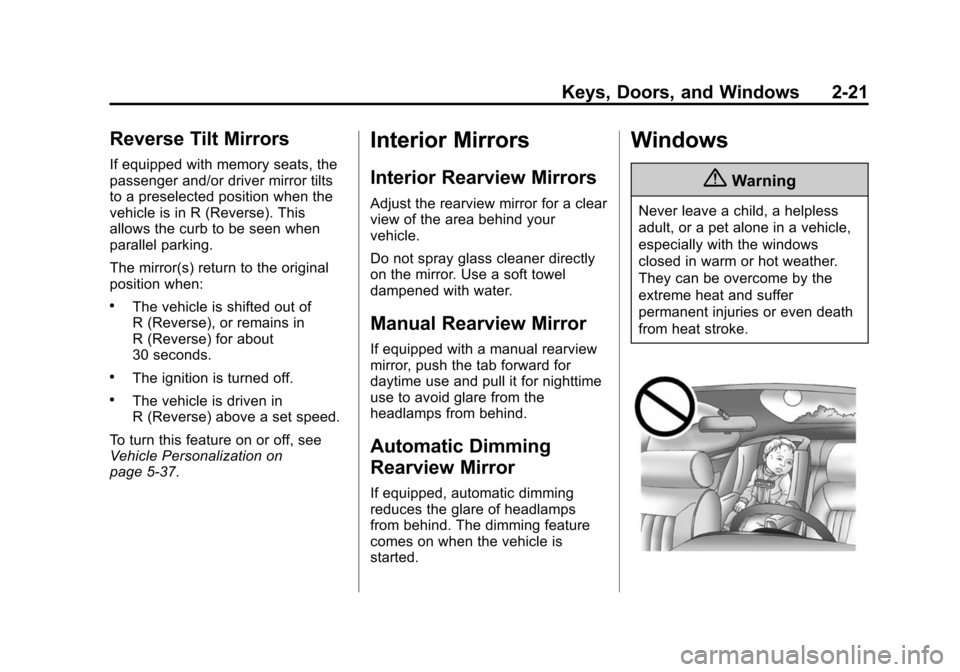
{Warning
Never leave a child, a helpless
adult, or a pet alone in a vehicle,
especially with the windows
closed in warm or hot weather.
They can be overcome by the
extreme heat and suffer
permanent injuries or even death
from heat stroke.
Page 66 of 413
Black plate (7,1)Chevrolet Impala Owner Manual (GMNA-Localizing-U.S./Canada-7576026) -
2015 - crc 2nd edition - 8/21/14
Seats and Restraints 3-7
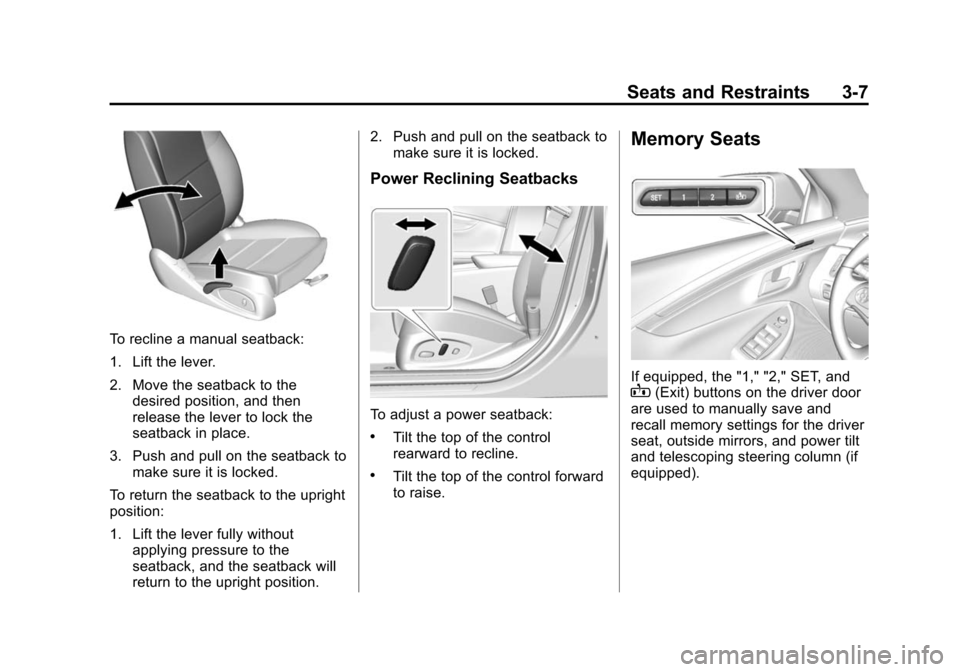
To recline a manual seatback:
1. Lift the lever.
2. Move the seatback to thedesired position, and then
release the lever to lock the
seatback in place.
3. Push and pull on the seatback to make sure it is locked.
To return the seatback to the upright
position:
1. Lift the lever fully without applying pressure to the
seatback, and the seatback will
return to the upright position. 2. Push and pull on the seatback to
make sure it is locked.
Power Reclining Seatbacks
To adjust a power seatback:
.Tilt the top of the control
rearward to recline.
.Tilt the top of the control forward
to raise.
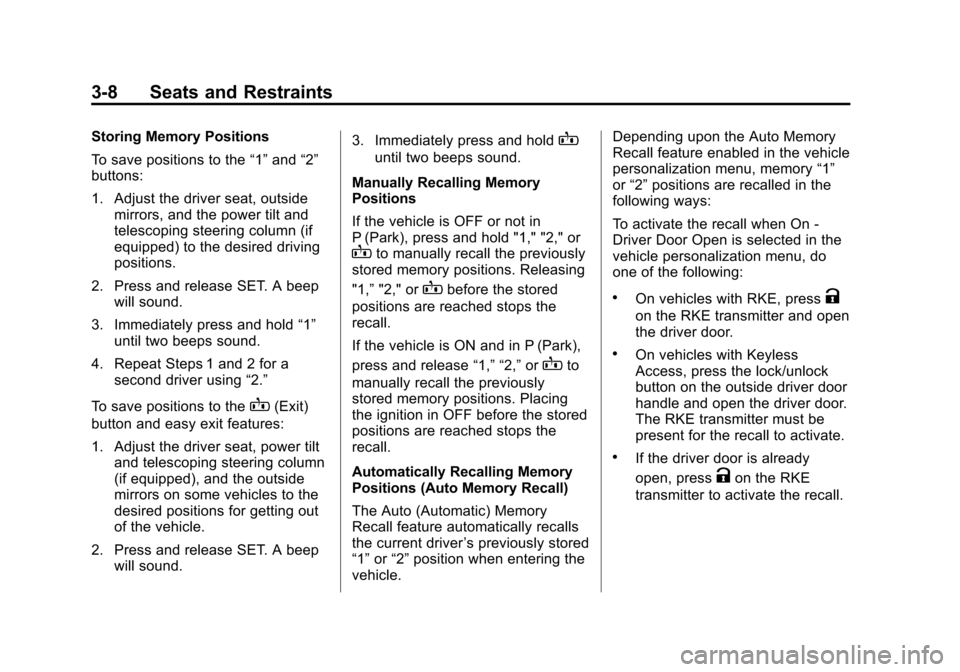
Memory Seats
If equipped, the "1," "2," SET, andB(Exit) buttons on the driver door
are used to manually save and
recall memory settings for the driver
seat, outside mirrors, and power tilt
and telescoping steering column (if
equipped).
Page 67 of 413
Black plate (8,1)Chevrolet Impala Owner Manual (GMNA-Localizing-U.S./Canada-7576026) -
2015 - crc 2nd edition - 8/21/14
3-8 Seats and Restraints
Storing Memory Positions
To save positions to the“1”and “2”
buttons:
1. Adjust the driver seat, outside mirrors, and the power tilt and
telescoping steering column (if
equipped) to the desired driving
positions.
2. Press and release SET. A beep will sound.
3. Immediately press and hold “1”
until two beeps sound.
4. Repeat Steps 1 and 2 for a second driver using “2.”
To save positions to the
B(Exit)
button and easy exit features:
1. Adjust the driver seat, power tilt and telescoping steering column
(if equipped), and the outside
mirrors on some vehicles to the
desired positions for getting out
of the vehicle.
2. Press and release SET. A beep will sound. 3. Immediately press and hold
B
until two beeps sound.
Manually Recalling Memory
Positions
If the vehicle is OFF or not in
P (Park), press and hold "1," "2," or
Bto manually recall the previously
stored memory positions. Releasing
"1,” "2," or
Bbefore the stored
positions are reached stops the
recall.
If the vehicle is ON and in P (Park),
press and release “1,” “2,”or
Bto
manually recall the previously
stored memory positions. Placing
the ignition in OFF before the stored
positions are reached stops the
recall.
Automatically Recalling Memory
Positions (Auto Memory Recall)
The Auto (Automatic) Memory
Recall feature automatically recalls
the current driver ’s previously stored
“1” or“2” position when entering the
vehicle. Depending upon the Auto Memory
Recall feature enabled in the vehicle
personalization menu, memory
“1”
or “2” positions are recalled in the
following ways:
To activate the recall when On -
Driver Door Open is selected in the
vehicle personalization menu, do
one of the following:
.On vehicles with RKE, pressK
on the RKE transmitter and open
the driver door.
.On vehicles with Keyless
Access, press the lock/unlock
button on the outside driver door
handle and open the driver door.
The RKE transmitter must be
present for the recall to activate.
.If the driver door is already
open, press
Kon the RKE
transmitter to activate the recall.
Page 68 of 413

Black plate (9,1)Chevrolet Impala Owner Manual (GMNA-Localizing-U.S./Canada-7576026) -
2015 - crc 2nd edition - 8/21/14
Seats and Restraints 3-9
To activate the recall when On - At
Ignition On is selected in the vehicle
personalization menu:
.Place the ignition in ON/RUN/
START.
See Vehicle Personalization on
page 5-37.
To stop recall movement, press one
of the memory, power mirror,
or power seat controls; or press the
power tilt and telescoping steering
column control (if equipped). If On -
At Ignition On is selected in the
vehicle personalization menu,
placing the ignition in OFF/LOCK
also stops the recall.
Easy Exit Recall
If programmed on in the vehicle
personalization menu, the easy exit
feature automatically moves the
driver seat, power tilt and
telescoping steering column (if
equipped), and outside mirrors on
some vehicles to the memory
positions saved to the
B(Exit)
button. See “Storing Memory Positions”
listed previously. See
also Vehicle Personalization on
page 5-37.
Easy exit recall automatically
activates when one of the following
occurs:
.The vehicle is turned off and the
driver door is opened within a
short time.
.The vehicle is turned off with the
driver door open.
Obstructions
If something has blocked the driver
seat and/or power tilt and
telescoping steering column (if
equipped) while recalling a memory
position, the recall may stop.
Remove the obstruction. Then do
one of the following:
.If manually recalling the position,
press and hold the appropriate
manual control for the memory
item that is not recalling for
two seconds. Try recalling again
by pressing the appropriate
memory button.
.If automatically recalling the
position, press and hold the
appropriate manual control for
the memory item that is not
recalling for two seconds. Try
recalling again by opening the
driver door and pressing
Kon
the RKE transmitter.
.If recalling the exit position,
press and hold the appropriate
manual control for the exit
feature not recalling for
two seconds. Then try recalling
the exit position again.
If the memory position is still not
recalling, see your dealer for
service.
Page 148 of 413

Black plate (33,1)Chevrolet Impala Owner Manual (GMNA-Localizing-U.S./Canada-7576026) -
2015 - crc 2nd edition - 8/21/14
Instruments and Controls 5-33
AUTOMATIC COLLISION PREP
REDUCED
This message displays when the
Active Emergency Braking System
has been set to the Alert setting.
This setting disables most Active
Emergency Braking functions. Some
last-second automatic braking
capability is still provided with the
Alert setting, but braking is less
likely to occur. SeeActive
Emergency Braking System on
page 9-48.
AUTOMATIC COLLISION PREP
UNAVAILABLE
This message displays when the
Active Emergency Braking System
has been unavailable for some time.
The Active Emergency Braking
System does not need service. This
can occur under the following
conditions:
.The radar is not clean. Keep the
radar sensors free of mud, dirt,
snow, ice, and slush. Clean the
entire front and/or rear of the vehicle. For cleaning
instructions, see
Exterior Care
on page 10-71.
.Heavy rain or snow is interfering
with the radar object detection or
camera performance.
This message may also be
displayed if there is a problem with
the StabiliTrak system.
FORWARD COLLISION
ALERT OFF
This message displays when the
Forward Collision Alert has been
turned off.
FRONT CAMERA BLOCKED
CLEAN WINDSHIELD
This message displays when the
camera is blocked. Cleaning the
outside of the windshield behind the
rearview mirror may correct the
issue. The Lane Departure Warning
system will not operate. Forward
Collision Alert (FCA) may not work
or may not work as well.
LANE DEPARTURE WARNING
UNAVAILABLE
This message displays when
attempting to activate the Lane
Departure Warning (LDW) system
when it is temporarily unavailable.
The LDW system does not need
service.
This message could be due to the
camera being blocked. Cleaning the
outside of the windshield behind the
rearview mirror may correct the
issue.
PARK ASSIST OFF
This message displays when the
Parking Assist system has been
turned off or when there is a
temporary condition causing the
system to be disabled.
REAR CROSS TRAFFIC
ALERT OFF
This message displays when the
Rear Cross Traffic Alert has been
turned off.
Page 155 of 413
Black plate (40,1)Chevrolet Impala Owner Manual (GMNA-Localizing-U.S./Canada-7576026) -
2015 - crc 2nd edition - 8/21/14
5-40 Instruments and Controls
SeeDriver Assistance Systems on
page 9-43.
Go Notifier
This feature will give a reminder that
Adaptive Cruise Control provides
when it has brought the vehicle to a
complete stop behind another
stopping vehicle, and then that
vehicle drives on.
Select Off or On.
See Active Emergency Braking
System on page 9-48.
Side Blind Zone Alert
This allows the feature to be turned
on or off.
Select Off or On.
See Side Blind Zone Alert (SBZA)
on page 9-50.
Rear Cross Traffic Alert
This allows the feature to be turned
on or off.
Select Off or On. See
Driver Assistance Systems on
page 9-43.
Comfort and Convenience
Select and the following may
display:
.Auto Memory Recall
.Easy Exit Options
.Chime Volume
.Reverse Tilt Mirror
Auto Memory Recall
This feature automatically recalls
the current driver ’s previously stored
1 or 2 button positions when
entering the vehicle. See Memory
Seats on page 3-7.
Select Off, On - Driver Door Open,
or On - At ignition On.
Easy Exit Options
This feature automatically recalls
the current driver ’s previously stored
Exit button position when exiting the
vehicle. See Memory Seats on
page 3-7. Select Off or On.
Chime Volume
This allows the selection of the
chime volume level.
Press + or
−to adjust the volume.
Reverse Tilt Mirror
When on, both the driver and
passenger, driver, or passenger
mirrors will tilt downward when the
vehicle is shifted to R (Reverse) to
improve visibility of the ground near
the rear wheels. They will return to
their previous driving position when
the vehicle is shifted out of
R (Reverse) or the ignition is turned
to OFF.
Select Off, On - Driver and
Passenger, On - Driver, or On -
Passenger.
Lighting
Select and the following may
display:
.Vehicle Locator Lights
.Exit Lighting
Page 205 of 413
Black plate (2,1)Chevrolet Impala Owner Manual (GMNA-Localizing-U.S./Canada-7576026) -
2015 - crc 2nd edition - 8/21/14
8-2 Climate Controls
Air Delivery Modes:PressY,\,
[, or-to change the direction of
the airflow. An indicator light comes
on in the selected mode button.
Y(Vent): Air is directed to the
instrument panel outlets.
\(Bi-Level): Air is directed to the
instrument panel outlets and the
floor outlets.
[(Floor): Air is directed to the
floor outlets.
-(Defog): Air is directed to the
windshield and floor outlets to clear
the windows of fog or moisture.
0(Defrost): Press to clear the
windshield of fog or frost more
quickly. Air is directed to the
windshield and side window outlets.
For best results, clear all snow and
ice from the windshield before
defrosting. A/C (Air Conditioning):
Press to
turn the air conditioning on or off.
If the fan is turned off, the air
conditioner will not run and the
indicator light may turn off.
L(Recirculation): Press to turn
on recirculation. An indicator light
comes on. Air is recirculated to
quickly cool the inside of the vehicle
or reduce the outside air and odors
that may enter.
Rear Window Defogger
K(Rear Window Defogger):
Press to turn the rear window
defogger on or off. An indicator light
on the button comes on to show that
the rear window defogger is on.
The upper region of gridlines on the
rear window are antenna lines and
are not intended to heat when the
defogger is activated. If equipped with heated outside
rearview mirrors, they turn on with
the rear window defogger and help
to clear fog or frost from the surface
of the mirror. See
Heated Mirrors on
page 2-20.
{Caution
Using a razor blade or sharp
object on the inside rear window
can damage the antenna or
defogger. Repairs would not be
covered by the vehicle warranty.
Do not stick anything to the rear
window.