2015 CHEVROLET IMPALA horn
[x] Cancel search: hornPage 308 of 413
Black plate (33,1)Chevrolet Impala Owner Manual (GMNA-Localizing-U.S./Canada-7576026) -
2015 - crc 2nd edition - 8/21/14
Vehicle Care 10-33
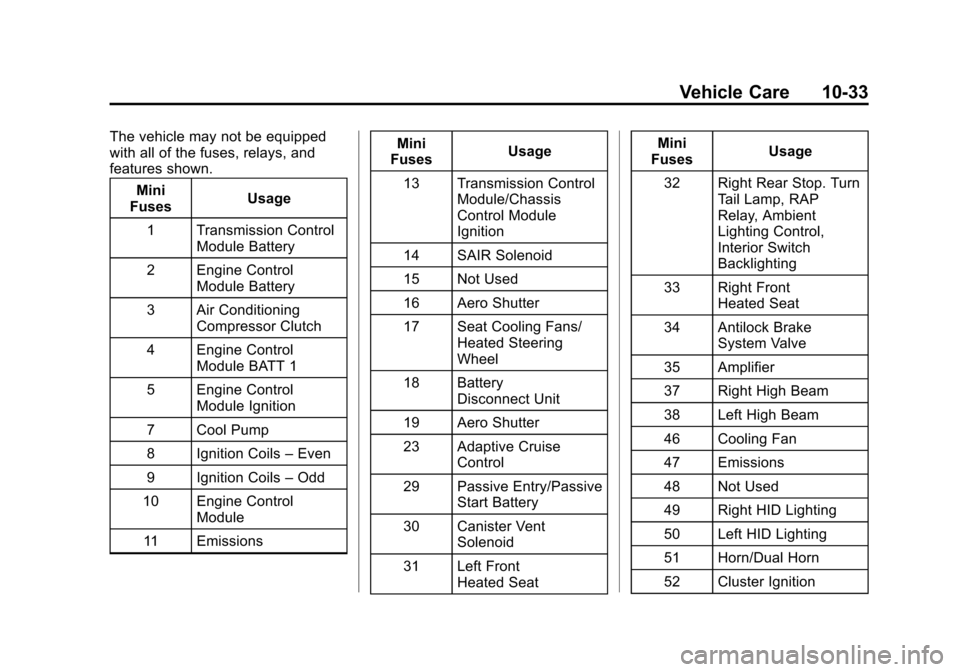
The vehicle may not be equipped
with all of the fuses, relays, and
features shown.Mini
Fuses Usage
1 Transmission Control Module Battery
2 Engine Control Module Battery
3 Air Conditioning Compressor Clutch
4 Engine Control Module BATT 1
5 Engine Control Module Ignition
7 Cool Pump
8 Ignition Coils –Even
9 Ignition Coils –Odd
10 Engine Control Module
11 Emissions Mini
Fuses Usage
13 Transmission Control Module/Chassis
Control Module
Ignition
14 SAIR Solenoid
15 Not Used
16 Aero Shutter
17 Seat Cooling Fans/ Heated Steering
Wheel
18 Battery Disconnect Unit
19 Aero Shutter
23 Adaptive Cruise Control
29 Passive Entry/Passive Start Battery
30 Canister Vent Solenoid
31 Left Front Heated Seat Mini
Fuses Usage
32 Right Rear Stop. Turn Tail Lamp, RAP
Relay, Ambient
Lighting Control,
Interior Switch
Backlighting
33 Right Front Heated Seat
34 Antilock Brake System Valve
35 Amplifier
37 Right High Beam
38 Left High Beam
46 Cooling Fan
47 Emissions
48 Not Used
49 Right HID Lighting
50 Left HID Lighting
51 Horn/Dual Horn
52 Cluster Ignition
Page 325 of 413

Black plate (50,1)Chevrolet Impala Owner Manual (GMNA-Localizing-U.S./Canada-7576026) -
2015 - crc 2nd edition - 8/21/14
10-50 Vehicle Care
The TPMS sensor matching
process is:
1. Set the parking brake.
2. Turn the ignition to ON/RUN withthe engine off or place the
vehicle power mode in ON/RUN/
START. See Ignition Positions
(Keyless Access) on page 9-14
or Ignition Positions (Key
Access) on page 9-16.
3. Make sure the Tire Pressure info page option is turned on. The
info pages on the DIC can be
turned on and off through the
Settings menu. See Driver
Information Center (DIC) on
page 5-25.
4. Use the DIC controls on the right side of the steering wheel to
scroll to the Tire Pressure
screen under the DIC info page. 5. Press and hold theV(Set/
Reset) button located in the
center of the DIC controls.
The horn sounds twice to signal
the receiver is in relearn mode
and the TIRE LEARNING
ACTIVE message displays on
the DIC screen.
6. Start with the driver side front tire.
7. Place the relearn tool against the tire sidewall, near the valve
stem. Then press the button to
activate the TPMS sensor.
A horn chirp confirms that the
sensor identification code has
been matched to this tire and
wheel position.
8. Proceed to the passenger side front tire, and repeat the
procedure in Step 7.
9. Proceed to the passenger side rear tire, and repeat the
procedure in Step 7. 10. Proceed to the driver side rear
tire, and repeat the procedure
in Step 7. The horn sounds two
times to indicate the sensor
identification code has been
matched to the driver side rear
tire, and the TPMS sensor
matching process is no longer
active. The TIRE LEARNING
ACTIVE message on the DIC
display screen goes off.
11. Turn the ignition to LOCK/OFF or press STOP to turn the
ignition off.
12. Set all four tires to the recommended air pressure
level as indicated on the Tire
and Loading Information label.
Tire Inspection
We recommend that the tires,
including the spare tire, if the
vehicle has one, be inspected
for signs of wear or damage at
least once a month.
Page 393 of 413
Black plate (4,1)Chevrolet Impala Owner Manual (GMNA-Localizing-U.S./Canada-7576026) -
2015 - crc 2nd edition - 8/21/14
14-4 OnStar
navigation system in the vehicle (if
equipped). After the call ends, press
the“Go” button on the navigation
screen to begin driving directions.
If directions are downloaded to the
navigation system, the route can
only be canceled through the
navigation system.
Destinations can also be
downloaded on the go. For
information about eNav or
Destination Download, see
www.onstar.com (U.S.) or
www.onstar.ca (Canada).
Connections
The required specific Onstar
subscription plan includes the
services that follow to help
customers stay connected.
For coverage maps, see
www.onstar.com (U.S.) or
www.onstar.ca (Canada). WiFi Connectivity (If Equipped)
The vehicle has a WiFi hotspot that
provides a high-speed, wireless
Internet connection to connect
multiple mobile devices (data plan
required).
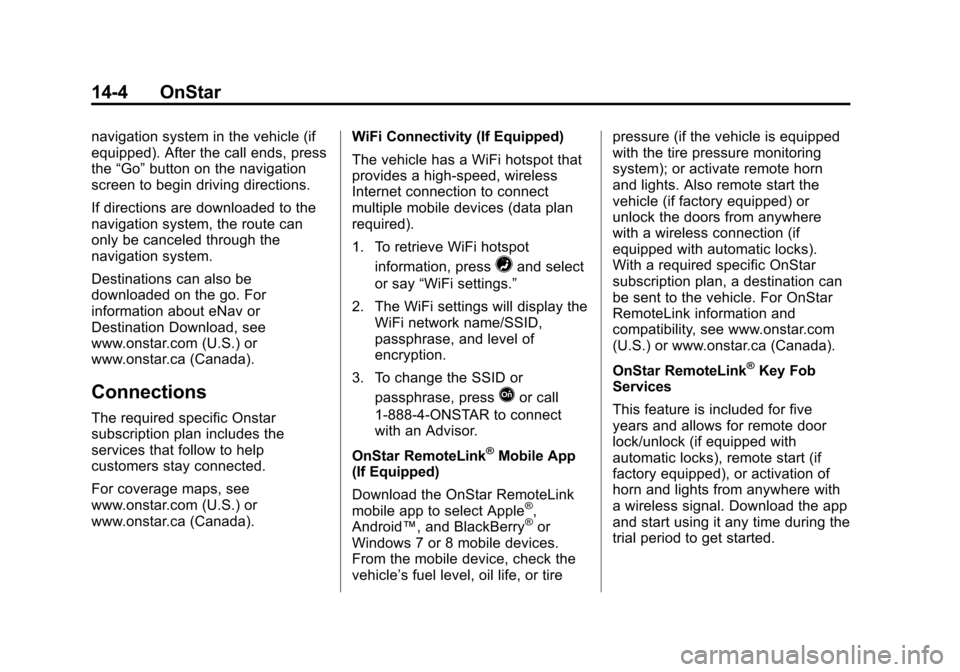
1. To retrieve WiFi hotspot
information, press
=and select
or say “WiFi settings.”
2. The WiFi settings will display the WiFi network name/SSID,
passphrase, and level of
encryption.
3. To change the SSID or passphrase, press
Qor call
1-888-4-ONSTAR to connect
with an Advisor.
OnStar RemoteLink
®Mobile App
(If Equipped)
Download the OnStar RemoteLink
mobile app to select Apple
®,
Android™, and BlackBerry®or
Windows 7 or 8 mobile devices.
From the mobile device, check the
vehicle’s fuel level, oil life, or tire pressure (if the vehicle is equipped
with the tire pressure monitoring
system); or activate remote horn
and lights. Also remote start the
vehicle (if factory equipped) or
unlock the doors from anywhere
with a wireless connection (if
equipped with automatic locks).
With a required specific OnStar
subscription plan, a destination can
be sent to the vehicle. For OnStar
RemoteLink information and
compatibility, see www.onstar.com
(U.S.) or www.onstar.ca (Canada).
OnStar RemoteLink
®Key Fob
Services
This feature is included for five
years and allows for remote door
lock/unlock (if equipped with
automatic locks), remote start (if
factory equipped), or activation of
horn and lights from anywhere with
a wireless signal. Download the app
and start using it any time during the
trial period to get started.
Page 405 of 413

Black plate (6,1)Chevrolet Impala Owner Manual (GMNA-Localizing-U.S./Canada-7576026) -
2015 - crc 2nd edition - 8/21/14
i-6 INDEX
Heating and Air Conditioning . . . 8-1
High Voltage Devices andWiring . . . . . . . . . . . . . . . . . . . . . . . 10-30
High-Beam On Light . . . . . . . . . . . 5-24
High-Speed Operation . . . . . . . . 10-46
Hill and Mountain Roads . . . . . . . . 9-7
Hill Start Assist (HSA) . . . . . . . . . 9-30
Home Page . . . . . . . . . . . . . . . . . . . . . 7-4
Hood . . . . . . . . . . . . . . . . . . . . . . . . . . 10-4
Horn . . . . . . . . . . . . . . . . . . . . . . . . . . . . 5-3
How to Wear Safety Belts Properly . . . . . . . . . . . . . . . . . . . . . . 3-14
I
Ignition Positions . . . . . . . . 9-14, 9-16
Ignition Transmission LockCheck . . . . . . . . . . . . . . . . . . . . . . . 10-24
Immobilizer . . . . . . . . . . . . . . . . . . . . 2-18
Indicator
Vehicle Ahead . . . . . . . . . . . . . . . . 5-22
Infants and Young Children, Restraints . . . . . . . . . . . . . . . . . . . . 3-35
Infotainment . . . . . . . . . . . . . . . . . . . . 7-1
Infotainment System . . . . . . . . . . 13-15
Instrument Cluster . . . . . . . . . . . . . . 5-9 Instrument Panel
Storage Area . . . . . . . . . . . . . . . . . . 4-1
Interior Rearview Mirrors . . . . . . . 2-21
Introduction . . . . . . . . . . . . . . . . . . . . . . . iii
J
Jack Auxiliary . . . . . . . . . . . . . . . . . . . . . . 7-17
Jump Starting . . . . . . . . . . . . . . . . . 10-66
K
Key and Lock Messages . . . . . . . 5-31
Keyless Entry
Remote (RKE) System . . . . . . . . 2-3
Keys . . . . . . . . . . . . . . . . . . . . . . . . . . . . 2-1
L
Labeling, Tire Sidewall . . . . . . . . 10-39
Lamps Courtesy . . . . . . . . . . . . . . . . . . . . . . . 6-4
Daytime Running (DRL) . . . . . . . 6-2
Dome . . . . . . . . . . . . . . . . . . . . . . . . . . 6-5
Exterior Controls . . . . . . . . . . . . . . . 6-1
Exterior Lamps OffReminder . . . . . . . . . . . . . . . . . . . . 6-1 Lamps (cont'd)
License Plate . . . . . . . . . . . . . . . 10-29
Malfunction Indicator . . . . . . . . . 5-17
Messages . . . . . . . . . . . . . . . . . . . . 5-32
On Reminder . . . . . . . . . . . . . . . . . 5-24
Reading . . . . . . . . . . . . . . . . . . . . . . . 6-5
Lane Departure Warning (LDW) . . . . . . . . . . . . . . . 9-52
Lane Departure Warning
Light . . . . . . . . . . . . . . . . . . . . . . . . . 5-21
Lap-Shoulder Belt . . . . . . . . . . . . . 3-15
LATCH System Replacing Parts after aCrash . . . . . . . . . . . . . . . . . . . . . . . 3-47
LATCH, Lower Anchors and Tethers for Children . . . . . . . . . . 3-41
LED Lighting . . . . . . . . . . . . . . . . . . 10-26
Lighting Entry . . . . . . . . . . . . . . . . . . . . . . . . . . 6-6
Exit . . . . . . . . . . . . . . . . . . . . . . . . . . . . 6-6
Illumination Control . . . . . . . . . . . . 6-4
LED . . . . . . . . . . . . . . . . . . . . . . . . 10-26
Lights
Airbag Readiness . . . . . . . . . . . . . 5-15
Antilock Brake System(ABS) Warning . . . . . . . . . . . . . . 5-21
Brake System Warning . . . . . . . 5-20