2015 CHEVROLET EQUINOX air condition
[x] Cancel search: air conditionPage 133 of 391
Black plate (26,1)Chevrolet Equinox Owner Manual (GMNA-Localizing-U.S./Canada-
7707483) - 2015 - crc - 9/29/14
5-26 Instruments and Controls
Brake System Messages
BRAKE FLUID LOW
This message is displayed when the
brake fluid level is low; seeBrake
Fluid on page 10-22.
RELEASE PARKING BRAKE
This message is displayed as a
reminder that the parking brake is
on. Release it before you attempt to
drive.
Compass Messages
CAL
This message is displayed when the
compass needs to be calibrated.
See Compass on page 5-4.
– –
Dashes will be displayed if the
compass needs service. See your
dealer for service.
Cruise Control Messages
APPLY BRAKE BEFORE
CRUISE
If this message displays when
attempting to activate cruise control,
apply the brake pedal and try again.
CRUISE SET TO XXX
This message displays when the
cruise control is set and shows the
speed it was set to. See Cruise
Control on page 9-35.
Door Ajar Messages
DOOR OPEN
A door open symbol will be
displayed on the DIC showing which
door is open. If the vehicle has been
shifted out of P (Park), a DOOR
OPEN message will also be
displayed. Close the door
completely.
MANUALLY CLOSE THE
POWER LIFTGATE
This message will display if the
power liftgate encounters multiple
obstacles on the same power cycle.
After removing the obstructions, the
liftgate will resume normal power
operation.
REAR ACCESS OPEN
This message will display along with
a symbol when the liftgate is open.
Close the liftgate completely.
Engine Cooling System
Messages
A/C OFF DUE TO HIGH
ENGINE TEMP
This message displays when the
engine coolant becomes hotter than
the normal operating temperature.
To avoid added strain on a hot
engine, the air conditioning
compressor automatically turns off.
When the coolant temperature
returns to normal, the air
Page 134 of 391
Black plate (27,1)Chevrolet Equinox Owner Manual (GMNA-Localizing-U.S./Canada-
7707483) - 2015 - crc - 9/29/14
Instruments and Controls 5-27
conditioning compressor turns back
on. The vehicle can continue to be
driven.
If this message continues to appear,
have the system repaired by your
dealer as soon as possible to avoid
damage to the engine.
COOLANT LEVEL LOW ADD
COOLANT
This message will display if the
coolant is low. SeeEngine Coolant
on page 10-15.
ENGINE OVERHEATED —
IDLE ENGINE
This message displays when the
engine coolant temperature is too
hot. Stop and allow the vehicle to
idle until it cools down.
ENGINE OVERHEATED —
STOP ENGINE
This message displays and a
continuous chime sounds if the
engine cooling system reaches
unsafe temperatures for operation.
Stop and turn off the vehicle as soon as it is safe to do so to avoid
severe damage. This message
clears when the engine has cooled
to a safe operating temperature.
HIGH COOLANT
TEMPERATURE
This message displays if the coolant
temperature is hot. See
Engine
Overheating on page 10-18.
Engine Oil Messages
CHANGE ENGINE OIL SOON
This message displays when the
engine oil needs to be changed.
When you change the engine oil, be
sure to reset the oil life system. See
Engine Oil Life System on
page 10-11, Driver Information
Center (DIC) on page 5-22, Engine
Oil on page 10-8, and Maintenance
Schedule on page 11-2.
ENGINE OIL HOT, IDLE
ENGINE
This message displays when the
engine oil temperature is too hot.
Stop and allow the vehicle to idle
until it cools down.
ENGINE OIL LOW —ADD OIL
On some vehicles, this message
displays when the engine oil level
may be too low. Check the oil level
before filling to the recommended
level. If the oil is not low and this
message remains on, take the
vehicle to your dealer for service.
See Engine Oil on page 10-8.
OIL PRESSURE LOW —STOP
ENGINE
This message displays if low oil
pressure levels occur. Stop the
vehicle as soon as safely possible
and do not operate it until the cause
of the low oil pressure has been
corrected. Check the oil as soon as
possible and have the vehicle
serviced by your dealer.
Page 137 of 391
Black plate (30,1)Chevrolet Equinox Owner Manual (GMNA-Localizing-U.S./Canada-
7707483) - 2015 - crc - 9/29/14
5-30 Instruments and Controls
still displays or appears again when
you begin driving, the system needs
service. See your dealer right away.
SERVICE TRACTION
CONTROL
This message displays when there
is a problem with the Traction
Control System (TCS). SeeTraction
Control/Electronic Stability Control
on page 9-33.
SERVICE STABILITRAK
This message displays if there is a
problem with the StabiliTrak system.
See Traction Control/Electronic
Stability Control on page 9-33.
STABILITRAK OFF
This message displays when the
StabiliTrak system is turned off. See
Traction Control/Electronic Stability
Control on page 9-33.
TRACTION CONTROL OFF
This message displays when the
Traction Control System (TCS) is
turned off. Adjust your driving
accordingly.
TRACTION CONTROL ON
This message displays when the
Traction Control System (TCS) is
first turned on. See Traction Control/
Electronic Stability Control on
page 9-33.
Airbag System Messages
SERVICE AIRBAG
This message displays if there is a
problem with the airbag system.
Take the vehicle to your dealer for
service.
Security Messages
THEFT ATTEMPTED
This message displays if the vehicle
detects a tamper condition.
Service Vehicle Messages
SERVICE POWER STEERING
This message is displayed if there is
a problem with the power steering
system and a chime may sound.
Take the vehicle to your dealer for
service.
SERVICE VEHICLE SOON
This message is displayed if there is
a problem with the vehicle. Take the
vehicle to your dealer for service.
Tire Messages
SERVICE TIRE MONITOR
SYSTEM
This message displays if there is a
problem with the Tire Pressure
Monitor System (TPMS). See Tire
Pressure Monitor Operation on
page 10-46.
Page 138 of 391
Black plate (31,1)Chevrolet Equinox Owner Manual (GMNA-Localizing-U.S./Canada-
7707483) - 2015 - crc - 9/29/14
Instruments and Controls 5-31
TIRE LEARNING ACTIVE
This message displays when the
system is learning new tires. See
Tire Pressure Monitor Operation on
page 10-46.
TIRE LOW ADD AIR TO TIRE
This message displays when the
pressure in one or more of the tires
is low.
This message also displays LEFT
FRONT, RIGHT FRONT, LEFT
REAR, or RIGHT REAR to indicate
the location of the low tire.
The low tire pressure warning light
will also come on. SeeTire
Pressure Light on page 5-19.
If a tire pressure message appears
on the DIC, stop as soon as you
can. Inflate the tires by adding air
until the tire pressure is equal to the
values shown on the Tire and
Loading Information label. See Tires
on page 10-36, Vehicle Load Limits
on page 9-14, and Tire Pressure on
page 10-44. You can receive more than one tire
pressure message at a time. The
DIC also shows the tire pressure
values. See
Driver Information
Center (DIC) on page 5-22.
Transmission Messages
SERVICE TRANSMISSION
This message displays if there is a
problem with the transmission. See
your dealer.
SHIFT TO PARK
This message displays when the
transmission needs to be shifted to
P (Park). This may appear when
attempting to remove the key from
the ignition or from the vehicle if the
vehicle is not in P (Park).
TRANSMISSION HOT —IDLE
ENGINE
This message displays and a chime
sounds if the transmission fluid in
the vehicle gets hot. Driving with the
transmission fluid temperature high
can cause damage to the vehicle. Stop the vehicle and let it idle to
allow the transmission to cool. This
message clears when the fluid
temperature reaches a safe level.
Vehicle Reminder
Messages
ICE POSSIBLE DRIVE
WITH CARE
This message is displayed when ice
conditions are possible.
TURN WIPER CONTROL TO
INTERMITTENT FIRST
This message is displayed when
attempting to adjust the intermittent
wiper speed without intermittent
selected on the wiper control. See
Windshield Wiper/Washer on
page 5-3.
Page 142 of 391
Black plate (35,1)Chevrolet Equinox Owner Manual (GMNA-Localizing-U.S./Canada-
7707483) - 2015 - crc - 9/29/14
Instruments and Controls 5-35
Sort
This feature allows the icons on the
Home Page to be moved.
Select and follow the screen
prompts.
Restore Home Page Defaults
This feature will restore the Home
Page to the factory settings.
Select and follow the screen
prompts.
Rear Camera Options
For more information on Rear
Camera Options, seeRear Vision
Camera (RVC) on page 9-41.
Display Off
Press to turn the display off. The
display will return when any radio
buttons are pressed or the screen is
touched (if equipped).
Map Settings
See “Map Settings” in“Configure
Menu” in the infotainment manual.
Vehicle Settings
Select and the following may
display:
.Climate and Air Quality
.Comfort and Convenience
.Collision Detection Systems
.Lighting
.Power Door Locks
.Remote Lock/Unlock/Start
.Return to Factory Settings?
Climate and Air Quality
Select and the following may
display:
.Auto Fan Speed
.Air Conditioning Mode
.Remote Start Auto Heat Seats
.Auto Defog
.Auto Rear Defog Auto Fan Speed
This selection is available on
vehicles with the Automatic Climate
Control System. Choose from the
following blower speed settings:
Select High, Medium, or Low
Air Conditioning Mode
This will allow you to select whether
or not the air conditioning comes on
automatically the next time the
vehicle is started. On means that
the air conditioning will be on at
start up, regardless of whether it
was on or off the last time the
vehicle was turned off. Off means
the air conditioning will be off at the
next start up, regardless of whether
it was on or off the last time the
vehicle was turned off. Last Setting
means that when the vehicle is
started, the air conditioning will
resume whichever setting it was at
the last time the vehicle was
turned off.
Select On, Off, or Last Setting.
Page 143 of 391
Black plate (36,1)Chevrolet Equinox Owner Manual (GMNA-Localizing-U.S./Canada-
7707483) - 2015 - crc - 9/29/14
5-36 Instruments and Controls
Remote Start Auto Heat Seats
When on, this feature will turn the
heated seats on when using remote
start on cold days.
Select On or Off.
Auto Defog
When turned on and high humidity
is detected, the climate control
system may adjust to outside air
supply and turn on the air
conditioner or the heater. The fan
speed may slightly increase to help
prevent fogging. When high
humidity is no longer detected, the
system will return to its prior
operation.
Select On or Off.
Auto Rear Defog
When on, this feature turns on the
rear defogger at vehicle start when
the interior temperature is cold and
fog is likely. The auto rear defog
function can be disabled by
pressing
1. When off, the feature
can be turned on by pressing
1. See
“Rear Window Defogger” under
Climate Control Systems on
page 8-1 orAutomatic Climate
Control System on page 8-3.
Select On or Off.
Comfort and Convenience
Select and the following may
display:
.Easy Exit Driver Seat
.Chime Volume
.Reverse Tilt Mirror
.Memory Remote Recall
Easy Exit Driver Seat
This feature moves the seat
rearward allowing the driver more
room to exit the vehicle. See “Easy
Exit Driver Seat” underMemory
Seats on page 3-6.
Select On or Off.
Chime Volume
This allows the selection of the
chime volume level.
Select Normal or High. Reverse Tilt Mirror
When on, both the driver and
passenger mirrors will tilt downward
when the vehicle is shifted to
R (Reverse) to improve visibility of
the ground near the rear wheels.
They will return to their previous
driving position when the vehicle is
shifted out of R (Reverse), the
ignition is turned to OFF, or the
vehicle is left in R (Reverse). See
Reverse Tilt Mirrors on page 2-16.
Select On or Off.
Memory Remote Recall
This feature automatically recalls
the current driver
’s previously stored
1 or 2 button positions when
entering the vehicle. See "Recalling
RKE Memory Positions (Memory
Remote Recall)" under Memory
Seats on page 3-6.
Select On or Off.
Collision Detection Systems
Select the following may display:
.Park Assist
Page 190 of 391
Black plate (1,1)Chevrolet Equinox Owner Manual (GMNA-Localizing-U.S./Canada-
7707483) - 2015 - crc - 9/29/14
Climate Controls 8-1
Climate Controls
Climate Control Systems
Climate Control Systems . . . . . . 8-1
Automatic Climate ControlSystem . . . . . . . . . . . . . . . . . . . . . . 8-3
Air Vents
Air Vents . . . . . . . . . . . . . . . . . . . . . . 8-6
Maintenance
Passenger Compartment AirFilter . . . . . . . . . . . . . . . . . . . . . . . . . 8-7
Climate Control Systems
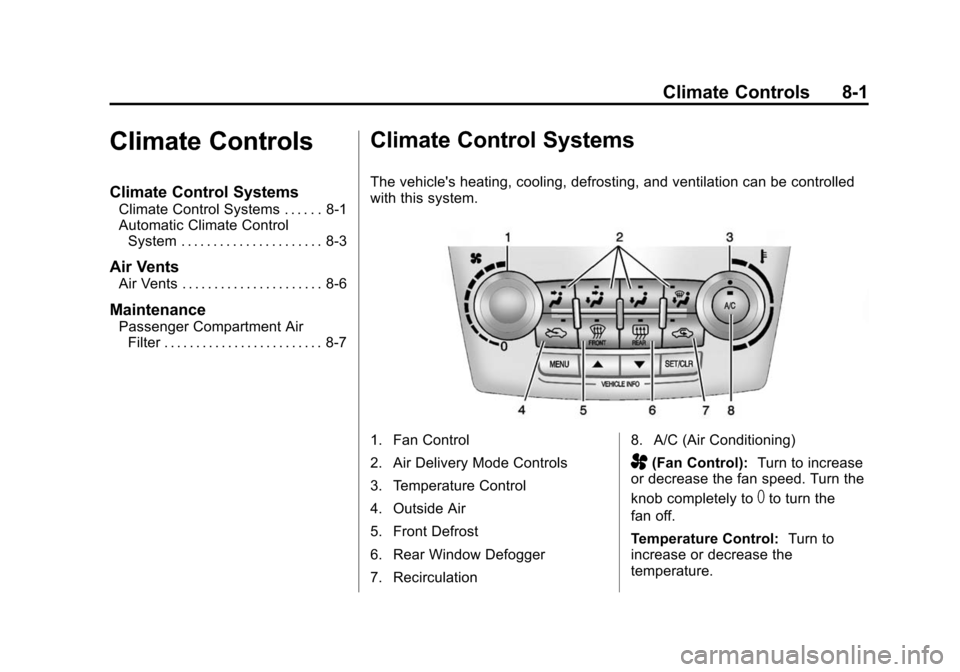
The vehicle's heating, cooling, defrosting, and ventilation can be controlled
with this system.
1. Fan Control
2. Air Delivery Mode Controls
3. Temperature Control
4. Outside Air
5. Front Defrost
6. Rear Window Defogger
7. Recirculation 8. A/C (Air Conditioning)
A(Fan Control):
Turn to increase
or decrease the fan speed. Turn the
knob completely to
Tto turn the
fan off.
Temperature Control: Turn to
increase or decrease the
temperature.
Page 191 of 391
Black plate (2,1)Chevrolet Equinox Owner Manual (GMNA-Localizing-U.S./Canada-
7707483) - 2015 - crc - 9/29/14
8-2 Climate Controls
Air Delivery Mode Control:To
change the current mode, select
one of the following:
F (Vent): Air is directed to the
instrument panel outlets.
* (Bi-Level): Air is directed to the
instrument panel outlets and the
floor outlets.
7 (Floor): Air is directed to the
floor outlets.
W(Defog): Clears the windows of
fog or moisture. Air is directed to the
windshield and floor outlets.
0FRONT (Front Defrost): Clears
the windshield of fog or frost more
quickly. Air is directed to the
windshield and side window outlets.
For best results, clear all snow and
ice from the windshield before
defrosting.
Do not drive the vehicle until all the
windows are clear.
If equipped with the Fuel Economy
Mode, the climate controls may take
longer to heat or cool the cabin and the rear window defogger will turn
off sooner, when this feature is in
use. See
Fuel Economy Mode on
page 9-29.
Air Conditioning
A/C (Air Conditioning): Press to
turn the air conditioning on or off.
If the fan is turned off or the outside
temperature falls below freezing, the
air conditioning will not work.
h(Recirculation): Press to turn
on the recirculation. An indicator
light comes on. Air is recirculated
inside the vehicle. It helps to quickly
cool the air inside the vehicle and
reduce the outside air and odor that
might enter. The air conditioning
may come on under certain
conditions.
To improve fuel efficiency and to
cool the vehicle faster, recirculation
may be automatically selected in
warm weather. The recirculation
light will not come on. To override
this feature, select outside air.
%(Outside Air): Press to turn
on the outside air. An indicator light
comes on. Outside air is circulated
throughout the vehicle.
Rear Window Defogger
1REAR (Rear Defogger): Press
to turn the rear window defogger on
or off. An indicator light on the
button comes on to show that the
rear window defogger is on. It turns
off if the ignition is put in the ACC/
ACCESSORY or LOCK/OFF
position.
The ignition must be on to use the
rear window defogger.
Do not drive the vehicle until all the
windows are clear.
{Caution
Do not use a razor blade or sharp
object to clear the inside rear
window. Do not adhere anything
to the defogger grid lines in the
(Continued)