2015 CHEVROLET CRUZE infotainment
[x] Cancel search: infotainmentPage 155 of 417
Black plate (4,1)Chevrolet Cruze Owner Manual (GMNA-Localizing-U.S./Canada-7707493) -
2015 - crc - 11/24/14
7-4 Infotainment System
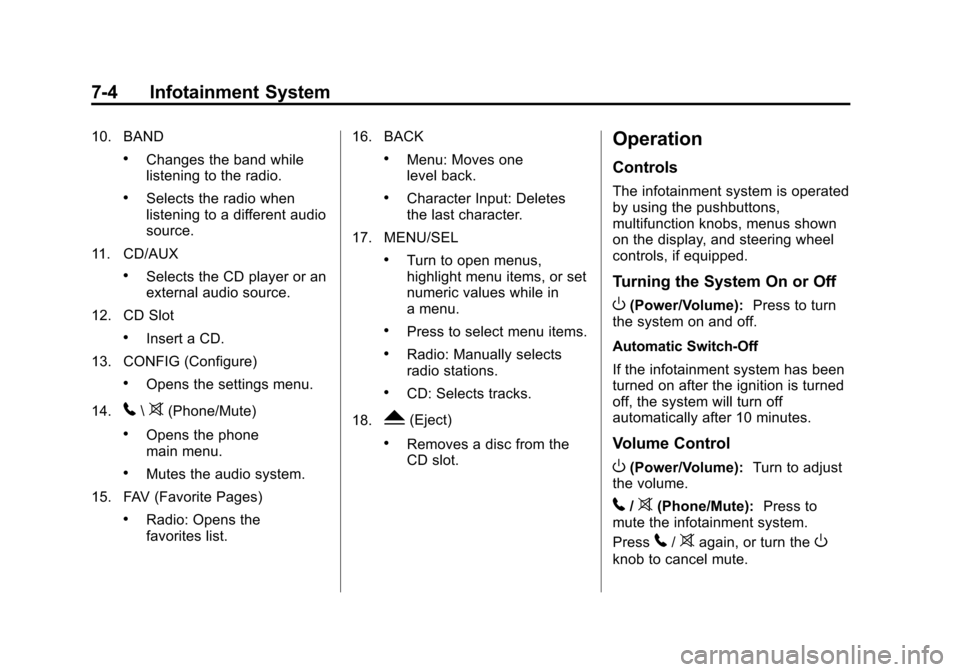
10. BAND
.Changes the band while
listening to the radio.
.Selects the radio when
listening to a different audio
source.
11. CD/AUX
.Selects the CD player or an
external audio source.
12. CD Slot
.Insert a CD.
13. CONFIG (Configure)
.Opens the settings menu.
14.
5\>(Phone/Mute)
.Opens the phone
main menu.
.Mutes the audio system.
15. FAV (Favorite Pages)
.Radio: Opens the
favorites list. 16. BACK
.Menu: Moves one
level back.
.Character Input: Deletes
the last character.
17. MENU/SEL
.Turn to open menus,
highlight menu items, or set
numeric values while in
a menu.
.Press to select menu items.
.Radio: Manually selects
radio stations.
.CD: Selects tracks.
18.
Y(Eject)
.Removes a disc from the
CD slot.
Operation
Controls
The infotainment system is operated
by using the pushbuttons,
multifunction knobs, menus shown
on the display, and steering wheel
controls, if equipped.
Turning the System On or Off
O(Power/Volume): Press to turn
the system on and off.
Automatic Switch-Off
If the infotainment system has been
turned on after the ignition is turned
off, the system will turn off
automatically after 10 minutes.
Volume Control
O(Power/Volume): Turn to adjust
the volume.
5/>(Phone/Mute): Press to
mute the infotainment system.
Press
5/>again, or turn theO
knob to cancel mute.
Page 156 of 417
Black plate (5,1)Chevrolet Cruze Owner Manual (GMNA-Localizing-U.S./Canada-7707493) -
2015 - crc - 11/24/14
Infotainment System 7-5
Menu System
The menu system appears on the
display screen.
Controls
The MENU/SEL knob and the BACK
button are used to navigate the
menu system.
MENU/SEL Knob:Press to:
.Enter the menu system.
.Select or activate the highlighted
menu option.
.Confirm a set value.
.Turn a system setting on or off.
Turn to:
.Highlight a menu option.
.Select a value.
BACK: Press to:
.Exit a menu.
.Return from a submenu screen
to the previous menu screen.
.Delete the last character in a
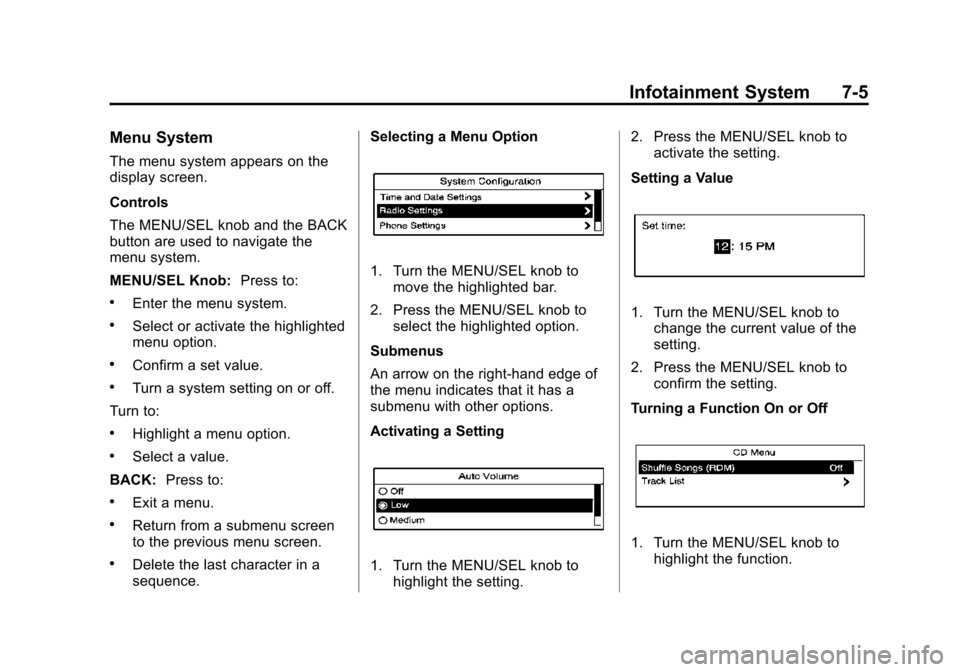
sequence. Selecting a Menu Option
1. Turn the MENU/SEL knob to
move the highlighted bar.
2. Press the MENU/SEL knob to select the highlighted option.
Submenus
An arrow on the right-hand edge of
the menu indicates that it has a
submenu with other options.
Activating a Setting
1. Turn the MENU/SEL knob to highlight the setting. 2. Press the MENU/SEL knob to
activate the setting.
Setting a Value
1. Turn the MENU/SEL knob to change the current value of the
setting.
2. Press the MENU/SEL knob to confirm the setting.
Turning a Function On or Off
1. Turn the MENU/SEL knob to highlight the function.
Page 157 of 417
Black plate (6,1)Chevrolet Cruze Owner Manual (GMNA-Localizing-U.S./Canada-7707493) -
2015 - crc - 11/24/14
7-6 Infotainment System
2. Press the MENU/SEL knob toturn the function on or off.
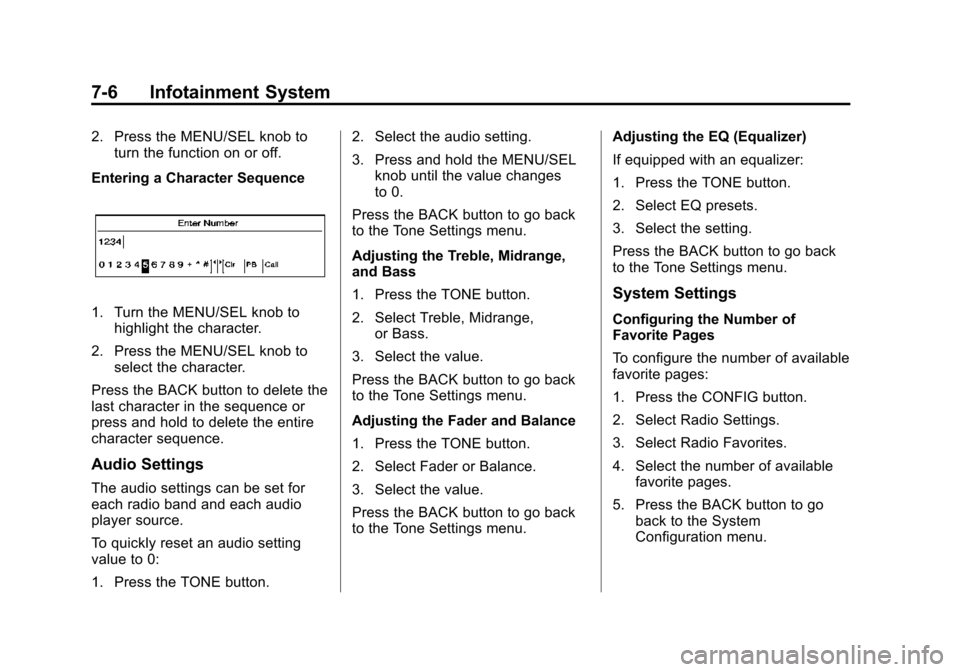
Entering a Character Sequence
1. Turn the MENU/SEL knob to highlight the character.
2. Press the MENU/SEL knob to select the character.
Press the BACK button to delete the
last character in the sequence or
press and hold to delete the entire
character sequence.
Audio Settings
The audio settings can be set for
each radio band and each audio
player source.
To quickly reset an audio setting
value to 0:
1. Press the TONE button. 2. Select the audio setting.
3. Press and hold the MENU/SEL
knob until the value changes
to 0.
Press the BACK button to go back
to the Tone Settings menu.
Adjusting the Treble, Midrange,
and Bass
1. Press the TONE button.
2. Select Treble, Midrange, or Bass.
3. Select the value.
Press the BACK button to go back
to the Tone Settings menu.
Adjusting the Fader and Balance
1. Press the TONE button.
2. Select Fader or Balance.
3. Select the value.
Press the BACK button to go back
to the Tone Settings menu. Adjusting the EQ (Equalizer)
If equipped with an equalizer:
1. Press the TONE button.
2. Select EQ presets.
3. Select the setting.
Press the BACK button to go back
to the Tone Settings menu.
System Settings
Configuring the Number of
Favorite Pages
To configure the number of available
favorite pages:
1. Press the CONFIG button.
2. Select Radio Settings.
3. Select Radio Favorites.
4. Select the number of available
favorite pages.
5. Press the BACK button to go back to the System
Configuration menu.
Page 158 of 417
Black plate (7,1)Chevrolet Cruze Owner Manual (GMNA-Localizing-U.S./Canada-7707493) -
2015 - crc - 11/24/14
Infotainment System 7-7
Auto Volume
The auto volume feature
automatically adjusts the radio
volume to compensate for road and
wind noise as the vehicle speeds up
or slows down, so that the volume
level is consistent.
The level of volume compensation
can be selected, or the auto volume
feature can be turned off.
1. Press the CONFIG button.
2. Select Radio Settings.
3. Select Auto Volume.
4. Select the setting.
5. Press the BACK button to goback to the System
Configuration menu. Maximum Startup Volume
The maximum volume played when
the radio is first turned on can
be set.
1. Press the CONFIG button.
2. Select Radio Settings.
3. Select Maximum Startup
Volume.
4. Select the setting.
5. Press the BACK button to go back to the System
Configuration menu.Radio
AM-FM Radio
Control Buttons
The buttons used to control the
radio are:
BAND: Press to turn the radio on
and choose between AM, FM, and
SiriusXM
®, if equipped.
MENU/SEL: Turn to navigate the
available menus and to search for
stations.
INFO: Press to display additional
information that may be available for
the current song.
gorl: Press to search for
stations.
FAV: Press to open the favorites
list and select the favorites page.
1 to 6: Press to select preset
stations.
AS (Autostore): Press to open the
autostore list.
Page 159 of 417
Black plate (8,1)Chevrolet Cruze Owner Manual (GMNA-Localizing-U.S./Canada-7707493) -
2015 - crc - 11/24/14
7-8 Infotainment System
RDS (Radio Data System)
The radio may have RDS. The RDS
feature is available for use only on
FM stations that broadcast RDS
information. This feature only works
when the information from the radio
station is available. In rare cases, a
radio station could broadcast
incorrect information that causes the
radio features to work improperly.
If this happens, contact the radio
station.
While the radio is tuned to an
FM-RDS station, the station name
or call letters display.
Radio Menus
Radio menus are available for AM
and FM.
Turn the MENU/SEL knob to open
the main radio menu for that band.
Selecting a Band
Press the BAND button to choose
AM, FM, or SiriusXM, if equipped.
The last station that was playing
starts playing again.
Selecting a Station
Seek Tuning
If the radio station is not known:
Briefly press
gorlto
automatically search for the next
available station. If a station is not
found, the radio switches to a more
sensitive search level. If a station
still is not found, the frequency that
was last active begins to play.
If the radio station is known:
Press and hold
gorluntil the
station on the display is reached,
then release the button.
Manual Tuning
Turn the MENU/SEL knob to select
the frequency on the display.
Favorites List
1. Turn the MENU/SEL knob.
2. Select Favorites List.
3. Select the station. Station Lists
1. Turn the MENU/SEL knob.
2. Select AM or FM Station List. All
receivable stations in the current
reception area are displayed. If a
station list has not been created,
an automatic station search
is done.
3. Select the station.
Category Lists
Most stations that broadcast an
RDS program type code specify the
type of programming transmitted.
Some stations change the program
type code depending on the
content. The system stores the RDS
stations sorted by program type in
the FM category list.
To search for a programming type
determined by station:
1. Turn the MENU/SEL knob.
2. Select FM category list. A list of all programming types available
displays.
Page 160 of 417
Black plate (9,1)Chevrolet Cruze Owner Manual (GMNA-Localizing-U.S./Canada-7707493) -
2015 - crc - 11/24/14
Infotainment System 7-9
3. Select the programming type.A list of stations that transmit
programming of the selected
type displays.
4. Select the station.
The category lists are updated when
the station lists are updated.
Updating Station & Category Lists
If stations stored in the station list
can no longer be received:
1. Turn the MENU/SEL knob.
2. Select Update AM or FM Station List, if the stations stored in the
station list are no longer
received. A station search will be
completed and the first station in
the updated list will play.
To cancel the station search, press
the MENU/SEL knob.
Storing a Station as a Favorite
Stations from all bands can be
stored in any order in the favorite
pages. Up to six stations can be stored in
each favorite page and the number
of available favorite pages can
be set.
Storing Stations
To store the station to a position in
the list, press the corresponding
button 1 to 6 until a beep is heard.
Retrieving Stations
Press the FAV button to open a
favorite page or to switch to another
favorite page. Briefly press one of
the 1 to 6 buttons to retrieve the
station.
Autostore Stations
AS (Autostore):
Autostore
searches and stores 12 FM and
12 AM stations with the strongest
signal on two pages with six
stations stored on each page. To
use autostore:
1. Press BAND to select FM or AM. 2. Press and hold AS until a beep
sounds. SEARCH displays on
the radio, followed by the
number of stations found.
3. The radio will automatically store the 12 strongest stations found
as autostore presets.
4. Repeat steps 1 and 2 to autostore stations on the other
radio band.
Press the AS button to alternate
between the autostore pages 1 and
2 of the selected radio band.
AS displays on the radio when using
autostore presets.
Autostore does not delete
previously stored favorite stations.
Autostore does not function with
SiriusXM radio stations.
Page 161 of 417
Black plate (10,1)Chevrolet Cruze Owner Manual (GMNA-Localizing-U.S./Canada-7707493) -
2015 - crc - 11/24/14
7-10 Infotainment System
Satellite Radio
Vehicles with a SiriusXM®Satellite
Radio tuner and a valid SiriusXM
Satellite Radio subscription can
receive SiriusXM programming.
SiriusXM Satellite Radio
Service
SiriusXM is a satellite radio service
based in the 48 contiguous United
States and 10 Canadian provinces.
SiriusXM Satellite Radio has a wide
variety of programming and
commercial-free music, coast to
coast, and in digital-quality sound.
A service fee is required to receive
the SiriusXM service. If SiriusXM
service needs to be reactivated, the
radio will display "No Subscription
Please Renew" on channel XM1.
For more information, contact
SiriusXM at www.siriusxm.com or
1-866-635-2349 in the U.S.,
or www.xmradio.ca or
1-877-209-0079 in Canada.
Control Buttons
The buttons used to control the
SiriusXM radio are:
BAND: Press to turn the radio on
and choose between AM, FM, and
SiriusXM.
gorl: Press to go to the
previous or next channel.
FAV: Press to open the
favorites list.
1 to 6: Press to select a favorite.
MENU/SEL: Turn to select a
channel.
INFO: Press to display additional
information that may be available
about the current song.
k(Play/Pause): Press to pause
time shifted content, if equipped.
Selecting the SiriusXM Band
Press the BAND button to choose
between the AM, FM, and SiriusXM
bands. The last channel played in
that band begins to play when that
band is selected.
SiriusXM Categories
SiriusXM channels are organized in
categories.
Removing or Adding Categories
Channels in a category that have
been removed can still be accessed
by using
gorl, or the MENU/
SEL knob.
To add or remove categories:
1. Press the CONFIG button.
2. Select Radio Settings.
3. Select XM Categories.
4. Turn the MENU/SEL knob to highlight the category.
5. Press the MENU/SEL knob to remove or add the category.
Selecting a SiriusXM Channel
SiriusXM channels can be selected
by using
g,l, the MENU/SEL
knob, or the Menu system.
Page 162 of 417
Black plate (11,1)Chevrolet Cruze Owner Manual (GMNA-Localizing-U.S./Canada-7707493) -
2015 - crc - 11/24/14
Infotainment System 7-11
Selecting a Channel Usingg
orl
.Press and releasegorlto
go to the previous or next
channel.
.Press and holdgorlto
scroll through the previous or
next channel until the channel is
reached.
Selecting a Channel Using the
MENU/SEL Knob
To select a SiriusXM channel using
the MENU/SEL knob:
Turn the MENU/SEL knob to
highlight a SiriusXM channel. The
channel is selected after a short
delay.
To select a channel using the
MENU/SEL knob:
1. Turn the MENU/SEL knob and select Channel List.
2. Select the desired channel. Selecting a Channel Using the
Menu System
1. Turn the MENU/SEL knob.
2. Select XM Category List.
3. Select the category.
4. Select the channel.
Storing a SiriusXM Channel as
a Favorite
Channels from all bands can be
stored in any order in the favorite
pages.
Up to six channels can be stored in
each favorite page and the number
of available favorite pages can
be set.
Storing a Channel as a Favorite
To store the channel to a position in
the list, press and hold the
corresponding 1 to 6 button until the
channel can be heard again.
Retrieving Channels
Press the FAV button to open a
favorite page or to change to
another favorite page. Briefly press
one of the 1 to 6 buttons to retrieve
the channel.
Radio Reception
Frequency interference and static
can occur during normal radio
reception if items such as phone
chargers, vehicle convenience
accessories, and external electronic
devices are plugged into the
accessory power outlet. If there is
interference or static, unplug the
item from the accessory power
outlet.
FM
FM signals only reach about 16 to
65 km (10 to 40 mi). Although the
radio has a built-in electronic circuit
that automatically works to reduce
interference, some static can occur,