2015 CHEVROLET CORVETTE tire pressure
[x] Cancel search: tire pressurePage 6 of 393

Black plate (5,1)Chevrolet Corvette Owner Manual (GMNA-Localizing-U.S./Canada/Mexico-
7576293) - 2015 - crc - 10/31/14
Introduction v
*:Malfunction Indicator Lamp
::Oil Pressure
}:Power
/:Remote Vehicle Start
>:Safety Belt Reminders
7:Tire Pressure Monitor
d:Traction Control/Active
Handling System
M: Windshield Washer Fluid
Page 8 of 393

Black plate (1,1)Chevrolet Corvette Owner Manual (GMNA-Localizing-U.S./Canada/Mexico-
7576293) - 2015 - crc - 10/31/14
In Brief 1-1
In Brief
Instrument Panel
Instrument Panel . . . . . . . . . . . . . . 1-2
Initial Drive Information
Initial Drive Information . . . . . . . . 1-4
Remote Keyless Entry (RKE)System . . . . . . . . . . . . . . . . . . . . . . 1-4
Remote Vehicle Start . . . . . . . . . 1-5
Door Locks . . . . . . . . . . . . . . . . . . . 1-5
Trunk Release . . . . . . . . . . . . . . . . 1-7
Windows . . . . . . . . . . . . . . . . . . . . . . 1-8
Seat Adjustment . . . . . . . . . . . . . . 1-8
Memory Features . . . . . . . . . . . . . 1-9
Heated and Ventilated Seats . . . . . . . . . . . . . . . . . . . . . . . 1-10
Safety Belts . . . . . . . . . . . . . . . . . . 1-10
Passenger Sensing System . . . . . . . . . . . . . . . . . . . . . 1-11
Mirror Adjustment . . . . . . . . . . . . 1-11
Steering Wheel Adjustment . . . . . . . . . . . . . . . . . 1-12
Interior Lighting . . . . . . . . . . . . . . 1-13
Exterior Lighting . . . . . . . . . . . . . 1-13
Windshield Wiper/Washer . . . . 1-14
Climate Controls . . . . . . . . . . . . . 1-15
Transmission . . . . . . . . . . . . . . . . 1-16
Vehicle Features
Infotainment System . . . . . . . . . 1-17
Steering Wheel Controls . . . . . 1-17
Cruise Control . . . . . . . . . . . . . . . 1-17
Driver Information Center (DIC) . . . . . . . . . . . . . . . 1-17
Rear Vision Camera (RVC) . . . . . . . . . . . . . 1-18
Power Outlets . . . . . . . . . . . . . . . 1-18
Universal Remote System . . . 1-18
Roof Panel . . . . . . . . . . . . . . . . . . 1-19
Convertible . . . . . . . . . . . . . . . . . . 1-19
Performance and Maintenance
Traction Control/Electronic Stability Control . . . . . . . . . . . . 1-19
Tire Pressure Monitor . . . . . . . . 1-20
Performance Vehicle Features . . . . . . . . . . . . . . . . . . . 1-20
Engine Oil Life System . . . . . . 1-21
Car Wash Guidelines . . . . . . . . 1-21
Driving for Better Fuel Economy . . . . . . . . . . . . . . . . . . . 1-22
Roadside Assistance Program . . . . . . . . . . . . . . . . . . . . 1-22
OnStar
®. . . . . . . . . . . . . . . . . . . . . 1-22
Page 27 of 393

Black plate (20,1)Chevrolet Corvette Owner Manual (GMNA-Localizing-U.S./Canada/Mexico-
7576293) - 2015 - crc - 10/31/14
1-20 In Brief
.To turn off both traction control
and StabiliTrak, press and hold
the TCS/StabiliTrak
gbutton,
until the Traction Off light
iand
the StabiliTrak OFF light
g
illuminate in the instrument
cluster.
.Press and release the TCS/
StabiliTrak
gbutton again to
turn on both systems.
See Traction Control/Electronic
Stability Control on page 9-38.
The vehicle has Driver Mode
Control and may have Competitive
Driving Mode. See Driver Mode
Control on page 9-40 and
Competitive Driving Mode on
page 9-44.
Tire Pressure Monitor
This vehicle may have a Tire
Pressure Monitor System (TPMS).
The low tire pressure warning light
alerts to a significant loss in
pressure of one of the vehicle's
tires. If the warning light comes on,
stop as soon as possible and inflate
the tires to the recommended
pressure shown on the Tire and
Loading Information label. See
Vehicle Load Limits on page 9-15.
The warning light will remain on until
the tire pressure is corrected.
The low tire pressure warning light
may come on in cool weather when
the vehicle is first started, and then
turn off as the vehicle is driven. This
may be an early indicator that the tire pressures are getting low and
the tires need to be inflated to the
proper pressure.
The TPMS does not replace normal
monthly tire maintenance. Maintain
the correct tire pressures.
See
Tire Pressure Monitor System
on page 10-59.
Performance Vehicle
Features
Checking Engine Oil
Your vehicle may have a high
performance dry sump lubrication
system. This system operates
differently than a standard engine
lubrication system. See Engine Oil
on page 10-12.
Check the oil level only after the
engine has been thoroughly warmed
up and then check between five and
10 minutes of shutoff. This ensures
that the oil level reading obtained
will be accurate.
Page 62 of 393
Black plate (33,1)Chevrolet Corvette Owner Manual (GMNA-Localizing-U.S./Canada/Mexico-
7576293) - 2015 - crc - 10/31/14
Keys, Doors, and Windows 2-33
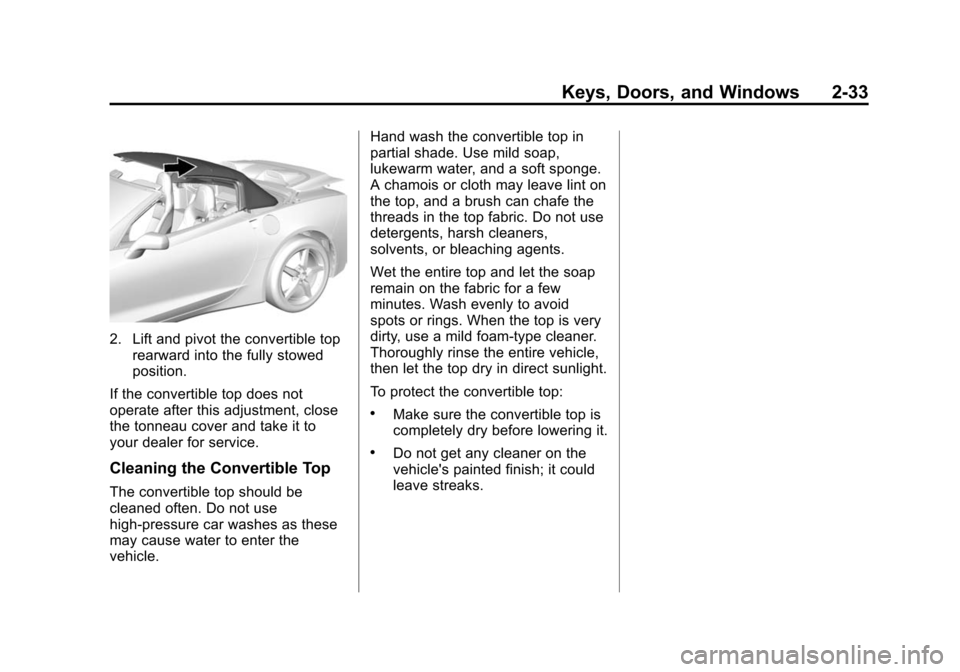
2. Lift and pivot the convertible toprearward into the fully stowed
position.
If the convertible top does not
operate after this adjustment, close
the tonneau cover and take it to
your dealer for service.
Cleaning the Convertible Top
The convertible top should be
cleaned often. Do not use
high-pressure car washes as these
may cause water to enter the
vehicle. Hand wash the convertible top in
partial shade. Use mild soap,
lukewarm water, and a soft sponge.
A chamois or cloth may leave lint on
the top, and a brush can chafe the
threads in the top fabric. Do not use
detergents, harsh cleaners,
solvents, or bleaching agents.
Wet the entire top and let the soap
remain on the fabric for a few
minutes. Wash evenly to avoid
spots or rings. When the top is very
dirty, use a mild foam-type cleaner.
Thoroughly rinse the entire vehicle,
then let the top dry in direct sunlight.
To protect the convertible top:
.Make sure the convertible top is
completely dry before lowering it.
.Do not get any cleaner on the
vehicle's painted finish; it could
leave streaks.
Page 106 of 393

Black plate (1,1)Chevrolet Corvette Owner Manual (GMNA-Localizing-U.S./Canada/Mexico-
7576293) - 2015 - crc - 10/31/14
Instruments and Controls 5-1
Instruments and
Controls
Controls
Steering Wheel Adjustment . . . 5-2
Steering Wheel Controls . . . . . . 5-2
Horn . . . . . . . . . . . . . . . . . . . . . . . . . . 5-2
Windshield Wiper/Washer . . . . . 5-2
Compass . . . . . . . . . . . . . . . . . . . . . 5-3
Clock . . . . . . . . . . . . . . . . . . . . . . . . . 5-4
Power Outlets . . . . . . . . . . . . . . . . . 5-4
Warning Lights, Gauges, and
Indicators
Warning Lights, Gauges, andIndicators . . . . . . . . . . . . . . . . . . . . 5-6
Instrument Cluster . . . . . . . . . . . . 5-7
Speedometer . . . . . . . . . . . . . . . . 5-12
Odometer . . . . . . . . . . . . . . . . . . . . 5-12
Trip Odometer . . . . . . . . . . . . . . . 5-12
Tachometer . . . . . . . . . . . . . . . . . . 5-12
Fuel Gauge . . . . . . . . . . . . . . . . . . 5-13
Boost Gauge . . . . . . . . . . . . . . . . 5-14
Engine Coolant Temperature Gauge . . . . . . . . . . . . . . . . . . . . . . 5-15
Safety Belt Reminders . . . . . . . 5-15
Airbag Readiness Light . . . . . . 5-16 Passenger Airbag Status
Indicator . . . . . . . . . . . . . . . . . . . . 5-17
Charging System Light . . . . . . 5-18
Malfunction Indicator Lamp . . . . . . . . . . . . . 5-18
Brake System Warning Light . . . . . . . . . . . . . . . . . . . . . . . 5-21
Electric Parking Brake Light . . . . . . . . . . . . . . . . . . . . . . . 5-21
Service Electric Parking Brake Light . . . . . . . . . . . . . . . . . . . . . . . 5-21
Antilock Brake System (ABS) Warning Light . . . . . . . . . . . . . . 5-22
Traction Off Light . . . . . . . . . . . . 5-22
StabiliTrak
®OFF Light . . . . . . . 5-23
Traction Control System (TCS)/StabiliTrak
®Light . . . . 5-23
Engine Coolant Temperature Warning Light . . . . . . . . . . . . . . 5-23
Tire Pressure Light . . . . . . . . . . 5-24
Engine Oil Pressure Light . . . . 5-24
Low Fuel Warning Light . . . . . . 5-25
Security Light . . . . . . . . . . . . . . . . 5-25
High-Beam On Light . . . . . . . . . 5-25
Lamps On Reminder . . . . . . . . . 5-26
Cruise Control Light . . . . . . . . . 5-26
Door Ajar Light . . . . . . . . . . . . . . 5-26
Information Displays
Driver Information Center (DIC) . . . . . . . . . . . . . . . 5-26
Head-Up Display (HUD) . . . . . 5-29
Vehicle Messages
Vehicle Messages . . . . . . . . . . . 5-34
Battery Voltage and Charging Messages . . . . . . . . . . . . . . . . . . 5-34
Brake System Messages . . . . 5-34
Compass Messages . . . . . . . . . 5-35
Convertible Top Messages . . . 5-35
Cruise Control Messages . . . . 5-36
Door Ajar Messages . . . . . . . . . 5-36
Engine Cooling System Messages . . . . . . . . . . . . . . . . . . 5-37
Engine Oil Messages . . . . . . . . 5-37
Engine Power Messages . . . . 5-38
Fuel System Messages . . . . . . 5-38
Key and Lock Messages . . . . . 5-38
Lamp Messages . . . . . . . . . . . . . 5-39
Ride Control System Messages . . . . . . . . . . . . . . . . . . 5-39
Airbag System Messages . . . . 5-42
Security Messages . . . . . . . . . . 5-42
Service Vehicle Messages . . . 5-42
Starting the Vehicle Messages . . . . . . . . . . . . . . . . . . 5-43
Tire Messages . . . . . . . . . . . . . . . 5-43
Page 116 of 393

Black plate (11,1)Chevrolet Corvette Owner Manual (GMNA-Localizing-U.S./Canada/Mexico-
7576293) - 2015 - crc - 10/31/14
Instruments and Controls 5-11
timer, highlight Reset on the
performance timer menu and
press SEL.
Lap Timer:Press
pwhen Lap
Timer is displayed to start, stop,
or reset the lap timer. A stopwatch
icon will be displayed when the lap
timer is active. Press SEL while the
Lap Timer page is active to start the
timer. If the lamp timer is active,
pressing SEL on any page will stop
the current lap timer and start a new
lap. Also, pressing and holding SEL
on any page will stop the lap timer.
Coolant Temperature: Shows the
current coolant temperature in either
degrees Celsius (°C) or degrees
Fahrenheit (°F).
Oil Temperature: Shows the
current oil temperature in either
degrees Celsius (°C) or degrees
Fahrenheit (°F).
Oil Pressure: Shows the current oil
pressure in either kilopascal (kPa) or
in pounds per square inch (psi). Battery Voltage:
Shows the
current battery voltage.
Transmission Fluid
Temperature: Shows the
temperature of the transmission fluid
in either degrees Celsius (°C) or
degrees Fahrenheit (°F).
Tire Temperature: Shows tire
temperature status as either Cold,
Warm, or Hot. Warm is typical for
normal driving while Hot is typical
for aggressive driving. Unknown
may be displayed if tire temperature
information is unavailable.
eLSD and Wheel Slip: Displays
when the Electronic Limited Slip
Differential (eLSD) is active and
intervening with the vehicle’s normal
operation. The display also displays
slip percentage in a range of low,
medium, and high. See Limited-Slip
Differential (Except Z51 and Z06) on
page 9-48 orLimited-Slip
Differential (Z51 and Z06 Only) on
page 9-48. Audio
While the audio app is open, use
w
orxto change the radio station or
seek to the next or previous track,
depending on the current audio
source. Press SEL to enter the
Audio menu. In the Audio menu
browse for music, select from the
favorites, or change the audio
source.
Phone
Press SEL to enter the Phone
menu. In the Phone menu, if there is
no active phone call, view recent
calls, or scroll through contacts.
If there is an active call, mute or
unmute the phone or switch to
handset or hands-free operation.
Navigation
If equipped, press SEL to enter the
Navigation menu. Displays a map or
turn by turn directions. If there is no
active route, press
pto resume the
last route and turn the voice
prompts on/off. If there is an active
Page 129 of 393

Black plate (24,1)Chevrolet Corvette Owner Manual (GMNA-Localizing-U.S./Canada/Mexico-
7576293) - 2015 - crc - 10/31/14
5-24 Instruments and Controls
{Caution
The engine coolant temperature
warning light indicates that the
vehicle has overheated. Driving
with this light on can damage the
engine and it may not be covered
by the vehicle warranty. See
Engine Overheating on
page 10-27.
The engine coolant temperature
warning light comes on when the
engine has overheated.
If this happens, pull over and turn
off the engine as soon as possible.
See Engine Overheating on
page 10-27.
Tire Pressure Light
For vehicles with the Tire Pressure
Monitor System (TPMS), this light
comes on briefly when the engine is
started. It provides information
about tire pressures and the TPMS.
When the Light Is On Steady
This indicates that one or more of
the tires are significantly
underinflated.
A Driver Information Center (DIC)
tire pressure message may also
display. See Tire Messages on
page 5-43. Stop as soon as
possible, and inflate the tires to the
pressure value shown on the Tire
and Loading Information label. See
Tire Pressure on page 10-57. When the Light Flashes First and
Then Is On Steady
If the light flashes for about a minute
and then stays on, there may be a
problem with the TPMS. If the
problem is not corrected, the light
will come on at every ignition cycle.
See
Tire Pressure Monitor
Operation on page 10-60.
Engine Oil Pressure Light
{Caution
Lack of proper engine oil
maintenance can damage the
engine. Driving with the engine
oil low can also damage the
engine. The repairs would not be
covered by the vehicle warranty.
Check the oil level as soon as
possible. Add oil if required, but if
the oil level is within the operating
range and the oil pressure is still
low, have the vehicle serviced.
Always follow the maintenance
schedule for changing engine oil.
Page 133 of 393
Black plate (28,1)Chevrolet Corvette Owner Manual (GMNA-Localizing-U.S./Canada/Mexico-
7576293) - 2015 - crc - 10/31/14
5-28 Instruments and Controls
Oil Life:Displays an estimate of
the oil's remaining useful life.
If REMAINING OIL LIFE 99% is
displayed, that means 99% of the
current oil life remains.
When the remaining oil life is low,
the CHANGE ENGINE OIL SOON
message will appear on the display.
See Engine Oil Messages on
page 5-37. The oil should be
changed as soon as possible. See
Engine Oil on page 10-12. In
addition to the engine oil life system
monitoring the oil life, additional
maintenance is recommended in the
Maintenance Schedule. See
Maintenance Schedule on
page 11-2.
The Oil Life display must be reset
after each oil change. It will not
reset itself. Do not reset the Oil Life
display accidentally at any time
other than when the oil has just
been changed. It cannot be reset
accurately until the next oil change.
To reset the engine oil life system,
press and hold SEL for several seconds while the Oil Life display is
active. See
Engine Oil Life System
on page 10-18.
Tire Pressure: Displays the
approximate pressures of all four
tires. Tire pressure is displayed in
either kilopascal (kPa) or in pounds
per square inch (psi). If the pressure
is low, the value for that tire is
shown in amber. See Tire Pressure
Monitor System on page 10-59 and
Tire Pressure Monitor Operation on
page 10-60.
Best Average Fuel Economy:
Displays the average fuel economy,
the best fuel economy over the
selected distance, and a bar graph
showing instantaneous fuel
economy. Press
pto change the
selected distance.
Fuel Used/Timer: Displays the
approximate liters (L) or
gallons (gal) of fuel that have been
used since last reset. The fuel used
can be reset by pressing and
holding SEL while this display is
active. This display can also be used as a
timer. To start/stop the timer,
press
pwhile this display is active
and then SEL to start/stop the timer.
The display will show the amount of
time that has passed since the timer
was last reset. To reset the timer to
zero, press and hold SEL or use
p
to access the menu while this
display is active.
ECO Index: Aids the driver in
determining how efficiently they are
driving.
This display may also show the
number of cylinders the vehicle is
running on. See Active Fuel
Management
®on page 9-26.
Speed Limit: Displays sign
information, which comes from a
roadway database in the onboard
navigation.
Engine Hours/Lifetime Revs:
Displays the total number of hours
the engine has run. It also shows
total engine revolutions divided by
10,000.