Page 162 of 373

Black plate (15,1)Chevrolet Captiva Sport Owner Manual (GMNA-Localizing-U.S./Mexico-
7576028) - 2015 - First Edition - 3/21/14
Infotainment System 7-15
File System and Naming
The song name displayed is the
song name contained in the ID3 tag.
If the song name is not present in
the ID3 tag, then the radio displays
the file name without the extension
(such as .mp3) as the track name.
Track names longer than
32 characters or four pages are
shortened. Parts of words on the
last page of text and the extension
of the file name do not display.
Preprogrammed Playlists
Preprogrammed playlists created by
WinAmp, MusicMatch, or Real
Jukebox software can be accessed;
however, they cannot be edited
using the radio. These playlists are
treated as special folders containing
compressed audio song files.Auxiliary Devices
Using the Auxiliary Input Jack
Radios with an auxiliary input jack
on the lower right side of the
faceplate can connect to an external
audio device such as an iPod
®,
MP3 player, or CD player, for use as
another source for audio listening.
This input jack is not an audio
output; do not plug headphones into
the front auxiliary input jack.
To use a portable audio player,
connect a 3.5 mm (1/8 in) cable to
the radio's front auxiliary input jack.
When a device is connected, press
the radio CD/AUX button to begin
playing audio from the device over
the vehicle speakers.
For optimal sound quality, increase
the portable audio device's volume
to the loudest level.
It is always best to power the
portable audio device through its
own battery while playing.
O(Power/Volume): Turn clockwise
or counterclockwise to increase or
decrease the volume of the portable
player. Additional volume
adjustments might have to be made
from the portable device if the
volume is not loud or soft enough.
BAND: Press to listen to the radio
when a portable audio device is
playing. The portable audio device
continues playing.
CD/AUX (CD/Auxiliary): Press to
play a CD when a portable audio
device is playing. Press again and
the system begins playing audio
from the connected portable audio
player. If a portable audio player is
not connected, No Input Device
Found displays.
Page 164 of 373

Black plate (17,1)Chevrolet Captiva Sport Owner Manual (GMNA-Localizing-U.S./Mexico-
7576028) - 2015 - First Edition - 3/21/14
Infotainment System 7-17
appear on the iPod and iPod
appears on the radio display. The
iPod music appears on the radio’s
display and begins playing.
The iPod charges while it is
connected to the vehicle if the
vehicle is in the ACC/ACCESSORY
or ON/RUN position. When the
vehicle is turned off, the iPod
automatically powers off and will not
charge or draw power from the
vehicle's battery.
If you have an older iPod model that
is not supported, it can still be used
by connecting it to the auxiliary
input jack using a standard 3.5 mm
(1/8 in) stereo cable. See“Using the
Auxiliary Input Jack” earlier for more
information.
Using the Radio to Control a
USB Storage Device or iPod
The radio can control a USB
storage device or an iPod using the
radio buttons and knobs, and
display song information on the
radio’s display.
f(Tune): Turn to select files.
©SEEK:Press to go to the start of
the track, if more than 10 seconds
have played. Press and hold or
press multiple times to continue
moving backward through tracks.
¨SEEK: Press to go to the next
track. Press and hold or press
multiple times to continue moving
forward through tracks.
sREV (Reverse): Press and hold
to reverse playback quickly. Sound
is heard at a reduced volume.
Release
sREV to resume playing.
The elapsed time of the file
displays.
\FWD (Fast Forward): Press
and hold to advance playback
quickly. Sound is heard at a reduced
volume. Release
\FWD to
resume playing. The elapsed time of
the file displays.
4(Information): Press to display
additional information about the
selected track.
Using Softkeys to Control a
USB Storage Device or iPod
The six softkeys below the radio
display are used to control the
functions listed below.
To use the softkeys:
1. Press the first or fifth softkey
below the radio display to
display the functions listed
below, or press the softkey
below the function if it is
currently displayed.
2. Press the softkey below the tab with the function on it to use that
function.
j(Pause): Press the softkey belowjto pause the track. The tab
appears raised when pause is being
used. Press the softkey below
j
again to resume playback.
Back: Press the softkey below the
radio display to go back to the main
display screen on an iPod, or the
root directory on a USB storage
device.
Page 266 of 373

Black plate (35,1)Chevrolet Captiva Sport Owner Manual (GMNA-Localizing-U.S./Mexico-
7576028) - 2015 - First Edition - 3/21/14
Vehicle Care 10-35
The vehicle may not have all of the
fuses, relays, and features shown.Fuses Usage
AMP Amplifier
APO JACK
(CONSOLE) Auxiliary Power
Outlet Jack
APO JACK (REAR
CARGO) Auxiliary Power
Outlet Jack Rear
Cargo
AWD/VENT All-Wheel Drive/ Ventilation
BCM (CTSY) Body Control Module (Courtesy)
BCM
(DIMMER) Body Control
Module (Dimmer)
BCM (INT LIGHT) Body Control
Module (Interior
Light)
BCM
(PRK/TN) Body Control
Module (Parking/
Turn Signal)
BCM (STOP) Body Control Module (Stoplamp) Fuses Usage
BCM
(TRN SIG) Body Control
Module (Turn
Signal)
BCM
(VBATT) Body Control
Module (Battery
Voltage)
CIGAR Cigarette Lighter CIM Communications Integration Module
CLSTR Instrument Cluster DRL Daytime Running Lamps
DR/LCK Driver Door Lock
DRVR
PWR SEAT Driver Power Seat
DRV/
PWR WNDW Driver Power
Window
F/DOOR LOCK Fuel Door Lock
FRT WSR Front Washer Fuses Usage
FSCM Fuel System Control Module
FSCM
VENT SOL Fuel System
Control Module
Vent Solenoid
HEATING MAT SW Heating Mat Switch
HTD
SEAT PWR Heated Seat
Power
HVAC BLWR Heating, Ventilation, and Air
Conditioning
Blower
IPC Instrument Panel Cluster
ISRVM/RCM Inside Rearview Mirror/Remote
Compass Module
KEY
CAPTURE Key Capture
L/GATE Liftgate
Page 267 of 373
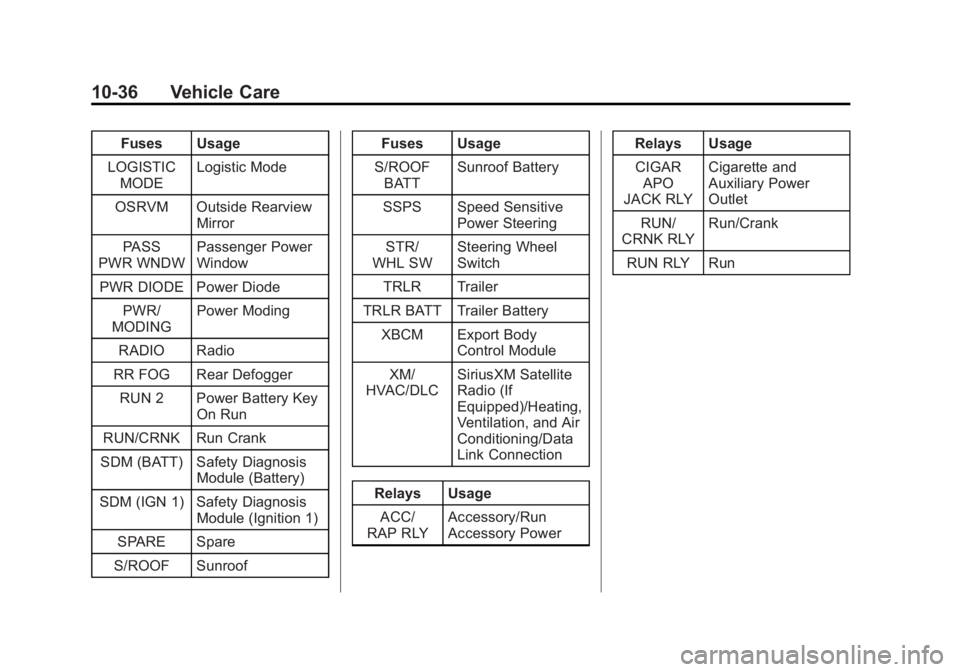
Black plate (36,1)Chevrolet Captiva Sport Owner Manual (GMNA-Localizing-U.S./Mexico-
7576028) - 2015 - First Edition - 3/21/14
10-36 Vehicle Care
Fuses Usage
LOGISTIC MODE Logistic Mode
OSRVM Outside Rearview Mirror
PASS
PWR WNDW Passenger Power
Window
PWR DIODE Power Diode PWR/
MODING Power Moding
RADIO Radio
RR FOG Rear Defogger RUN 2 Power Battery Key On Run
RUN/CRNK Run Crank
SDM (BATT) Safety Diagnosis Module (Battery)
SDM (IGN 1) Safety Diagnosis Module (Ignition 1)
SPARE Spare
S/ROOF Sunroof Fuses Usage
S/ROOF BATT Sunroof Battery
SSPS Speed Sensitive Power Steering
STR/
WHL SW Steering Wheel
Switch
TRLR Trailer
TRLR BATT Trailer Battery XBCM Export Body Control Module
XM/
HVAC/DLC SiriusXM Satellite
Radio (If
Equipped)/Heating,
Ventilation, and Air
Conditioning/Data
Link Connection
Relays Usage ACC/
RAP RLY Accessory/Run
Accessory Power Relays Usage
CIGAR APO
JACK RLY Cigarette and
Auxiliary Power
Outlet
RUN/
CRNK RLY Run/Crank
RUN RLY Run