2015 CHEVROLET CAMARO clock
[x] Cancel search: clockPage 296 of 435

Black plate (33,1)Chevrolet Camaro Owner Manual (GMNA-Localizing-U.S./Canada/Mexico-
7695163) - 2015 - crc - 9/4/14
Vehicle Care 10-33
{Warning
An electric engine cooling fan
under the hood can start up even
when the engine is not running
and can cause injury. Keep
hands, clothing, and tools away
from any underhood electric fan.
{Warning
Steam and scalding liquids from a
hot cooling system can blow out
and burn you badly. They are
under pressure, and if you turn
the surge tank pressure
cap—even a little —they can
come out at high speed. Never
turn the cap when the cooling
system, including the surge tank
pressure cap, is hot. Wait for the
cooling system and surge tank
pressure cap to cool if you ever
have to turn the pressure cap. If coolant is needed, add the proper
mixture directly to the radiator, but
be sure the cooling system is cool
before this is done.
If no coolant is visible in the engine
coolant recovery bottle, add coolant
as follows:
3.6L V6 Engine Fill Procedure
1. Locate the radiator cap. See
Engine Compartment Overview
on page 10-6.
2. Remove the engine cover to access the radiator cap. See
Engine Cover on page 10-13.
3. Cover the radiator cap with athick cloth and turn it slowly
counterclockwise and remove. 4. If there is no coolant visible or
the level is low, slowly fill the
system through the radiator cap
opening with a 50/50 mixture of
DEX-COOL and clean drinkable
water.
Wait 30 seconds for coolant to
settle and continue filling if the
level drops.
Do not spill coolant on the
accessory drive belts.
If a spill occurs, rinse the belt
with fresh water.
5. Start the engine.
6. With the engine idling, continue to add coolant through the
radiator cap opening until full.
Wait 30 seconds for the coolant
to settle and top off, if the level
drops.
7. Once the system is full, put the radiator cap back on by turning
clockwise.
Page 297 of 435

Black plate (34,1)Chevrolet Camaro Owner Manual (GMNA-Localizing-U.S./Canada/Mexico-
7695163) - 2015 - crc - 9/4/14
10-34 Vehicle Care
8. With the engine still running,raise the engine to 2500 rpm for
30–40 seconds.
9. Turn the engine off.
10. Repeat Steps 2–7 then turn the engine off.
11. Allow engine to cool for 45 minutes. Top off coolant
through the radiator cap
opening and reinstall the
radiator cap.
12. Reinstall the engine cover. See Engine Cover on page 10-13.13. Check the coolant level in theengine coolant recovery bottle
and fill it until the level is at the
top symbol on the dipstick.
6.2L V8 and 7.0L V8 Engine Fill
Procedure
1. Locate the radiator cap. See Engine Compartment Overview
on page 10-6.
2. Cover the radiator cap with athick cloth and turn it slowly
counterclockwise and remove. 3. If there is no coolant visible or
the level is low, slowly fill the
system through the radiator cap
opening with a 50/50 mixture of
clean, drinkable water and
DEX-COOL coolant until full.
Wait 30 seconds for coolant to
settle and top off if the level
drops.
Do not spill coolant on the
accessory drive belts.
If a spill occurs, rinse the belt
with fresh water.
4. Start the engine.
5. With the engine idling, top off the coolant through the radiator cap
opening until full.
Wait 30 seconds for the coolant
to settle and top off, if the level
drops.
6. Once the system is full, put the radiator cap back on by turning
clockwise.
7. Turn the engine off.
Page 300 of 435

Black plate (37,1)Chevrolet Camaro Owner Manual (GMNA-Localizing-U.S./Canada/Mexico-
7695163) - 2015 - crc - 9/4/14
Vehicle Care 10-37
When to Check Power Steering
Fluid
It is not necessary to regularly
check power steering fluid unless
you suspect there is a leak in the
system or an unusual noise is
heard. A fluid loss in this system
could indicate a problem. Have the
system inspected and repaired.
How to Check Power Steering
Fluid
Check the level after the vehicle has
been driven for at least 20 minutes
so the fluid is warm.
To check the power steering fluid:
1. Turn the ignition key to LOCK/OFF and let the engine
compartment cool down.
2. Remove the engine cover. See Engine Cover on page 10-13.
3. Wipe the cap and the top of the reservoir clean.
4. Turn the cap counterclockwise and pull it straight up. 5. Wipe the dipstick with a
clean rag.
6. Replace the cap and completely tighten it.
7. Remove the cap again and look at the fluid level on the dipstick.
When the engine is hot, the level
should be at the hot MAX level.
When the engine is cold, the
fluid level should be between
MIN and MAX on the dipstick.
What to Use
To determine what kind of fluid to
use, see Recommended Fluids and
Lubricants on page 11-12. Always
use the proper fluid.
Washer Fluid
What to Use
When windshield washer fluid is
needed, be sure to read the
manufacturer's instructions before
use. If operating the vehicle in an
area where the temperature can fall
below freezing, use a fluid that has
sufficient protection against
freezing.
Adding Washer Fluid
Open the cap with the washer
symbol on it. Add washer fluid until
the reservoir is full. See Engine
Compartment Overview on
page 10-6 for reservoir location.
Page 308 of 435

Black plate (45,1)Chevrolet Camaro Owner Manual (GMNA-Localizing-U.S./Canada/Mexico-
7695163) - 2015 - crc - 9/4/14
Vehicle Care 10-45
function of the HID headlamp. See
High Intensity Discharge (HID)
Lighting on page 10-44.
To replace the turn signal bulb:
1. Open the hood. SeeHood on
page 10-5.
2. Press in on the tabs on the sides of the duct, and then push the
duct rearward into the air
cleaner/filter housing.
3. Disconnect the wiring harness
and turn the bulb socket
counterclockwise to remove it
from the headlamp assembly.
4. Pull the bulb straight out from the socket.
5. Push the new bulb into the socket and reinstall the socket
into the headlamp assembly by
turning it clockwise.
6. Reconnect the electrical connector. 7. Pull the duct back out of the air
cleaner/filter housing until the
tabs snap the duct back into
position.
Headlamps, Front Turn
Signal and Parking
Lamps (Base Vehicle)
The base model vehicle has a
halogen headlamp and a turn
signal/parking lamp on the
headlamp assembly.
To replace one of these bulbs:
1. Open the hood. See Hood on
page 10-5.
Page 309 of 435

Black plate (46,1)Chevrolet Camaro Owner Manual (GMNA-Localizing-U.S./Canada/Mexico-
7695163) - 2015 - crc - 9/4/14
10-46 Vehicle Care
2. Press in on the tabs on the sidesof the duct, and then push the
duct rearward into the air
cleaner/filter housing.
3. Disconnect the wiring harness and turn the bulb socket
counterclockwise to remove it
from the headlamp assembly.
4. Pull the bulb straight out from the socket.
5. Push the new bulb into the socket and reinstall the socket
into the headlamp assembly by
turning it clockwise. 6. Reconnect the electrical
connector.
7. Pull the duct back out of the air cleaner/filter housing until the
tabs snap the duct back into
position.
Taillamps, Turn Signal,
and Stoplamps
To replace a taillamp, turn signal,
or stoplamp bulb:
1. Open the trunk. See Trunk on
page 2-10.
2. Remove the close out panel retainers to gain access to the
bulb socket connectors.
3. Turn the bulb socket counterclockwise to remove it.
4. Pull the old bulb straight out of the bulb socket.
5. Push the new bulb straight into the bulb socket until it clicks.
6. Turn the bulb socket clockwise to reinstall.
Page 310 of 435

Black plate (47,1)Chevrolet Camaro Owner Manual (GMNA-Localizing-U.S./Canada/Mexico-
7695163) - 2015 - crc - 9/4/14
Vehicle Care 10-47
License Plate Lamp
To replace one of these bulbs:
1. Unclip the license plate lampfrom the fascia opening.
2. Pull the license plate lamp down through the fascia opening.
3. Turn the bulb socket counterclockwise and pull the
bulb straight out of the lamp
socket.
4. Install the new bulb. 5. Push the bulb straight into the
socket and turn clockwise to
reinstall.
6. Reinstall the license plate lamp by lifting it through the fascia
opening until the clip is in place.
Replacement Bulbs
Exterior Lamp Bulb
Number
Front Parking and
Turn Signal Lamp
(Except ZL1) T20
Front Park and Turn
Signal Lamp (ZL1) 3457NAK
Low-Beam
Headlamp H11LL
High-Beam
Headlamp H9LL
License Plate Lamp W5WLL
Rear Stoplamps T20
Rear Taillamp 7444LL Exterior Lamp
Bulb
Number
Rear Turn
Signal Lamp W21/5W
For replacement bulbs not listed
here, contact your dealer.
Page 345 of 435
Black plate (82,1)Chevrolet Camaro Owner Manual (GMNA-Localizing-U.S./Canada/Mexico-
7695163) - 2015 - crc - 9/4/14
10-82 Vehicle Care
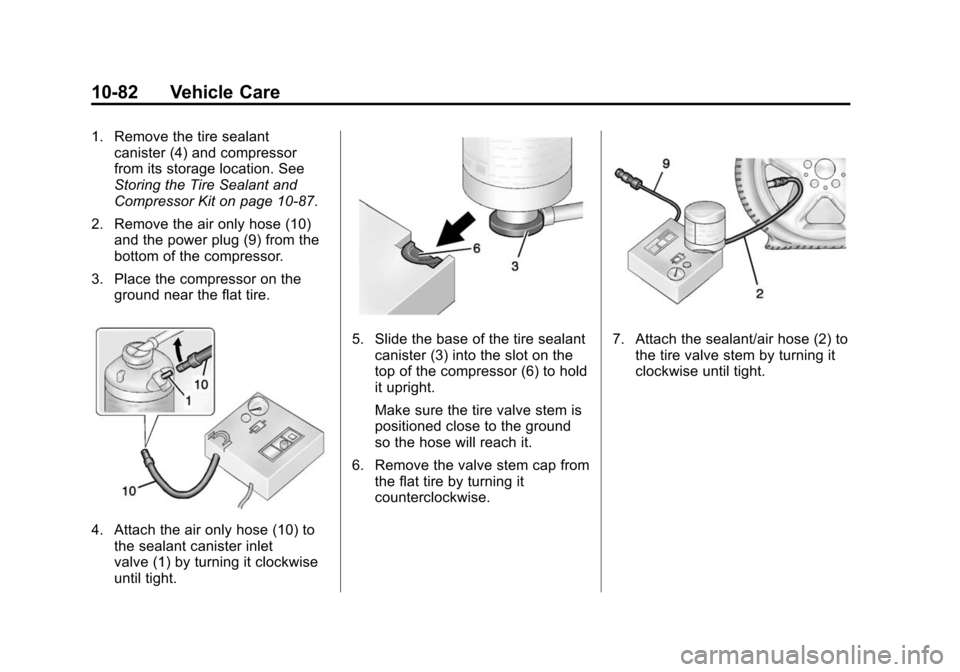
1. Remove the tire sealantcanister (4) and compressor
from its storage location. See
Storing the Tire Sealant and
Compressor Kit on page 10-87.
2. Remove the air only hose (10) and the power plug (9) from the
bottom of the compressor.
3. Place the compressor on the ground near the flat tire.
4. Attach the air only hose (10) tothe sealant canister inlet
valve (1) by turning it clockwise
until tight.
5. Slide the base of the tire sealant
canister (3) into the slot on the
top of the compressor (6) to hold
it upright.
Make sure the tire valve stem is
positioned close to the ground
so the hose will reach it.
6. Remove the valve stem cap from the flat tire by turning it
counterclockwise.7. Attach the sealant/air hose (2) tothe tire valve stem by turning it
clockwise until tight.
Page 347 of 435
Black plate (84,1)Chevrolet Camaro Owner Manual (GMNA-Localizing-U.S./Canada/Mexico-
7695163) - 2015 - crc - 9/4/14
10-84 Vehicle Care
13. Unplug the power plug (9) fromthe accessory power outlet in
the vehicle.
14. Turn the sealant/air hose (2) counterclockwise to remove it
from the tire valve stem.
15. Replace the tire valve stem cap.
16. Remove the tire sealant canister (4) from the slot on top
of the compressor (6).
17. Turn the air only hose (10) counterclockwise to remove it
from the tire sealant canister
inlet valve (1).
18. Turn the sealant/air hose (2) clockwise onto the sealant
canister inlet valve (1) to
prevent sealant leakage.
19. Return the air only hose (10) and power plug (9) back to
their original storage location.
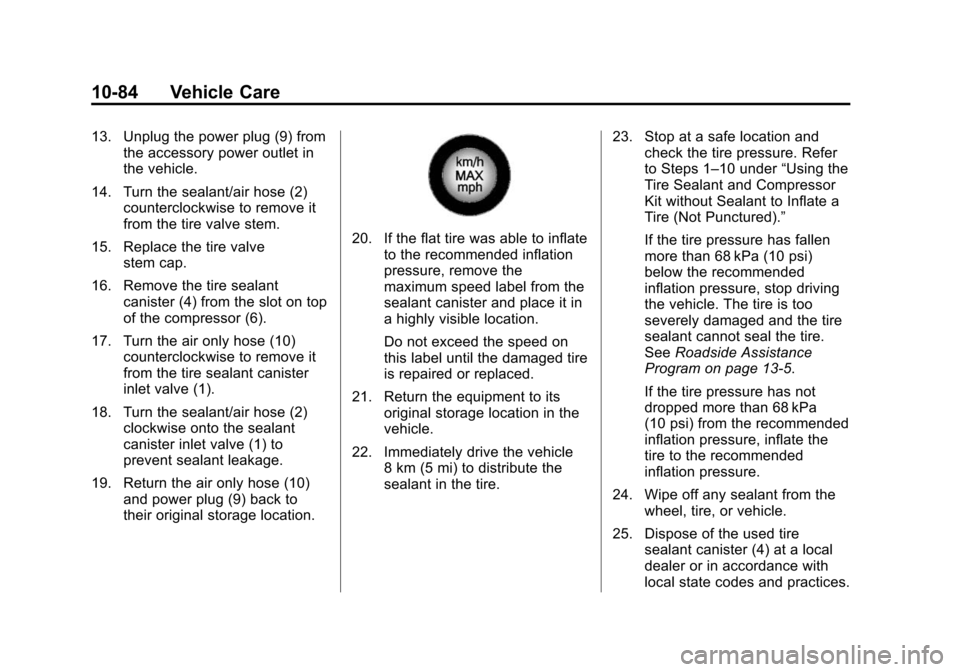
20. If the flat tire was able to inflateto the recommended inflation
pressure, remove the
maximum speed label from the
sealant canister and place it in
a highly visible location.
Do not exceed the speed on
this label until the damaged tire
is repaired or replaced.
21. Return the equipment to its original storage location in the
vehicle.
22. Immediately drive the vehicle 8 km (5 mi) to distribute the
sealant in the tire. 23. Stop at a safe location and
check the tire pressure. Refer
to Steps 1–10 under “Using the
Tire Sealant and Compressor
Kit without Sealant to Inflate a
Tire (Not Punctured).”
If the tire pressure has fallen
more than 68 kPa (10 psi)
below the recommended
inflation pressure, stop driving
the vehicle. The tire is too
severely damaged and the tire
sealant cannot seal the tire.
See Roadside Assistance
Program on page 13-5.
If the tire pressure has not
dropped more than 68 kPa
(10 psi) from the recommended
inflation pressure, inflate the
tire to the recommended
inflation pressure.
24. Wipe off any sealant from the wheel, tire, or vehicle.
25. Dispose of the used tire sealant canister (4) at a local
dealer or in accordance with
local state codes and practices.