2015 CHEVROLET CAMARO traction control
[x] Cancel search: traction controlPage 134 of 435

Black plate (29,1)Chevrolet Camaro Owner Manual (GMNA-Localizing-U.S./Canada/Mexico-
7695163) - 2015 - crc - 9/4/14
Instruments and Controls 5-29
The following indicator lights come
on in the instrument cluster when
activated and may also appear on
the HUD:
.Turn Signal Indicators
.High-Beam Indicator Symbol
The HUD also temporarily displays
the following messages on vehicles
with these systems, when they are
active:
.Check Tire Pressure
.Cruise Set To
.Fuel Level Low
.Speed Limited To
.Traction Control Active
.Stabilitrak Active
.Park Distance Unavailable
.Gap Alert Off
When the HUD is on, the
speedometer reading is continually
displayed. The current radio station
or CD track number may display for
a short period of time after the radio or CD track status changes. This
may happen whenever radio
information is changed. The
speedometer size is reduced when
radio, CD information, or warnings
are displayed on the HUD.
When the phone feature is
activated, the HUD will briefly
display phone information,
if available.
The HUD control is to the right of
the steering wheel.
To adjust the HUD image so that
items are properly displayed:
1. Adjust the driver seat to a
comfortable position.
2. Start the engine.
3. Adjust the HUD controls.
Use the following settings to adjust
the HUD.
OFF: Turn the HUD dimming knob
fully counterclockwise until the HUD
display turns off.
Brightness: Turn the dimming knob
clockwise or counterclockwise to
brighten or dim the display. The
HUD image will automatically dim
and brighten to compensate for
outside lighting. The HUD
brightness control can also be
adjusted as needed. The HUD
image can temporarily light up
depending on the angle and position
of the sunlight on the HUD display.
This is normal. Polarized
sunglasses could make the HUD
image harder to see.
Page 143 of 435

Black plate (38,1)Chevrolet Camaro Owner Manual (GMNA-Localizing-U.S./Canada/Mexico-
7695163) - 2015 - crc - 9/4/14
5-38 Instruments and Controls
Ride Control System
Messages
PERF TRACTION 1–WET
ACTIVE HANDLING ON
CHASSIS MODE TOUR (ZL1
Coupe and Z/28 Only)
This message displays when this
Performance Traction Management
(PTM) mode is selected. The TCS
and StabiliTrak OFF cluster lights
will also be on when this mode is
selected. Once this message is
acknowledged, PTM1 –WET ESC =
ON displays on the bottom of the
digital speed page. Launch Control
is available when this mode is
selected. In this mode, the Traction
Control and Active Handling System
are available but intended for use
on wet race track conditions. Adjust
your driving accordingly. See
“Performance Traction Management
(PTM) (ZL1 Coupe and Z/28 Only)”
and “Launch Control (V8 with
Manual Transmissions except Z/28)”
under Competitive Driving Mode on
page 9-40.
PERF TRACTION 2 –DRY
ACTIVE HANDLING ON
CHASSIS MODE TOUR (ZL1
Coupe and Z/28 Only)
This message displays when this
Performance Traction Management
(PTM) mode is selected. The TCS
and StabiliTrak OFF cluster lights
will also be on when this mode is
selected. Once this message is
acknowledged, PTM2 –DRY ESC =
ON displays on the bottom of the
digital speed page. Launch Control
is available when this mode is
selected. In this mode, the Traction
Control and Active Handling System
are available but intended for use
on dry race track conditions. Adjust
your driving accordingly. See
“Performance Traction Management
(PTM) (ZL1 Coupe and Z/28 Only)”
and “Launch Control (V8 with
Manual Transmissions except Z/28)”
under Competitive Driving Mode on
page 9-40.
PERF TRACTION 3 –SPORT 1
ACTIVE HANDLING ON
CHASSIS MODE SPORT (ZL1
Coupe and Z/28 Only)
This message displays when this
Performance Traction Management
(PTM) mode is selected. The TCS
and StabiliTrak OFF cluster lights
will also be on when this mode is
selected. Once this message is
acknowledged, PTM3 –SPORT1
ESC = ON displays on the bottom of
the digital speed page. Launch
Control is available when this mode
is selected. In this mode, the
Traction Control and Active
Handling System are available but
intended for use on dry race track
conditions. Adjust your driving
accordingly. See “Performance
Traction Management (PTM) (ZL1
Coupe and Z/28 Only)” and“Launch
Control (V8 with Manual
Transmissions except Z/28)” under
Competitive Driving Mode on
page 9-40.
Page 144 of 435

Black plate (39,1)Chevrolet Camaro Owner Manual (GMNA-Localizing-U.S./Canada/Mexico-
7695163) - 2015 - crc - 9/4/14
Instruments and Controls 5-39
PERF TRACTION 4–SPORT 2
ACTIVE HANDLING OFF
CHASSIS MODE SPORT (ZL1
Coupe and Z/28 Only)
This message displays when this
Performance Traction Management
(PTM) mode is selected. The TCS
and StabiliTrak OFF cluster lights
will also be on when this mode is
selected. Once this message is
acknowledged, PTM4 –SPORT2
ESC = OFF displays on the bottom
of the digital speed page. Launch
Control is available when this mode
is selected. In this mode, the
Traction Control is available but
intended for use on dry race track
conditions. The Active Handling
System is disabled when this mode
is selected. This mode will require
more driver skill than modes 1–3.
Adjust your driving accordingly. See
“Performance Traction Management
(PTM) (ZL1 Coupe and Z/28 Only)”
and “Launch Control (V8 with
Manual Transmissions except Z/28)”
under Competitive Driving Mode on
page 9-40.
PERF TRACTION 5 –RACE
ACTIVE HANDLING OFF
CHASSIS MODE TRACK (ZL1
Coupe and Z/28 Only)
This message displays when this
Performance Traction Management
(PTM) mode is selected. The TCS
and StabiliTrak OFF cluster lights
will also be on when this mode is
selected. Once this message is
acknowledged, PTM5 –RACE ESC
= OFF displays on the bottom of the
digital speed page. Launch Control
is available when this mode is
selected. In this mode, the Traction
Control is available but intended for
use on dry race track conditions.
The Active Handling System is
disabled when this mode is
selected. This mode will require
more driver skill than modes 1–4.
Adjust your driving accordingly. See
“Performance Traction Management
(PTM) (ZL1 Coupe and Z/28 Only)”
and “Launch Control (V8 with
Manual Transmissions except Z/28)”
under Competitive Driving Mode on
page 9-40.
SERVICE STABILITRAK
This message displays if there is a
problem with the StabiliTrak®
system. If this message appears, try
to reset the system. Stop; turn off
the engine and remove the key from
the ignition; open and close the
driver door and wait for at least
one minute. During this time you
should notice the lights on the
cluster turn off. After a minute has
passed, start the engine again.
If this message still comes on, it
means there is a problem. See your
dealer for service. The vehicle is
safe to drive; however, you do not
have the benefit of StabiliTrak, so
reduce your speed and drive
accordingly.
Page 145 of 435
Black plate (40,1)Chevrolet Camaro Owner Manual (GMNA-Localizing-U.S./Canada/Mexico-
7695163) - 2015 - crc - 9/4/14
5-40 Instruments and Controls
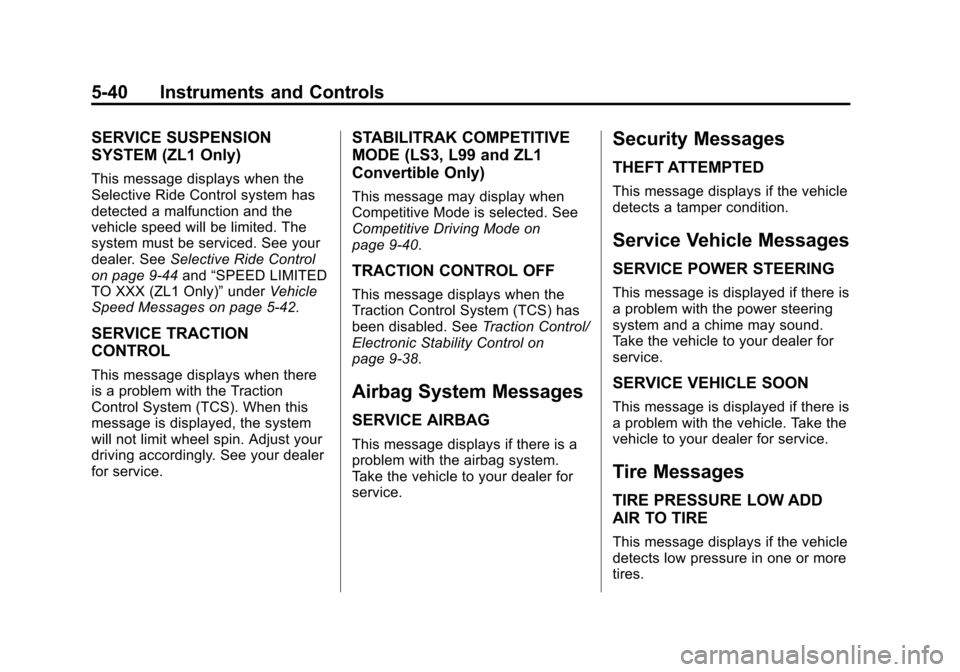
SERVICE SUSPENSION
SYSTEM (ZL1 Only)
This message displays when the
Selective Ride Control system has
detected a malfunction and the
vehicle speed will be limited. The
system must be serviced. See your
dealer. SeeSelective Ride Control
on page 9-44 and“SPEED LIMITED
TO XXX (ZL1 Only)” underVehicle
Speed Messages on page 5-42.
SERVICE TRACTION
CONTROL
This message displays when there
is a problem with the Traction
Control System (TCS). When this
message is displayed, the system
will not limit wheel spin. Adjust your
driving accordingly. See your dealer
for service.
STABILITRAK COMPETITIVE
MODE (LS3, L99 and ZL1
Convertible Only)
This message may display when
Competitive Mode is selected. See
Competitive Driving Mode on
page 9-40.
TRACTION CONTROL OFF
This message displays when the
Traction Control System (TCS) has
been disabled. See Traction Control/
Electronic Stability Control on
page 9-38.
Airbag System Messages
SERVICE AIRBAG
This message displays if there is a
problem with the airbag system.
Take the vehicle to your dealer for
service.
Security Messages
THEFT ATTEMPTED
This message displays if the vehicle
detects a tamper condition.
Service Vehicle Messages
SERVICE POWER STEERING
This message is displayed if there is
a problem with the power steering
system and a chime may sound.
Take the vehicle to your dealer for
service.
SERVICE VEHICLE SOON
This message is displayed if there is
a problem with the vehicle. Take the
vehicle to your dealer for service.
Tire Messages
TIRE PRESSURE LOW ADD
AIR TO TIRE
This message displays if the vehicle
detects low pressure in one or more
tires.
Page 166 of 435
Black plate (1,1)Chevrolet Camaro Owner Manual (GMNA-Localizing-U.S./Canada/Mexico-
7695163) - 2015 - crc - 9/4/14
Infotainment System 7-1
Infotainment
System
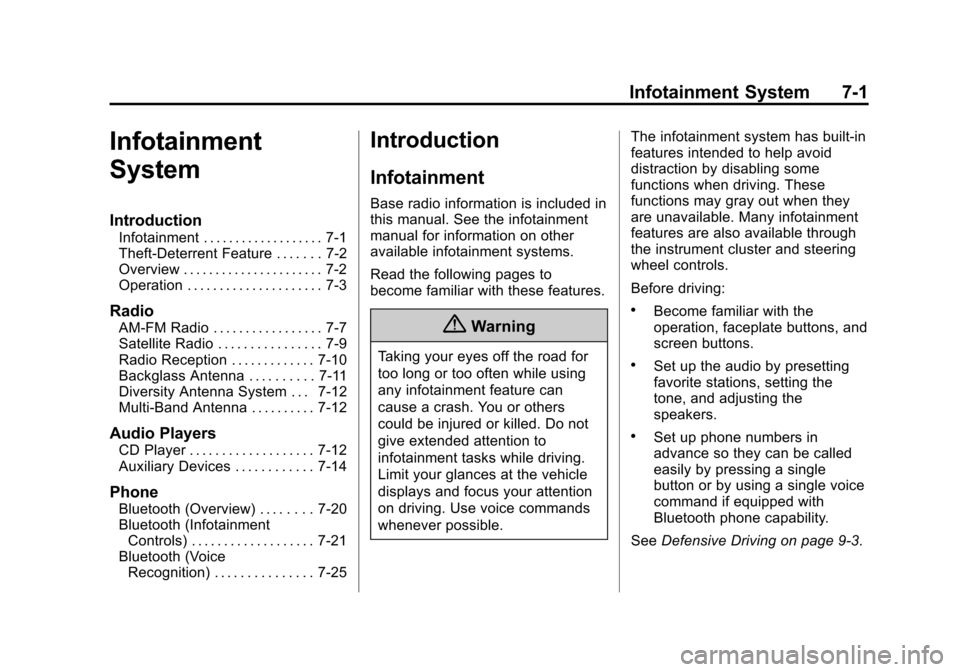
Introduction
Infotainment . . . . . . . . . . . . . . . . . . . 7-1
Theft-Deterrent Feature . . . . . . . 7-2
Overview . . . . . . . . . . . . . . . . . . . . . . 7-2
Operation . . . . . . . . . . . . . . . . . . . . . 7-3
Radio
AM-FM Radio . . . . . . . . . . . . . . . . . 7-7
Satellite Radio . . . . . . . . . . . . . . . . 7-9
Radio Reception . . . . . . . . . . . . . 7-10
Backglass Antenna . . . . . . . . . . 7-11
Diversity Antenna System . . . 7-12
Multi-Band Antenna . . . . . . . . . . 7-12
Audio Players
CD Player . . . . . . . . . . . . . . . . . . . 7-12
Auxiliary Devices . . . . . . . . . . . . 7-14
Phone
Bluetooth (Overview) . . . . . . . . 7-20
Bluetooth (InfotainmentControls) . . . . . . . . . . . . . . . . . . . 7-21
Bluetooth (Voice Recognition) . . . . . . . . . . . . . . . 7-25
Introduction
Infotainment
Base radio information is included in
this manual. See the infotainment
manual for information on other
available infotainment systems.
Read the following pages to
become familiar with these features.
{Warning
Taking your eyes off the road for
too long or too often while using
any infotainment feature can
cause a crash. You or others
could be injured or killed. Do not
give extended attention to
infotainment tasks while driving.
Limit your glances at the vehicle
displays and focus your attention
on driving. Use voice commands
whenever possible. The infotainment system has built-in
features intended to help avoid
distraction by disabling some
functions when driving. These
functions may gray out when they
are unavailable. Many infotainment
features are also available through
the instrument cluster and steering
wheel controls.
Before driving:
.Become familiar with the
operation, faceplate buttons, and
screen buttons.
.Set up the audio by presetting
favorite stations, setting the
tone, and adjusting the
speakers.
.Set up phone numbers in
advance so they can be called
easily by pressing a single
button or by using a single voice
command if equipped with
Bluetooth phone capability.
See Defensive Driving on page 9-3.
Page 185 of 435
Black plate (20,1)Chevrolet Camaro Owner Manual (GMNA-Localizing-U.S./Canada/Mexico-
7695163) - 2015 - crc - 9/4/14
7-20 Infotainment System
Phone
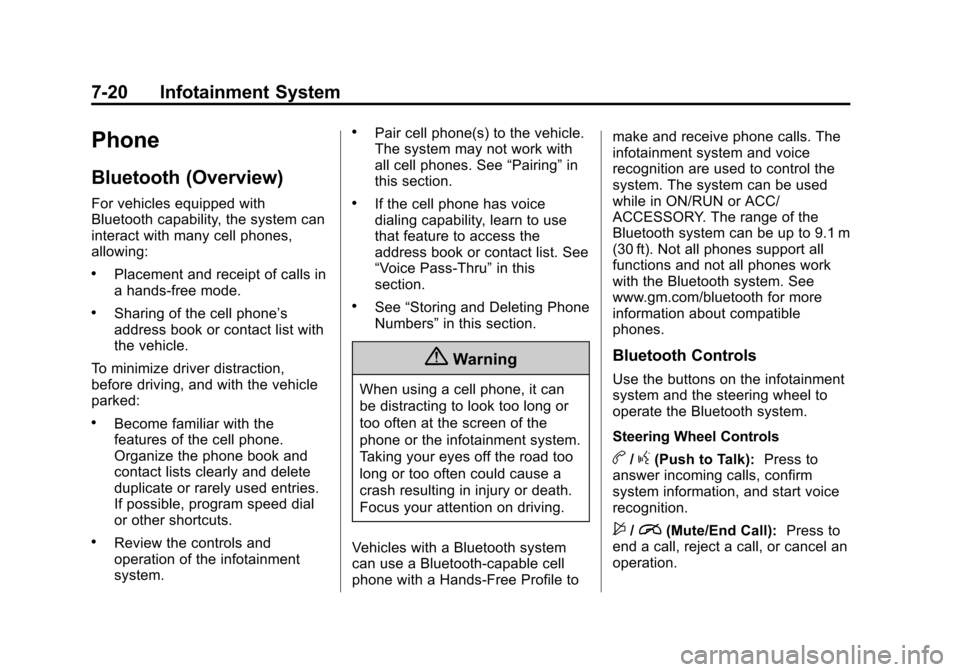
Bluetooth (Overview)
For vehicles equipped with
Bluetooth capability, the system can
interact with many cell phones,
allowing:
.Placement and receipt of calls in
a hands-free mode.
.Sharing of the cell phone’s
address book or contact list with
the vehicle.
To minimize driver distraction,
before driving, and with the vehicle
parked:
.Become familiar with the
features of the cell phone.
Organize the phone book and
contact lists clearly and delete
duplicate or rarely used entries.
If possible, program speed dial
or other shortcuts.
.Review the controls and
operation of the infotainment
system.
.Pair cell phone(s) to the vehicle.
The system may not work with
all cell phones. See “Pairing”in
this section.
.If the cell phone has voice
dialing capability, learn to use
that feature to access the
address book or contact list. See
“Voice Pass-Thru” in this
section.
.See “Storing and Deleting Phone
Numbers” in this section.
{Warning
When using a cell phone, it can
be distracting to look too long or
too often at the screen of the
phone or the infotainment system.
Taking your eyes off the road too
long or too often could cause a
crash resulting in injury or death.
Focus your attention on driving.
Vehicles with a Bluetooth system
can use a Bluetooth-capable cell
phone with a Hands-Free Profile to make and receive phone calls. The
infotainment system and voice
recognition are used to control the
system. The system can be used
while in ON/RUN or ACC/
ACCESSORY. The range of the
Bluetooth system can be up to 9.1 m
(30 ft). Not all phones support all
functions and not all phones work
with the Bluetooth system. See
www.gm.com/bluetooth for more
information about compatible
phones.
Bluetooth Controls
Use the buttons on the infotainment
system and the steering wheel to
operate the Bluetooth system.
Steering Wheel Controls
b/g(Push to Talk):
Press to
answer incoming calls, confirm
system information, and start voice
recognition.
$/i(Mute/End Call): Press to
end a call, reject a call, or cancel an
operation.
Page 202 of 435

Black plate (1,1)Chevrolet Camaro Owner Manual (GMNA-Localizing-U.S./Canada/Mexico-
7695163) - 2015 - crc - 9/4/14
Driving and Operating 9-1
Driving and
Operating
Driving Information
Distracted Driving . . . . . . . . . . . . . 9-2
Defensive Driving . . . . . . . . . . . . . 9-3
Drunk Driving . . . . . . . . . . . . . . . . . 9-3
Control of a Vehicle . . . . . . . . . . . 9-3
Braking . . . . . . . . . . . . . . . . . . . . . . . 9-3
Steering . . . . . . . . . . . . . . . . . . . . . . . 9-4
Off-Road Recovery . . . . . . . . . . . . 9-5
Loss of Control . . . . . . . . . . . . . . . . 9-5
Track Events and CompetitiveDriving . . . . . . . . . . . . . . . . . . . . . . . 9-6
Driving on Wet Roads . . . . . . . 9-10
Hill and Mountain Roads . . . . . 9-11
Winter Driving . . . . . . . . . . . . . . . 9-12
If the Vehicle Is Stuck . . . . . . . . 9-13
Vehicle Load Limits . . . . . . . . . . 9-14
Starting and Operating
New Vehicle Break-In . . . . . . . . 9-18
Ignition Positions . . . . . . . . . . . . 9-19
Starting the Engine . . . . . . . . . . 9-21
Engine Heater . . . . . . . . . . . . . . . 9-22
Retained Accessory Power (RAP) . . . . . . . . . . . . . . . 9-23 Shifting Into Park . . . . . . . . . . . . 9-24
Shifting out of Park . . . . . . . . . . 9-25
Parking (Manual
Transmission) . . . . . . . . . . . . . . 9-26
Parking over Things
That Burn . . . . . . . . . . . . . . . . . . 9-26
Active Fuel Management
®. . . 9-26
Engine Exhaust
Engine Exhaust . . . . . . . . . . . . . . 9-27
Running the Vehicle While Parked . . . . . . . . . . . . . . . . . . . . . 9-28
Automatic Transmission
Automatic Transmission . . . . . 9-28
Manual Mode . . . . . . . . . . . . . . . . 9-31
Manual Transmission
Manual Transmission . . . . . . . . 9-34
Brakes
Antilock BrakeSystem (ABS) . . . . . . . . . . . . . . 9-36
Parking Brake . . . . . . . . . . . . . . . 9-37
Brake Assist . . . . . . . . . . . . . . . . . 9-38
Hill Start Assist (HSA) . . . . . . . 9-38
Ride Control Systems
Traction Control/Electronic Stability Control . . . . . . . . . . . . 9-38
Competitive Driving Mode . . . 9-40
Limited-Slip Rear Axle . . . . . . . 9-44
Selective Ride Control . . . . . . . 9-44
Cruise Control
Cruise Control . . . . . . . . . . . . . . . 9-45
Driver Assistance Systems
Parking Assist . . . . . . . . . . . . . . . 9-48
Rear Vision Camera (RVC) . . . . . . . . . . . . . 9-49
Fuel
Fuel . . . . . . . . . . . . . . . . . . . . . . . . . 9-52
California FuelRequirements . . . . . . . . . . . . . . 9-53
Fuels in Foreign Countries . . . 9-53
Fuel Additives . . . . . . . . . . . . . . . 9-53
Filling the Tank . . . . . . . . . . . . . . 9-54
Filling a Portable Fuel Container . . . . . . . . . . . . . . . . . . . 9-55
Trailer Towing
General TowingInformation . . . . . . . . . . . . . . . . . 9-56
Driving Characteristics and Towing Tips . . . . . . . . . . . . . . . . 9-56
Page 203 of 435

Black plate (2,1)Chevrolet Camaro Owner Manual (GMNA-Localizing-U.S./Canada/Mexico-
7695163) - 2015 - crc - 9/4/14
9-2 Driving and Operating
Trailer Towing (ZL1 orZ/28) . . . . . . . . . . . . . . . . . . . . . . . 9-59
Trailer Towing (Except ZL1 or Z/28) . . . . . . . . . . . . . . . . . . . . . . . 9-59
Towing Equipment . . . . . . . . . . . 9-60
Conversions and Add-Ons
Add-On Electrical
Equipment . . . . . . . . . . . . . . . . . 9-61
Driving Information
Distracted Driving
Distraction comes in many forms
and can take your focus from the
task of driving. Exercise good
judgment and do not let other
activities divert your attention away
from the road. Many local
governments have enacted laws
regarding driver distraction. Become
familiar with the local laws in
your area.
To avoid distracted driving, always
keep your eyes on the road, hands
on the wheel, and mind on the drive.
.Do not use a phone in
demanding driving situations.
Use a hands-free method to
place or receive necessary
phone calls.
.Watch the road. Do not read,
take notes, or look up
information on phones or other
electronic devices.
.Designate a front seat
passenger to handle potential
distractions.
.Become familiar with vehicle
features before driving, such as
programming favorite radio
stations and adjusting climate
control and seat settings.
Program all trip information into
any navigation device prior to
driving.
.Wait until the vehicle is parked
to retrieve items that have fallen
to the floor.
.Stop or park the vehicle to tend
to children.
.Keep pets in an appropriate
carrier or restraint.
.Avoid stressful conversations
while driving, whether with a
passenger or on a cell phone.