2015 CADILLAC XTS SEDAN light
[x] Cancel search: lightPage 120 of 419

Black plate (1,1)Cadillac XTS Owner Manual (GMNA-Localizing-U.S./Canada-7707485) -
2015 - CRC - 10/31/14
Instruments and Controls 5-1
Instruments and
Controls
Controls
Steering Wheel Adjustment . . . 5-2
Steering Wheel Controls . . . . . . 5-2
Heated Steering Wheel . . . . . . . 5-2
Horn . . . . . . . . . . . . . . . . . . . . . . . . . . 5-3
Windshield Wiper/Washer . . . . . 5-3
Compass . . . . . . . . . . . . . . . . . . . . . 5-4
Clock . . . . . . . . . . . . . . . . . . . . . . . . . 5-5
Power Outlets . . . . . . . . . . . . . . . . . 5-6
Cigarette Lighter . . . . . . . . . . . . . . 5-7
Warning Lights, Gauges, and
Indicators
Warning Lights, Gauges, andIndicators . . . . . . . . . . . . . . . . . . . . 5-8
Instrument Cluster . . . . . . . . . . . . 5-9
Speedometer . . . . . . . . . . . . . . . . 5-13
Odometer . . . . . . . . . . . . . . . . . . . . 5-13
Trip Odometer . . . . . . . . . . . . . . . 5-13
Tachometer . . . . . . . . . . . . . . . . . . 5-13
Fuel Gauge . . . . . . . . . . . . . . . . . . 5-13
Engine Coolant Temperature Gauge . . . . . . . . . . . . . . . . . . . . . . 5-15
Safety Belt Reminders . . . . . . . 5-15 Airbag Readiness Light . . . . . . 5-16
Passenger Airbag Status
Indicator . . . . . . . . . . . . . . . . . . . . 5-17
Charging System Light . . . . . . 5-18
Malfunction Indicator Lamp . . . . . . . . . . . . . 5-18
Brake System Warning Light . . . . . . . . . . . . . . . . . . . . . . . 5-21
Electric Parking Brake Light . . . . . . . . . . . . . . . . . . . . . . . 5-21
Service Electric Parking Brake Light . . . . . . . . . . . . . . . . . . . . . . . 5-22
Antilock Brake System (ABS) Warning Light . . . . . . . . . . . . . . 5-22
Lane Departure Warning (LDW) Light . . . . . . . . . . . . . . . . 5-23
Lane Keep Assist (LKA) Light . . . . . . . . . . . . . . . . . . . . . . . 5-23
Vehicle Ahead Indicator . . . . . . 5-23
Traction Off Light . . . . . . . . . . . . 5-24
StabiliTrak
®OFF Light . . . . . . . 5-24
Traction Control System (TCS)/StabiliTrak
®Light . . . . 5-24
Engine Coolant Temperature Warning Light . . . . . . . . . . . . . . 5-25
Tire Pressure Light . . . . . . . . . . 5-25
Engine Oil Pressure Light . . . . 5-26
Low Fuel Warning Light . . . . . . 5-26
Security Light . . . . . . . . . . . . . . . . 5-27 High-Beam On Light . . . . . . . . . 5-27
Adaptive Forward Lighting
(AFL) Light . . . . . . . . . . . . . . . . . 5-27
Lamps On Reminder . . . . . . . . . 5-28
Cruise Control Light . . . . . . . . . 5-28
Door Ajar Light . . . . . . . . . . . . . . 5-28
Information Displays
Driver Information Center (DIC) . . . . . . . . . . . . . . . 5-29
Head-Up Display (HUD) . . . . . 5-32
Vehicle Messages
Vehicle Messages . . . . . . . . . . . 5-35
Battery Voltage and Charging Messages . . . . . . . . . . . . . . . . . . 5-36
Brake System Messages . . . . 5-36
Compass Messages . . . . . . . . . 5-37
Cruise Control Messages . . . . 5-37
Door Ajar Messages . . . . . . . . . 5-38
Engine Cooling System Messages . . . . . . . . . . . . . . . . . . 5-38
Engine Oil Messages . . . . . . . . 5-39
Engine Power Messages . . . . 5-39
Fuel System Messages . . . . . . 5-39
Key and Lock Messages . . . . . 5-39
Lamp Messages . . . . . . . . . . . . . 5-40
Object Detection System Messages . . . . . . . . . . . . . . . . . . 5-41
Page 122 of 419

Black plate (3,1)Cadillac XTS Owner Manual (GMNA-Localizing-U.S./Canada-7707485) -
2015 - CRC - 10/31/14
Instruments and Controls 5-3
Horn
Pressaon the steering wheel pad
to sound the horn.
Windshield Wiper/Washer
With the ignition in ACC/
ACCESSORY or ON/RUN/START,
move the windshield wiper lever to
select the wiper speed.
HI: Use for fast wipes.
LO: Use for slow wipes.
INT (Intermittent Wipes): Move
the lever up to INT for intermittent
wipes, then turn the
xINT band
up for more frequent wipes or down
for less frequent wipes.
If the windshield wipers are in use
for about six seconds while driving,
the exterior lamps come on
automatically if the exterior lamp
control is in AUTO. See “Lights On
with Wipers” underAutomatic
Headlamp System on page 6-4.
OFF: Use to turn the wipers off.
1X (Mist): For a single wipe, briefly
move the wiper lever down. For
several wipes, hold the wiper
lever down.
Clear snow and ice from the wiper
blades and windshield before using
them. If frozen to the windshield,
carefully loosen or thaw them.
Damaged blades should be
replaced. See Wiper Blade
Replacement on page 10-26.
Heavy snow or ice can overload the
wiper motor. Wiper Parking
If the ignition is put in OFF while the
wipers are on LO, HI, or INT, they
will immediately stop.
If the windshield wiper lever is then
moved to OFF before the driver
door is opened or within 10 minutes,
the wipers will restart and move to
the base of the windshield.
If the ignition is put in OFF while the
wipers are performing wipes due to
windshield washing, the wipers
continue to run until they reach the
base of the windshield.
Rainsense™
For vehicles with Rainsense, a
sensor near the top center of the
windshield detects the amount of
water on the windshield and
controls the frequency of the
windshield wiper.
Keep this area of the windshield
clear of debris to allow for best
system performance.
Page 125 of 419

Black plate (6,1)Cadillac XTS Owner Manual (GMNA-Localizing-U.S./Canada-7707485) -
2015 - CRC - 10/31/14
5-6 Instruments and Controls
To set the clock display:
1. Press the SETTINGS screenbutton and press Time and Date.
2. Press Clock Display, then select Off or On.
3. Press
[Back to go back to the
previous menu.
Power Outlets
The accessory power outlets can be
used to plug in electrical equipment,
such as a cell phone or MP3 player.
The vehicle has three accessory
power outlets:
.Inside the front storage area
below the climate control
system.
.Inside the center console.
.On the rear of the center
console.
Lift the cover to access the
accessory power outlet. Certain accessory power plugs may
not be compatible with the
accessory power outlet and could
overload vehicle or adapter fuses.
If a problem is experienced, see
your dealer.
When adding electrical equipment,
be sure to follow the proper
installation instructions included with
the equipment. See
Add-On
Electrical Equipment on page 9-69.
{Caution
Hanging heavy equipment from
the power outlet can cause
damage not covered by the
vehicle warranty. The power
outlets are designed for
accessory power plugs only, such
as cell phone charge cords.
Always unplug electrical equipment
when not in use and do not plug in
equipment that exceeds the
maximum 20 amps rating.
Power Outlet 110 Volt
Alternating Current
If equipped with this power outlet on
the rear of the center console. It can
be used to plug in electrical
equipment that uses a maximum
limit of 150 watts.
An indicator light on the outlet turns
on to show it is in use. The light
comes on when the ignition is in
ON/RUN, equipment requiring less
than 150 watts is plugged into the
outlet, and no system fault is
detected.
Page 126 of 419

Black plate (7,1)Cadillac XTS Owner Manual (GMNA-Localizing-U.S./Canada-7707485) -
2015 - CRC - 10/31/14
Instruments and Controls 5-7
The indicator light does not come on
when the ignition is in LOCK/OFF or
if the equipment is not fully seated
into the outlet.
If equipment is connected using
more than 150 watts or a system
fault is detected, a protection circuit
shuts off the power supply and the
indicator light turns off. To reset the
circuit, unplug the item and plug it
back in or turn the Retained
Accessory Power (RAP) off and
then back on. SeeRetained
Accessory Power (RAP) on
page 9-19. The power restarts when
equipment using 150 watts or less is
plugged into the outlet and a system
fault is not detected. The power outlet is not designed for
the following and may not work
properly, if this equipment is
plugged in:
.Equipment with high initial peak
wattage such as:
compressor-driven refrigerators
and electric power tools.
.Other equipment requiring an
extremely stable power supply
such as:
microcomputer-controlled
electric blankets, touch sensor
lamps, etc.
.Medical equipment.
Cigarette Lighter
If equipped with cigarette lighters,
they are under the climate control
system inside the storage area and
on the rear of the center console.To activate the cigarette lighter,
push it into the heating element and
let go. The lighter pops out when it
is ready to be used.
{Caution
Holding a cigarette lighter in while
it is heating does not let the
lighter back away from the
heating element when it is hot.
Damage from overheating can
occur to the lighter or heating
element, or a fuse could be
blown. Do not hold a cigarette
lighter in while it is heating.
Page 127 of 419

Black plate (8,1)Cadillac XTS Owner Manual (GMNA-Localizing-U.S./Canada-7707485) -
2015 - CRC - 10/31/14
5-8 Instruments and Controls
Warning Lights,
Gauges, and
Indicators
Warning lights and gauges can
signal that something is wrong
before it becomes serious enough
to cause an expensive repair or
replacement. Paying attention to the
warning lights and gauges could
prevent injury.Warning lights come on when there
could be a problem with a vehicle
function. Some warning lights come
on briefly when the engine is started
to indicate they are working.
Gauges can indicate when there
could be a problem with a vehicle
function. Often gauges and warning
lights work together to indicate a
problem with the vehicle.
When one of the warning lights
comes on and stays on while
driving, or when one of the gauges
shows there may be a problem,
check the section that explains what
to do. Waiting to do repairs can be
costly and even dangerous.
Page 131 of 419

Black plate (12,1)Cadillac XTS Owner Manual (GMNA-Localizing-U.S./Canada-7707485) -
2015 - CRC - 10/31/14
5-12 Instruments and Controls
Use the five-way control on the right
side of the steering wheel to move
between the different display zones
and scroll through the different
displays.
To change the cluster configuration:
1. Find the Settings page in one ofthe interactive display zones on
the cluster.
2. Press SEL to enter the Settings menu.
3. Scroll down to highlight Display Layout. Then press SEL to
select it.
4. Each layout in the menu is represented by a small preview
image of the display layout.
Scroll up or down and highlight
the selection. Press SEL to
select the desired cluster
configuration.
5. Exit the Display Layout menu by pressing
S.
Cluster Application Displays
The cluster can display information
regarding Navigation, Audio, and
Phone. On the base cluster, a
speedometer can also be displayed
in the center zone.
Navigation
If there is no active route, a
compass will be displayed. If there
is an active route, press SEL to end
route guidance or turn the voice
prompts on or off.
Audio
While the Audio application page is
displayed, press SEL to enter the
Audio menu. In the Audio menu,
search for music, select from
favorites, or change the audio
source
Phone
While the Phone application page is
displayed, press SEL to enter the
Phone menu. In the Phone menu,
if there is no active phone call, view
recent calls, select from favorites, or scroll through contacts. If there is
an active call, mute the phone or
switch to handset operation.
Cluster Settings Menu
To enter the cluster settings menu:
1. Use the five-way control on the
right side of the steering wheel
to find the Settings page in one
of the interactive display zones
on the cluster.
2. Press SEL on the center of the five-way control to enter the
Settings menu.
Units: Press SEL while Units is
highlighted to enter the Unit menu.
Choose English or metric units by
pressing SEL while the desired item
is highlighted. A checkmark will be
displayed next to the selected item.
Info Pages: Press SEL while Info
Pages is highlighted to select the
items to be displayed in the DIC info
displays. See Driver Information
Center (DIC) on page 5-29.
Page 132 of 419
Black plate (13,1)Cadillac XTS Owner Manual (GMNA-Localizing-U.S./Canada-7707485) -
2015 - CRC - 10/31/14
Instruments and Controls 5-13
Display Layout:Press SEL while
Display Layout is highlighted to
change the configuration of the
uplevel cluster. See “Reconfigurable
Instrument Cluster” earlier in this
section.
Open Source Software: Press
SEL while Open Source Software is
highlighted to display open source
software information.
Speedometer
The speedometer shows the
vehicle's speed in either kilometers
per hour (km/h) or miles per
hour (mph).
Odometer
The odometer shows how far the
vehicle has been driven, in either
kilometers or miles.
Trip Odometer
The trip odometer shows how far
the vehicle has been driven since
the trip odometer was last reset. The trip odometer is accessed and
reset through the Driver Information
Center (DIC). See
Driver
Information Center (DIC) on
page 5-29.
Tachometer
The tachometer displays the engine
speed in revolutions per
minute (rpm).
{Caution
If the engine is operated with the
rpm’s in the warning area at the
high end of the tachometer, the
vehicle could be damaged, and
the damage would not be covered
by the vehicle warranty. Do not
operate the engine with the rpm’s
in the warning area.
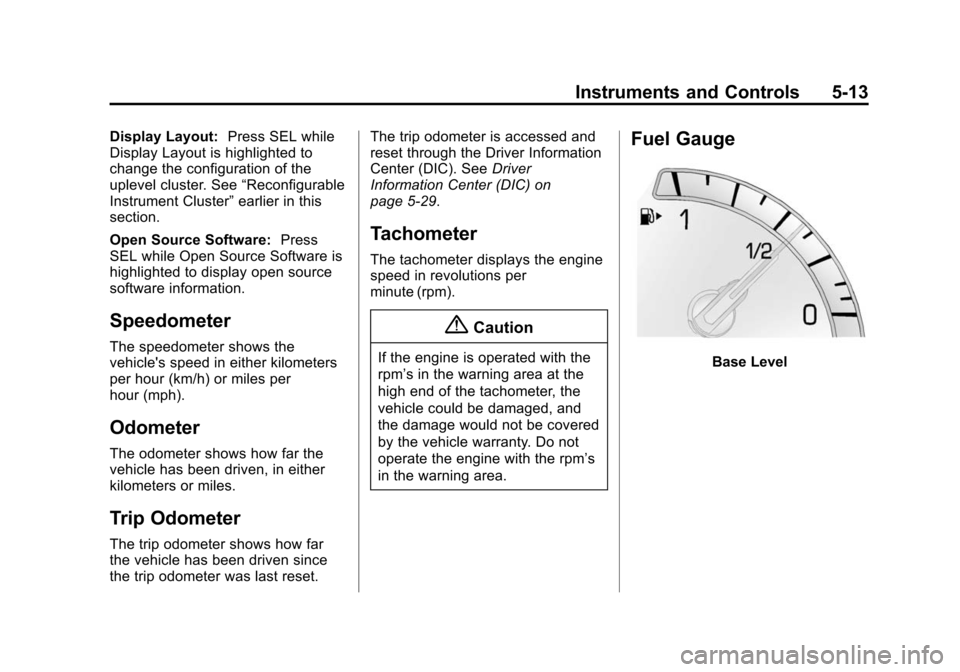
Fuel Gauge
Base Level
Page 133 of 419

Black plate (14,1)Cadillac XTS Owner Manual (GMNA-Localizing-U.S./Canada-7707485) -
2015 - CRC - 10/31/14
5-14 Instruments and Controls
Uplevel Balanced Configuration,Performance SimilarUplevel Simple and Enhanced Configurations
When the ignition is on, the fuel
gauge indicates about how much
fuel is left in the tank.
There is an arrow near the fuel
gauge pointing to the side of the
vehicle the fuel door is on.
When the indicator nears empty, the
low fuel light comes on. There still is
a little fuel left, but the vehicle
should be refueled soon. Here are four things that some
owners ask about. None of these
show a problem with the fuel gauge:
.At the service station, the fuel
pump shuts off before the gauge
reads full.
.It takes a little more or less fuel
to fill up than the gauge
indicated. For example, the
gauge may have indicated the
tank was half full, but it actually
took a little more or less than
half the tank's capacity to fill
the tank.
.The gauge moves a little while
turning a corner or speeding up.
.The gauge takes a few seconds
to stabilize after the ignition is
turned on, and goes back to
empty when the ignition is
turned off.