2015 CADILLAC XTS SEDAN display
[x] Cancel search: displayPage 28 of 419

Black plate (21,1)Cadillac XTS Owner Manual (GMNA-Localizing-U.S./Canada-7707485) -
2015 - CRC - 10/31/14
In Brief 1-21
.To turn off both traction control
and StabiliTrak, press and hold
the
gbutton on the center stack,
until
iandgcome on in the
instrument cluster and the
appropriate DIC message is
displayed. See Ride Control
System Messages on page 5-43.
.Press and release thegbutton
again to turn on both systems.
See Traction Control/Electronic
Stability Control on page 9-29.
Tire Pressure Monitor
This vehicle may have a Tire
Pressure Monitor System (TPMS).
The low tire pressure warning light
alerts to a significant loss in
pressure of one of the vehicle's tires. If the warning light comes on,
stop as soon as possible and inflate
the tires to the recommended
pressure shown on the Tire and
Loading Information label. See
Vehicle Load Limits on page 9-10.
The warning light will remain on until
the tire pressure is corrected.
The low tire pressure warning light
may come on in cool weather when
the vehicle is first started, and then
turn off as the vehicle is driven. This
may be an early indicator that the
tire pressures are getting low and
the tires need to be inflated to the
proper pressure.
The TPMS does not replace normal
monthly tire maintenance. Maintain
the correct tire pressures.
See
Tire Pressure Monitor System
on page 10-47.
Engine Oil Life System
The engine oil life system calculates
engine oil life based on vehicle use
and displays the CHANGE ENGINE
OIL SOON message when it is time to change the engine oil and filter.
The oil life system should be reset
to 100% only following an oil
change.
Resetting the Oil Life System
1. Using the DIC controls on the
right side of the steering wheel,
display REMAINING OIL LIFE
on the DIC. See Driver
Information Center (DIC) on
page 5-29. When remaining oil
life is low, the CHANGE
ENGINE OIL SOON message
will appear on the display. See
Engine Oil Messages on
page 5-39.
2. Press SEL on the DIC controls and hold SEL down for a few
seconds to clear the CHANGE
ENGINE OIL SOON message
and reset the oil life at 100%.
Be careful not to reset the oil life
display accidentally at any time
other than after the oil is
changed. It cannot be reset
accurately until the next oil
change.
Page 35 of 419

Black plate (6,1)Cadillac XTS Owner Manual (GMNA-Localizing-U.S./Canada-7707485) -
2015 - CRC - 10/31/14
2-6 Keys, Doors, and Windows
1. Open the center console storagearea and the storage tray.
2. Place the recognizedtransmitter(s) in the pocket. The
transmitter pocket is inside the
center console storage area
between the driver and front
passenger seats. 3. Remove the key lock cylinder
cap. See Door Locks on
page 2-11. Insert the vehicle key
into the key lock cylinder on the
driver door handle. Then turn the
key counterclockwise, to the
unlock position, five times within
10 seconds.
The Driver Information Center
(DIC) displays READY FOR
REMOTE #2, 3, 4, ETC.
4. Replace the recognized transmitter with a new
transmitter. Place the new
transmitter in the transmitter
pocket.
5. Press the ENGINE START/ STOP button. When the
transmitter is learned, the DIC
display will show that it is ready
to program the next transmitter.
6. Remove the transmitter from the transmitter pocket and press
K
orQon the transmitter.
To program additional
transmitters, repeat Steps 3–5.
When all additional transmitters
are programmed, press and hold
the ENGINE START/STOP
button for approximately
12 seconds to exit
programming mode.
7. Return the key back into the transmitter.
Page 36 of 419

Black plate (7,1)Cadillac XTS Owner Manual (GMNA-Localizing-U.S./Canada-7707485) -
2015 - CRC - 10/31/14
Keys, Doors, and Windows 2-7
Programming without a
Recognized Transmitter
If there are no currently recognized
transmitters available, follow this
procedure to program up to eight
transmitters. This feature is not
available in Canada. This procedure
will take approximately 30 minutes
to complete. The vehicle must be off
and all transmitters to be
programmed must be with you.
1. Remove the key lock cylindercap. See Door Locks on
page 2-11. Insert the vehicle key
into the key lock cylinder on the
driver door handle; then turn the
key counterclockwise, to the
unlock position five times within
10 seconds.
The Driver Information Center
(DIC) displays REMOTE LEARN
PENDING, PLEASE WAIT. 2. Wait for 10 minutes until the DIC
displays PRESS ENGINE
START BUTTON TO LEARN,
then press the ENGINE START/
STOP button.
The DIC display will again show
REMOTE LEARN PENDING,
PLEASE WAIT.
3. Repeat Step 2 two additional times. After the third time all
previously known transmitters
will no longer work with the
vehicle. Remaining transmitters
can be relearned during the next
steps.
The DIC display should
now show READY FOR
REMOTE # 1.
4. Place the new transmitter in thetransmitter pocket. The
transmitter pocket is inside the
center console storage area
between the driver and front
passenger seats. The storage
area will need to be opened to
access the transmitter pocket.
5. Press the ENGINE START/ STOP button. When the
transmitter is learned, the DIC
display will show that it is ready
to program the next transmitter.
Page 37 of 419
Black plate (8,1)Cadillac XTS Owner Manual (GMNA-Localizing-U.S./Canada-7707485) -
2015 - CRC - 10/31/14
2-8 Keys, Doors, and Windows
6. Remove the transmitter from thetransmitter pocket and press
K
orQon the transmitter.
To program additional
transmitters, repeat Steps 4–6.
When all additional transmitters
are programmed, press and hold
the ENGINE START/STOP
button for approximately
12 seconds to exit
programming mode.
7. Return the key back into the transmitter.
Starting the Vehicle with a Low
Transmitter Battery
If the transmitter battery is weak,
or if there is interference with the
signal, the DIC may display NO
REMOTE DETECTED or NO
REMOTE KEY WAS DETECTED
PLACE KEY IN TRANSMITTER
POCKET THEN START YOUR
VEHICLE when you try to start the
vehicle. See Key and Lock
Messages on page 5-39. To start the vehicle:
1. Open the center console storage
area and the storage tray.
2. Place the transmitter in thetransmitter pocket.
3. With the vehicle in P (Park) or N (Neutral), press the brake
pedal and the ENGINE START/
STOP button.
Replace the transmitter battery
as soon as possible.
Battery Replacement
{Caution
When replacing the battery, do
not touch any of the circuitry on
the transmitter. Static from your
body could damage the
transmitter.
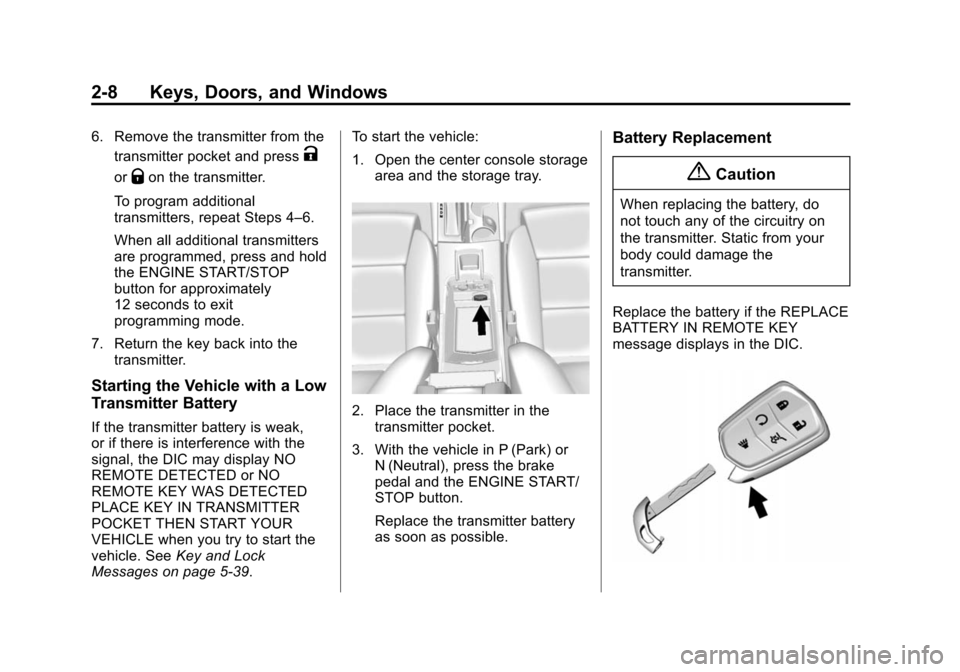
Replace the battery if the REPLACE
BATTERY IN REMOTE KEY
message displays in the DIC.
Page 62 of 419

Black plate (5,1)Cadillac XTS Owner Manual (GMNA-Localizing-U.S./Canada-7707485) -
2015 - CRC - 10/31/14
Seats and Restraints 3-5
.Move Feature Select (1) to
display seat adjustments on the
center stack. Press and release
or hold to scroll through
features.
.Press Up (2) to make upward
adjustments of the selected
feature.
.Press Rearward (3) to make
rearward adjustments of the
selected feature.
.Press Down (4) to make
downward adjustments of the
selected feature.
.Press Forward (5) to make
forward adjustments of the
selected feature.Lumbar and Bolster Support
To adjust lumbar support,
if equipped:
.Press and release or hold
Feature Select (1) to scroll to
lumbar support on the center
stack.
.Press Forward (5) or
Rearward (3) to adjust lumbar
forward or rearward.
.Press Up (2) or Down (4) to
adjust lumbar support up
or down.To adjust bolster support,
if equipped:
.Press and release or hold
Feature Select (1) to scroll to
bolster support on the center
stack.
.Press Forward (5) or
Rearward (3) to adjust bolster
support inward or outward.
Page 69 of 419

Black plate (12,1)Cadillac XTS Owner Manual (GMNA-Localizing-U.S./Canada-7707485) -
2015 - CRC - 10/31/14
3-12 Seats and Restraints
Press the heated or ventilated seat
button to use the heated or
ventilated seats after the vehicle is
started.
The heated or ventilated seat
indicator lights do not turn on during
a remote start.
The temperature performance of an
unoccupied seat may be reduced.
This is normal.
The heated or ventilated seats may
be enabled or disabled in the
vehicle personalization menu. See
Remote Vehicle Start on page 2-9
andVehicle Personalization on
page 5-47.Massage
Driver Seat Shown, Passenger
Seat Similar
1. Feature Select
2. Next Higher Massage Type
3. Decrease Massage Intensity
4. Next Lower Massage Type
5. Increase Massage Intensity
6. Massage On/Off
If equipped, the ignition must be on
to use the massage feature. Press Massage On/Off (6) to
reactivate the most recent massage
type and intensity for a
predetermined amount of time.
Massage may also be activated and
adjusted as follows:
1. Move Feature Select (1) to
display seating adjustments on
the center stack. Press and
release or hold forward or
rearward to scroll to massage
options and activate.
2. Press Next Higher Massage Type (2) or Next Lower Massage
Type (4) to select the next higher
or lower massage type.
3. Press Increase Massage Intensity (5) or Decrease
Massage Intensity (3) to
increase or decrease the
intensity of the massage.
Page 72 of 419

Black plate (15,1)Cadillac XTS Owner Manual (GMNA-Localizing-U.S./Canada-7707485) -
2015 - CRC - 10/31/14
Seats and Restraints 3-15
Heated Rear Seats
{Warning
If you cannot feel temperature
change or pain to the skin, the
seat heater may cause burns.
See the Warning underHeated
and Ventilated Front Seats on
page 3-11.
Rear Heated Seat Buttons with
Rear Climate Controls Shown, Base Similar
If available, the buttons are on the
rear of the center console.
With the ignition in ON/RUN/START,
press
MorLto heat the left or right
outboard seat cushion and
seatback. On vehicles without rear
climate controls, an indicator light on the button will turn on when the
heated seat is on. On vehicles with
rear climate controls, an indicator on
the climate control display appears
when this feature is on.
On vehicles without rear climate
controls, press the button again to
turn this feature off. The light on the
button will turn off. On vehicles with
rear climate controls, this feature
turns on at the highest setting. With
each press of the button, the heated
seat changes to the next lower
setting, and then the off setting.
Three lights indicate the highest
setting, and one light indicates the
lowest. If the heated seats are on
high, the level may automatically be
lowered after approximately
30 minutes.
Page 120 of 419

Black plate (1,1)Cadillac XTS Owner Manual (GMNA-Localizing-U.S./Canada-7707485) -
2015 - CRC - 10/31/14
Instruments and Controls 5-1
Instruments and
Controls
Controls
Steering Wheel Adjustment . . . 5-2
Steering Wheel Controls . . . . . . 5-2
Heated Steering Wheel . . . . . . . 5-2
Horn . . . . . . . . . . . . . . . . . . . . . . . . . . 5-3
Windshield Wiper/Washer . . . . . 5-3
Compass . . . . . . . . . . . . . . . . . . . . . 5-4
Clock . . . . . . . . . . . . . . . . . . . . . . . . . 5-5
Power Outlets . . . . . . . . . . . . . . . . . 5-6
Cigarette Lighter . . . . . . . . . . . . . . 5-7
Warning Lights, Gauges, and
Indicators
Warning Lights, Gauges, andIndicators . . . . . . . . . . . . . . . . . . . . 5-8
Instrument Cluster . . . . . . . . . . . . 5-9
Speedometer . . . . . . . . . . . . . . . . 5-13
Odometer . . . . . . . . . . . . . . . . . . . . 5-13
Trip Odometer . . . . . . . . . . . . . . . 5-13
Tachometer . . . . . . . . . . . . . . . . . . 5-13
Fuel Gauge . . . . . . . . . . . . . . . . . . 5-13
Engine Coolant Temperature Gauge . . . . . . . . . . . . . . . . . . . . . . 5-15
Safety Belt Reminders . . . . . . . 5-15 Airbag Readiness Light . . . . . . 5-16
Passenger Airbag Status
Indicator . . . . . . . . . . . . . . . . . . . . 5-17
Charging System Light . . . . . . 5-18
Malfunction Indicator Lamp . . . . . . . . . . . . . 5-18
Brake System Warning Light . . . . . . . . . . . . . . . . . . . . . . . 5-21
Electric Parking Brake Light . . . . . . . . . . . . . . . . . . . . . . . 5-21
Service Electric Parking Brake Light . . . . . . . . . . . . . . . . . . . . . . . 5-22
Antilock Brake System (ABS) Warning Light . . . . . . . . . . . . . . 5-22
Lane Departure Warning (LDW) Light . . . . . . . . . . . . . . . . 5-23
Lane Keep Assist (LKA) Light . . . . . . . . . . . . . . . . . . . . . . . 5-23
Vehicle Ahead Indicator . . . . . . 5-23
Traction Off Light . . . . . . . . . . . . 5-24
StabiliTrak
®OFF Light . . . . . . . 5-24
Traction Control System (TCS)/StabiliTrak
®Light . . . . 5-24
Engine Coolant Temperature Warning Light . . . . . . . . . . . . . . 5-25
Tire Pressure Light . . . . . . . . . . 5-25
Engine Oil Pressure Light . . . . 5-26
Low Fuel Warning Light . . . . . . 5-26
Security Light . . . . . . . . . . . . . . . . 5-27 High-Beam On Light . . . . . . . . . 5-27
Adaptive Forward Lighting
(AFL) Light . . . . . . . . . . . . . . . . . 5-27
Lamps On Reminder . . . . . . . . . 5-28
Cruise Control Light . . . . . . . . . 5-28
Door Ajar Light . . . . . . . . . . . . . . 5-28
Information Displays
Driver Information Center (DIC) . . . . . . . . . . . . . . . 5-29
Head-Up Display (HUD) . . . . . 5-32
Vehicle Messages
Vehicle Messages . . . . . . . . . . . 5-35
Battery Voltage and Charging Messages . . . . . . . . . . . . . . . . . . 5-36
Brake System Messages . . . . 5-36
Compass Messages . . . . . . . . . 5-37
Cruise Control Messages . . . . 5-37
Door Ajar Messages . . . . . . . . . 5-38
Engine Cooling System Messages . . . . . . . . . . . . . . . . . . 5-38
Engine Oil Messages . . . . . . . . 5-39
Engine Power Messages . . . . 5-39
Fuel System Messages . . . . . . 5-39
Key and Lock Messages . . . . . 5-39
Lamp Messages . . . . . . . . . . . . . 5-40
Object Detection System Messages . . . . . . . . . . . . . . . . . . 5-41