2015 CADILLAC SRX lights
[x] Cancel search: lightsPage 179 of 417

Black plate (8,1)Cadillac SRX Owner Manual (GMNA-Localizing-U.S./Canada/Mexico-
7707476) - 2015 - crc - 4/8/14
6-8 Lighting
Reading Lamps
There are reading lamps in the
overhead console and over the rear
passenger doors. These lamps
come on automatically when any
door is opened.
To manually turn the reading lamps
on or off:
.Pressmornnext to each
overhead console reading lamp.
.Press the lamp lens on the rear
passenger reading lamps.
Lighting Features
Entry Lighting
The headlamps, taillamps, license
plate lamps, dome lamps, and most
of the interior lights turn on briefly at
night, or in areas with limited
lighting, when
Kis pressed on the
Remote Keyless Entry (RKE)
transmitter. After about 30 seconds
the exterior lamps turn off, and then
the dome and remaining interior
lights dim to off. The entry lighting
can be manually turned off by
changing the ignition out of the off
position, or by pressing
Qon the
RKE transmitter.
This feature can be changed. See
Vehicle Personalization on
page 5-38.
Exit Lighting
The headlamps, taillamps, parking
lamps, and license plate lamps
come on at night, or in areas with
limited lighting, when a door is opened after the ignition is turned
off. The dome lamps also come on
when the driver door is opened after
the ignition is changed to the off
position.
The exterior lamps and dome lamp
remain on after the door is closed
for a set amount of time, then
automatically turn off.
The exterior lamps turn off
immediately by turning the exterior
lamps control to off.
This feature can be changed. See
Vehicle Personalization on
page 5-38.
Battery Load
Management
The vehicle has Electric Power
Management (EPM) that estimates
the battery's temperature and state
of charge. It then adjusts the voltage
for best performance and extended
life of the battery.
Page 230 of 417
Black plate (39,1)Cadillac SRX Owner Manual (GMNA-Localizing-U.S./Canada/Mexico-
7707476) - 2015 - crc - 4/8/14
Driving and Operating 9-39
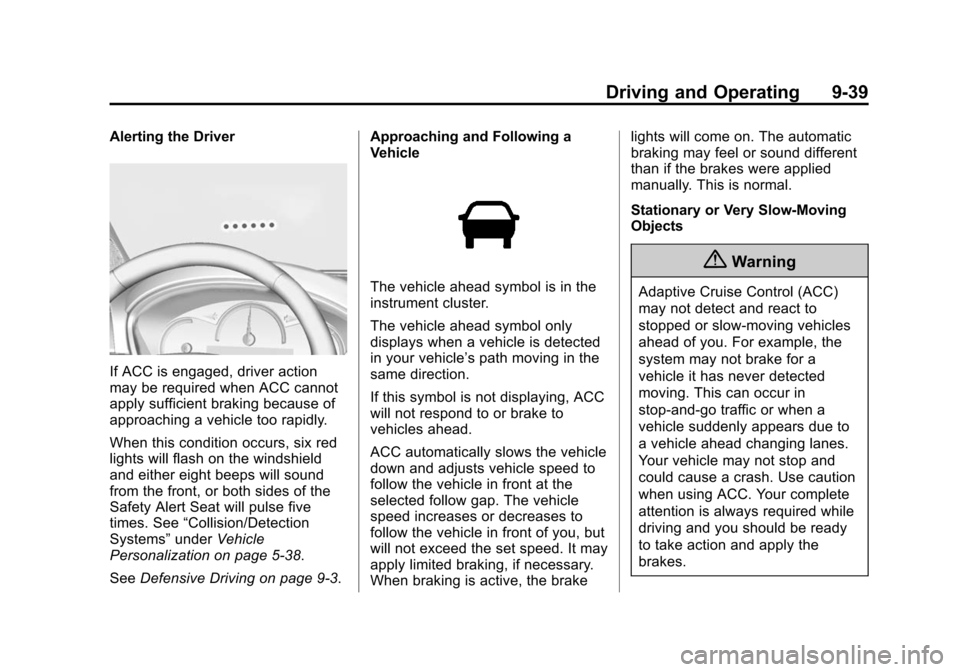
Alerting the Driver
If ACC is engaged, driver action
may be required when ACC cannot
apply sufficient braking because of
approaching a vehicle too rapidly.
When this condition occurs, six red
lights will flash on the windshield
and either eight beeps will sound
from the front, or both sides of the
Safety Alert Seat will pulse five
times. See“Collision/Detection
Systems” underVehicle
Personalization on page 5-38.
See Defensive Driving on page 9-3. Approaching and Following a
Vehicle
The vehicle ahead symbol is in the
instrument cluster.
The vehicle ahead symbol only
displays when a vehicle is detected
in your vehicle’s path moving in the
same direction.
If this symbol is not displaying, ACC
will not respond to or brake to
vehicles ahead.
ACC automatically slows the vehicle
down and adjusts vehicle speed to
follow the vehicle in front at the
selected follow gap. The vehicle
speed increases or decreases to
follow the vehicle in front of you, but
will not exceed the set speed. It may
apply limited braking, if necessary.
When braking is active, the brake lights will come on. The automatic
braking may feel or sound different
than if the brakes were applied
manually. This is normal.
Stationary or Very Slow-Moving
Objects
{Warning
Adaptive Cruise Control (ACC)
may not detect and react to
stopped or slow-moving vehicles
ahead of you. For example, the
system may not brake for a
vehicle it has never detected
moving. This can occur in
stop-and-go traffic or when a
vehicle suddenly appears due to
a vehicle ahead changing lanes.
Your vehicle may not stop and
could cause a crash. Use caution
when using ACC. Your complete
attention is always required while
driving and you should be ready
to take action and apply the
brakes.
Page 239 of 417

Black plate (48,1)Cadillac SRX Owner Manual (GMNA-Localizing-U.S./Canada/Mexico-
7707476) - 2015 - crc - 4/8/14
9-48 Driving and Operating
Turn off parking assist and Rear
Automatic Braking when towing a
trailer.
To turn the parking assist symbols
or guidance lines on or off:
1. On the infotainment system,press the Settings screen
button, or turn the MENU knob
to highlight Settings and
press MENU.
2. Select Rear Camera.
3. Press Rear Park Assist Symbols or Guidance Lines and then
select Off or On.
RCTA can be turned on or off
through vehicle personalization. See
“Collision/Detection Systems” under
Vehicle Personalization on
page 5-38.
Assistance Systems for
Driving
If equipped, when driving the
vehicle forward, Forward Collision
Alert (FCA), Lane Departure Warning (LDW), Side Blind Zone
Alert (SBZA), and/or the Active
Emergency Braking System can
help to avoid a crash or reduce
crash damage.
Forward Collision Alert
(FCA) System
If equipped, the FCA system may
help to avoid or reduce the harm
caused by front-end crashes. When
approaching a vehicle ahead too
quickly, FCA provides a red flashing
alert on the windshield and rapidly
beeps or pulses the driver seat.
FCA also lights an amber visual
alert if following another vehicle
much too closely.
FCA detects vehicles within a
distance of approximately 60 m
(197 ft) and operates at speeds
above 40 km/h (25 mph). If the
vehicle has Adaptive Cruise Control
(ACC), it can detect vehicles to
distances of approximately 110 m
(360 ft) and operates at all speeds.
See
Adaptive Cruise Control on
page 9-35.
{Warning
FCA is a warning system and
does not apply the brakes. When
approaching a slower-moving or
stopped vehicle ahead too rapidly,
or when following a vehicle too
closely, FCA may not provide a
warning with enough time to help
avoid a crash. FCA does not warn
of pedestrians, animals, signs,
guardrails, bridges, construction
barrels, or other objects. Be ready
to take action and apply the
brakes. For more information, see
Defensive Driving on page 9-3.
Page 244 of 417

Black plate (53,1)Cadillac SRX Owner Manual (GMNA-Localizing-U.S./Canada/Mexico-
7707476) - 2015 - crc - 4/8/14
Driving and Operating 9-53
SBZA Detection Zones
The SBZA sensor covers a zone of
approximately one lane over from
both sides of the vehicle, or 3.5 m
(11 ft). The height of the zone is
approximately between 0.5 m (1.5 ft)
and 2 m (6 ft) off the ground. This
zone starts at approximately the
middle of the vehicle and goes back
5 m (16 ft).
How the System Works
The SBZA symbol lights up in the
side mirrors when the system
detects a vehicle in the next laneover that is in the side blind zone.
This indicates it may be unsafe to
change lanes. Before making a lane
change, check the SBZA display,
check mirrors, glance over your
shoulder, and use the turn signals.
Left Side Mirror
DisplayRight Side Mirror Display
When the vehicle is started, both
outside mirror SBZA displays will
briefly come on to indicate the
system is operating. When the
vehicle is moving forward, the left or
right side mirror display will light up
if a vehicle is detected in that blind
zone. If the turn signal is activated
in the same direction of a detected
vehicle, this display will flash as an
extra warning not to change lanes. SBZA can be disabled through
vehicle personalization. See
“Collision/Detection Systems”
under
Vehicle Personalization on
page 5-38. If SBZA is disabled by
the driver, the SBZA mirror displays
will not light up.
When the System Does Not
Seem to Work Properly
SBZA displays may not come on
when passing a vehicle quickly or
when towing a trailer. The SBZA
detection zones that extend back
from the side of the vehicle do not
move further back when a trailer is
towed. Use caution while changing
lanes when towing a trailer. SBZA
may alert to objects attached to the
vehicle, such as a trailer, bicycle,
or object extending out to either side
of the vehicle. This is normal system
operation; the vehicle does not need
service.
SBZA may not always alert the
driver to vehicles in the side blind
zone, especially in wet conditions.
The system does not need to be
Page 365 of 417

Black plate (10,1)Cadillac SRX Owner Manual (GMNA-Localizing-U.S./Canada/Mexico-
7707476) - 2015 - crc - 4/8/14
11-10 Service and Maintenance
Battery
The battery supplies power to start
the engine and operate any
additional electrical accessories.
.To avoid break-down or failure to
start the vehicle, maintain a
battery with full cranking power.
.Trained dealer technicians have
the diagnostic equipment to test
the battery and ensure that the
connections and cables are
corrosion-free.
Belts
.Belts may need replacing if they
squeak or show signs of
cracking or splitting.
.Trained dealer technicians have
access to tools and equipment
to inspect the belts and
recommend adjustment or
replacement when necessary. Brakes
Brakes stop the vehicle and are
crucial to safe driving.
.Signs of brake wear may include
chirping, grinding, or squealing
noises, or difficulty stopping.
.Trained dealer technicians have
access to tools and equipment
to inspect the brakes and
recommend quality parts
engineered for the vehicle.
Fluids
Proper fluid levels and approved
fluids protect the vehicle’s systems
and components. See
Recommended Fluids and
Lubricants on page 11-13 for GM
approved fluids.
.Engine oil and windshield
washer fluid levels should be
checked at every fuel fill.
.Instrument cluster lights may
come on to indicate that fluids
may be low and need to be
filled. Hoses
Hoses transport fluids and should
be regularly inspected to ensure
that there are no cracks or leaks.
With a multi-point inspection, your
dealer can inspect the hoses and
advise if replacement is needed.
Lamps
Properly working headlamps,
taillamps, and brake lamps are
important to see and be seen on
the road.
.Signs that the headlamps need
attention include dimming, failure
to light, cracking, or damage.
The brake lamps need to be
checked periodically to ensure
that they light when braking.
.With a multi-point inspection,
your dealer can check the lamps
and note any concerns.
Page 397 of 417

Black plate (4,1)Cadillac SRX Owner Manual (GMNA-Localizing-U.S./Canada/Mexico-
7707476) - 2015 - crc - 4/8/14
14-4 OnStar
Destination Download:PressQ,
then request the Advisor to
download directions to the
navigation system in the vehicle (if
equipped). After the call ends, press
the “Go” button on the navigation
screen to begin driving directions.
If directions are downloaded to the
navigation system, the route can
only be canceled through the
navigation system.
Destinations can also be
downloaded on the go. For
information about eNav or
Destination Download, see
www.onstar.com (U.S.) or
www.onstar.ca (Canada).
Connections
The required specific Onstar
subscription plan includes the
services that follow to help
customers stay connected.
For coverage maps, see
www.onstar.com (U.S.) or
www.onstar.ca (Canada). WiFi Connectivity (If Equipped)
The vehicle has a WiFi hotspot that
provides a high-speed, wireless
Internet connection to connect
multiple mobile devices (data plan
required).
1. To retrieve WiFi hotspot
information, press
=and select
or say “WiFi settings.”
2. The WiFi settings will display the WiFi network name/SSID,
passphrase, and level of
encryption.
3. To change the SSID or passphrase, press
Qor call
1-888-4-ONSTAR to connect
with an Advisor.
OnStar RemoteLink
®Mobile App
(If Equipped)
Download the OnStar RemoteLink
mobile app to select Apple
®,
Android™, and BlackBerry®or
Windows 7 or 8 mobile devices.
From the mobile device, check the
vehicle’s fuel level, oil life, or tire pressure (if the vehicle is equipped
with the tire pressure monitoring
system); or activate remote horn
and lights. Also remote start the
vehicle (if factory equipped) or
unlock the doors from anywhere
with a wireless connection (if
equipped with automatic locks).
With a required specific OnStar
subscription plan, a destination can
be sent to the vehicle. For OnStar
RemoteLink information and
compatibility, see www.onstar.com
(U.S.) or www.onstar.ca (Canada).
OnStar RemoteLink
®Key Fob
Services
This feature is included for five
years and allows for remote door
lock/unlock (if equipped with
automatic locks), remote start (if
factory equipped), or activation of
horn and lights from anywhere with
a wireless signal. Download the app
and start using it any time during the
trial period to get started.
Page 408 of 417

Black plate (5,1)Cadillac SRX Owner Manual (GMNA-Localizing-U.S./Canada/Mexico-
7707476) - 2015 - crc - 4/8/14
INDEX i-5
F
FeaturesMemory . . . . . . . . . . . . . . . . . . . . . . . . 1-8
Filter, Engine Air Cleaner . . . . . . . . . 10-10
Flash-to-Pass . . . . . . . . . . . . . . . . . . . 6-3
Flashers, Hazard Warning . . . . . . 6-5
Flat Tire . . . . . . . . . . . . . . . . . . . . . . 10-62 Changing . . . . . . . . . . . . . . . . . . . 10-72
Floor Mats . . . . . . . . . . . . . . . . . . . . 10-94
Fluid Automatic Transmission . . . . 10-10
Brakes . . . . . . . . . . . . . . . . . . . . . . 10-20
Power Steering . . . . . . . . . . . . . 10-18
Washer . . . . . . . . . . . . . . . . . . . . . 10-18
Fog Lamps
Front . . . . . . . . . . . . . . . . . . . . . . . . . . 6-6
Folding Mirrors . . . . . . . . . . . . . . . . 2-21
Forward Collision Alert (FCA) System . . . . . . . . . . . . . . . . 9-48
Frequency Statement Radio . . . . . . . . . . . . . . . . . . . . . . . 13-12
Front Fog Lamp Light . . . . . . . . . . . . . . . . . . . . . . . . . . 5-24 Front Seats
Adjustment . . . . . . . . . . . . . . . . . . . . 3-3
Heated and Ventilated . . . . . . . . . 3-8
Front Storage . . . . . . . . . . . . . . . . . . . 4-2
Fuel . . . . . . . . . . . . . . . . . . . . . . . . . . . 9-56 Additives . . . . . . . . . . . . . . . . . . . . . 9-57
Economy Driving . . . . . . . . . . . . . 1-20
Economy Light . . . . . . . . . . . . . . . 5-23
Filling a Portable FuelContainer . . . . . . . . . . . . . . . . . . . 9-59
Filling the Tank . . . . . . . . . . . . . . . 9-57
Foreign Countries . . . . . . . . . . . . 9-57
Gauge . . . . . . . . . . . . . . . . . . . . . . . . 5-11
Low Fuel Warning Light . . . . . . . 5-23
Requirements, California . . . . . 9-57
System Messages . . . . . . . . . . . . 5-31
Fuel Economy Mode . . . . . . . . . . . 9-25
Fuses Engine CompartmentFuse Block . . . . . . . . . . . . . . . . 10-33
Fuses and Circuit
Breakers . . . . . . . . . . . . . . . . . . 10-33
Instrument Panel Fuse Block . . . . . . . . . . . . . . . . . . . . . . 10-36
Rear Compartment Fuse
Block . . . . . . . . . . . . . . . . . . . . . . 10-38
G
Garage Door Opener . . . . . . . . . . 5-45Programming . . . . . . . . . . . . . . . . . 5-45
Gasoline Engine, Starting . . . . . . 9-16
Gauges Engine CoolantTemperature . . . . . . . . . . . . . . . . 5-12
Fuel . . . . . . . . . . . . . . . . . . . . . . . . . . 5-11
Odometer . . . . . . . . . . . . . . . . . . . . . 5-10
Speedometer . . . . . . . . . . . . . . . . . 5-10
Tachometer . . . . . . . . . . . . . . . . . . . 5-11
Trip Odometer . . . . . . . . . . . . . . . . 5-10
Warning Lights and Indicators . . . . . . . . . . . . . . . . . . . . 5-8
General Information Service and Maintenance . . . . . 11-1
Towing . . . . . . . . . . . . . . . . . . . . . . . . 9-60
Vehicle Care . . . . . . . . . . . . . . . . . . 10-2
Glove Box . . . . . . . . . . . . . . . . . . . . . . 4-1
Page 410 of 417

Black plate (7,1)Cadillac SRX Owner Manual (GMNA-Localizing-U.S./Canada/Mexico-
7707476) - 2015 - crc - 4/8/14
INDEX i-7
Lamps (cont'd)Messages . . . . . . . . . . . . . . . . . . . . 5-32
On Reminder . . . . . . . . . . . . . . . . . 5-24
Reading . . . . . . . . . . . . . . . . . . . . . . . 6-8
Lane Departure Warning (LDW) . . . . . . . . . . . . . . . 9-54
Lane Departure Warning Light . . . . . . . . . . . . . . . . . . . . . . . . . 5-20
Lap-Shoulder Belt . . . . . . . . . . . . . 3-14
LATCH System
Replacing Parts after aCrash . . . . . . . . . . . . . . . . . . . . . . . 3-47
LATCH, Lower Anchors and Tethers for Children . . . . . . . . . . 3-40
Liftgate . . . . . . . . . . . . . . . . . . . . . . . . 2-14
Lighter, Cigarette . . . . . . . . . . . . . . . 5-7
Lighting Entry . . . . . . . . . . . . . . . . . . . . . . . . . . 6-8
Exit . . . . . . . . . . . . . . . . . . . . . . . . . . . . 6-8
Illumination Control . . . . . . . . . . . . 6-7
Lights Airbag Readiness . . . . . . . . . . . . . 5-13
Antilock Brake System(ABS) Warning . . . . . . . . . . . . . . 5-19
Brake System Warning . . . . . . . 5-18
Charging System . . . . . . . . . . . . . 5-15
Cruise Control . . . . . . . . . . . . . . . . 5-24 Lights (cont'd)
Electric Parking Brake . . . . . . . . 5-18
Engine Coolant
Temperature Warning . . . . . . . 5-21
Engine Oil Pressure . . . . . . . . . . 5-22
Flash-to-Pass . . . . . . . . . . . . . . . . . . 6-3
Front Fog Lamp . . . . . . . . . . . . . . 5-24
Fuel Economy . . . . . . . . . . . . . . . . 5-23
High-Beam On . . . . . . . . . . . . . . . . 5-24
High/Low Beam Changer . . . . . . 6-3
Lane Departure Warning . . . . . . 5-20
Low Fuel Warning . . . . . . . . . . . . 5-23
Safety Belt Reminders . . . . . . . . 5-12
Security . . . . . . . . . . . . . . . . . . . . . . 5-23
Service Electric Parking Brake . . . . . . . . . . . . . . . . . . . . . . . 5-19
StabiliTrak
®OFF . . . . . . . . . . . . . 5-20
Tire Pressure . . . . . . . . . . . . . . . . . 5-22
Traction Control System
(TCS)/StabiliTrak
®. . . . . . . . . . 5-21
Traction Off . . . . . . . . . . . . . . . . . . . 5-20
Limited-Slip Rear Axle . . . . . . . . . 9-32
Locks Automatic Door . . . . . . . . . . . . . . . 2-12
Delayed Locking . . . . . . . . . . . . . . 2-12
Door . . . . . . . . . . . . . . . . . . . . . . . . . . 2-11 Locks (cont'd)
Lockout Protection . . . . . . . . . . . . 2-13
Power Door . . . . . . . . . . . . . . . . . . . 2-12
Safety . . . . . . . . . . . . . . . . . . . . . . . . 2-13
Loss of Control . . . . . . . . . . . . . . . . . 9-5
Low Fuel Warning Light . . . . . . . . 5-23
Lower Anchors and Tethers for Children (LATCH
System) . . . . . . . . . . . . . . . . . . . . . . 3-40
Lumbar Adjustment . . . . . . . . . . . . . 3-4 Front Seats . . . . . . . . . . . . . . . . . . . . 3-4
M
MaintenanceRecords . . . . . . . . . . . . . . . . . . . . .11-15
Maintenance and Care
Additional . . . . . . . . . . . . . . . . . . . . . 11-9
Maintenance Schedule . . . . . . . . 11-3 Recommended Fluidsand Lubricants . . . . . . . . . . . . .11-13
Malfunction Indicator Lamp . . . . 5-15
Manual Mode . . . . . . . . . . . . . . . . . . 9-24
Memory Features . . . . . . . . . . . . . . . 1-8
Memory Seats . . . . . . . . . . . . . . . . . . 3-6