2015 CADILLAC CTS SEDAN seat memory
[x] Cancel search: seat memoryPage 8 of 401

Black plate (1,1)Cadillac CTS Owner Manual (GMNA-Localizing-U.S./Canada/Mexico-
7707478) - 2015 - crc - 10/1/14
In Brief 1-1
In Brief
Instrument Panel
Instrument Panel . . . . . . . . . . . . . . 1-2
Initial Drive Information
Initial Drive Information . . . . . . . . 1-4
Starting the Engine . . . . . . . . . . . 1-4
Remote Keyless Entry (RKE)System . . . . . . . . . . . . . . . . . . . . . . 1-4
Remote Vehicle Start . . . . . . . . . 1-5
Door Locks . . . . . . . . . . . . . . . . . . . 1-5
Trunk . . . . . . . . . . . . . . . . . . . . . . . . . 1-6
Windows . . . . . . . . . . . . . . . . . . . . . . 1-6
Seat Adjustment . . . . . . . . . . . . . . 1-7
Memory Features . . . . . . . . . . . . . 1-8
Heated and Ventilated Seats . . . . . . . . . . . . . . . . . . . . . . . . 1-8
Head Restraint Adjustment . . . . 1-9
Safety Belts . . . . . . . . . . . . . . . . . . . 1-9
Passenger Sensing System . . . . . . . . . . . . . . . . . . . . . 1-10 Mirror Adjustment . . . . . . . . . . . . 1-10
Steering Wheel
Adjustment . . . . . . . . . . . . . . . . . 1-11
Interior Lighting . . . . . . . . . . . . . . 1-11
Exterior Lighting . . . . . . . . . . . . . 1-12
Windshield Wiper/Washer . . . . 1-13
Climate Controls . . . . . . . . . . . . . 1-14
Transmission . . . . . . . . . . . . . . . . 1-15
Vehicle Features
Infotainment System . . . . . . . . . 1-15
Steering Wheel Controls . . . . . 1-15
Cruise Control . . . . . . . . . . . . . . . 1-15
Driver Information Center (DIC) . . . . . . . . . . . . . . . 1-16
Forward Collision Alert (FCA) System . . . . . . . . . . . . . . . . . . . . . 1-16
Lane Keep Assist (LKA) . . . . . 1-16
Lane Change Alert (LCA) . . . . 1-17
Rear Vision Camera (RVC) . . . . . . . . . . . . . 1-17
Rear Cross Traffic Alert (RCTA) System . . . . . . . . . . . . 1-17 Parking Assist . . . . . . . . . . . . . . . 1-17
Automatic Parking
Assist (APA) . . . . . . . . . . . . . . . . 1-17
Rear Automatic Braking (RAB) System . . . . . . . . . . . . . . . . . . . . . 1-18
Active Emergency Braking System . . . . . . . . . . . . . . . . . . . . . 1-18
Power Outlets . . . . . . . . . . . . . . . 1-18
Universal Remote System . . . 1-19
Sunroof . . . . . . . . . . . . . . . . . . . . . . 1-19Performance and Maintenance
Traction Control/Electronic Stability Control . . . . . . . . . . . . 1-20
Tire Pressure Monitor . . . . . . . . 1-20
Engine Oil Life System . . . . . . 1-21
Driving for Better Fuel Economy . . . . . . . . . . . . . . . . . . . 1-22
Roadside Service . . . . . . . . . . . . 1-22
OnStar
®. . . . . . . . . . . . . . . . . . . . . 1-22
Page 15 of 401
Black plate (8,1)Cadillac CTS Owner Manual (GMNA-Localizing-U.S./Canada/Mexico-
7707478) - 2015 - crc - 10/1/14
1-8 In Brief
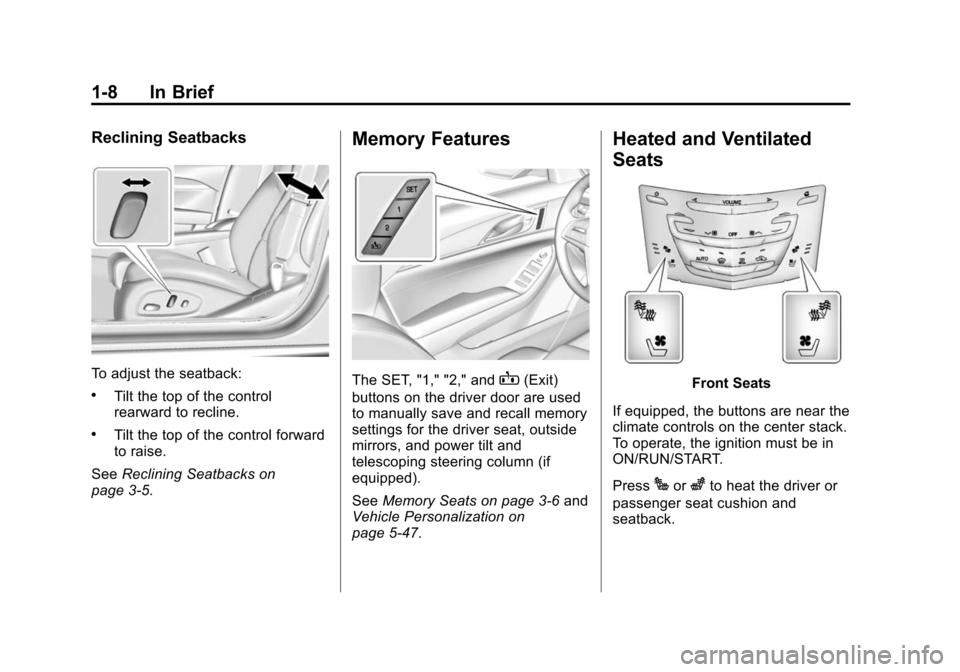
Reclining Seatbacks
To adjust the seatback:
.Tilt the top of the control
rearward to recline.
.Tilt the top of the control forward
to raise.
See Reclining Seatbacks on
page 3-5.
Memory Features
The SET, "1," "2," andB(Exit)
buttons on the driver door are used
to manually save and recall memory
settings for the driver seat, outside
mirrors, and power tilt and
telescoping steering column (if
equipped).
See Memory Seats on page 3-6 and
Vehicle Personalization on
page 5-47.
Heated and Ventilated
Seats
Front Seats
If equipped, the buttons are near the
climate controls on the center stack.
To operate, the ignition must be in
ON/RUN/START.
Press
Jorzto heat the driver or
passenger seat cushion and
seatback.
Page 18 of 401
Black plate (11,1)Cadillac CTS Owner Manual (GMNA-Localizing-U.S./Canada/Mexico-
7707478) - 2015 - crc - 10/1/14
In Brief 1-11
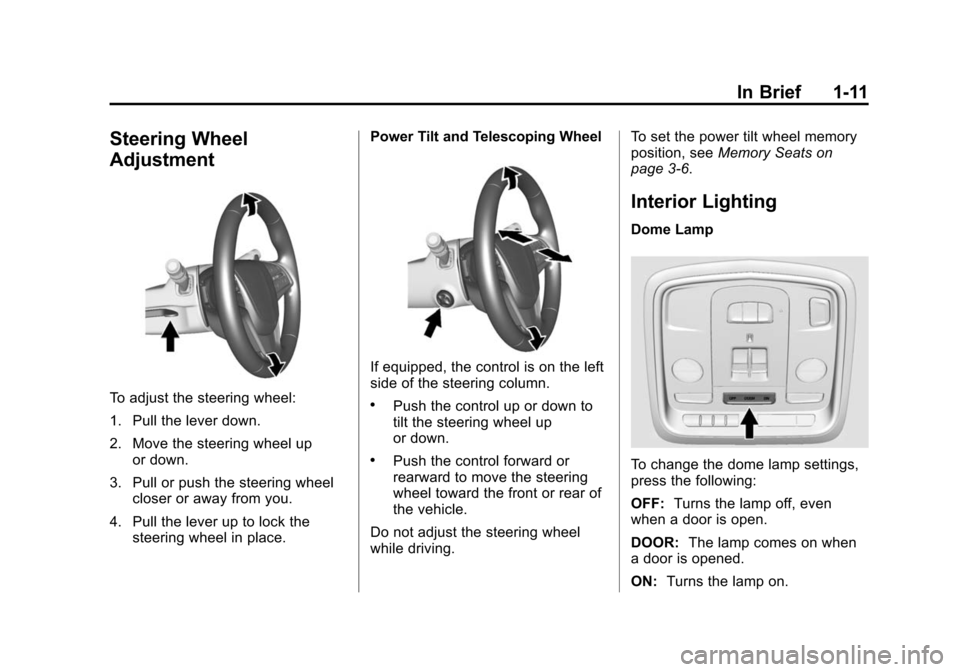
Steering Wheel
Adjustment
To adjust the steering wheel:
1. Pull the lever down.
2. Move the steering wheel upor down.
3. Pull or push the steering wheel closer or away from you.
4. Pull the lever up to lock the steering wheel in place. Power Tilt and Telescoping Wheel
If equipped, the control is on the left
side of the steering column.
.Push the control up or down to
tilt the steering wheel up
or down.
.Push the control forward or
rearward to move the steering
wheel toward the front or rear of
the vehicle.
Do not adjust the steering wheel
while driving. To set the power tilt wheel memory
position, see
Memory Seats on
page 3-6.
Interior Lighting
Dome Lamp
To change the dome lamp settings,
press the following:
OFF: Turns the lamp off, even
when a door is open.
DOOR: The lamp comes on when
a door is opened.
ON: Turns the lamp on.
Page 23 of 401

Black plate (16,1)Cadillac CTS Owner Manual (GMNA-Localizing-U.S./Canada/Mexico-
7707478) - 2015 - crc - 10/1/14
1-16 In Brief
increase speed to the next 5 km/h
(5 mph) mark on the speedometer,
press +RES up to the second
detent.
SET−:Press the control down
briefly to set the speed and activate
cruise control. If cruise control is
already active, use to decrease
vehicle speed. To decrease speed
by 1 km/h (1 mph), press SET−
down to the first detent. To decrease
speed to the next 5 km/h (5 mph)
mark on the speedometer, press
SET− down to the second detent.
*:Press to disengage cruise
control without erasing the set
speed from memory.
See Cruise Control on page 9-34 or
Adaptive Cruise Control on
page 9-37 (if equipped).
Driver Information
Center (DIC)
The DIC display is in the instrument
cluster. It shows the status of many
vehicle systems.
yorz:Press to move up or
down in a list.
SorT: Press to move between
the interactive display zones in the
cluster. Press
Sto go back to the
previous menu.
SEL: Press to open a menu or
select a menu item. Press and hold
to reset values on certain screens.
See Driver Information Center (DIC)
on page 5-29.
Forward Collision Alert
(FCA) System
If equipped, FCA may help avoid or
reduce the harm caused by
front-end crashes. FCA provides a
green indicator,
V, when a vehicle
is detected ahead. This indicator
displays amber if you follow a
vehicle much too closely. When
approaching a vehicle ahead too
quickly, FCA provides a flashing red
alert on the windshield and rapidly
beeps or pulses the driver seat.
See Forward Collision Alert (FCA)
System on page 9-52.
Lane Keep Assist (LKA)
If equipped, LKA may help avoid
crashes due to unintentional lane
departures. It may assist by gently
turning the steering wheel if the
vehicle approaches a detected lane
marking without using a turn signal
in that direction. It may also provide
a Lane Departure Warning (LDW)
alert as the lane marking is crossed.
Page 32 of 401

Black plate (3,1)Cadillac CTS Owner Manual (GMNA-Localizing-U.S./Canada/Mexico-
7707478) - 2015 - crc - 10/1/14
Keys, Doors, and Windows 2-3
Keep in mind that other conditions,
such as those previously stated, can
impact the performance of the
transmitter.
Q(Lock):Press to lock all doors.
The turn signal indicators may flash
and/or the horn may sound on the
second press to indicate locking.
See “Remote Lock, Unlock, Start”
under Vehicle Personalization on
page 5-47.
If the driver door is open when
Qis
pressed and Unlocked Door
Anti-Lockout is enabled through the vehicle personalization, all doors will
lock and then the driver door will
immediately unlock. See
“Unlocked
Door Anti Lock Out” underVehicle
Personalization on page 5-47. If the
passenger door is open when
Qis
pressed, all doors lock.
Pressing
Qmay also arm the alarm
system. See Vehicle Alarm System
on page 2-16.
K(Unlock): Press to unlock the
driver door or all doors. When
remotely unlocking the vehicle at
night, the headlamps and back-up
lamps will come on for about
30 seconds to light your approach to
the vehicle. The turn signal
indicators may flash to indicate
unlocking. If equipped, memory seat
positions may be recalled when the
vehicle is unlocked and the driver
door is open.
See Memory Seats on page 3-6 and
“Remote Lock, Unlock, Start” under
Vehicle Personalization on
page 5-47. Pressing
Kwill disarm the alarm
system. See Vehicle Alarm System
on page 2-16.
Press and hold
Kuntil the windows
fully open.
/(Remote Start): Press and
release
Qand then immediately
press and hold
/for at least
four seconds to start the engine
from outside the vehicle using the
RKE transmitter. See Remote
Vehicle Start on page 2-9.
7(Vehicle Locator/Panic
Alarm): Press and release one
time to initiate vehicle locator. The
exterior lamps flash and the horn
chirps three times. Press and
hold
7for more than three seconds
to sound the panic alarm. The horn
sounds and the turn signal lamps
flash for 30 seconds, or until
7is
pressed again or the vehicle is
started.
Page 49 of 401
Black plate (20,1)Cadillac CTS Owner Manual (GMNA-Localizing-U.S./Canada/Mexico-
7707478) - 2015 - crc - 10/1/14
2-20 Keys, Doors, and Windows
4. Return the selector switch to thecenter position.
Memory Mirrors
If equipped, the vehicle may have
memory mirrors. See Memory Seats
on page 3-6.
Automatic Dimming
If equipped, the driver side mirror
automatically dims to reduce the
glare of the vehicle headlamps from
behind. This feature comes on when
the vehicle is started.
Folding Mirrors
Manual Folding Mirrors
The mirrors can be folded inward
toward the vehicle to prevent
damage when going through an
automatic car wash. Push the mirror
outward to return it to the original
position.
Heated Mirrors
=
(Rear Window Defogger):
If equipped, press to heat the
mirrors.
See Dual Automatic Climate Control
System on page 8-1.
Reverse Tilt Mirrors
The passenger and/or driver mirror
tilt to a preselected position when
the vehicle is in R (Reverse). This
feature allows the driver to view the
curb when parallel parking. The
mirror returns to the original position
when the vehicle is shifted out of
R (Reverse), the ignition is turned
off, or if the vehicle is driven in
reverse above a predetermined
speed.
Turn this feature on or off through
vehicle personalization. See Vehicle
Personalization on page 5-47.
Interior Mirrors
Interior Rearview Mirrors
Adjust the rearview mirror for a clear
view of the area behind your
vehicle.
Do not spray glass cleaner directly
on the mirror. Use a soft towel
dampened with water.
Automatic Dimming
Rearview Mirror
The rearview mirror automatically
dims to reduce the glare of the
headlamps from behind. This
feature comes on when the vehicle
is started.
Page 56 of 401
Black plate (1,1)Cadillac CTS Owner Manual (GMNA-Localizing-U.S./Canada/Mexico-
7707478) - 2015 - crc - 10/1/14
Seats and Restraints 3-1
Seats and
Restraints
Head Restraints
Head Restraints . . . . . . . . . . . . . . . 3-2
Front Seats
Power Seat Adjustment . . . . . . . 3-3
Lumbar Adjustment . . . . . . . . . . . 3-4
Thigh Support Adjustment . . . . 3-5
Reclining Seatbacks . . . . . . . . . . 3-5
Memory Seats . . . . . . . . . . . . . . . . 3-6
Heated and Ventilated FrontSeats . . . . . . . . . . . . . . . . . . . . . . . . 3-8
Rear Seats
Rear Seats . . . . . . . . . . . . . . . . . . 3-10
Heated Rear Seats . . . . . . . . . . 3-12
Rear SeatPass-Through Door . . . . . . . . 3-12
Safety Belts
Safety Belts . . . . . . . . . . . . . . . . . . 3-13
How to Wear Safety BeltsProperly . . . . . . . . . . . . . . . . . . . . 3-14
Lap-Shoulder Belt . . . . . . . . . . . 3-15
Safety Belt Use During Pregnancy . . . . . . . . . . . . . . . . . . 3-20
Safety Belt Extender . . . . . . . . . 3-20
Safety System Check . . . . . . . . 3-21
Safety Belt Care . . . . . . . . . . . . . 3-21
Replacing Safety Belt System Parts after a Crash . . . . . . . . . 3-21
Airbag System
Airbag System . . . . . . . . . . . . . . . 3-22
Where Are the Airbags? . . . . . 3-24
When Should an AirbagInflate? . . . . . . . . . . . . . . . . . . . . . 3-26
What Makes an Airbag Inflate? . . . . . . . . . . . . . . . . . . . . . 3-27
How Does an Airbag Restrain? . . . . . . . . . . . . . . . . . . . 3-27
What Will You See after an Airbag Inflates? . . . . . . . . . . . . 3-27 Passenger Sensing
System . . . . . . . . . . . . . . . . . . . . . 3-29
Servicing the Airbag-Equipped Vehicle . . . . . . . . . . . . . . . . . . . . . 3-33
Adding Equipment to the
Airbag-Equipped Vehicle . . . 3-34
Airbag System Check . . . . . . . . 3-34
Replacing Airbag System Parts after a Crash . . . . . . . . . 3-35
Child Restraints
Older Children . . . . . . . . . . . . . . . 3-35
Infants and YoungChildren . . . . . . . . . . . . . . . . . . . . 3-37
Child Restraint Systems . . . . . 3-40
Where to Put the Restraint . . . 3-42
Lower Anchors and Tethers for Children (LATCH
System) . . . . . . . . . . . . . . . . . . . . 3-43
Replacing LATCH System Parts After a Crash . . . . . . . . . 3-49
Securing Child Restraints (Rear Seat) . . . . . . . . . . . . . . . . . 3-49
Securing Child Restraints (Front Passenger Seat) . . . . 3-52
Page 61 of 401
Black plate (6,1)Cadillac CTS Owner Manual (GMNA-Localizing-U.S./Canada/Mexico-
7707478) - 2015 - crc - 10/1/14
3-6 Seats and Restraints
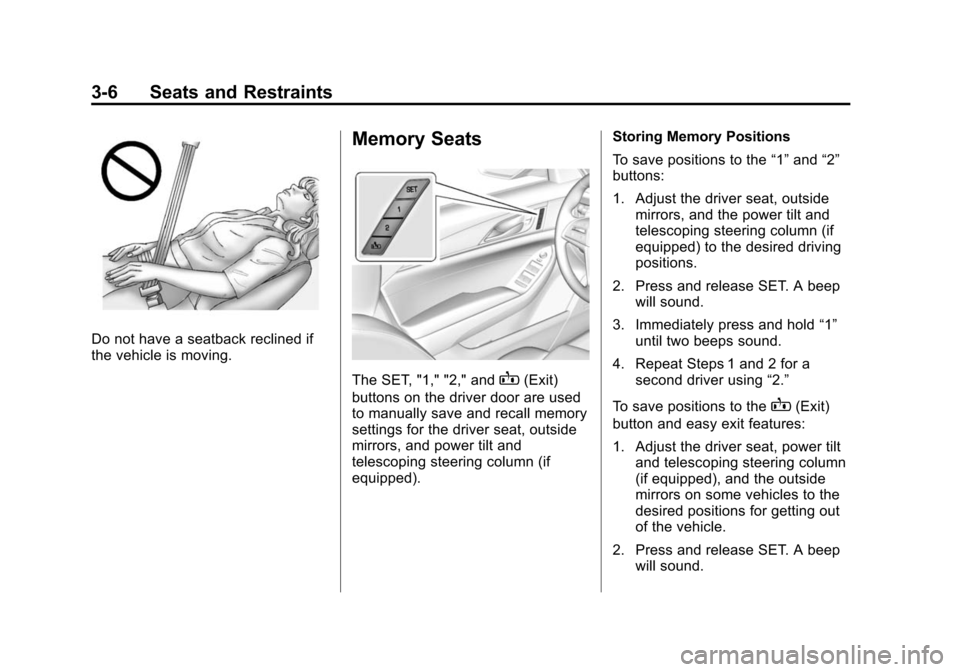
Do not have a seatback reclined if
the vehicle is moving.
Memory Seats
The SET, "1," "2," andB(Exit)
buttons on the driver door are used
to manually save and recall memory
settings for the driver seat, outside
mirrors, and power tilt and
telescoping steering column (if
equipped). Storing Memory Positions
To save positions to the
“1”and “2”
buttons:
1. Adjust the driver seat, outside mirrors, and the power tilt and
telescoping steering column (if
equipped) to the desired driving
positions.
2. Press and release SET. A beep will sound.
3. Immediately press and hold “1”
until two beeps sound.
4. Repeat Steps 1 and 2 for a second driver using “2.”
To save positions to the
B(Exit)
button and easy exit features:
1. Adjust the driver seat, power tilt and telescoping steering column
(if equipped), and the outside
mirrors on some vehicles to the
desired positions for getting out
of the vehicle.
2. Press and release SET. A beep will sound.