2015 CADILLAC CTS SEDAN ECO mode
[x] Cancel search: ECO modePage 169 of 401
Black plate (56,1)Cadillac CTS Owner Manual (GMNA-Localizing-U.S./Canada/Mexico-
7707478) - 2015 - crc - 10/1/14
5-56 Instruments and Controls
home automation devices. These
instructions refer to a garage door
opener, but can be used for other
devices.
Do not use the Universal Remote
system with any garage door opener
that does not have the stop and
reverse feature. This includes any
garage door opener model
manufactured before April 1, 1982.
Read these instructions completely
before programming the Universal
Remote system. It may help to have
another person assist with the
programming process.
Keep the original hand-held
transmitter for use in other vehicles
as well as for future programming.
Erase the programming when
vehicle ownership is terminated.
See“Erasing Universal Remote
System Buttons” later in this
section. To program a garage door opener,
park outside directly in line with and
facing the garage door opener
receiver. Clear all people and
objects near the garage door.
Make sure the hand-held transmitter
has a new battery for quick and
accurate transmission of the
radio-frequency signal.
Programming the Universal
Remote System
For questions or help programming
the Universal Remote system, call
1-800-355-3515 or see
www.homelink.com.
Programming involves
time-sensitive actions, and may time
out causing the procedure to be
repeated.
To program up to three devices:
1. Hold the end of the hand-held
transmitter about 3 to 8 cm (1 to
3 in) away from the Universal
Remote system buttons with the
indicator light in view. The hand-held transmitter was
supplied by the manufacturer of
the garage door opener receiver.
2. At the same time, press and hold both the hand-held
transmitter button and one of the
three Universal Remote system
buttons to be used to operate
the garage door. Do not release
either button until the indicator
light changes from a slow to a
rapid flash. Then release both
buttons.
Some garage door openers may
require substitution of Step 2
with the procedure under in
“Radio Signals for Canada and
Some Gate Operators” later in
this section.
3. Press and hold the newly programmed Universal Remote
system button for five seconds
while watching the indicator light
and garage door activation.
.If the indicator light stays on
continuously or the garage
door moves when the
Page 189 of 401

Black plate (6,1)Cadillac CTS Owner Manual (GMNA-Localizing-U.S./Canada/Mexico-
7707478) - 2015 - crc - 10/1/14
8-6 Climate Controls
Sensor
The solar sensor, on top of the
instrument panel near the
windshield, monitors the solar heat.
The climate control system uses the
sensor information to adjust the
temperature, fan speed,
recirculation, and air delivery mode
for best comfort.
If the sensor is covered, the
automatic climate control system
may not work properly.Air Quality Sensor
If equipped with an air quality
sensor, the climate control system
adjusts to limit some exhaust fumes
from being pulled inside the vehicle.
Press the AUTO button on the
climate control to activate the air
quality sensor. The recirculation
indicator light comes on when poor
quality air is detected. The air
quality sensor will not maintain
recirculation for an extended period
to prevent the air inside the vehicle
from becoming too dry or stuffy.
Under certain conditions, the air
quality sensor will not activate, such
as during cold weather or with
extreme odors. Press
@to
activate recirculation.
The air quality sensor system does
not protect against carbon monoxide
(CO), which you cannot see or
smell. See Engine Exhaust on
page 9-22. The air quality sensor
operation can be adjusted, See “Climate and Air Quality”
under
Vehicle Personalization on
page 5-47.
Rear Climate Control
System
If equipped, the rear climate control
system is on the rear of the center
console. The settings can be
adjusted with the rear climate
control buttons and the touch
screen.
Page 190 of 401

Black plate (7,1)Cadillac CTS Owner Manual (GMNA-Localizing-U.S./Canada/Mexico-
7707478) - 2015 - crc - 10/1/14
Climate Controls 8-7
Rear Climate Control Buttons
1. Heated Rear Seats (If Equipped)
2. AUTO (Automatic Operation)
3. MODE (Air Delivery Mode Control)
4.
O(On/Off)
5. Temperature Control
Rear Climate Touch Screen Controls
1. Outside Temperature Display
2. Rear Climate Temperature Control
3. SYNC (Synchronized Temperatures)
4. REAR
O(On/Off)
5. Rear AUTO (Automatic Operation)
6. Front (Front Climate Control Touch Screen)
7. Rear Control Lockout 8. Air Delivery Mode Control
Rear:
Press this button on the front
climate control touch screen to open
the rear climate control screen. The
rear climate control settings can
now be adjusted from the front
passenger area.
O(On/Off): Press theObutton or
REAR
Oon the touch screen to turn
the rear climate control on or off.
If the rear climate control is turned
off using REAR
Oon the touch
screen, the rear climate control
buttons must be pressed twice to
turn the system back on. Press
O
on the rear climate control faceplate
and within 5 seconds press the
MODE or temperature buttons on
the faceplate.
SYNC: Press SYNC on the touch
screen to match the rear climate
control temperature to the front
climate control driver temperature.
The SYNC button will be lit. Press
the TEMP, MODE, or AUTO button
Page 194 of 401
Black plate (1,1)Cadillac CTS Owner Manual (GMNA-Localizing-U.S./Canada/Mexico-
7707478) - 2015 - crc - 10/1/14
Driving and Operating 9-1
Driving and
Operating
Driving Information
Distracted Driving . . . . . . . . . . . . . 9-2
Defensive Driving . . . . . . . . . . . . . 9-3
Drunk Driving . . . . . . . . . . . . . . . . . 9-3
Control of a Vehicle . . . . . . . . . . . 9-3
Braking . . . . . . . . . . . . . . . . . . . . . . . 9-3
Steering . . . . . . . . . . . . . . . . . . . . . . . 9-4
Off-Road Recovery . . . . . . . . . . . . 9-5
Loss of Control . . . . . . . . . . . . . . . . 9-5
Track Events and CompetitiveDriving . . . . . . . . . . . . . . . . . . . . . . . 9-6
Driving on Wet Roads . . . . . . . . . 9-7
Hill and Mountain Roads . . . . . . 9-8
Winter Driving . . . . . . . . . . . . . . . . . 9-8
If the Vehicle Is Stuck . . . . . . . . 9-10
Vehicle Load Limits . . . . . . . . . . 9-11
Starting and Operating
New Vehicle Break-In . . . . . . . . 9-15
Ignition Positions . . . . . . . . . . . . 9-16
Starting the Engine . . . . . . . . . . 9-18
Retained Accessory Power (RAP) . . . . . . . . . . . . . . . 9-19
Engine Coolant Heater . . . . . . . 9-19 Shifting Into Park . . . . . . . . . . . . 9-20
Shifting out of Park . . . . . . . . . . 9-21
Parking over Things
That Burn . . . . . . . . . . . . . . . . . . 9-21
Engine Exhaust
Engine Exhaust . . . . . . . . . . . . . . 9-22
Running the Vehicle WhileParked . . . . . . . . . . . . . . . . . . . . . 9-22
Automatic Transmission
Automatic Transmission . . . . . 9-23
Manual Mode . . . . . . . . . . . . . . . . 9-25
Drive Systems
All-Wheel Drive . . . . . . . . . . . . . . 9-26
Brakes
Antilock BrakeSystem (ABS) . . . . . . . . . . . . . . 9-27
Electric Parking Brake . . . . . . . 9-28
Brake Assist . . . . . . . . . . . . . . . . . 9-29
Ride Control Systems
Traction Control/Electronic Stability Control . . . . . . . . . . . . 9-30
Driver Mode Control . . . . . . . . . 9-31
Competitive Driving Mode (LF3 Only) . . . . . . . . . . . . . . . . . . 9-33
Limited-Slip Differential (LF3 Only) . . . . . . . . . . . . . . . . . . 9-34
Cruise Control
Cruise Control . . . . . . . . . . . . . . . 9-34
Adaptive Cruise Control . . . . . 9-37
Driver Assistance Systems
Driver AssistanceSystems . . . . . . . . . . . . . . . . . . . . 9-45
Assistance Systems for Parking or Backing . . . . . . . . . 9-46
Assistance Systems for Driving . . . . . . . . . . . . . . . . . . . . . 9-51
Forward Collision Alert (FCA) System . . . . . . . . . . . . . . . . . . . . . 9-52
Active Emergency Braking System . . . . . . . . . . . . . . . . . . . . . 9-54
Side Blind Zone Alert (SBZA) . . . . . . . . . . . . . . . 9-56
Page 208 of 401

Black plate (15,1)Cadillac CTS Owner Manual (GMNA-Localizing-U.S./Canada/Mexico-
7707478) - 2015 - crc - 10/1/14
Driving and Operating 9-15
Warning (Continued)
.Never stack heavier
things, like suitcases,
inside the vehicle so that
some of them are above
the tops of the seats.
.Do not leave an
unsecured child restraint
in the vehicle.
.Secure loose items in the
vehicle.
.Do not leave a seat folded
down unless needed.
Starting and
Operating
New Vehicle Break-In
Follow these recommended
guidelines during the first
2 400 km (1,500 mi) of driving this
vehicle. Parts have a break-in
period and performance will be
better in the long run.
For the first 2 414 km (1,500 mi):
.Avoid full throttle starts and
abrupt stops.
.Do not exceed 4000 engine rpm.
.Avoid driving at any one
constant speed, fast or slow.
.Avoid downshifting to brake or
slow the vehicle when the
engine speed will exceed
4000 rpm.
.Do not let the engine labor.
Never lug the engine in high
gear at low speeds.
.Do not participate in track
events, sport driving schools,
or similar activities during this
break-in period.
.Check engine oil with every
refueling and add if necessary.
Oil and fuel consumption may be
higher than normal during the
first 2 400 km (1,500 mi).
.To break in new tires, drive at
moderate speeds and avoid hard
cornering for the first
322 km (200 mi). New tires do
not have maximum traction and
may tend to slip.
.New brake linings also need a
break–in period. Avoid making
hard stops during the first
322 km (200 mi). This is
recommended every time brake
linings are replaced.
Page 210 of 401

Black plate (17,1)Cadillac CTS Owner Manual (GMNA-Localizing-U.S./Canada/Mexico-
7707478) - 2015 - crc - 10/1/14
Driving and Operating 9-17
2. Shift the vehicle to N (Neutral).This can be done while the
vehicle is moving. After shifting
to N (Neutral), firmly apply the
brakes and steer the vehicle to a
safe location.
3. Come to a complete stop, shift to P (Park), and turn the ignition
to OFF. On vehicles with an
automatic transmission, the shift
lever must be in P (Park) to turn
the ignition switch to the OFF
position.
4. Set the parking brake. See Electric Parking Brake on
page 9-28.
{Warning
Turning off the vehicle while
moving may cause loss of power
assist in the brake and steering
systems and disable the airbags.
While driving, only shut the
vehicle off in an emergency. If the vehicle cannot be pulled over,
and must be shut off while driving,
press and hold the ENGINE START/
STOP button for longer than
two seconds, or press twice in
five seconds.
ACC/ACCESSORY (Amber
Indicator Light):
This mode allows
you to use some electrical
accessories when the engine is off.
With the ignition off, pressing the
button one time without the brake
pedal applied will place the ignition
system in ACC/ACCESSORY.
The ignition will switch from ACC/
ACCESSORY to OFF after
five minutes to prevent battery
rundown.
ON/RUN/START (Green Indicator
Light): This mode is for driving and
starting. With the ignition off, and
the brake pedal applied, pressing
the button once will place the
ignition system in ON/RUN/START.
Once engine cranking begins,
release the button. Engine cranking
will continue until the engine starts. See
Starting the Engine on
page 9-18. The ignition will then
remain in ON/RUN.
Service Only Mode
This power mode is available for
service and diagnostics, and to
verify the proper operation of the
malfunction indicator lamp as may
be required for emission inspection
purposes. With the vehicle off, and
the brake pedal not applied,
pressing and holding the button for
more than five seconds will place
the vehicle in Service Only Mode.
The instruments and audio systems
will operate as they do in ON/RUN,
but the vehicle will not be able to be
driven. The engine will not start in
Service Only Mode. Press the
button again to turn the vehicle off.
Page 217 of 401

Black plate (24,1)Cadillac CTS Owner Manual (GMNA-Localizing-U.S./Canada/Mexico-
7707478) - 2015 - crc - 10/1/14
9-24 Driving and Operating
{Caution
Shifting to R (Reverse) while the
vehicle is moving forward could
damage the transmission. The
repairs would not be covered by
the vehicle warranty. Shift to
R (Reverse) only after the vehicle
is stopped.
R (Reverse): Use this gear to
back up.
At low vehicle speeds, R (Reverse)
can be used to rock the vehicle
back and forth to get out of snow,
ice, or sand without damaging your
transmission. See If the Vehicle Is
Stuck on page 9-10.
N (Neutral): In this position, the
engine does not connect with the
wheels. To restart when the vehicle
is already moving, use N (Neutral)
only. You can also use N (Neutral)
when the vehicle is being towed.
{Warning
Shifting into a drive gear while the
engine is running at high speed is
dangerous. Unless your foot is
firmly on the brake pedal, the
vehicle could move very rapidly.
You could lose control and hit
people or objects. Do not shift
into a drive gear while the engine
is running at high speed.
{Caution
Shifting out of P (Park) or
N (Neutral) with the engine
running at high speed may
damage the transmission. The
repairs would not be covered by
the vehicle warranty. Be sure the
engine is not running at high
speed when shifting the vehicle. D (Drive):
This position is for
normal driving. It provides the best
fuel economy. If you need more
power for passing, and you are:
.Going less than 55 km/h
(35 mph), push the accelerator
pedal about halfway down.
.Going about 55 km/h (35 mph) or
more, push the accelerator all
the way down.
The transmission will shift down
to a lower gear and have more
power.
Downshifting the transmission in
slippery road conditions could result
in skidding. See “Skidding”under
Loss of Control on page 9-5.
M (Manual Mode): This mode can
be entered with the shift lever in the
D (Drive) position by pressing the
M (Manual Mode) button on the top
of the shift lever. M (Manual Mode)
allows the driver to select gears
appropriate for current driving
conditions. M (Manual Mode) can be
Page 218 of 401
Black plate (25,1)Cadillac CTS Owner Manual (GMNA-Localizing-U.S./Canada/Mexico-
7707478) - 2015 - crc - 10/1/14
Driving and Operating 9-25
exited with a second press of the
M (Manual Mode) button. See
Manual Mode on page 9-25.
{Caution
Spinning the tires or holding the
vehicle in one place on a hill
using only the accelerator pedal
may damage the transmission.
The repair will not be covered by
the vehicle warranty. If you are
stuck, do not spin the tires. When
stopping on a hill, use the brakes
to hold the vehicle in place.
While in Sport Mode, the vehicle
monitors driving behavior, and
automatically enables Performance
Shift Features when spirited driving
is detected. These features maintain
lower transmission gears to
increase available engine braking
and improve acceleration response.
The vehicle will exit these features
and return to normal operation after a short period when no spirited
driving is detected. See
Driver Mode
Control on page 9-31.
Manual Mode
Tap Shift
{Caution
Driving with the engine at a high
rpm without upshifting while using
Tap Shift, could damage the
vehicle. Always upshift when
necessary while using Tap Shift.
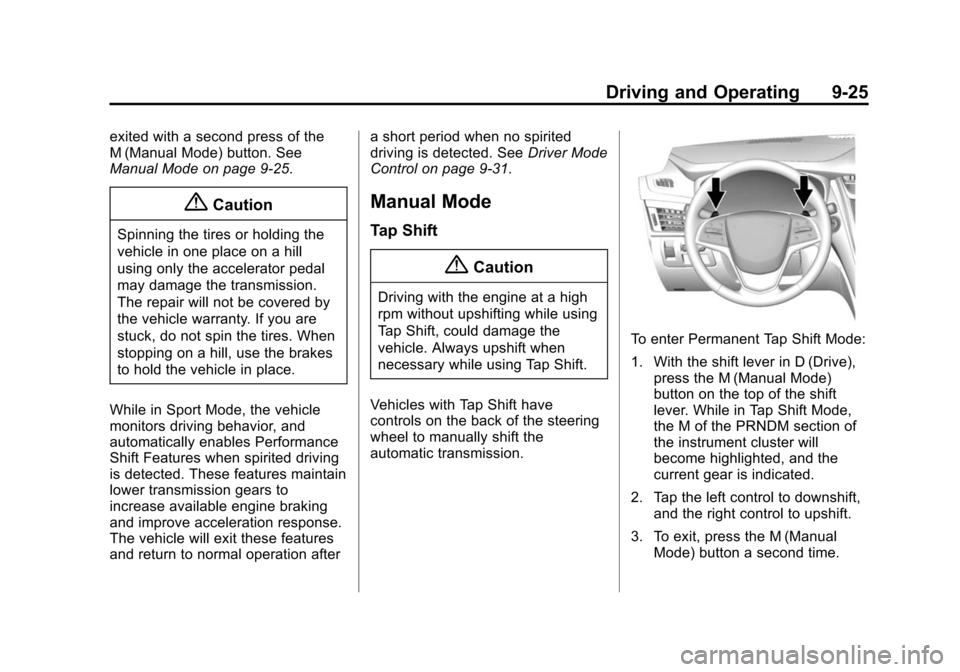
Vehicles with Tap Shift have
controls on the back of the steering
wheel to manually shift the
automatic transmission.
To enter Permanent Tap Shift Mode:
1. With the shift lever in D (Drive), press the M (Manual Mode)
button on the top of the shift
lever. While in Tap Shift Mode,
the M of the PRNDM section of
the instrument cluster will
become highlighted, and the
current gear is indicated.
2. Tap the left control to downshift, and the right control to upshift.
3. To exit, press the M (Manual Mode) button a second time.