2015 CADILLAC CTS SEDAN keyless entry
[x] Cancel search: keyless entryPage 44 of 401
Black plate (15,1)Cadillac CTS Owner Manual (GMNA-Localizing-U.S./Canada/Mexico-
7707478) - 2015 - crc - 10/1/14
Keys, Doors, and Windows 2-15
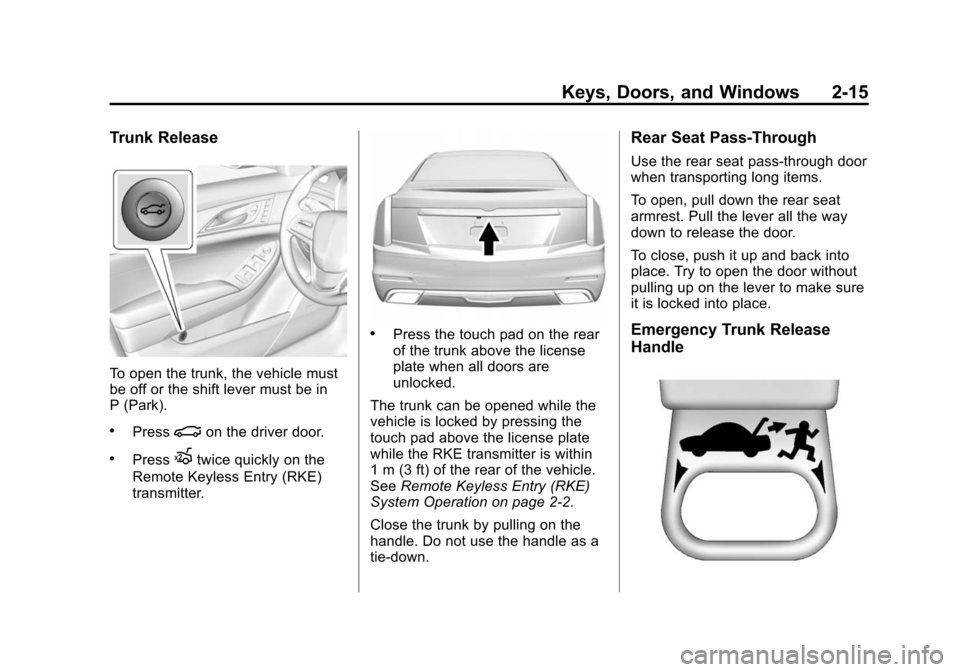
Trunk Release
To open the trunk, the vehicle must
be off or the shift lever must be in
P (Park).
.Press|on the driver door.
.PressXtwice quickly on the
Remote Keyless Entry (RKE)
transmitter.
.Press the touch pad on the rear
of the trunk above the license
plate when all doors are
unlocked.
The trunk can be opened while the
vehicle is locked by pressing the
touch pad above the license plate
while the RKE transmitter is within
1 m (3 ft) of the rear of the vehicle.
See Remote Keyless Entry (RKE)
System Operation on page 2-2.
Close the trunk by pulling on the
handle. Do not use the handle as a
tie-down.
Rear Seat Pass-Through
Use the rear seat pass-through door
when transporting long items.
To open, pull down the rear seat
armrest. Pull the lever all the way
down to release the door.
To close, push it up and back into
place. Try to open the door without
pulling up on the lever to make sure
it is locked into place.
Emergency Trunk Release
Handle
Page 48 of 401

Black plate (19,1)Cadillac CTS Owner Manual (GMNA-Localizing-U.S./Canada/Mexico-
7707478) - 2015 - crc - 10/1/14
Keys, Doors, and Windows 2-19
It is possible for the immobilizer
system to learn new or replacement
RKE transmitters. Up to eight
transmitters can be programmed for
the vehicle. To program additional
transmitters, see“Programming
Transmitters to the Vehicle” under
Remote Keyless Entry (RKE)
System Operation on page 2-2.
Do not leave the key or device that
disarms or deactivates the
theft-deterrent system in the vehicle.Exterior Mirrors
Convex Mirrors
{Caution
A convex mirror can make things,
like other vehicles, look farther
away than they really are. If you
cut too sharply into the right lane,
you could hit a vehicle on the
right. Check the inside mirror or
glance over your shoulder before
changing lanes.
The passenger side mirror is convex
shaped. A convex mirror's surface is
curved so more can be seen from
the driver seat.
Power Mirrors
Controls for the outside power
mirrors are on the driver door.
To adjust each mirror:
1. Press (L) or (R) to select the driver or passenger side mirror.
2. Press the arrows on the control pad to move the mirror up,
down, right, or left.
3. Adjust each mirror so that a little of the vehicle and the area
behind it can be seen.
Page 149 of 401

Black plate (36,1)Cadillac CTS Owner Manual (GMNA-Localizing-U.S./Canada/Mexico-
7707478) - 2015 - crc - 10/1/14
5-36 Instruments and Controls
Vehicle Messages
Messages displayed on the DIC
indicate the status of the vehicle or
some action that may be needed to
correct a condition. Multiple
messages may display one after the
other.
The messages that do not require
immediate action can be
acknowledged and cleared by
pressing SEL. The messages that
require immediate action cannot be
cleared until that action is
performed. All messages should be
taken seriously and clearing the
messages does not correct the
problem.
The following are some of the
vehicle messages that may be
displayed depending on the vehicle
content.
Battery Voltage and
Charging Messages
BATTERY SAVER ACTIVE
This message displays when the
vehicle has detected that the battery
voltage is dropping beyond a
reasonable point. The battery saver
system starts reducing features of
the vehicle that may be noticed. At
the point that features are disabled,
this message displays. Turn off
unnecessary accessories to allow
the battery to recharge.
LOW BATTERY
This message is displayed when the
battery voltage is low. SeeBattery
on page 10-25.
SERVICE BATTERY
CHARGING SYSTEM
This message is displayed when
there is a fault in the battery
charging system. Take the vehicle to
your dealer for service.
TRANSPORT MODE ON
This message is displayed when the
vehicle is in transport mode. Some
features can be disabled while in
this mode, including Remote
Keyless Entry (RKE), remote start,
and the vehicle alarm system. Take
the vehicle to your dealer for service
to turn transport mode off.
Brake System Messages
BRAKE FLUID LOW
This message displays when the
brake fluid level is low. See Brake
Fluid on page 10-24.
RELEASE PARKING BRAKE
This message displays if the electric
parking brake is on while the vehicle
is in motion. Release it before
attempting to drive. See Electric
Parking Brake on page 9-28.
SERVICE BRAKE ASSIST
This message displays when there
is a problem with the brake boost
system. When this message
Page 152 of 401

Black plate (39,1)Cadillac CTS Owner Manual (GMNA-Localizing-U.S./Canada/Mexico-
7707478) - 2015 - crc - 10/1/14
Instruments and Controls 5-39
Engine Oil Messages
CHANGE ENGINE OIL SOON
This message displays when the
engine oil needs to be changed.
When you change the engine oil, be
sure to reset the oil life system. See
Engine Oil Life System on
page 10-12,Driver Information
Center (DIC) on page 5-29, Engine
Oil on page 10-10, and Maintenance
Schedule on page 11-3.
ENGINE OIL HOT, IDLE
ENGINE
This message displays when the
engine oil temperature is too hot.
Stop and allow the vehicle to idle
until it cools down.
ENGINE OIL LOW —ADD OIL
On some vehicles, this message
displays when the engine oil level
may be too low. Check the oil level
before filling to the recommended
level. If the oil is not low and this message remains on, take the
vehicle to your dealer for service.
See
Engine Oil on page 10-10.
OIL PRESSURE LOW —STOP
ENGINE
This message displays if low oil
pressure levels occur. Stop the
vehicle as soon as safely possible
and do not operate it until the cause
of the low oil pressure has been
corrected. Check the oil as soon as
possible and have the vehicle
serviced by your dealer.
Engine Power Messages
ENGINE POWER IS REDUCED
This message displays when the
vehicle's engine power is reduced.
Reduced engine power can affect
the vehicle's ability to accelerate.
If this message is on, but there is no
reduction in performance, proceed
to your destination. The
performance may be reduced the
next time the vehicle is driven. The
vehicle may be driven at a reduced speed while this message is on, but
maximum acceleration and speed
may be reduced. Anytime this
message stays on, the vehicle
should be taken to your dealer for
service as soon as possible.
Fuel System Messages
FUEL LEVEL LOW
This message displays when the
vehicle is low on fuel. Refuel as
soon as possible.
Key and Lock Messages
NO REMOTE DETECTED
This message displays when the
transmitter battery may be weak.
See
“Starting the Vehicle with a Low
Transmitter Battery” underRemote
Keyless Entry (RKE) System
Operation on page 2-2.
Page 153 of 401

Black plate (40,1)Cadillac CTS Owner Manual (GMNA-Localizing-U.S./Canada/Mexico-
7707478) - 2015 - crc - 10/1/14
5-40 Instruments and Controls
NO REMOTE KEY WAS
DETECTED PLACE KEY IN
TRANSMITTER POCKET THEN
START YOUR VEHICLE
This message displays when trying
to start the vehicle if an RKE
transmitter is not detected. The
transmitter battery may be weak.
See“Starting the Vehicle with a Low
Transmitter Battery” underRemote
Keyless Entry (RKE) System
Operation on page 2-2.
NO REMOTE DETECTED
PRESS BRAKE TO RESTART
This message displays when
attempting to turn off the vehicle
and the RKE transmitter is no longer
detected. Restarting is allowed
without the RKE transmitter for
five minutes. Press the brake pedal
to restart the vehicle.
NUMBER OF KEYS
PROGRAMMED
This message displays when
programming new keys to the
vehicle.
REMOTE LEFT IN VEHICLE
This message displays when
leaving the vehicle with the RKE
transmitter still inside.
REPLACE BATTERY IN
REMOTE KEY
This message displays when the
battery in the RKE transmitter needs
to be replaced.
Lamp Messages
AFL (ADAPTIVE FORWARD
LIGHTING) LAMPS NEED
SERVICE
This message displays when the
AFL system is disabled and needs
service. See your dealer. See
Adaptive Forward Lighting (AFL) on
page 6-5.
AUTOMATIC LIGHT CONTROL
ON/OFF
This message is displayed when the
exterior lamp control is in AUTO and
the lights have turned on or off. See
Automatic Headlamp System on
page 6-4.
XXX TURN INDICATOR
FAILURE
When one of the turn signals is out,
this message displays to show
which bulb needs to be replaced.
See Bulb Replacement on
page 10-29 andReplacement Bulbs
on page 10-31.
TURN SIGNAL ON
This message is displayed if the
turn signal has been left on. Turn off
the turn signal.
Page 165 of 401

Black plate (52,1)Cadillac CTS Owner Manual (GMNA-Localizing-U.S./Canada/Mexico-
7707478) - 2015 - crc - 10/1/14
5-52 Instruments and Controls
Chime Volume
This allows the selection of the
chime volume level.
Press + or−to adjust the volume.
Reverse Tilt Mirror
This allows the feature to be turned
on or off.
Select Off, On - Driver and
Passenger, On - Driver, or On -
Passenger.
Rain Sense Wipers
This allows the feature to be turned
on or off.
Select Off or On.
Lighting
Select and the following may
display:
.Vehicle Locator Lights
.Exit Lighting
.Auto High Beam Vehicle Locator Lights
This feature will flash the exterior
lamps when
Kon the Remote
Keyless Entry (RKE) transmitter is
pressed to locate the vehicle.
Select Off or On.
Exit Lighting
This allows the selection of how
long the exterior lamps stay on
when leaving the vehicle when it is
dark outside.
Select Off, 30 Seconds, 60
Seconds, or 120 Seconds.
Auto High Beam
This allows the feature to be turned
on or off.
Select On or Off.
Power Door Locks
Select and the following may
display:
.Unlocked Door Anti-Lockout
.Auto Door Unlock
.Delayed Door Lock
Unlocked Door Anti-Lockout
When on, this feature will keep the
driver door from locking when the
door is open. If Off is selected, the
Delayed Door Lock menu will be
available.
Select Off or On.
Auto Door Unlock
This allows selection of which of the
doors will automatically unlock when
the vehicle is shifted into P (Park).
Select Off, All Doors, or Driver Door.
Delayed Door Lock
When on, this feature will delay the
locking of the doors. To override the
delay, press the power door lock
switch on the door.
Select Off or On.
Remote Lock, Unlock, Start
Select and the following may
display:
.Remote Unlock Light Feedback
Page 166 of 401

Black plate (53,1)Cadillac CTS Owner Manual (GMNA-Localizing-U.S./Canada/Mexico-
7707478) - 2015 - crc - 10/1/14
Instruments and Controls 5-53
.Remote Lock Feedback
.Remote Door Unlock
.Remote Start Auto Cool Seats
.Remote Start Auto Heat Seats
.Passive Door Unlock
.Passive Door Lock
.Remote Left in Vehicle Alert
Remote Unlock Light Feedback
When on, the exterior lamps will
flash when unlocking the vehicle
with the RKE transmitter.
Select Off or Flash Lights.
Remote Lock Feedback
This allows selection of what type of
feedback is given when locking the
vehicle with the RKE transmitter.
Select Off, Lights and Horn, Lights
Only, or Horn Only.
Remote Door Unlock
This allows selection of which doors
will unlock when pressing
Kon the
RKE transmitter. Select All Doors or Driver Door.
Remote Start Auto Cool Seats
If equipped and turned on, this
feature will turn on the ventilated
seats when using remote start on
warm days.
Select Off or On.
Remote Start Auto Heat Seats
If equipped and turned on, this
feature will turn on the heated seats
when using remote start on
cold days.
Select Off or On.
Passive Door Unlock
This allows the selection of what
doors will unlock when using the
button on the driver door to unlock
the vehicle.
Select All Doors or Driver Door.
Passive Door Lock
This allows passive locking to be
turned on or off and selects
feedback. See
Remote Keyless
Entry (RKE) System Operation on
page 2-2.
Select Off, On with Horn
Chirp, or On.
Remote Left in Vehicle Alert
This feature sounds an alert when
the RKE transmitter is left in the
vehicle.
Select Off or On.
Bluetooth
Select and the following may
display:
.Pair New Device
.Device Management
.Ringtones
.Voice Mail Numbers
Page 179 of 401

Black plate (8,1)Cadillac CTS Owner Manual (GMNA-Localizing-U.S./Canada/Mexico-
7707478) - 2015 - crc - 10/1/14
6-8 Lighting
Lighting Features
Entry Lighting
The headlamps, taillamps, back-up
lamps, license plate lamps, dome
lamps, and most of the interior lights
turn on briefly at night when
Kis
pressed on the Remote Keyless
Entry (RKE) transmitter. See Ignition
Positions on page 9-16. After about
30 seconds the exterior lamps turn
off, then the dome and remaining
interior lamps dim to off. Entry
lighting can be disabled manually by
changing the ignition out of the OFF
position, or by pressing
Qon the
RKE transmitter.
This feature can be turned on or off.
See “Vehicle Locator Lights” under
Vehicle Personalization on
page 5-47.
Exit Lighting
The headlamps, taillamps, back-up
lamps, parking lamps, and license
plate lamps come on at night, or in
areas with limited lighting, when the
key is removed from the ignition.
The dome lamps also come on
when the key is removed from the
ignition. The exterior lamps and
dome lamps remain on after the
door is closed for a set amount of
time, then automatically turn off.
If equipped with Keyless Access,
the exterior lamps and dome lamps
automatically turn on when the
driver door is opened after the
ignition is turned off. See Ignition
Positions on page 9-16.
The exterior lamps turn off
immediately by turning the exterior
lamp control off.
This feature can be changed. See
Vehicle Personalization on
page 5-47.
Battery Load
Management
The vehicle has Electric Power
Management (EPM), which
estimates the battery's temperature
and state of charge. It then adjusts
the voltage for best performance
and extended life of the battery.
When the battery's state of charge
is low, the voltage is raised slightly
to quickly bring the charge back up.
When the state of charge is high,
the voltage is lowered slightly to
prevent overcharging. If the vehicle
has a voltmeter gauge or a voltage
display on the Driver Information
Center (DIC), you may see the
voltage move up or down. This is
normal. If there is a problem, an
alert will be displayed.
The battery can be discharged at
idle if the electrical loads are very
high. This is true for all vehicles.
This is because the generator
(alternator) may not be spinning fast