2015 CADILLAC ATS COUPE warning light
[x] Cancel search: warning lightPage 143 of 443

Black plate (30,1)Cadillac ATS Owner Manual (GMNA-Localizing-U.S./Canada/Mexico-
7707477) - 2015 - crc - 9/15/14
5-30 Instruments and Controls
To adjust the HUD image:
1. Adjust the driver seat to acomfortable position.
2. Start the engine.
Use the following settings to adjust
the HUD.
$(Image Adjustment): Press
down or lift up to center the HUD
image. The HUD image can only be
adjusted up and down, not side
to side.
!(Display View): Press to
select the display view. Each press
will change the display view.
D(Image Brightness): Lift up
and hold to brighten the display.
Press down and hold to dim the
display. Hold down to turn the
display off.
The HUD image will automatically
dim and brighten to compensate for
outside lighting. The HUD
brightness control can also be
adjusted as needed. The HUD image can temporarily
light up depending on the angle and
position of the sunlight on the HUD
display. This is normal.
Polarized sunglasses could make
the HUD image harder to see.
HUD Views
There are four views in the HUD.
Some vehicle information and
vehicle messages or alerts may be
displayed in any view.
Metric
English
Speed View: This display gives the
speedometer reading (in English or
metric units), Adaptive Cruise
Control speed, Forward Collision
Alert, Lane Departure Warning, and
Vehicle Ahead indicator. Some
information only appears on
vehicles that have these features,
and when they are active.
Metric
Page 148 of 443

Black plate (35,1)Cadillac ATS Owner Manual (GMNA-Localizing-U.S./Canada/Mexico-
7707477) - 2015 - crc - 9/15/14
Instruments and Controls 5-35
conditioning compressor turns back
on. The vehicle can continue to be
driven.
If this message continues to appear,
have the system repaired by your
dealer as soon as possible to avoid
damage to the engine.
ENGINE OVERHEATED—
IDLE ENGINE
This message displays and a chime
sounds when the engine coolant
temperature is too hot. The engine
coolant temperature warning light
will also be on. Stop and allow the
vehicle to idle until it cools down.
ENGINE OVERHEATED —
TURN VEHICLE OFF
This message displays and a
continuous chime sounds if the
engine cooling system reaches
unsafe temperatures for operation.
The engine coolant temperature
warning light will flash. Stop and
turn off the vehicle as soon as it is
safe to do so to avoid severe damage. This message clears when
the engine has cooled to a safe
operating temperature.
Engine Oil Messages
CHANGE ENGINE OIL SOON
This message displays when the
engine oil needs to be changed.
When you change the engine oil, be
sure to reset the oil life system. See
Engine Oil Life System on
page 10-12,
Driver Information
Center (DIC) on page 5-25, Engine
Oil on page 10-10, and Maintenance
Schedule on page 11-3.
ENGINE OIL HOT, IDLE
ENGINE
This message displays when the
engine oil temperature is too hot.
Stop and allow the vehicle to idle
until it cools down.
ENGINE OIL LOW —ADD OIL
On some vehicles, this message
displays when the engine oil level
may be too low. Check the oil level before filling to the recommended
level. If the oil is not low and this
message remains on, take the
vehicle to your dealer for service.
See
Engine Oil on page 10-10.
OIL PRESSURE LOW —STOP
ENGINE
This message displays if low oil
pressure levels occur. Stop the
vehicle as soon as safely possible
and do not operate it until the cause
of the low oil pressure has been
corrected. Check the oil as soon as
possible and have the vehicle
serviced by your dealer.
Engine Power Messages
ENGINE POWER IS REDUCED
This message displays when the
vehicle's engine power is reduced.
Reduced engine power can affect
the vehicle's ability to accelerate.
If this message is on, but there is no
reduction in performance, proceed
to your destination. The
performance may be reduced the
Page 155 of 443

Black plate (42,1)Cadillac ATS Owner Manual (GMNA-Localizing-U.S./Canada/Mexico-
7707477) - 2015 - crc - 9/15/14
5-42 Instruments and Controls
SERVICE KEYLESS START
SYSTEM
This message is displayed if there is
a problem with the pushbutton start
system. Take the vehicle to your
dealer for service.
TURN STEERING WHEEL
START VEHICLE AGAIN
This message may display when
you try to start the vehicle, but the
column remains locked. Try turning
the steering wheel while starting the
vehicle to unlock the steering
column. If the vehicle still does not
start, turn the steering wheel the
other way, and try starting the
vehicle again.
Tire Messages
SERVICE TIRE MONITOR
SYSTEM
This message displays if there is a
problem with the Tire Pressure
Monitor System (TPMS). SeeTire
Pressure Monitor Operation on
page 10-50.
TIRE LEARNING ACTIVE
This message displays when the
system is learning new tires. See
Tire Pressure Monitor Operation on
page 10-50.
TIRE LOW ADD AIR TO TIRE
This message displays when the
pressure in one or more of the tires
is low.
This message also displays LEFT
FRONT, RIGHT FRONT, LEFT
REAR, or RIGHT REAR to indicate
the location of the low tire.
The low tire pressure warning light
will also come on. See Tire
Pressure Light on page 5-23. If a tire pressure message appears
on the DIC, stop as soon as you
can. Inflate the tires by adding air
until the tire pressure is equal to the
values shown on the Tire and
Loading Information label. See
Tires
on page 10-40, Vehicle Load Limits
on page 9-11, and Tire Pressure on
page 10-47.
You can receive more than one tire
pressure message at a time. The
DIC also shows the tire pressure
values. See Driver Information
Center (DIC) on page 5-25.
Transmission Messages
SERVICE TRANSMISSION
This message displays if there is a
problem with the transmission. See
your dealer.
SHIFT DENIED
This message displays when using
the Driver Shift Control (DSC) and
attempting to shift to a gear not
Page 170 of 443

Black plate (1,1)Cadillac ATS Owner Manual (GMNA-Localizing-U.S./Canada/Mexico-
7707477) - 2015 - crc - 9/15/14
Lighting 6-1
Lighting
Exterior Lighting
Exterior Lamp Controls . . . . . . . . 6-1
Exterior Lamps OffReminder . . . . . . . . . . . . . . . . . . . . 6-3
Headlamp High/Low-Beam Changer . . . . . . . . . . . . . . . . . . . . . 6-3
Flash-to-Pass . . . . . . . . . . . . . . . . . 6-4
Daytime Running Lamps (DRL) . . . . . . . . . . . . . . . . 6-4
Automatic Headlamp System . . . . . . . . . . . . . . . . . . . . . . 6-4
Adaptive Forward Lighting (AFL) . . . . . . . . . . . . . . . 6-5
Hazard Warning Flashers . . . . . 6-5
Turn and Lane-Change Signals . . . . . . . . . . . . . . . . . . . . . . 6-6
Interior Lighting
Instrument Panel IlluminationControl . . . . . . . . . . . . . . . . . . . . . . 6-6
Courtesy Lamps . . . . . . . . . . . . . . 6-7
Dome Lamps . . . . . . . . . . . . . . . . . 6-7
Reading Lamps . . . . . . . . . . . . . . . 6-7
Lighting Features
Entry Lighting . . . . . . . . . . . . . . . . . 6-8
Exit Lighting . . . . . . . . . . . . . . . . . . . 6-8
Battery Power Protection . . . . . . 6-8
Exterior Lighting Battery Saver . . . . . . . . . . . . . . . . . . . . . . . . 6-8Exterior Lighting
Exterior Lamp Controls
The exterior lamp control is on the
turn signal lever.
Turn the control to the following
positions:
O(Off): Turns off the exterior
lamps. The knob returns to the
AUTO position after it is released.
Turn to
Oagain to reactivate the
AUTO mode.
In Canada, the headlamps will
automatically reactivate when the
vehicle is shifted out of P (Park) on
automatic transmission vehicles,
Page 172 of 443
Black plate (3,1)Cadillac ATS Owner Manual (GMNA-Localizing-U.S./Canada/Mexico-
7707477) - 2015 - crc - 9/15/14
Lighting 6-3
.The IntelliBeam system can be
disabled by the High/Low-Beam
Changer or the Flash-to-Pass
feature. If this happens, the
High/Low-Beam Changer must
be activated two times within
five seconds to reactivate the
IntelliBeam system. The
instrument cluster light will come
on to indicate the IntelliBeam is
reactivated.
The high beams may not turn off
automatically if the system cannot
detect other vehicle's lamps
because of any of the following:
.The other vehicle's lamp(s) are
missing, damaged, obstructed
from view, or otherwise
undetected.
.The other vehicle's lamp(s) are
covered with dirt, snow, and/or
road spray.
.The other vehicle's lamp(s)
cannot be detected due to dense
exhaust, smoke, fog, snow, road
spray, mist, or other airborne
obstructions.
.Your vehicle's windshield is dirty,
cracked, or obstructed by
something that blocks the view
of the light sensor.
.Your vehicle's windshield is
covered with ice, dirt, haze,
or other obstructions.
.Your vehicle is loaded such that
the front end points upward,
causing the light sensor to aim
high and not detect headlamps
and taillamps.
.You are driving on winding or
hilly roads.
You may need to manually disable
or cancel the high-beam headlamps
by turning the low-beam headlamps
on, if any of the above conditions
exist.
Exterior Lamps Off
Reminder
A warning chime will sound if the
exterior lamp control is left on in
either the headlamp or parking lamp
position and the driver door is
opened with the ignition off.
Headlamp High/
Low-Beam Changer
2 3
(Headlamp High/Low-Beam
Changer): Push the turn signal
lever away from you and release, to
turn the high beams on. To return to
low beams, push the lever again or
pull it toward you and release.
This indicator light turns on in the
instrument cluster when the
high-beam headlamps are on.
Page 174 of 443
Black plate (5,1)Cadillac ATS Owner Manual (GMNA-Localizing-U.S./Canada/Mexico-
7707477) - 2015 - crc - 9/15/14
Lighting 6-5
The system may also turn on the
headlamps when driving through a
parking garage or tunnel.
If the vehicle is started in a dark
garage, the automatic headlamp
system comes on immediately. If it
is light outside when the vehicle
leaves the garage, there is a slight
delay before the automatic
headlamp system changes to the
DRL. During that delay, the
instrument cluster may not be as
bright as usual. Make sure the
instrument panel brightness control
is in the full bright position. See
Instrument Panel Illumination
Control on page 6-6.
When it is bright enough outside,
the headlamps will turn off or may
change to Daytime Running
Lamps (DRL).
The automatic headlamp system
turns off when the exterior lamp
control is turned to
Oor the ignition
is off.
Lights On with Wipers
If the windshield wipers are
activated in daylight with the engine
on, and the exterior lamp control is
in AUTO, the headlamps, parking
lamps, and other exterior lamps
come on. The transition time for the
lamps coming on varies based on
wiper speed. When the wipers are
not operating, these lamps turn off.
Move the exterior lamp control to
P
or;to disable this feature.
Adaptive Forward
Lighting (AFL)
On vehicles with the AFL system,
the headlamps pivot horizontally to
provide greater road illumination
while turning. To enable AFL, set
the exterior lamp control on the turn
signal lever to the AUTO position.
Moving the control out of the AUTO
position will deactivate the system.
AFL will operate when the vehicle
speed is greater than 3 km/h
(2 mph). AFL will not operate when the transmission is in R (Reverse).
AFL is not immediately operable
after starting the vehicle; driving a
short distance is required to
calibrate the AFL. See
Exterior
Lamp Controls on page 6-1.
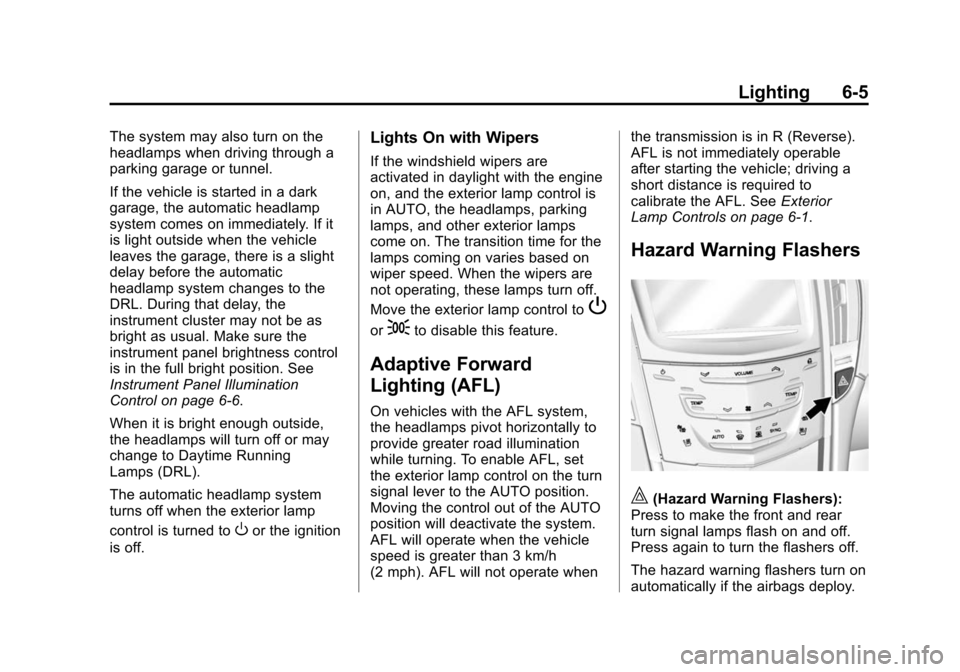
Hazard Warning Flashers
|(Hazard Warning Flashers):
Press to make the front and rear
turn signal lamps flash on and off.
Press again to turn the flashers off.
The hazard warning flashers turn on
automatically if the airbags deploy.
Page 231 of 443

Black plate (8,1)Cadillac ATS Owner Manual (GMNA-Localizing-U.S./Canada/Mexico-
7707477) - 2015 - crc - 9/15/14
9-8 Driving and Operating
{Warning
Wet brakes can cause crashes.
They might not work as well in a
quick stop and could cause
pulling to one side. You could
lose control of the vehicle.
After driving through a large
puddle of water or a car/vehicle
wash, lightly apply the brake
pedal until the brakes work
normally.
Flowing or rushing water creates
strong forces. Driving through
flowing water could cause the
vehicle to be carried away. If this
happens, you and other vehicle
occupants could drown. Do not
ignore police warnings and be
very cautious about trying to drive
through flowing water.
Hydroplaning
Hydroplaning is dangerous. Water
can build up under the vehicle's
tires so they actually ride on the
water. This can happen if the road is
wet enough and you are going fast
enough. When the vehicle is
hydroplaning, it has little or no
contact with the road.
There is no hard and fast rule about
hydroplaning. The best advice is to
slow down when the road is wet.
Other Rainy Weather Tips
Besides slowing down, other wet
weather driving tips include:
.Allow extra following distance.
.Pass with caution.
.Keep windshield wiping
equipment in good shape.
.Keep the windshield washer fluid
reservoir filled.
.Have good tires with proper
tread depth. SeeTires on
page 10-40.
.Turn off cruise control.
Hill and Mountain Roads
Driving on steep hills or through
mountains is different than driving
on flat or rolling terrain. Tips for
driving in these conditions include:
.Keep the vehicle serviced and in
good shape.
.Check all fluid levels and brakes,
tires, cooling system, and
transmission.
.Shift to a lower gear when going
down steep or long hills.
{Warning
Using the brakes to slow the
vehicle on a long downhill slope
can cause brake overheating, can
reduce brake performance, and
could result in a loss of braking.
Shift the transmission to a lower
gear to let the engine assist the
brakes on a steep downhill slope.
Page 233 of 443

Black plate (10,1)Cadillac ATS Owner Manual (GMNA-Localizing-U.S./Canada/Mexico-
7707477) - 2015 - crc - 9/15/14
9-10 Driving and Operating
Blizzard Conditions
Being stuck in snow can be a
serious situation. Stay with the
vehicle unless there is help nearby.
If possible, use Roadside Service.
SeeRoadside Service on
page 13-5. To get help and keep
everyone in the vehicle safe:
.Turn on the hazard warning
flashers.
.Tie a red cloth to an outside
mirror.
{Warning
Snow can trap engine exhaust
under the vehicle. This may
cause exhaust gases to get
inside. Engine exhaust contains
carbon monoxide (CO) which
cannot be seen or smelled. It can
cause unconsciousness and even
death.
If the vehicle is stuck in the snow:
(Continued)
Warning (Continued)
.Clear away snow from around
the base of your vehicle,
especially any that is blocking
the exhaust pipe.
.Check again from time to
time to be sure snow does
not collect there.
.Open a window about 5 cm
(2 in) on the side of the
vehicle that is away from the
wind to bring in fresh air.
.Fully open the air outlets on
or under the instrument
panel.
.Adjust the climate control
system to a setting that
circulates the air inside the
vehicle and set the fan speed
to the highest setting. See
“Climate Control Systems.”
For more information about
carbon monoxide, see Engine
Exhaust on page 9-23. To save fuel, run the engine for only
short periods as needed to warm
the vehicle and then shut the engine
off and close the window most of
the way to save heat. Repeat this
until help arrives but only when you
feel really uncomfortable from the
cold. Moving about to keep warm
also helps.
If it takes some time for help to
arrive, now and then when you run
the engine, push the accelerator
pedal slightly so the engine runs
faster than the idle speed. This
keeps the battery charged to restart
the vehicle and to signal for help
with the headlamps. Do this as little
as possible to save fuel.
If the Vehicle Is Stuck
Slowly and cautiously spin the
wheels to free the vehicle when
stuck in sand, mud, ice, or snow.
If stuck too severely for the traction
system to free the vehicle, turn the
traction system off and use the