Page 154 of 393

Black plate (5,1)Buick Verano Owner Manual (GMNA-Localizing-U.S./Canada/Mexico-
7707488) - 2015 - CRC - 10/31/14
Lighting 6-5
#(Front Fog Lamps):Press to
turn the fog lamps on or off. An
indicator light on the instrument
cluster comes on when the fog
lamps are on.
The fog lamps come on together
with the parking lamps.
If the high-beam headlamps are
turned on, the fog lamps will turn off.
If the high-beam headlamps are
turned off, the fog lamps will turn
back on again.
Some localities have laws that
require the headlamps to be on
along with the fog lamps.Interior Lighting
Instrument Panel
Illumination Control
This feature controls the brightness
of the instrument panel controls and
infotainment display screen. The
thumbwheel is to the left of the
steering column on the instrument
panel.
D(Instrument Panel
Brightness): Move the
thumbwheel up or down and hold, to
brighten or dim the instrument panel
controls and infotainment display
screen.
Courtesy Lamps
The courtesy lamps come on
automatically when any door is
opened and the dome lamp is in the
door position.
Dome Lamps
The interior lamps control located in
the overhead console controls both
the front and rear interior lamps.
((Dome Lamp Override): Press
to turn the lamps off, even when a
door is open.
H(Door): Press to turn the lamps
on automatically when a door is
opened.
Page 155 of 393

Black plate (6,1)Buick Verano Owner Manual (GMNA-Localizing-U.S./Canada/Mexico-
7707488) - 2015 - CRC - 10/31/14
6-6 Lighting
'(On):Press to turn on the
dome lamps.
Reading Lamps
There are front and rear reading
lamps.
The front reading lamps are located
in the overhead console.
The rear reading lamps are located
in the headliner.
#or$(Reading Lamps): Press
the button near each lamp to turn it
on or off.
Lighting Features
Entry Lighting
The headlamps, parking lamps,
taillamps, back-up lamps, and most
of the interior lamps turn on briefly
at night or in areas of limited lighting
when
Kis pressed on the Remote
Keyless Entry (RKE) transmitter.
After about 30 seconds the exterior
lamps turn off, and then the dome
and remaining interior lamps will dim
to off. Entry lighting can be disabled
manually by changing the ignition
out of the OFF position, or by
pressing the RKE transmitter
Q
button.
This feature can be changed. See
“Vehicle Locator Lights” under
Vehicle Personalization on
page 5-33.
Page 156 of 393

Black plate (7,1)Buick Verano Owner Manual (GMNA-Localizing-U.S./Canada/Mexico-
7707488) - 2015 - CRC - 10/31/14
Lighting 6-7
Exit Lighting
The headlamps, taillamps, back-up
lamps, parking lamps, and license
plate lamps come on at night, or in
areas with limited lighting, when the
key is removed from the ignition.
The dome lamps also come on
when the key is removed from the
ignition. The exterior lamps and
dome lamps remain on after the
door is closed for a set amount of
time, then automatically turn off.
If equipped with Keyless Access,
the exterior lamps and dome lamps
automatically turn on when the
driver door is opened after the
ignition is turned off. SeeIgnition
Positions (Keyless Access) on
page 9-14 orIgnition Positions (Key
Access) on page 9-16. The exterior lamps turn off
immediately by turning the exterior
lamp control off.
This feature can be changed. See
Vehicle Personalization on
page 5-33.
Battery Power Protection
The battery saver feature is
designed to protect the vehicle's
battery.
If some interior lamps are left on
and the ignition is turned off, the
battery rundown protection system
automatically turns the lamp off after
some time.
Exterior Lighting Battery
Saver
The exterior lamps turn off about
10 minutes after the ignition is
turned off, if the parking lamps or
headlamps have been manually left
on. This protects against draining
the battery. To restart the 10-minute
timer, turn the exterior lamp control
to the off position and then back to
the parking lamp or headlamp
position.
To keep the lamps on for more than
10 minutes, the ignition must be in
the ACC/ACCESSORY or ON/RUN
position.
Page 157 of 393
Black plate (8,1)Buick Verano Owner Manual (GMNA-Localizing-U.S./Canada/Mexico-
7707488) - 2015 - CRC - 10/31/14
6-8 Lighting
2NOTES
Page 161 of 393

Black plate (4,1)Buick Verano Owner Manual (GMNA-Localizing-U.S./Canada/Mexico-
7707488) - 2015 - CRC - 10/31/14
7-4 Infotainment System
9.V/8(Phone/Mute)
.Opens the phone
main menu.
.Mutes the audio system.
10. CD Slot
.Insert a CD.
11. TONE
.Opens the tone menu.
12.
/BACK
.Menu: Moves one
level back.
.Character Input: Deletes
the last character.
13. TUNE/MENU
.Turn to open menus,
highlight menu items,
or set numeric values
while in a menu.
.Press to select menu
items.
.Radio: Manually selects
radio stations.
.CD: Selects tracks.
14. CONFIG (Configuration)
.Opens the settings menu.
15. INFO (Information)
.Radio: Shows available
information about the
current station.
.CD: Shows available
information about the
current track.
16.
Z(Eject)
.Removes a disc from the
CD slot.
17.
H(Clock)
.Opens the clock menu.
18. AS 1-2 (Autostore)
.Radio: Opens the auto
store stations list.
Operation
Controls
The infotainment system is operated
by using the pushbuttons,
multifunction knobs, menus shown
on the display, and steering wheel
controls, if equipped.
Turning the System On or Off
O/VOL (Power/Volume): Press to
turn the system on and off.
Automatic Switch-Off
If the infotainment system has been
turned on after the ignition is turned
off, the system will turn off
automatically after 10 minutes.
Volume Control
O/VOL (Power/Volume): Turn to
adjust the volume.
V/8(Phone/Mute): Press to
mute the infotainment system. Press
V/8again, or turn theO/VOL
knob to cancel mute.
Page 162 of 393
Black plate (5,1)Buick Verano Owner Manual (GMNA-Localizing-U.S./Canada/Mexico-
7707488) - 2015 - CRC - 10/31/14
Infotainment System 7-5
Menu System (Radio with CD)
For radios with CD and touch
screen, see“Using the System” in
the infotainment manual.
Controls
The TUNE/MENU knob and
/
BACK are used to navigate the
menu system.
TUNE/MENU:
Press to:
.Enter the menu system.
.Select or activate the highlighted
menu option.
.Confirm a set value.
.Turn a system setting on or off.
Turn to:
.Highlight a menu option.
.Select a value.
/BACK:
Press to:
.Exit a menu.
.Return from a submenu screen
to the previous menu screen.
.Delete the last character in a
sequence.
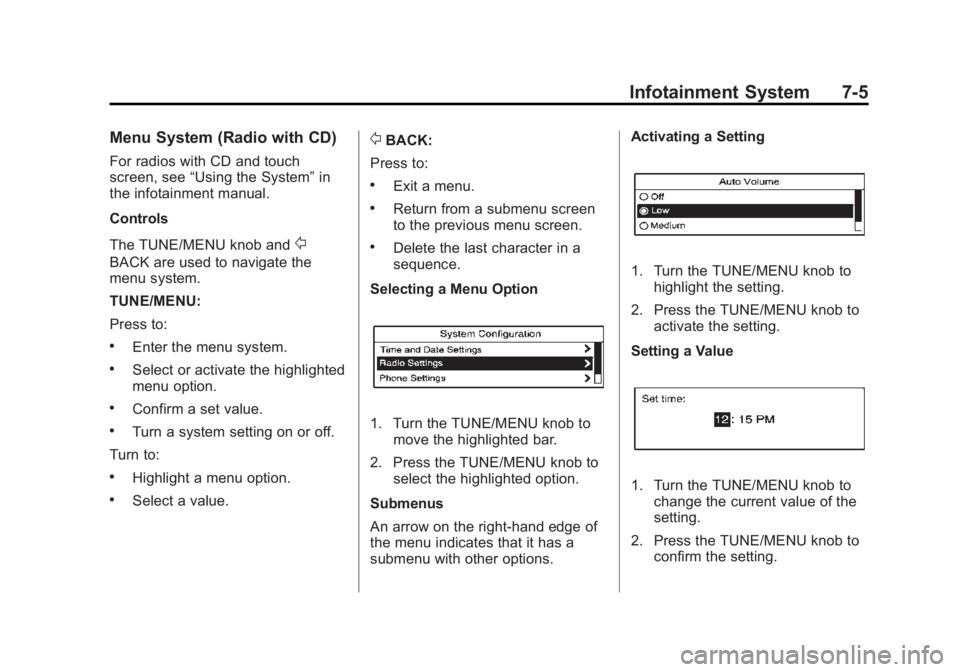
Selecting a Menu Option
1. Turn the TUNE/MENU knob to move the highlighted bar.
2. Press the TUNE/MENU knob to select the highlighted option.
Submenus
An arrow on the right-hand edge of
the menu indicates that it has a
submenu with other options. Activating a Setting
1. Turn the TUNE/MENU knob to
highlight the setting.
2. Press the TUNE/MENU knob to activate the setting.
Setting a Value
1. Turn the TUNE/MENU knob to change the current value of the
setting.
2. Press the TUNE/MENU knob to confirm the setting.
Page 163 of 393

Black plate (6,1)Buick Verano Owner Manual (GMNA-Localizing-U.S./Canada/Mexico-
7707488) - 2015 - CRC - 10/31/14
7-6 Infotainment System
Turning a Function On or Off
1. Turn the TUNE/MENU knob tohighlight the function.
2. Press the TUNE/MENU knob to turn the function on or off.
Entering a Character Sequence
1. Turn the TUNE/MENU knob to highlight the character.
2. Press the TUNE/MENU knob to select the character. Press
/BACK to delete the last
character in the sequence or press
and hold to delete the entire
character sequence.
Audio Settings
The audio settings can be set for
each radio band and each audio
player source.
To quickly reset an audio setting
value to 0:
1. Press the TONE button.
2. Select the audio setting.
3. Press and hold the TUNE/MENU knob until the value changes
to 0.
Press
/BACK to go back to the
Tone Settings menu.
Adjusting the Treble, Midrange,
and Bass
1. Press the TONE button.
2. Select Treble, Midrange, or Bass.
3. Select the value. Press
/BACK to go back to the
Tone Settings menu.
Adjusting the Fader and Balance
1. Press the TONE button.
2. Select Fader or Balance.
3. Select the value.
Press
/BACK to go back to the
Tone Settings menu.
Adjusting the EQ (Equalizer)
For vehicles that have an equalizer:
1. Press the TONE button.
2. Select EQ presets.
3. Select the setting.
Press
/BACK to go back to the
Tone Settings menu.
System Settings
Configuring the Number of
Favorite Pages
To configure the number of available
favorite pages:
1. Press the CONFIG button.
Page 166 of 393

Black plate (9,1)Buick Verano Owner Manual (GMNA-Localizing-U.S./Canada/Mexico-
7707488) - 2015 - CRC - 10/31/14
Infotainment System 7-9
3. Select the programming type.A list of stations that transmit
programming of the selected
type displays.
4. Select the station.
The category lists are updated when
the station lists are updated.
Updating Station & Category Lists
If stations stored in the station list
can no longer be received:
1. Turn the TUNE/MENU knob.
2. Select Update AM or FM Station List, if the stations stored in the
station list are no longer
received. A station search will be
completed and the first station in
the updated list will play.
To cancel the station search, press
the TUNE/MENU knob.
Radio Settings
To access the Radio Settings menu:
1. Press the CONFIG button. 2. Turn the TUNE/MENU knob until
Radio Settings displays. Press
the TUNE/MENU knob to display
other options within that feature.
Audio system settings or features
can be customized for:
.Auto Volume
.Maximum Start Up Volume
.Radio Favorites
.RDS Options
.XM Categories
Auto Volume: Turn the TUNE/
MENU knob to select volume Off,
Low, Medium, or High.
Maximum Start Up Volume: Turn
the TUNE/MENU knob to increase
or decrease the infotainment startup
volume.
Radio Favorites: Turn the TUNE/
MENU knob to highlight the number
of favorites. Press the TUNE/MENU
knob to select.
RDS Options: Press the TUNE/
MENU knob to turn RDS on or off. XM Categories:
If equipped, turn
the TUNE/MENU knob to highlight
the category. Press the TUNE/
MENU knob to select. Turn the
TUNE/MENU knob to Show all XM
Categories to display all categories.
Finding a Station
Select a band such as AM, FM,
or SIriusXM (if equipped).
Turn the TUNE/MENU knob to find
a radio station. To select a preset
station, press the corresponding
preset button.
Seeking a Station
Press
s ©or¨\to search for a
station.
Storing a Station as a Favorite
Up to 36 preset stations can be
stored. Each page can store
six preset stations. The presets
within a page can be from different
radio bands.