2015 BUICK REGAL oil
[x] Cancel search: oilPage 143 of 399

Black plate (34,1)Buick Regal Owner Manual (GMNA-Localizing-U.S./Canada/Mexico-
7576024) - 2015 - CRC - 9/15/14
5-34 Instruments and Controls
Timer:To start the timer, pressV
while this display is active. The
display will show the amount of time
that has passed since the timer was
last reset. To stop the timer, press
V
briefly while this display is active
and the timer is running. To reset
the timer to zero, press and hold
V
while this display is active.
Oil Life: Displays an estimate of
the oil's remaining useful life.
If REMAINING OIL LIFE 99% is
displayed, that means 99% of the
current oil life remains.
When the remaining oil life is low,
the CHANGE ENGINE OIL SOON
message will appear on the display.
See Engine Oil Messages on
page 5-41. The oil should be
changed as soon as possible. See
Engine Oil on page 10-11. In
addition to the engine oil life system
monitoring the oil life, additional
maintenance is recommended in the
Maintenance Schedule. See
Maintenance Schedule on
page 11-3. The Oil Life display must be reset
after each oil change. It will not
reset itself. Do not reset the Oil Life
display accidentally at any time
other than when the oil has just
been changed. It cannot be reset
accurately until the next oil change.
To reset the engine oil life system,
press and holdVfor several
seconds while the Oil Life display is
active. See Engine Oil Life System
on page 10-13.
Coolant Temperature: Displays
the coolant temperature in either
degrees Celsius (°C) or degrees
Fahrenheit (°F).
Tire Pressure: Displays the
approximate pressures of all four
tires. Tire pressure is displayed in
either kilopascal (kPa) or in pounds
per square inch (psi). If the pressure
is low, the value for that tire is
shown in amber. See Tire Pressure
Monitor System on page 10-50 and
Tire Pressure Monitor Operation on
page 10-51. Battery Voltage:
Displays the
current battery voltage. The battery
voltage can fluctuate while viewing
this information on the DIC. This is
normal.
Speed Signs: Displays sign
information, which comes from a
roadway database in the onboard
navigation.
Following Distance/Gap Setting:
When Adaptive Cruise Control
(ACC) is not engaged, the current
follow time to the vehicle ahead is
displayed as a time value on this
page. When ACC has been
engaged, the display switches to the
gap setting page. This page shows
the current gap setting. See
Forward Collision Alert (FCA)
System on page 9-52 andAdaptive
Cruise Control on page 9-40.
Drive Cycle Info (eAssist Only):
Shows the distance and fuel
economy for the current drive cycle.
Page 145 of 399

Black plate (36,1)Buick Regal Owner Manual (GMNA-Localizing-U.S./Canada/Mexico-
7576024) - 2015 - CRC - 9/15/14
5-36 Instruments and Controls
Trip A or Trip B with Average Fuel
Economy and Average Speed:
The Trip display shows the current
distance traveled, in either
kilometers (km) or miles (mi), since
the trip odometer was last reset.
The trip odometer can be reset by
pressing and holding
Vwhile this
display is active, or by pressing
T
and resetting through the
right menu.
The Average Fuel Economy display
shows the approximate average
liters per 100 kilometers (L/100 km)
or miles per gallon (mpg). This
number is calculated based on the
number of L/100 km (mpg) recorded
since the last time this menu item
was reset. This number reflects only
the approximate average fuel
economy that the vehicle has right
now, and will change as driving
conditions change. The Average
Fuel Economy can be reset by
pressing and holding
Vwhile this display is active, or by pressing
T
and resetting through the
right menu.
The Average Speed display shows
the average speed of the vehicle in
kilometers per hour (km/h) or miles
per hour (mph). This average is
calculated based on the various
vehicle speeds recorded since the
last reset of this value. The average
speed can be reset by pressing and
holding
Vwhile this display is
active, or by pressing
Tand
resetting through the right menu.
Fuel Range and Instantaneous
Fuel Economy: Displays the
approximate distance the vehicle
can be driven without refueling.
LOW will be displayed when the
vehicle is low on fuel. The fuel
range estimate is based on an
average of the vehicle's fuel
economy over recent driving history
and the amount of fuel remaining in
the fuel tank. Displays the current fuel economy in
either liters per 100 kilometers
(L/100 km) or miles per
gallon (mpg). This number reflects
only the approximate fuel economy
that the vehicle has right now and
changes frequently as driving
conditions change.
Oil Life:
Displays an estimate of
the oil's remaining useful life.
If REMAINING OIL LIFE 99% is
displayed, that means 99% of the
current oil life remains.
When the remaining oil life is low,
the CHANGE ENGINE OIL SOON
message will appear on the display.
See Engine Oil Messages on
page 5-41. The oil should be
changed as soon as possible. See
Engine Oil on page 10-11. In
addition to the engine oil life system
monitoring the oil life, additional
maintenance is recommended in the
Maintenance Schedule. See
Maintenance Schedule on
page 11-3.
Page 146 of 399

Black plate (37,1)Buick Regal Owner Manual (GMNA-Localizing-U.S./Canada/Mexico-
7576024) - 2015 - CRC - 9/15/14
Instruments and Controls 5-37
The Oil Life display must be reset
after each oil change. It will not
reset itself. Do not reset the Oil Life
display accidentally at any time
other than when the oil has just
been changed. It cannot be reset
accurately until the next oil change.
To reset the engine oil life system,
press and hold
Vfor several
seconds while the Oil Life display is
active. See Engine Oil Life System
on page 10-13.
Tire Pressure: Displays the
approximate pressures of all four
tires. Tire pressure is displayed in
either kilopascal (kPa) or in pounds
per square inch (psi). If the pressure
is low, the value for that tire is
shown in amber. See Tire Pressure
Monitor System on page 10-50 and
Tire Pressure Monitor Operation on
page 10-51.
Fuel Economy: The right hand
side displays the best average fuel
economy (AFE) that is achieved for
a selected distance. The left hand
side displays a running average of fuel economy for the most recently
traveled selected distance. The
center bar graph displays the
instantaneous fuel economy. Press
the
Tbutton to display a page for
selecting one of the distance
options. Move the up/down arrow to
choose the selection, and
Vto
change the setting. When viewing
best AFE, a several second press
and hold of
Vwill reset the best
value. The best value will show
“- - -“ until the selected distance has
been traveled. The display provides
feedback on how current driving
behavior in the bar graph affects the
running average in the left display
and how well recent driving
compares to the best that has been
achieved.
Fuel Used and Timer: Displays
the approximate liters (L) or
gallons (gal) of fuel that have been
used since last reset. The fuel used
can be reset by pressing the
T
button while the Fuel Used display
is showing. To start the timer, press
Vwhile this
display is active. The display will
show the amount of time that has
passed since the timer was last
reset. To stop the timer, press
V
briefly while this display is active
and the timer is running. To reset
the timer to zero, press
Twhile this
display is active.
Speed Limit: Displays sign
information, which comes from a
roadway database in the onboard
navigation.
Following Distance/Gap Setting:
When Adaptive Cruise Control
(ACC) is not engaged, the current
follow time to the vehicle ahead is
displayed as a time value on this
page. When ACC has been
engaged, the display switches to the
gap setting page. This page shows
the current gap setting. See
Forward Collision Alert (FCA)
System on page 9-52 andAdaptive
Cruise Control on page 9-40.
Page 150 of 399

Black plate (41,1)Buick Regal Owner Manual (GMNA-Localizing-U.S./Canada/Mexico-
7576024) - 2015 - CRC - 9/15/14
Instruments and Controls 5-41
Engine Cooling System
Messages
A/C OFF DUE TO HIGH
ENGINE TEMP
This message displays when the
engine coolant becomes hotter than
the normal operating temperature.
To avoid added strain on a hot
engine, the air conditioning
compressor automatically turns off.
When the coolant temperature
returns to normal, the air
conditioning compressor turns back
on. The vehicle can continue to be
driven.
If this message continues to appear,
have the system repaired by your
dealer as soon as possible to avoid
damage to the engine.
COOLANT LEVEL LOW ADD
COOLANT
This message will display if the
coolant is low. SeeEngine Coolant
on page 10-19.
ENGINE OVERHEATED —
IDLE ENGINE
This message displays when the
engine coolant temperature is too
hot. Stop and allow the vehicle to
idle until it cools down.
ENGINE OVERHEATED —
STOP ENGINE
This message displays and a
continuous chime sounds if the
engine cooling system reaches
unsafe temperatures for operation.
Stop and turn off the vehicle as
soon as it is safe to do so to avoid
severe damage. This message
clears when the engine has cooled
to a safe operating temperature.
HIGH COOLANT
TEMPERATURE
This message displays if the coolant
temperature is hot. See Engine
Overheating on page 10-22.
Engine Oil Messages
CHANGE ENGINE OIL SOON
This message displays when the
engine oil needs to be changed.
When you change the engine oil, be
sure to reset the Oil Life System.
See Engine Oil Life System on
page 10-13, Driver Information
Center (DIC) (Base Level Cluster)
on page 5-32 orDriver Information
Center (DIC) (Uplevel Cluster) on
page 5-35, Engine Oil on
page 10-11, and Maintenance
Schedule on page 11-3.
ENGINE OIL HOT, IDLE
ENGINE
This message displays when the
engine oil temperature is too hot.
Stop and allow the vehicle to idle
until it cools down.
ENGINE OIL LOW —ADD OIL
On some vehicles, this message
may display when the engine oil
level is too low. Check the oil level.
See Engine Oil on page 10-11.
Page 151 of 399
Black plate (42,1)Buick Regal Owner Manual (GMNA-Localizing-U.S./Canada/Mexico-
7576024) - 2015 - CRC - 9/15/14
5-42 Instruments and Controls
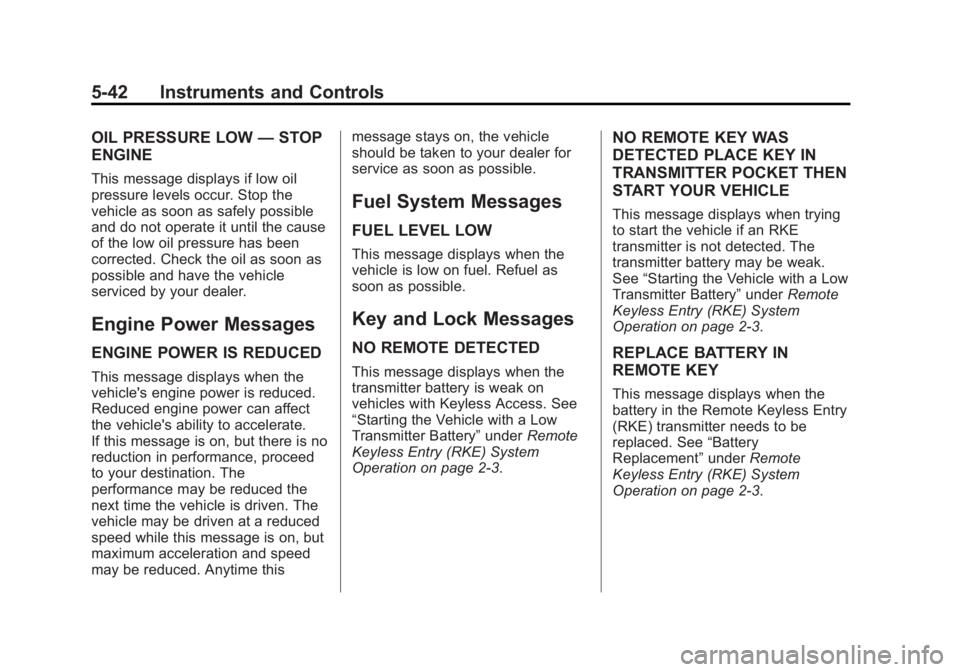
OIL PRESSURE LOW—STOP
ENGINE
This message displays if low oil
pressure levels occur. Stop the
vehicle as soon as safely possible
and do not operate it until the cause
of the low oil pressure has been
corrected. Check the oil as soon as
possible and have the vehicle
serviced by your dealer.
Engine Power Messages
ENGINE POWER IS REDUCED
This message displays when the
vehicle's engine power is reduced.
Reduced engine power can affect
the vehicle's ability to accelerate.
If this message is on, but there is no
reduction in performance, proceed
to your destination. The
performance may be reduced the
next time the vehicle is driven. The
vehicle may be driven at a reduced
speed while this message is on, but
maximum acceleration and speed
may be reduced. Anytime this message stays on, the vehicle
should be taken to your dealer for
service as soon as possible.
Fuel System Messages
FUEL LEVEL LOW
This message displays when the
vehicle is low on fuel. Refuel as
soon as possible.
Key and Lock Messages
NO REMOTE DETECTED
This message displays when the
transmitter battery is weak on
vehicles with Keyless Access. See
“Starting the Vehicle with a Low
Transmitter Battery”
underRemote
Keyless Entry (RKE) System
Operation on page 2-3.
NO REMOTE KEY WAS
DETECTED PLACE KEY IN
TRANSMITTER POCKET THEN
START YOUR VEHICLE
This message displays when trying
to start the vehicle if an RKE
transmitter is not detected. The
transmitter battery may be weak.
See “Starting the Vehicle with a Low
Transmitter Battery” underRemote
Keyless Entry (RKE) System
Operation on page 2-3.
REPLACE BATTERY IN
REMOTE KEY
This message displays when the
battery in the Remote Keyless Entry
(RKE) transmitter needs to be
replaced. See “Battery
Replacement” underRemote
Keyless Entry (RKE) System
Operation on page 2-3.
Page 187 of 399

Black plate (6,1)Buick Regal Owner Manual (GMNA-Localizing-U.S./Canada/Mexico-
7576024) - 2015 - CRC - 9/15/14
9-6 Driving and Operating
material on the road. Learn to
recognize warning clues—such
as enough water, ice, or packed
snow on the road to make a
mirrored surface —and slow
down when you have any doubt.
.Try to avoid sudden steering,
acceleration, or braking,
including reducing vehicle speed
by shifting to a lower gear. Any
sudden changes could cause
the tires to slide.
Remember: Antilock brakes help
avoid only the braking skid.
Track Events and
Competitive Driving
Racing, track testing, or competitive
driving may affect the vehicle
warranty. See the warranty manual
before using the vehicle for racing
or other competitive driving.
{Caution
If the vehicle is used for track
events and competitive driving,
the engine may use more oil than
it would with normal use. Low oil
levels can damage the engine.
Check the oil level often and
maintain the proper level. See
Engine Oil on page 10-11.
For the 2.0L engine: Add and keep
the oil level at 1 L (1 qt) above the
high mark when driving under these
conditions. For information on how
to check and add oil, see Engine Oil
on page 10-11.
{Caution
During a first time track or racing
event, high rear axle
temperatures can occur. Damage
could be caused to the rear axle
and would not be covered by the
(Continued)
Caution (Continued)
vehicle warranty. Do not drive as
long or as fast the first time the
vehicle is driven on the track or
raced.
Driving on Wet Roads
Rain and wet roads can reduce
vehicle traction and affect your
ability to stop and accelerate.
Always drive slower in these types
of driving conditions and avoid
driving through large puddles and
deep‐standing or flowing water.
{Warning
Wet brakes can cause crashes.
They might not work as well in a
quick stop and could cause
pulling to one side. You could
lose control of the vehicle.(Continued)
Page 200 of 399

Black plate (19,1)Buick Regal Owner Manual (GMNA-Localizing-U.S./Canada/Mexico-
7576024) - 2015 - CRC - 9/15/14
Driving and Operating 9-19
{Caution
Cranking the engine for long
periods of time, by returning the
ignition to the START position
immediately after cranking has
ended, can overheat and damage
the cranking motor, and drain the
battery. Wait at least 15 seconds
between each try, to let the
cranking motor cool down.
2. If the engine does not start after five to 10 seconds, especially in
very cold weather (below −18°C
or 0°F), it could be flooded with
too much gasoline. Try pushing
the accelerator pedal all the way
to the floor and holding it there
as you hold the key in START,
or press the START button, for
up to a maximum of 15 seconds.
Wait at least 15 seconds
between each try, to allow the
cranking motor to cool down. When the engine starts, let go of
the key or button, and the
accelerator. If the vehicle starts
briefly but then stops again, do
the same thing. This clears the
extra gasoline from the engine.
Do not race the engine
immediately after starting it.
Operate the engine and
transmission gently until the oil
warms up and lubricates all
moving parts.
Starting Procedure (Keyless
Access)
1. With the Keyless Access system, the RKE transmitter
must be in the vehicle. Press the
ENGINE START/STOP button
with the brake pedal applied.
When the engine begins
cranking, let go of the button.
The idle speed will go down as
your engine gets warm. Do not
race the engine immediately
after starting it. If the RKE transmitter is
not in the vehicle, if there is
interference, or the RKE battery
is low, the Driver Information
Center (DIC) will display a
message. See
Remote Keyless
Entry (RKE) System Operation
on page 2-3 andKey and Lock
Messages on page 5-42.
{Caution
Cranking the engine for long
periods of time, by pressing the
ENGINE START/STOP button
immediately after cranking has
ended, can overheat and damage
the cranking motor, and drain the
battery. Wait at least 15 seconds
between each try, to let the
cranking motor cool down.
2. If the engine does not start after five to 10 seconds, especially in
very cold weather (below −18°C
or 0°F), it could be flooded with
too much gasoline. Try pushing
the accelerator pedal all the way
Page 201 of 399

Black plate (20,1)Buick Regal Owner Manual (GMNA-Localizing-U.S./Canada/Mexico-
7576024) - 2015 - CRC - 9/15/14
9-20 Driving and Operating
to the floor and holding it there
as you press the ENGINE
START/STOP button, for up to a
maximum of 15 seconds. Wait at
least 15 seconds between each
try, to allow the cranking motor
to cool down. When the engine
starts, let go of the button and
the accelerator. If the vehicle
starts briefly but then stops
again, do the same thing. This
clears the extra gasoline from
the engine. Do not race the
engine immediately after starting
it. Operate the engine and
transmission gently until the oil
warms up and lubricates all
moving parts.
eAssist Automatic Engine
Start/Stop
{Warning
Exiting the vehicle without first
shifting into P (Park) may cause
the vehicle to move. You or others(Continued)
Warning (Continued)
may be injured. Because the
vehicle has the automatic engine
start/stop feature, the vehicle's
engine might seem to be shut off;
however, once the brake pedal is
released, the engine will start up
again.
Shift to P (Park) and turn the
ignition to LOCK/OFF, before
exiting the vehicle.
Vehicles with eAssist have an
automatic engine start/stop feature.
After the engine is started and has
reached operating temperature, the
auto stop feature may cause the
engine to turn off when the brakes
are applied and the vehicle comes
to a complete stop. The vehicle may
remain in auto stop for up to
two minutes. When the brake is
released or the accelerator pedal is
applied, the engine will start. The
engine will continue to run until the
next auto stop. AUTO STOP on the tachometer
signifies that the engine is in auto
stop mode. See
Tachometer on
page 5-15. When the vehicle is
turned off, the tachometer will move
to OFF. If the driver door is opened
while in auto stop mode, a chime
will sound.
To restart the engine during auto
stop, release the brake pedal or
press the accelerator pedal. The
engine starts immediately. The
vehicle continues to run until the
next stop.
Several conditions may prevent an
auto stop or cause an auto start.
The Engine Will Remain
Running When:
.The engine, transmission,
or high voltage battery is not
warmed up yet.
.The outside temperature is less
than −20°C (−4°F).
.The air conditioning or defrost
system need the compressor
to maintain vehicle comfort.