2015 BMW Z4 SDRIVE35IS engine light
[x] Cancel search: engine lightPage 17 of 289

3Opening and closing front win‐
dows 434Exterior mirrors, folding in and out 525Adjust the exterior mirrors, Automatic Curb
Monitor 526Parking lights 87Low beams 87Automatic headlight con‐
trol 88
Adaptive Light Control 88
High-beam Assistant 897Turn signal 62High-beams, head‐
light flasher 89High-beam Assistant 89Roadside parking lights 89Computer 75Settings and information about
the vehicle 778Instrument cluster 169Buttons on the steering wheelChange the radio station
Select a music track
Leaf through the phone book and
through lists with stored phone
numbersNext entertainment sourceRecirculated air mode 11310Windshield wipers 63Rain sensor 6311Start/stop the engine and switch
the ignition on/off 5712Ignition lock 5713Steering wheel heating 5414Horn, the entire surface15Adjust the steering wheel 5416Cruise control 10517Buttons on the steering wheelTelephone 194VolumeActivate/deactivate the voice acti‐
vation system 2718Releasing the hood 23819Open the trunk lid 38Seite 15CockpitAt a glance15
Online Edition for Part no. 01 40 2 954 104 - II/15
Page 19 of 289

Indicator/warning lightsInstrument cluster
The indicator and warning lights can light up in
a variety of combinations and colors.
Several of the lights are checked for proper
functioning when the engine is started or the
ignition is switched on, and light up briefly.
Text messages Text messages at the upper edge of the Con‐
trol Display explain the meaning of the dis‐
played indicator and warning lamps.
You can call up additional information, e.g., on
the cause of a malfunction and on how to re‐
spond, via Check Control, refer to page 84.
In urgent cases, this information will be shown
as soon as the corresponding light comes on.
Indicator lights without text messages
The following indicator lamps notify you that
certain functions are active:SymbolFunction or systemTurn signalHigh-beams/headlight flasherLamp flashes:
DSC or DTC is regulating the pro‐
pulsive forces in order to maintain
driving stabilityParking brake setCanada: the parking brake is setEngine malfunction with adverse ef‐
fect on exhaust emissionsCanada: engine malfunction with
adverse effect on exhaust emis‐
sionsSeite 17CockpitAt a glance17
Online Edition for Part no. 01 40 2 954 104 - II/15
Page 41 of 289

Closing
Recessed grips in the interior trim of the trunk
lid make it easier to pull down the lid.
Danger of pinching
Make sure that the closing path of the
trunk lid is clear; otherwise, injuries may re‐
sult.◀
Press the trunk lid down lightly.
It is closed automatically.
Emergency unlocking
Pull the lever in the cargo area.
The trunk lid unlocks.
Comfort Access
The concept The vehicle can be accessed without activat‐
ing the remote control.
All you need to do is to have the remote con‐ trol with you, e.g., in your jacket pocket.
The vehicle automatically detects the remote
control when it is nearby or in the passenger
compartment.
Comfort Access supports the following func‐
tions:▷Unlocking/locking of the vehicle.▷Convenient closing.▷Convenient opening▷Unlocking of the trunk lid separately.▷Starting the engine.
Functional requirement
▷To lock the vehicle, the remote control
must be located outside of the vehicle.▷The vehicle cannot be unlocked or locked
again for approx. the next two seconds.▷The engine can only be started if the re‐
mote control is inside the vehicle.
Comparison to the standard remote
control
The specified functions can be controlled by
pressing the button or via Comfort Access.
If you notice a brief delay while opening or
closing the windows or retractable hardtop, the
system is checking whether a remote control is
inside the vehicle. Repeat the opening or clos‐
ing procedure, if necessary.
Unlocking
Pull the handle up, arrow 1. This corresponds
to pressing the
button.
Seite 39Opening and closingControls39
Online Edition for Part no. 01 40 2 954 104 - II/15
Page 42 of 289

Locking
Press on the surface, arrow 2.
This corresponds to pressing the
but‐
ton.
To save battery power, ensure that the ignition
and all electronic systems and/or power con‐
sumers are switched off before locking the ve‐
hicle.
Window and convertible top operation
With the ignition in the radio ready state or be‐
yond, the windows and the convertible top can
be opened and closed when a remote control
is located inside the vehicle.
Unlocking the trunk lid separately
Press on the top half of the BMW emblem.
This corresponds to pressing the
button.
If a remote control accidentally left in the cargo
area is detected in the locked vehicle, then the
trunk lid opens again. The hazard warning sys‐
tem flashes and, depending on the vehicle
equipment, a signal sounds.
Switching on the radio ready state
Pressing the Start/Stop button switches on the
radio ready state, refer to page 58.
Do not depress the brake or the clutch; other‐
wise, the engine will start.
Starting the engine
The engine can be started or the ignition can
be switched on when a remote control is inside
the vehicle. It is not necessary to insert a re‐
mote control into the ignition lock, refer to
page 57.
Switching off the engine in cars with
Sport automatic transmission
When the engine is switched off, transmission
position P is engaged automatically unless N is
engaged and the remote control is inserted in
the ignition lock.
Driving into an automatic car wash with a
Sport automatic transmission
To make it possible for the vehicle to roll, such
as in an automatic car wash, follow the instruc‐
tions in Car washes, refer to page 257.
Malfunction
The Comfort Access functions can be distur‐
bed by local radio waves, such as by a mobile
phone in the immediate vicinity of the remote
control or when a mobile phone is being
charged in the vehicle.
If this occurs, open or close the vehicle using
the buttons on the remote control or use the
integrated key in the door lock.
To start the engine afterward, insert the re‐
mote control into the ignition switch.
Warning lights The warning light in the instrument
cluster lights up when you attempt to
start the engine: the engine cannot
be started.
The remote control is not inside the vehicle or
is malfunctioning. Take the remote control with
you inside the vehicle or have it checked. If
necessary, insert another remote control into
the ignition switch.
The warning light in the instrument
cluster lights up while the engine is
running: the remote control is no lon‐
ger inside the vehicle.Seite 40ControlsOpening and closing40
Online Edition for Part no. 01 40 2 954 104 - II/15
Page 47 of 289

Folding down the cargo area partition
Before opening the hardtop, close the cargo
area partition, arrow, and make sure it engages
on both sides.
Opening and closing In the radio ready state or beyond, refer to
page 58, and when the vehicle is stationary:
If possible, conserve the battery by only oper‐
ating the retractable hardtop when the engine
is running.
Before closing the retractable hardtop, remove
all foreign objects from the windshield frame
as these could prevent the hardtop from clos‐
ing properly.
1Press and hold button 1:
The retractable hardtop closes.2Press and hold button 2:
The retractable hardtop opens.3LEDs
The side windows move down when the hard‐
top is opened or closed.
If the windows pause briefly as they move, this
is for technical reasons and is not a malfunc‐
tion.
Operation while driving
The hardtop can be opened or closed at vehi‐
cle speeds up to approx. 25 mph/40 km/h.
The procedure stops if the vehicle speed ex‐
ceeds approx. 25 mph/40 km/h.
Operation while driving
When operating the hardtop while driv‐
ing, pay extra attention to the traffic to avoid an
accident. If possible, do not move the hardtop
while driving in reverse because your view to
the rear is severely limited during the proce‐
dure. Do not drive faster than 25 mph/40 km/h,
or else damage to the vehicle may occur. Do
not operate the hardtop while the vehicle is
moving through curves, on uneven road surfa‐
ces, or in wind.◀
LEDs
In the following situations, a message appears
on the Control Display or an acoustic signal
sounds in addition to the LED lighting up:▷While the hardtop is being operated, the
green LED lights up. It goes out as soon as
the top is fully opened or closed.▷If the red LED flashes when you release the
switch, the opening or closing action has
not yet finished.▷If the red LED lights up when the switch is
pressed, the cargo area partition is folded
up, the trunk lid is not closed, the vehicle is
standing on a strong incline or there is a
malfunction. The retractable hardtop can‐
not be moved.
Interruption
The automatic sequence of movements is in‐
terrupted if the switch for hardtop operation is
released. The sequence can be continued in
Seite 45Opening and closingControls45
Online Edition for Part no. 01 40 2 954 104 - II/15
Page 61 of 289

Sport automatic transmissionRemote control in the ignition lock or, with
Comfort Access, inside the vehicle, refer to
page 39.1.Depress the brake pedal.2.Press the Start/Stop button.
The starter operates automatically for a certain
time, and stops automatically as soon as the
engine has started.
Engine stop Take the remote control with you
Take the remote control with you when
leaving the vehicle so that children, for exam‐
ple, cannot start the engine or release the
parking brake.◀
Set the parking brake and further secure
the vehicle as required
Set the parking brake firmly when parking; oth‐
erwise, the vehicle could roll. On steep upward
and downward inclines, further secure the ve‐
hicle, for example, by turning the steering
wheel in the direction of the curb.◀
Manual transmission
1.With the vehicle at a standstill, press the
Start/Stop button.2.Shift into first gear or reverse.3.Set the parking brake.4.Remove the remote control from the igni‐
tion lock, refer to page 57.
Sport automatic transmission
1.With the vehicle at a standstill, press the
Start/Stop button.2.Set the parking brake.3.Remove the remote control from the igni‐
tion lock, refer to page 57.Automatic Engine Start/Stop
Function
The concept The Automatic Engine Start/Stop Function
helps save fuel and lower emissions. The sys‐
tem automatically switches off the engine dur‐
ing a stop, e.g., in traffic congestion or at traffic
lights. The ignition remains switched on. The
engine starts again automatically when the
clutch is pressed.
Automatic operation
The automatic engine Start/Stop function is
operational after each engine start. It is acti‐
vated whenever you drive forward faster than
3 mph/5 km/h.
Automatic engine stop The engine is switched off automatically dur‐
ing a stop under the following conditions:▷Neutral gear is engaged and the clutch
pedal is not depressed.▷The driver's safety belt is fastened or the
driver's door is closed.
When the engine is switched off, the air vol‐
ume of the air conditioner or automatic climate
control is reduced.
Indicator light in the instrument
cluster
The indicator lamp lights up when the
Auto Start/Stop function is ready to
start the engine automatically.
The indicator lamp lights up if the re‐
quirements for an automatic engine
stop are not fulfilled.
Note The engine is not switched off automatically in
the following situations:
▷External temperature too low.Seite 59DrivingControls59
Online Edition for Part no. 01 40 2 954 104 - II/15
Page 62 of 289

▷High external temperature and operation of
the automatic climate control.▷The interior is not yet heated or cooled as
much as desired.▷The engine is not yet at operating temper‐
ature.▷Sharp steering angle or the steering wheel
is being turned.▷After driving in reverse.▷Fogging of the windows when the auto‐
matic climate control is switched on.▷Vehicle battery charge is very low.▷Hood is unlocked.▷Stop-and-go traffic.
The indicator lamp is lit.
Parking the vehicle during an
automatic engine stop
The vehicle can be parked safely during an au‐
tomatic engine stop, such as when you wish to
leave the vehicle.
1.Press the Start/Stop button. The ignition is
switched off. The Auto Start/Stop function
is deactivated.2.Set the parking brake.
Start the engine as usual using the Start/Stop
button.
Automatic engine start To drive away, the engine starts automatically
as soon as the clutch pedal is depressed.
After the engine starts, accelerate as usual.
Safety mode
The engine does not start by itself after it is
switched off automatically if any of the follow‐
ing conditions are fulfilled:
▷The driver's safety belt is unfastened or
the driver's door is open.▷Hood was unlocked.The indicator lamp lights up. A mes‐
sage appears on the Control Display.
The engine can only be started via
the Start/Stop button.
Note Even if you do not wish to drive away, the stop‐
ped engine still starts automatically in the fol‐
lowing situations:▷The interior has heated up strongly with
the cooling function switched on.▷The steering wheel is turned.▷The vehicle begins to roll.▷Fogging of the windows when the auto‐
matic climate control is switched on.▷Vehicle battery charge is very low.▷The interior has cooled down strongly with
the heating switched on.▷Low braking pressure, such as from de‐
pressing the brake pedal a number of times
consecutively.
Activating/deactivating the system
manually
Press the button.
▷LED on the button lights up: the Auto Start/
Stop function is deactivated.
The engine is started during an automatic
engine stop.
The engine can only be stopped or started
via the Start/Stop button.Seite 60ControlsDriving60
Online Edition for Part no. 01 40 2 954 104 - II/15
Page 63 of 289
▷LED goes out: the Auto Start/Stop function
is activated.
Automatic deactivation
In certain situations, the Auto Start/Stop func‐
tion is deactivated automatically in the interest
of safety, for example if the driver's absence is
detected.
Malfunction The automatic engine Start/Stop
function no longer switches of the
engine automatically. The indicator
lamp lights up. A message appears on the
Control Display.It is possible to continue driv‐
ing. Have the system checked.
Parking brake The concept
Your vehicle is equipped with an electrome‐
chanical parking brake that can be set and re‐
leased by using a switch.
The parking brake is primarily used to prevent
the vehicle from rolling when it is parked.
When the vehicle is stationary, the parking
brake acts on the rear wheels via an electro‐
mechanical mechanism. When the vehicle is
rolling or being driven, the parking brake acts
on the disc brakes of the front and rear wheels
via the hydraulic brake system.
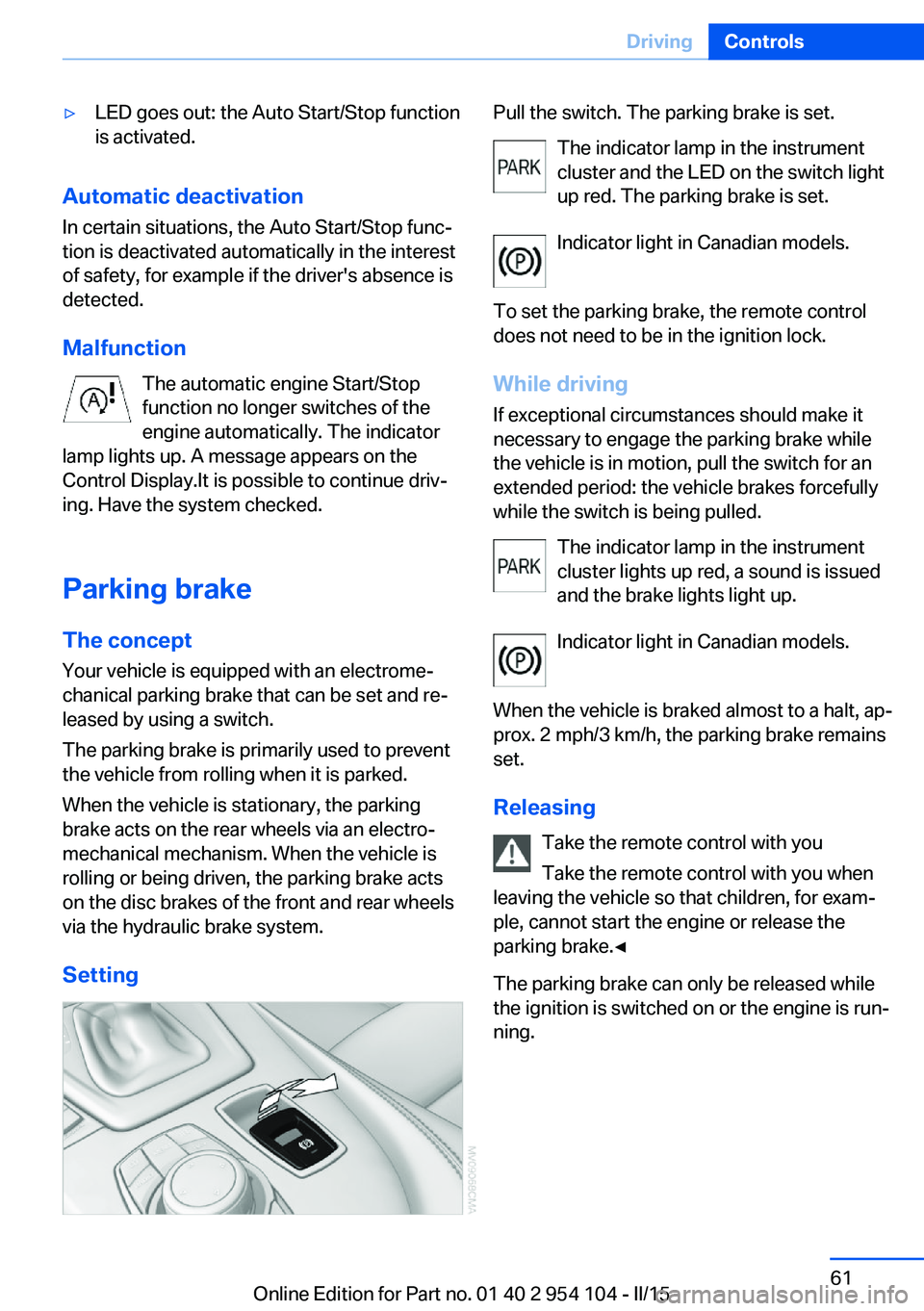
Setting
Pull the switch. The parking brake is set. The indicator lamp in the instrument
cluster and the LED on the switch light
up red. The parking brake is set.
Indicator light in Canadian models.
To set the parking brake, the remote control
does not need to be in the ignition lock.
While driving
If exceptional circumstances should make it
necessary to engage the parking brake while
the vehicle is in motion, pull the switch for an
extended period: the vehicle brakes forcefully
while the switch is being pulled.
The indicator lamp in the instrument
cluster lights up red, a sound is issued
and the brake lights light up.
Indicator light in Canadian models.
When the vehicle is braked almost to a halt, ap‐
prox. 2 mph/3 km/h, the parking brake remains set.
Releasing Take the remote control with you
Take the remote control with you when
leaving the vehicle so that children, for exam‐
ple, cannot start the engine or release the
parking brake.◀
The parking brake can only be released while
the ignition is switched on or the engine is run‐
ning.Seite 61DrivingControls61
Online Edition for Part no. 01 40 2 954 104 - II/15