2015 BMW Z4 manually
[x] Cancel search: manuallyPage 167 of 289

3.Highlight the desired station.4.Press the controller for an extended period.5.Select the desired memory location.
The stations are stored for the remote control
currently in use.
The stations can also be stored on the pro‐
grammable memory buttons, refer to page 24.
Selecting a station manually
Station selection via the frequency.
1."Radio"2."FM" or "AM"3."Manual"4.To select the frequency: turn the control‐
ler.
To store the station: press the controller for an
extended period.
Renaming a station An FM station with changing station names
can be renamed.
1."Radio"2."FM"3.Select the desired station.4.Open "Options".5."Rename to:"
If necessary, wait for the desired name to
be displayed.
The selected station name is added to the list
of current stations and stored stations.
RDSRDS broadcasts additional information, such
as the station name, in the FM wave band.
Switching the RDS on/off
1."Radio"2."FM"3.Open "Options".4."RDS"
The setting is stored for the remote control
currently in use.
HD Radio™ reception
Many stations broadcast both analog and digi‐
tal signals.
License conditions
HD Radio Technology manufactured under li‐
cense from iBiquity Digital Corporation. U.S.
and Foreign Patents. HD Radio™ and the HD,
HD Radio, and Arc logos are proprietary trade‐
marks of iBiquity Digital Corp.
Seite 165RadioEntertainment165
Online Edition for Part no. 01 40 2 954 104 - II/15
Page 226 of 289
RefuelingVehicle equipment
This chapter describes all series equipment as
well as country-specific and special equipment
offered for this model series. Therefore, it also
describes equipment that may not be found in
your vehicle, for instance due to the selected
special equipment or the country version. This
also applies to safety-related functions and
systems.
When using the features and systems descri‐
bed here, adhere to local regulations.
General information Refuel promptly
At the latest, refuel at a range of
30 miles/50 km; otherwise, the engine function
is not ensured and damage may occur.◀
Notes Switch off the engine before refueling
Always switch off the engine before refu‐
eling; otherwise, fuel cannot be added to the tank and a message will be displayed.◀
Observe when handling fuel▷Take all precautionary measures and
observe all applicable regulations
when handling fuel.▷Do not carry any spare fuel containers in
your vehicle. They can develop a leak and
cause an explosion or cause a fire in the
event of an accident.◀Fuel filler flap
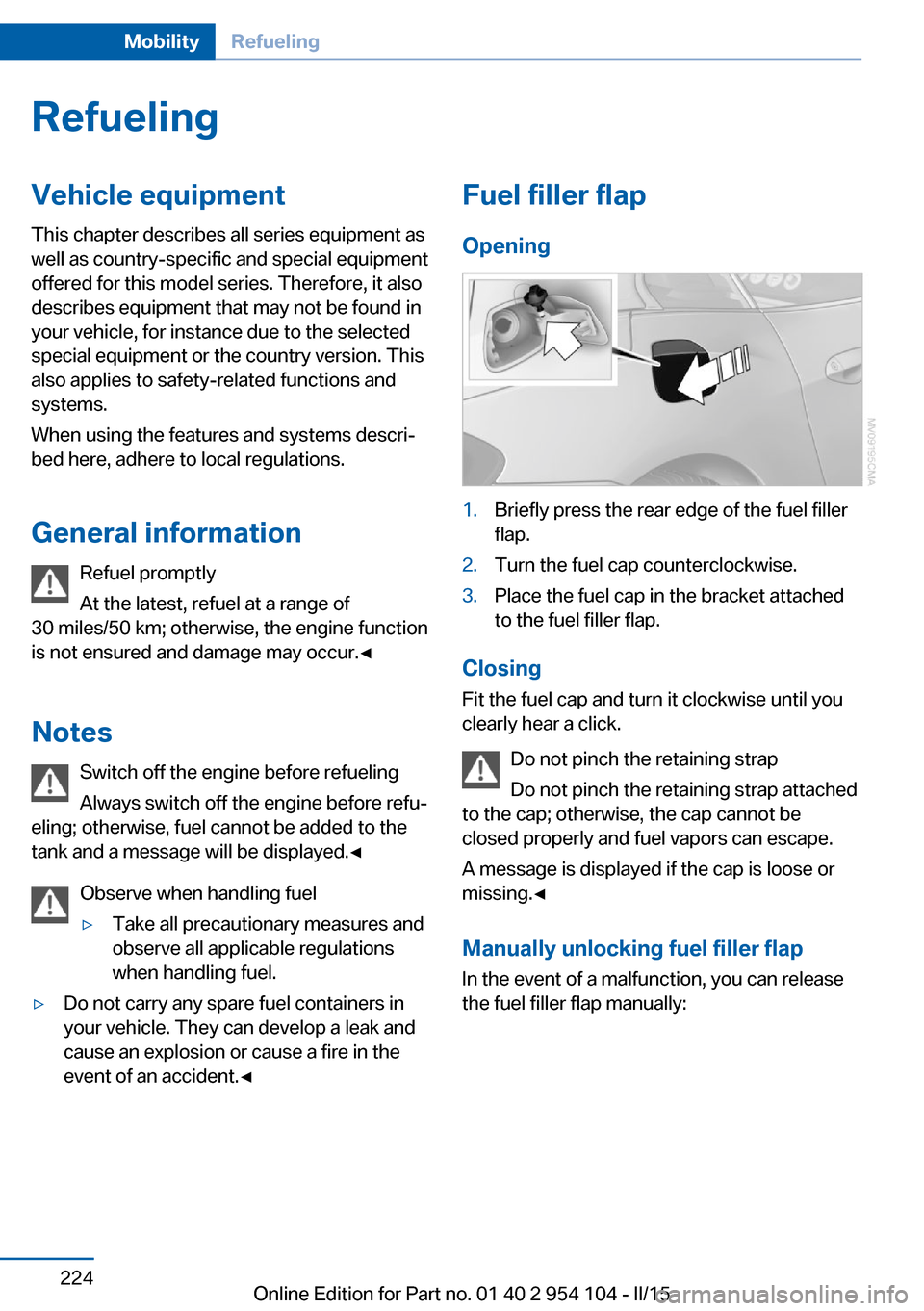
Opening1.Briefly press the rear edge of the fuel filler
flap.2.Turn the fuel cap counterclockwise.3.Place the fuel cap in the bracket attached
to the fuel filler flap.
Closing
Fit the fuel cap and turn it clockwise until you
clearly hear a click.
Do not pinch the retaining strap
Do not pinch the retaining strap attached
to the cap; otherwise, the cap cannot be
closed properly and fuel vapors can escape.
A message is displayed if the cap is loose or
missing.◀
Manually unlocking fuel filler flap In the event of a malfunction, you can release
the fuel filler flap manually:
Seite 224MobilityRefueling224
Online Edition for Part no. 01 40 2 954 104 - II/15
Page 256 of 289

Tow truck
Do not lift the vehicle
Do not lift the vehicle by the tow fitting or
body and chassis parts; otherwise, damage
may result.◀
Use the tow fitting screwed in at the front for
maneuvering the vehicle only.
7-gear Sport automatic transmission
Vehicles with a 7-gear Sport automatic trans‐
mission with a dual clutch can be towed for
short distances if the following instructions are
adhered to.
Manually release the transmission lock, refer to
page 71.
Manually release the transmission lock
Manually release the transmission lock,
even if there is no malfunction involving the
transmission. Otherwise, there is the danger
that the transmission lock will be engaged au‐
tomatically during towing.◀
Adhere to the towing speed and distance
Do not exceed a towing speed of
30 mph/50 km/h and a towing distance of
30 miles/50 km or damage to the transmission
can occur.◀
Blocked parking brake
The parking brake cannot be released
manually.
When the parking brake is blocked, do not tow
the vehicle or else it may be damaged.
Contact your service center.◀
Follow the towing instructions
Follow all towing instructions, or vehicle
damage or accidents may occur.◀▷Make sure that the ignition is switched on;
otherwise, the low beams, tail lights, turn
signals, and windshield wipers may be un‐
available.▷Do not tow the vehicle with the rear axle
tilted, as the front wheels could turn.▷When the engine is stopped, there is no
power assist. Consequently, more force
needs to be applied when braking and
steering.▷Larger steering wheel movements are re‐
quired.▷The towing vehicle must not be lighter
than the vehicle being towed; otherwise,
it will not be possible to control the vehicle
response.
Secure the vehicle against rolling off
Apply the parking brake after towing and
secure the vehicle against rolling off if neces‐
sary.
Have the operability of transmission position P
checked by the service center.◀
Manual transmission
Observe before towing your vehicle Gearshift lever in neutral position.
Being towed Blocked parking brake
The parking brake cannot be released
manually.
When the parking brake is blocked, do not tow
the vehicle or else it may be damaged.
Contact your service center.◀
Seite 254MobilityBreakdown assistance254
Online Edition for Part no. 01 40 2 954 104 - II/15
Page 286 of 289

Telephone, installation loca‐tion, refer to Center arm‐
rest 124
TeleService 217
Temperature, air condi‐ tioner 110
Temperature, automatic cli‐ mate control 112
Temperature, changing the unit of measure 78
Temperature, coolant 74
Temperature display, external temperature 73
Temperature display, external temperature warning 73
Temperature display, setting the units 78
Temperature, engine oil 74
Text messages 208
Theft alarm system, refer to Alarm system 41
Thigh support adjustment 49
Third brake light, refer to Center brake light 248
Through-loading opening with integrated transport
bag 121
Tilt alarm sensor 42
Tilting the passenger side mirror 52
Time, setting the time 78
Tire age 232
Tire damage 233
Tire identification marks 231
Tire inflation pressure 228
Tire inflation pressure, pres‐ sure loss 97
Tire pressure monitoring, re‐ fer to FTM 94
Tire Pressure Monitor TPM 96
Tire Pressure Monitor TPM, system reset 97
Tire Pressure Monitor TPM, warning lamp 98
Tire Quality Grading 232 Tires, changing 234
Tires, flat tire 249
Tire size 231
Tires, run-flat tires 234
Tires, Tire Pressure Monitor TPM 96
Tire tread 233
Toll roads, route 151
Tone 162
Tool kit, refer to Onboard ve‐ hicle tool kit 245
Tools, refer to Onboard vehi‐ cle tool kit 245
Towing 253
Town/city, navigation 143
Tow-starting 253
TPM Tire Pressure Moni‐ tor 96
Traction control 102
TRACTION program, Dy‐ namic Driving Control 103
Traffic bulletins, naviga‐ tion 155
Transmission, 7-gear auto‐ matic transmission with dual
clutch 68
Transmission, 8-gear auto‐ matic transmission 66
Transmission lock, unlocking manually 71
Transmission lock, unlocking manually, with 7-gear auto‐
matic transmission 71
Transmission, manual trans‐ mission 65
Transmission positions, 7- gear automatic transmis‐
sion 68
Transmission positions, 8- gear automatic transmis‐
sion 66
Transmission, unlocking transmission lock manually,
for 7-gear automatic trans‐
mission 71 Transporting children
safely 55
Tread depth, tires 233
Tread, tires 233
Treble, tone 162
Trip-distance counter, refer to Trip odometer 73
Triple turn signal activa‐ tion 62
Trip odometer 73
Trips, planning 149
Trunk lid 38
Trunk lid, Comfort Access 40
Trunk lid, emergency unlock‐ ing 39
Trunk lid, opening from the inside 38
Trunk lid, opening from the outside 38
Turning circle, refer to Dimen‐ sions 264
Turn signal, indicator/warning lamp 16
Turn signals 62
Turn signals, bulb replace‐ ment, front 247
Turn signals, triple turn signal activation 62
U Uniform Tire Quality Grading/ UTQG 232
Unintentional alarms 42
Units, average fuel consump‐ tion 78
Units of measure, changing on the Control Display 78
Units, temperature 78
Universal remote control 116
Unlocking, from the inside 38
Unlocking, from the out‐ side 34
Unlocking, hood 238
Unlocking, setting the unlock‐ ing characteristics 34 Seite 284ReferenceEverything from A to Z284
Online Edition for Part no. 01 40 2 954 104 - II/15