2015 BMW X5 camera
[x] Cancel search: cameraPage 160 of 275
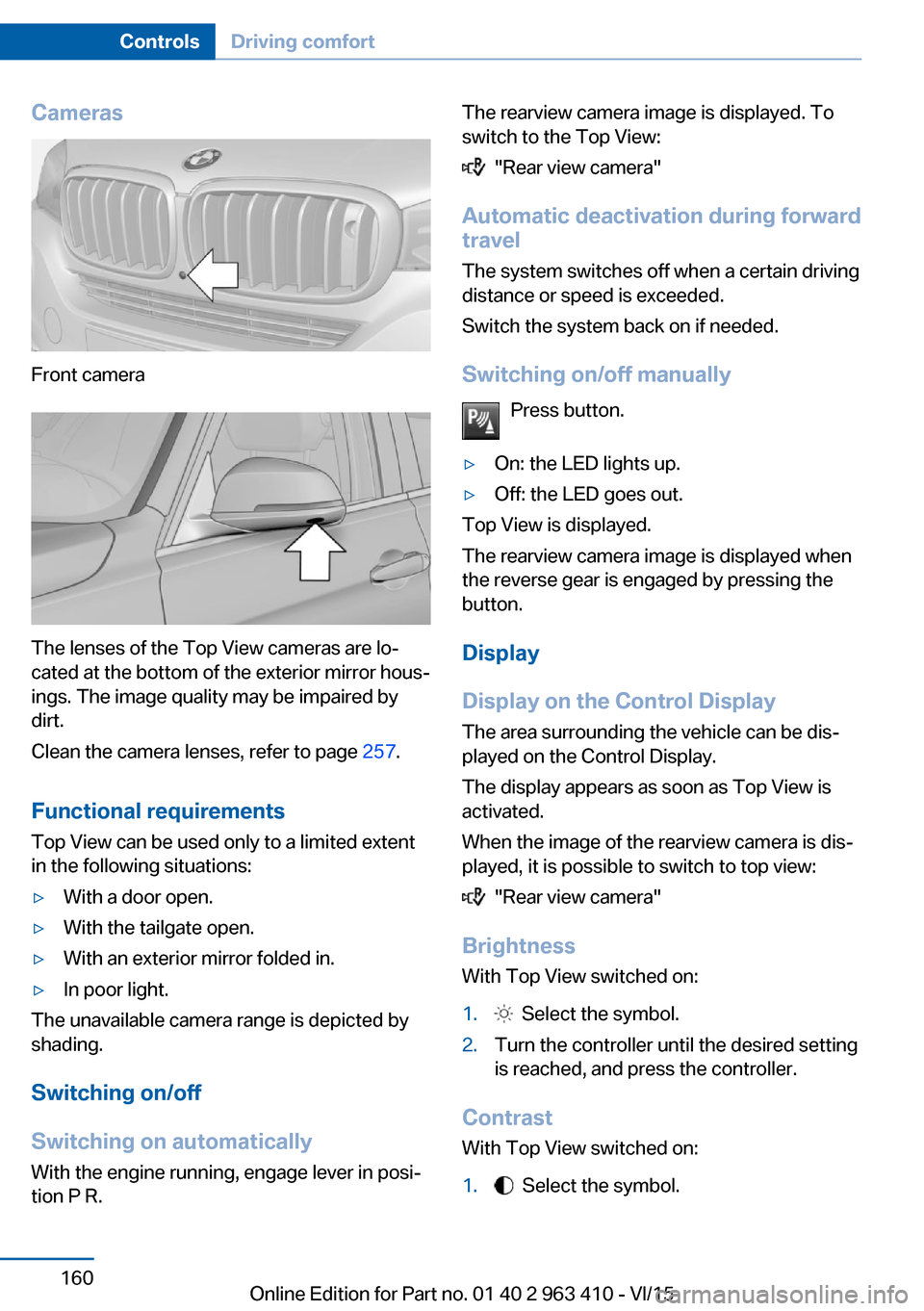
Cameras
Front camera
The lenses of the Top View cameras are lo‐
cated at the bottom of the exterior mirror hous‐
ings. The image quality may be impaired by
dirt.
Clean the camera lenses, refer to page 257.
Functional requirements
Top View can be used only to a limited extent
in the following situations:
▷With a door open.▷With the tailgate open.▷With an exterior mirror folded in.▷In poor light.
The unavailable camera range is depicted by
shading.
Switching on/off
Switching on automatically With the engine running, engage lever in posi‐
tion P R.
The rearview camera image is displayed. To
switch to the Top View:
"Rear view camera"
Automatic deactivation during forward
travel
The system switches off when a certain driving
distance or speed is exceeded.
Switch the system back on if needed.
Switching on/off manually Press button.
▷On: the LED lights up.▷Off: the LED goes out.
Top View is displayed.
The rearview camera image is displayed when
the reverse gear is engaged by pressing the
button.
Display
Display on the Control Display The area surrounding the vehicle can be dis‐
played on the Control Display.
The display appears as soon as Top View is
activated.
When the image of the rearview camera is dis‐
played, it is possible to switch to top view:
"Rear view camera"
Brightness
With Top View switched on:
1. Select the symbol.2.Turn the controller until the desired setting
is reached, and press the controller.
Contrast
With Top View switched on:
1. Select the symbol.Seite 160ControlsDriving comfort160
Online Edition for Part no. 01 40 2 963 410 - VI/15
Page 161 of 275

2.Turn the controller until the desired setting
is reached, and press the controller.
Displaying the turning radius and
pathway lines
▷The static, red turning radius line shows
the space needed to the side of the vehicle
when the steering wheel is turned all the
way.▷The variable, green pathway line assists
you in assessing the amount of space ac‐
tually needed to the side of the vehicle.
The lane line depends on the engaged
gear and the current steering angle. The
track line is continuously adjusted for the
steering wheel movement.
"Parking aid lines"
Turning circle and pathway lines are displayed.
System limits
A Check Control message is displayed when a
camera is not working.
Side View The concept
Side View provides an early look at cross traffic
at blind driveways and intersections. Road
users concealed by obstacles to the left and
right of the vehicle can only be detected rela‐
tively late from the driver's seat. To improve
the viewing, each camera, front and rear on the
vehicle, detects the traffic area on the side.
Which camera is active is shown on the top
edge of the screen.
Information The images of the cameras are displayed, de‐
pending on the gear selected, on the Control
Display.
WARNING
The system does not relieve from the
personal responsibility to correctly assess the
traffic situation. There is risk of an accident.
Adjust the driving style to the traffic condi‐
tions. Watch traffic and vehicle surroundings
closely and actively interfere in the respective
situations.◀
Overview
Button in the vehicle
Side View
Cameras
Front camera
Seite 161Driving comfortControls161
Online Edition for Part no. 01 40 2 963 410 - VI/15
Page 162 of 275

Rear camera
Two cameras are used for the detection.
The image quality may be impaired by dirt.
Clean the camera lenses, refer to page 257.
Switching on/off
Switching on/off manually Press button.
Depending on the transmission position, the
picture of the front or rear camera is displayed.
Switching off automatically By switching into a different function or when
changing gears.
Front Side View: when a certain driving dis‐
tance or speed is exceeded.
Display
General information
The traffic area in front of or behind the vehicle
is displayed on the Control Display.
Brightness With the Side View switched on:
1. Select the symbol.2.Turn the controller until the desired setting
is reached, and press the controller.Contrast
With the Side View switched on:1. Select the symbol.2.Turn the controller until the desired setting
is reached, and press the controller.
Warning of crossing traffic
The concept When an object approaching from the side is
detected by the front or rear camera, this is de‐
picted by a symbol in the Side View display.
Requirements
▷Side View switched on.▷Your vehicle moves no faster than walking
speed.▷To detect approaching objects, sufficient
brightness, e.g., daylight is necessary.
Display
The yellow symbol is displayed if anapproaching vehicle is detected by the
camera.
A gray symbol is displayed if crossing
traffic cannot be detected.
System limits
In the following situations, the warning about
crossing traffic may be limited:
▷In poor lighting or visibility conditions.▷If the camera is soiled or covered.
System limits
The objects displayed on the Control Display
under certain circumstances are closer than
they appear. Therefore, do not estimate the
distance from the objects on the display.
The viewing angle is approx. 180°.
Seite 162ControlsDriving comfort162
Online Edition for Part no. 01 40 2 963 410 - VI/15
Page 163 of 275

Parking assistantThe concept
This system assists the driver in parking paral‐
lel to the road.
Ultrasound sensors measure parking spaces
on both sides of the vehicle.
The parking assistant calculates the best pos‐
sible parking line and during the parking proce‐
dure takes control of steering, the acceleration
and braking and if needed changes the gears.
Hold down the parking assistant button for the
duration of the parking procedure. At the end
of the parking procedure, the P selector lever
position is set.
When parking, also take note of the visual and
acoustic information and instructions issued
by the PDC, the parking assistant and the rear‐
view camera and react accordingly.
A component of the parking assistant is the
PDC Park Distance Control, refer to page 154.
Information WARNING
The system does not relieve from the
personal responsibility to correctly assess the
traffic situation. Based on the limits of the sys‐
tem, it cannot independently react to all traffic
situations. There is risk of an accident. Adjust
the driving style to the traffic conditions. Watch
traffic closely and actively interfere in the re‐
spective situations.◀
CAUTION
The parking assistant can steer the vehi‐
cle over or onto curbs. There is risk of property
damage. Watch traffic closely and actively in‐
terfere in the respective situations.◀
An engine that has been switched off by the
Auto Start Stop function is restarted automati‐
cally when the parking assistant is activated.
Overview
Button in the vehicle
Parking assistant
Ultrasound sensors
The ultrasound sensors for measuring parking
spaces are located on the side of the vehicle.
To ensure full functionality:
▷Keep the sensors clean and free of ice.▷When using high-pressure washers, do not
spray the sensors for long periods and
maintain a distance of at least 12 in/30 cm.▷Do not put stickers over sensors.Seite 163Driving comfortControls163
Online Edition for Part no. 01 40 2 963 410 - VI/15
Page 254 of 275

CareVehicle features and optionsThis chapter describes all standard, country-
specific and optional features offered with the
series. It also describes features that are not
necessarily available in your car, e. g., due to
the selected options or country versions. This
also applies to safety-related functions and
systems. The respectively applicable country
provisions must be observed when using the
respective features and systems.
Car washes General information
Regularly remove foreign objects such as
leaves in the area below the windshield when
the hood is raised.
Wash your vehicle frequently, particularly in
winter. Intense soiling and road salt can dam‐
age the vehicle.
Steam blaster and high-pressure
washer
Information CAUTION
When cleaning with high-pressure wash‐
ers, components can be damaged due to the
pressure or temperatures being too high.
There is risk of property damage. Maintain suf‐
ficient distance and do not spray too long con‐
tinuously. Follow the user's manual for the
high-pressure washer.◀
Distances and temperature▷Maximum temperature: 140 ℉/60 ℃.▷Minimum distance from sensors, cameras,
seals: 12 in/30 cm.▷Minimum distance from glass sunroof:
31.5 inches/80 cm.
Automatic car washes
Information Note the following:
▷Give preference to cloth car washes or
those that use soft brushes in order to
avoid paint damage.▷Make sure that the wheels and tires are not
damaged by the transport mechanisms.▷Fold in the exterior mirrors; otherwise, they
may be damaged, depending on the width
of the vehicle.▷Deactivate the rain sensor, refer to
page 78, to avoid unintentional wiper acti‐
vation.▷In some cases, an unintentional alarm can
be triggered by the interior motion sensor
of the alarm system. Follow the instruc‐
tions on avoiding an unintentional alarm,
refer to page 47.
CAUTION
Too high guide rails in car washes can
damage body parts. There is risk of property
damage. Avoid car washes with guide rails
higher than 4 in/10 cm.◀
Different types of tires CAUTION
The vehicle might be too large for the car
wash. There is risk of property damage. Before
driving into the car wash, make sure that the
vehicle is not too large.◀
Seite 254MobilityCare254
Online Edition for Part no. 01 40 2 963 410 - VI/15
Page 257 of 275

Safety belts
Dirty belt straps impede the reeling action and
thus have a negative impact on safety.
WARNING
Chemical cleansers can destroy the
safety belt webbing. Missing protective effect
of the safety belts. There is risk of injuries or
danger to life. Use only a mild soapy solution
for cleaning the safety belts.◀
Use only a mild soapy solution, with the safety
belts clipped into their buckles.
Do not allow the switchs to retract the safety
belts until they are dry.
Carpets and floor mats WARNING
Objects in the driver's floor area can limit
the pedal distance or block a depressed pedal.
There is risk of an accident. Stow objects in
the vehicle such that they are secured and
cannot enter into the driver's floor area. Use
floor mats that are suitable for the vehicle and
can be safely attached to the floor. Do not use
loose floor mats and do not layer several floor
mats. Make sure that there is sufficient clear‐
ance for the pedals. Ensure that the floor mats
are securely fastened again after they were re‐
moved, e.g. for cleaning.◀
Floor mats can be removed from the car's inte‐
rior for cleaning.
If the floor carpets are very dirty, clean with a
microfiber cloth and water or a textile cleaner.
To prevent matting of the carpet, rub back and
forth in the direction of travel only.
Sensor/camera lenses
To clean sensors and camera lenses, use a
cloth moistened with a small amount of glass
detergent.Displays/Screens/protective glass of
the Head-up Display
CAUTION
Chemical cleansers, moisture or fluids of
any kind can damage the surface of displays
and screens. There is risk of property damage.
Clean with a clean, antistatic microfiber cloth.◀
CAUTION
The surface of displays can be damaged
with improper cleaning. There is risk of prop‐
erty damage. Avoid pressure that is too high
and do not use any scratching materials.◀
Clean with a clean, antistatic microfiber cloth.
Clean the protective glass of the Head-up Dis‐
play using a microfiber cloth and commercially
available dish-washing soap.
Long-term
When the vehicle is shut down for longer than
three months, special measures must be
taken. Further information is available from a
dealer’s service center or another qualified
service center or repair shop.Seite 257CareMobility257
Online Edition for Part no. 01 40 2 963 410 - VI/15
Page 265 of 275

Biodiesel 211
Blinds, sun protection 48
BMW Advanced Diesel 211
BMW Assist, see user's manual for Navigation, En‐
tertainment and Communi‐
cation
BMW Driver’s Guide App 6
BMW Homepage 6
BMW Internet page 6
BMW maintenance sys‐ tem 238
Bonus range, ECO PRO 201
Bottle holder, see Cu‐ pholder 186
Brake assistant 137
Brake assistant, adaptive 137
Brake discs, break-in 192
Brake force display 135
Brake lights, adaptive 135
Brake lights, brake force dis‐ play 135
Brake pads, break-in 192
Braking, hints 193
Breakdown assistance 248
Break-in 192
Brightness of Control Dis‐ play 101
Bulb replacement 241
Bulb replacement, front 242
Bulb replacement, rear 244
Bulbs and lights 241
Button, RES 148
Button, Start/Stop 69
Bypassing, see Jump-start‐ ing 249
C
California Proposition 65 Warning 8
Calling up mirror adjust‐ ment 45
Calling up seat adjust‐ ment 45 Calling up steering wheel ad‐
justment 45
Camera lenses, care 257
Camera, rearview cam‐ era 157
Camera, Side View 161
Camera, Top View 160
Can holder, see Cu‐ pholder 186
Car battery 246
Car care products 255
Care, displays 257
Care, vehicle 255
Cargo 196
Cargo area 181
Cargo area, enlarging 181
Cargo area, storage compart‐ ments 187
Cargo cover 181
Cargo, securing 197
Cargo straps, securing cargo 197
Car key, see Remote con‐ trol 34
Carpet, care 257
Car wash 254
Catalytic converter, see Hot exhaust system 193
CBS Condition Based Serv‐ ice 238
CD/Multimedia, see user's manual for Navigation, En‐
tertainment and Communi‐
cation
Center armrest 185
Center console 16
Central locking system 40
Central screen, see Control Display 18
Changes, technical, see Own Safety 7
Changing parts 240
Changing wheels 244
Changing wheels/tires 223
Chassis number, see vehicle identification number 10 Check Control 89
Checking the engine oil level electronically 232
Checking the oil level elec‐ tronically 232
Children, seating position 64
Children, transporting safely 64
Child restraint fixing sys‐ tem 64
Child restraint fixing system LATCH 66
Child restraint fixing systems, mounting 65
Child safety locks 68
Child seat, mounting 65
Child seats 64
Chrome parts, care 256
Cigarette lighter 177
Cleaning displays 257
Climate control 167
Climate control wind‐ shield 193
Clock 94
Closing/opening via door lock 39
Closing/opening with remote control 37
Clothes hooks 187
Coasting 203
Coasting with engine decou‐ pled, coasting 203
Coasting with idling en‐ gine 203
Cockpit 14
Cold starting, refer to Starting the engine 70
Combination switch, refer to Wiper system 77
Combination switch, see Turn signals 76
Comfort Access 43
COMFORT program, Driving Dynamics Control 143
Compact wheel, see Emer‐ gency wheel 244 Seite 265Everything from A to ZReference265
Online Edition for Part no. 01 40 2 963 410 - VI/15
Page 269 of 275

Lane margin, warning 131
Language on Control Dis‐ play 101
Lashing eyes, securing cargo 197
LATCH child restraint sys‐ tem 66
Launch Control 83
Leather, care 255
LED headlights, bulb replace‐ ment 243
LEDs, light-emitting di‐ odes 242
Letters and numbers, enter‐ ing 25
Light 104
Light alloy wheels, care 256
Light control 106
Light-emitting diodes, LEDs 242
Lighting 104
Lights and bulbs 241
Light switch 104
Load 197
Loading 196
Lock, door 39
Locking/unlocking via door lock 39
Locking/unlocking with re‐ mote control 37
Locking, automatic 45
Locking, settings 44
Lock, power window 48
Locks, doors, and win‐ dows 68
Low beams 104
Low beams, automatic, see High-beam Assistant 106
Lower back support 53
Lower tailgate 43
Low-Sulfur Diesel 211
Luggage rack, see Roof- mounted luggage rack 198
Lumbar support 53 M
Maintenance 238
Maintenance require‐ ments 238
Maintenance, service require‐ ments 95
Maintenance system, BMW 238
Make-up mirror 176
Malfunction displays, see Check Control 89
Malfunction, self-leveling sus‐ pension 142
Manual air distribution 169
Manual air flow 169
Manual brake, see Parking brake 73
Manual mode, Steptronic transmission 82
Manual operation, door lock 39
Manual operation, exterior mirrors 62
Manual operation, fuel filler flap 209
Manual operation, Park Dis‐ tance Control PDC 155
Manual operation, parking brake 75
Manual operation, rearview camera 157
Manual operation, Top View 160
Marking, run-flat tires 225
Master key, see Remote con‐ trol 34
Maximum cooling 168
Maximum speed, display 96
Maximum speed, winter tires 224
Measurement, units of 101
Medical kit 249
Memory for seat, mirrors, steering wheel 60
Menu, EfficientDynamics 202 Menu in instrument clus‐
ter 97
Menus, operating, iDrive 18
Menus, refer to iDrive operat‐ ing concept 20
Messages, see Check Con‐ trol 89
Microfilter 170
Minimum tread, tires 223
Mirror 61
Mirror memory 60
Mobile communication devi‐ ces in the vehicle 193
Mobility System 225
Modifications, technical, see Own Safety 7
Moisture in headlight 242
Monitor, see Control Dis‐ play 18
Mounting of child restraint systems 65
Moving sun visor 176
Multifunctional instrument display 86
Multifunction steering wheel, buttons 14
N Navigation, see user's manual for Navigation, Entertain‐
ment and Communication
Neck restraints, front, see Head restraints 58
Neck restraints, rear, see Head restraints 59
Neutral cleaner, see wheel cleaner 256
New wheels and tires 223
Night Vision 127
Night Vision device, see Night Vision 127
Nylon rope for tow-starting/ towing 251 Seite 269Everything from A to ZReference269
Online Edition for Part no. 01 40 2 963 410 - VI/15