2015 BMW X5 egr
[x] Cancel search: egrPage 159 of 275

2.Turn the steering wheel to the point where
the pathway line covers the corresponding
turning radius line.
Display settings
Brightness
With the rearview camera switched on:
1. Select the symbol.2.Turn the controller until the desired setting
is reached, and press the controller.
Contrast
With the rearview camera switched on:
1. Select the symbol.2.Turn the controller until the desired setting
is reached, and press the controller.
System limits
Detection of objects
Very low obstacles as well as high, protruding
objects such as ledges may not be detected by
the system.
Assistance functions also take into account
data of the PDC.
Follow instructions in the PDC chapter, refer to
page 154.
The objects displayed on the Control Display
under certain circumstances are closer than
they appear. Do not estimate the distance from
the objects on the display.
Top View
The concept Top View provides assistance in parking and
maneuvering. The area around the vehicle is
shown on the Control Display.
General information The image is captured by two cameras
integrated in the exterior mirrors, by the rear‐
view camera and a camera on the front of the
vehicle.
The range is no more than approx. 6.5 ft/2 m to
the side, front and rear.
Obstacles within this range are thus displayed
early on the Control Display.
Information WARNING
The system does not relieve from the
personal responsibility to correctly assess the
traffic situation. There is risk of an accident.
Adjust the driving style to the traffic condi‐ tions. Watch traffic and vehicle surroundings
closely and actively interfere in the respective
situations.◀
Overview
Button in the vehicle
Top View
Seite 159Driving comfortControls159
Online Edition for Part no. 01 40 2 963 410 - VI/15
Page 174 of 275
Interior equipmentVehicle features and optionsThis chapter describes all standard, country-
specific and optional features offered with the
series. It also describes features that are not
necessarily available in your car, e. g., due to
the selected options or country versions. This
also applies to safety-related functions and
systems. The respectively applicable country
provisions must be observed when using the
respective features and systems.
Universal Integrated Remote Control
The concept The universal garage door opener can operate
up to 3 functions of remote-controlled sys‐
tems such as garage door drives or lighting
systems. The universal garage door opener re‐
places up to 3 different hand-held transmitters.
To operate the remote control, the buttons on
the interior rearview mirror must be program‐
med with the desired functions. The hand-held
transmitter for the particular system is required
in order to program the remote control.
Before selling the vehicle, delete the stored
functions for the sake of security.
Information WARNING
Body parts can be jammed when operat‐
ing remote-controlled systems, e.g. the garage
door, using the universal garage door opener.
There is risk of injuries or risk of property dam‐
age. Make sure that the area of movement of
the respective system is clear during program‐
ming and operation. Also follow the safety in‐
structions of the hand-held transmitter.◀Compatibility
If this symbol is printed on the packag‐
ing or in the instructions of the system
to be controlled, the system is gener‐
ally compatible with the universal garage door opener.
If you have any questions, please contact:▷A dealer’s service center or another quali‐
fied service center or repair shop.▷www.homelink.com on the Internet.
HomeLink is a registered trademark of Gentex
Corporation.
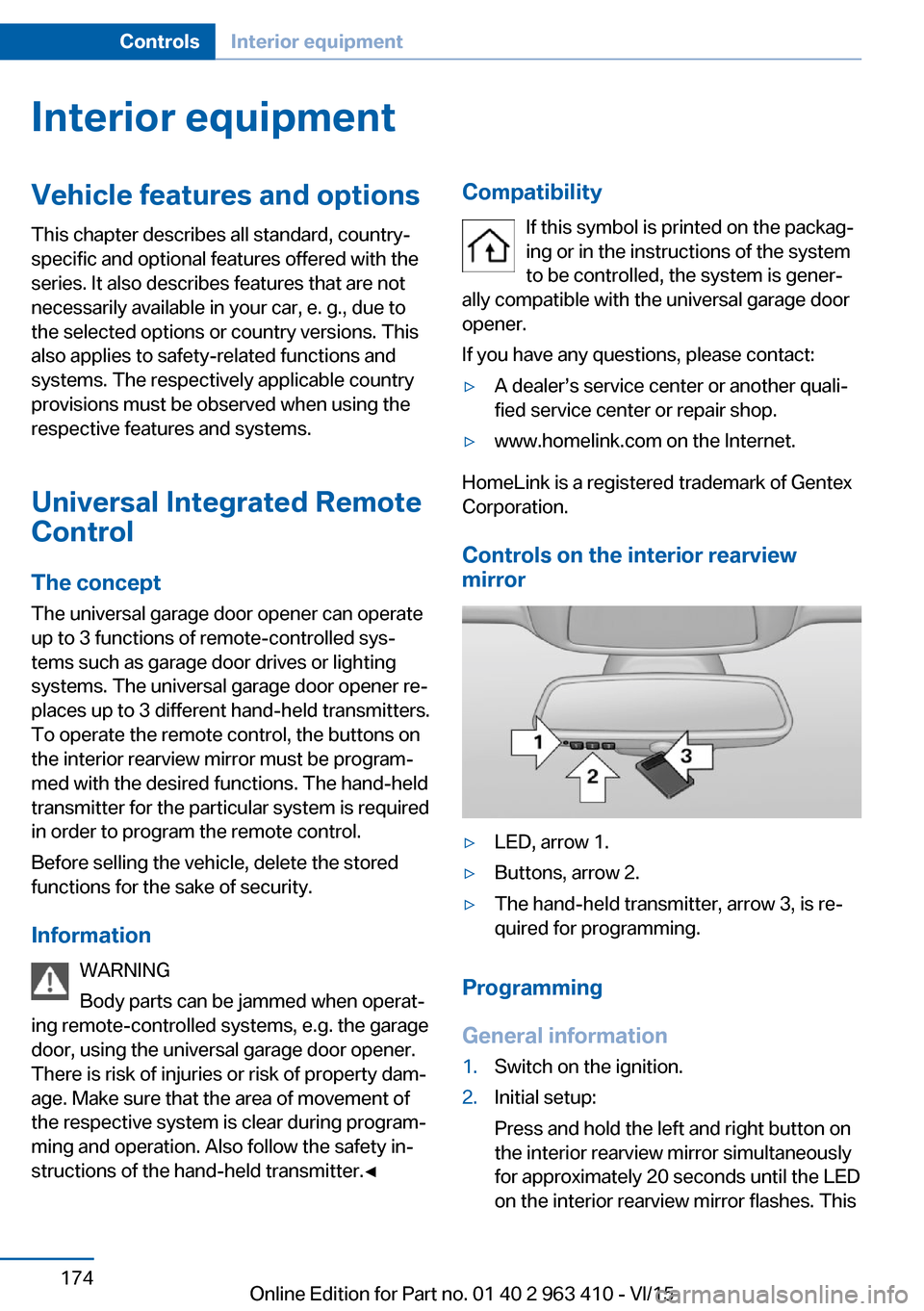
Controls on the interior rearview
mirror
▷LED, arrow 1.▷Buttons, arrow 2.▷The hand-held transmitter, arrow 3, is re‐
quired for programming.
Programming
General information
1.Switch on the ignition.2.Initial setup:
Press and hold the left and right button on
the interior rearview mirror simultaneously
for approximately 20 seconds until the LED
on the interior rearview mirror flashes. ThisSeite 174ControlsInterior equipment174
Online Edition for Part no. 01 40 2 963 410 - VI/15
Page 184 of 275

LockingThe glove compartment can be locked with an
integrated key. This prevents access to the
glove compartment.
After the glove compartment is locked, the re‐
mote control can be handed over, such as at a
hotel, without the integrated key.
Driver's side
Information WARNING
Folded open, the glove compartment
protrudes in the car's interior. Objects in the glove compartment can be thrown into the
car's interior while driving, e.g. in the event of
an accident or during braking and evasive ma‐
neuvers. There is risk of injuries. Always close
the glove compartment immediately after us‐ ing it.◀
Opening
Pull the handle.
ClosingFold cover closed.
Compartments in the doors WARNING
Breakable object, e.g. glass bottle, can
break in the event of an accident. Broken glass
can be scattered in the car's interior. There is
risk of injuries. Do not stow any breakable ob‐
jects in the car's interior.◀
Storage compartment on the
center console
Opening
Slide the cover forward.
Closing Slide the cover rearward.
Small storage compartment
Storage possibility for small objects, e.g.,
coins.
Storage compartment third
row of seats
Overview
A storage compartment is located between the
seats of third row of seats.
Seite 184ControlsStorage compartments184
Online Edition for Part no. 01 40 2 963 410 - VI/15
Page 225 of 275

Run-flat tires
Label
RSC label on the tire sidewall.
The wheels consist of tires that are self-sup‐
porting, to a limited degree, and possibly spe‐
cial rims.
The support of the sidewall allows the tire to
remain drivable to a restricted degree in the
event of a tire inflation pressure loss.
Follow the instructions for continued driving
with a flat tire.
Changing run-flat tires
For your own safety, only use run-flat tires. No
spare tire is available in the case of a flat tire. A
dealer’s service center or another qualified
service center or repair shop will be glad to an‐
swer additional questions at any time.
Mobility System
The concept With the Mobility System, minor tire damage
can be sealed quickly to enable continued
travel. To accomplish this, sealant is pumped
into the tires, which seals the damage from the
inside.
The compressor can be used to check the tire
inflation pressure.
Information▷Follow the instructions on using the Mobi‐
lity System found on the compressor and
sealant container.▷Use of the Mobility System may be ineffec‐
tive if the tire puncture measures approx.
1/8 in/4 mm or more.▷Contact a dealer’s service center or an‐
other qualified service center or repair
shop if the tire cannot be made drivable.▷If possible, do not remove foreign bodies
that have penetrated the tire.▷Pull the speed limit sticker off the sealant
container and apply it to the steering
wheel.▷The use of a sealant can damage the TPM
wheel electronics. In this case, have the
electronics checked at the next opportu‐
nity and have them replaced if needed.
DANGER
If the exhaust pipe is blocked or ventila‐
tion is insufficient, harmful exhaust gases can
enter into the vehicle. The exhaust gases con‐
tain carbon monoxide, an odorless and color‐
less but highly toxic gas. In enclosed areas, ex‐
haust gases can also accumulate outside of
the vehicle. There is danger to life. Keep the
exhaust pipe free and ensure sufficient ventila‐
tion.◀
Storage
The Mobility System is located behind the left side trim in the trunk.
Seite 225Wheels and tiresMobility225
Online Edition for Part no. 01 40 2 963 410 - VI/15
Page 248 of 275

Breakdown assistanceVehicle features and options
This chapter describes all standard, country-
specific and optional features offered with the
series. It also describes features that are not
necessarily available in your car, e. g., due to
the selected options or country versions. This
also applies to safety-related functions and
systems. The respectively applicable country
provisions must be observed when using the
respective features and systems.
Hazard warning flashers
The button is located in the center console.
Intelligent Emergency
Request
The concept In case of an emergency, an Emergency Re‐
quest can be made through this system.
General information
Only press the SOS button in an emergency.
For technical reasons, the Emergency Request
cannot be guaranteed under unfavorable con‐
ditions.
Overview
SOS button in the roofliner
Requirements
▷The SIM card integrated in the vehicle has
been activated.▷The radio-ready state is switched on.▷The Assist system is functional.
Initiating an Emergency Request
1.Press the cover briefly to open it.2.Press the SOS button until the LED at the
button lights up green.▷The LED lights up green: an Emergency
Request was initiated.
If a cancel prompt appears on the display,
the Emergency Request can be aborted.
If the situation allows, wait in your vehicle
until the voice connection has been estab‐
lished.▷The LED flashes green when a connection
to the BMW Response Center has been
established.
When the emergency request is received
at the BMW Response Center, the BMW
Response Center contacts you and takes
further steps to help you.
Even if you are unable to respond, the
BMW Response Center can take furtherSeite 248MobilityBreakdown assistance248
Online Edition for Part no. 01 40 2 963 410 - VI/15
Page 256 of 275

Otherwise, particles of dust and road grime
chafe in pores and folds, and lead to increased
wear and premature degradation of the leather
surface.
To guard against discoloration, such as from
clothing, provide leather care roughly every
two months.
Clean light-colored leather more frequently be‐
cause soiling on such surfaces is substantially
more visible.
Use leather care products; otherwise, dirt and
grease will gradually break down the protective
layer of the leather surface.
Suitable care products are available from a
dealer’s service center or another qualified
service center or repair shop.
Upholstery material careVacuum regularly with a vacuum cleaner.
If upholstery is very dirty, e.g., with beverage
stains, use a soft sponge or microfiber cloth
with a suitable interior cleaner.
Clean the upholstery down to the seams using
large sweeping motions. Avoid rubbing the
material vigorously.
CAUTION
Open Velcro® fasteners on articles of
clothing can damage the seat covers. There is
risk of property damage. Ensure that any Vel‐
cro® fasteners are closed.◀
Caring for special components
Light-alloy wheels When cleaning the vehicle, use only neutral
wheel cleaners having a pH value from 5 to 9.
Do not use abrasive cleaning agents or steam jets above 140 ℉/60 ℃. Follow the manufac‐
turer's instructions.
Aggressive, acidic or alkaline cleaning agents
can destroy the protective layer of adjacent
components, such as the brake disk.Chrome surfaces
Carefully clean components such as the radia‐
tor grille or door handles with an ample supply
of water, possibly with shampoo added, partic‐
ularly when they have been exposed to road
salt.
Rubber components
Environmental influences can cause surface
soiling of rubber parts and a loss of gloss. For cleaning, use only water and suitable care
products, the manufacturer of your vehicle rec‐
ommends original BMW care products.
Treat especially worn rubber parts with rubber
care agents at regular intervals. When cleaning
rubber seals, do not use any silicon-containing
car care products in order to avoid damage or noises.
Fine wood partsClean fine wood facing and fine wood compo‐
nents only with a moist rag. Then dry with a
soft cloth.
Plastic components
These include:▷Imitation leather surfaces.▷Roofliner.▷Lamp lenses.▷Instrument cluster cover.▷Matt black spray-coated components.▷Painted parts in the interior.
Clean with a microfiber cloth.
Dampen cloth lightly with water.
Do not soak the roofliner.
CAUTION
Cleansers that contain alcohol or sol‐
vents, such as lacquer thinners, heavy-duty
grease removers, fuel, or such, can damage
plastic parts. There is risk of property damage.
Clean with a microfiber cloth. Dampen cloth
lightly with water.◀
Seite 256MobilityCare256
Online Edition for Part no. 01 40 2 963 410 - VI/15
Page 267 of 275

ECO PRO Tip - driving in‐struction 202
EfficientDynamics 202
Electronic displays, instru‐ ment cluster 85
Electronic oil measure‐ ment 232
Electronic Stability Program ESP, see DSC 138
Emergency detection, remote control 35
Emergency release, fuel filler flap 209
Emergency release, parking brake 75
Emergency Request 248
Emergency start function, en‐ gine start 35
Emergency unlocking, trans‐ mission lock 83
Emergency wheel 244
Energy Control 94
Energy recovery 95
Engine, automatic Start/Stop function 71
Engine, automatic switch- off 71
Engine compartment 229
Engine compartment, work‐ ing in 230
Engine coolant 236
Engine idling when driving, coasting 203
Engine oil 232
Engine oil, adding 233
Engine oil additives 234
Engine oil change 234
Engine oil filler neck 233
Engine oil temperature 93
Engine oil types, alterna‐ tive 234
Engine oil types, suitable 234
Engine start during malfunc‐ tion 35
Engine start, jump-start‐ ing 249 Engine start, refer to Starting
the engine 70
Engine stop 70
Engine temperature 93
Entering a car wash 254
Equipment, interior 174
Error displays, see Check Control 89
ESP Electronic Stability Pro‐ gram, see DSC 138
Exchanging wheels/tires 223
Exhaust system 193
Exterior mirror, automatic dimming feature 62
Exterior mirrors 61
External start 249
External temperature dis‐ play 93
External temperature warn‐ ing 93
Eyes for securing cargo 197
F
Failure message, see Check Control 89
False alarm, see Unintentional alarm 47
Fan, see Air flow 169
Filler neck for engine oil 233
Fine wood, care 256
First-aid kit 249
Fitting for towing, see Tow fit‐ ting 252
Flat tire, changing wheels 244
Flat Tire Monitor FTM 116
Flat tire, Tire Pressure Moni‐ tor TPM 112
Flat tire, warning lamp 113, 117
Flooding 193
Floor carpet, care 257
Floor mats, care 257
Folding back rear seat back‐ rests 181 Fold-out position, wiper 79
Foot brake 193
Front airbags 109
Front center armrest 185
Front cupholder 186
Front-end collision warning with braking function 122
Front-end collision warning with City Braking func‐
tion 119
Front fog lamps, , LED, bulb replacement 244
Front fog lights 107
Front fog lights/cornering lights, bulb replace‐
ment 243
Front lights 242
Front-seat passenger airbags, automatic deactivation 111
Front-seat passenger airbags, indicator lamp 111
Front seats 52
FTM Flat Tire Monitor 116
Fuel 210
Fuel consumption, see Aver‐ age fuel consumption 98
Fuel filler flap 208
Fuel gauge 93
Fuel lid 208
Fuel quality 210
Fuel recommendation 210
Fuel, tank capacity 262
Fuse 247
G
Garage door opener, see Uni‐ versal Integrated Remote
Control 174
Gasoline 210
Gear change, Steptronic transmission 81
Gear shift indicator 96
General driving notes 192
Glare shield 176
Glasses compartment 186 Seite 267Everything from A to ZReference267
Online Edition for Part no. 01 40 2 963 410 - VI/15
Page 268 of 275

Glass sunroof, refer to Panor‐amic glass sunroof 49
Glove compartment 183
Gross vehicle weight, ap‐ proved 261
H
Handbrake, see Parking brake 73
Hand-held transmitter, alter‐ nating code 175
Hazard warning flashers 248
HDC Hill Descent Con‐ trol 140
Head airbags 109
Headlight control, auto‐ matic 105
Headlight courtesy delay fea‐ ture 105
Headlight flasher 77
Headlight glass 242
Headlights 242
Headlights, care 255
Head restraints 52
Head restraints, front 58
Head restraints, rear 59
Head-up Display 101
Head-up Display, care 257
Heavy cargo, stowing 197
High-beam Assistant 106
High beams 77
High beams/low beams, see High-beam Assistant 106
Hill Descent Control HDC 140
Hills 194
Hill start assistant, see Drive- off assistant 137
Holder for beverages 186
Homepage 6
Hood 230
Horn 14
Hot exhaust system 193
HUD Head-up Display 101
Hydroplaning 193 I
Ice warning, see External temperature warning 93
Icy roads, see External tem‐ perature warning 93
Identification marks, tires 221
Identification number, see ve‐ hicle identification num‐
ber 10
iDrive 18
Ignition key, see Remote con‐ trol 34
Ignition off 69
Ignition on 69
Indication of a flat tire 113 , 117
Indicator and alarm lamps, see Check Control 89
Indicator lamp, see Check Control 89
Individual air distribution 169
Individual settings, see Per‐ sonal Profile 35
Inflation pressure, tires 215
Inflation pressure warning FTM, tires 116
Info display, refer to On- Board computer 98
Information 6
Initialize, Tire Pressure Moni‐ tor TPM 113
Initializing, Flat Tire Monitor FTM 116
Instrument cluster 85
Instrument cluster, electronic displays 85
Instrument display, multifunc‐ tional 86
Instrument lighting 108
Integrated key 34
Integrated Owner's Manual in the vehicle 29
Intelligent Emergency Re‐ quest 248
Intelligent Safety 118 Intensity, AUTO pro‐
gram 169
Interior equipment 174
Interior lights 108
Interior lights during unlock‐ ing 37
Interior lights with the vehicle locked 38
Interior motion sensor 46
Interior rearview mirror, auto‐ matic dimming feature 63
Internet page 6
Interval display, service re‐ quirements 95
Interval mode 78
J
Jacking points for the vehicle jack 244
Joystick, Steptronic transmis‐ sion 81
Jump-starting 249
K
Key/remote control 34
Keyless Go, see Comfort Ac‐ cess 43
Key Memory, see Personal Profile 35
Kickdown, Steptronic trans‐ mission 81
Knee airbag 110
L Label on recommended tires 224
Lamp in the exterior mirror, see Active Blind Spot De‐
tection 133
Lamp replacement 241
Lamp replacement, front 242
Lamp replacement, rear 244
Lane departure warning 131 Seite 268ReferenceEverything from A to Z268
Online Edition for Part no. 01 40 2 963 410 - VI/15