2015 BMW X1 instrument cluster
[x] Cancel search: instrument clusterPage 142 of 297

Use coasting conditions
When approaching a red light, take your foot
off the accelerator and let the vehicle coast to
a halt.
On a downhill gradient, take your foot off the
accelerator and let the vehicle roll.
The flow of fuel is interrupted while coasting.
Switch off the engine during longer stops
Switch off the engine during longer stops, e.g.,
at traffic lights, railroad crossings or in traffic
congestion.
Automatic Engine Start/Stop Function The Automatic Start/Stop Function of your ve‐
hicle automatically switches off the engine
during a stop. Additional information on the
Automatic Engine Start/Stop Function, refer to
page 61.
If the engine is stopped and then started again,
fuel consumption and emissions drop com‐
pared to an engine that runs permanently.
Stopping the engine even for just a few sec‐
onds can result in savings.
Use of this system can cause premature wear
on certain vehicle components.
In addition, fuel consumption depends on
other factors as well, such as driving style, road
conditions, maintenance, and environmental
factors.
Switch off any functions that
are not currently needed
Functions such as seat heating and the rear
window defroster require a lot of energy and
consume additional fuel, especially in city and
stop-and-go traffic.
Therefore, switch off these functions if they
are not actually needed.Have maintenance carried
out
Have vehicles maintained regularly to achieve
optimal vehicle economy and operating life.
Have the maintenance carried out by your
service center.
Please also note the BMW Maintenance Sys‐
tem, refer to page 247.
ECO PRO
The concept ECO PRO supports the driver in achieving high
fuel economy. Engine control and comfort
functions, such as the climate control system,
are adjusted accordingly.
In addition, situation-related information can
be displayed that helps the driver achieve
lower fuel consumption.
The resulting range extension can be dis‐
played in the instrument cluster.
Activating ECO PRO Press the button; the LED above the
button lights up.
ECO PRO appears in the instrument cluster
and DSC is activated if necessary.
Displays in the instrument cluster
After activation, ECO PRO and the bonus
range are displayed in the instrument cluster.
Seite 140Driving tipsSaving fuel140
Online Edition for Part no. 01 40 2 954 052 - II/15
Page 143 of 297

ECO PRO bonus rangeThe vehicle's cruising range can be extended
by adjusting your driving style.
This extended range can be displayed as a bo‐
nus range in the instrument cluster.
The bonus range is indicated in the range dis‐
play.
The bonus range is automatically reset after
refueling.
Driving style
ECO PRO displays the efficiency of the current
driving style in the instrument cluster.▷ECO PRO not highlighted: efficient driving
style.▷ECO PRO highlighted: adjust your driving
style, for example by accelerating less
quickly.
To drive efficiently:
▷Accelerate less quickly.▷Brake in advance.▷Reduce speed to the ECO PRO speed of
80 mph/130 km/h.▷Automatic transmission: shift from S to D,
or avoid shifting manually.
ECO PRO tip
Situation-related tips that indicate measures to
achieve optimum fuel economy can be dis‐
played.
A reminder is displayed when the ECO PRO
speed of 80 mph/130 km/h is exceeded.
Displaying the ECO PRO tip
1."Vehicle Info"2."ECO PRO Tips"
ECO PRO climate control
Climate control is adjusted for optimum fuel
economy.
To achieve better fuel economy, the actual
temperature may vary slightly from the set
temperature and the passenger compartment
may be heated or cooled more slowly.
Deactivating ECO PRO Press the button again.
The LED above the button and the
ECO PRO display in the instrument cluster go
out.Seite 141Saving fuelDriving tips141
Online Edition for Part no. 01 40 2 954 052 - II/15
Page 207 of 297

Calling a contact
SymbolMeaningContact with one stored phone
number.Contact with more than one stored
phone number.Call not possible; mobile phone
without reception or network, or
Service Request is active.
For contacts with one stored phone number:
select the required contact. The connection is
being established.
For contacts with more than one stored phone
number: select the required contact and the
phone number. The connection is being estab‐
lished.
Editing a contact Changing the entries in "Contacts". When a
contact is changed, the changes are not stored
on the mobile phone. A copy of the entry is
stored in the vehicle.
1.Highlight the contact.2.Open "Options".3."Edit entry"
The contact can be edited.
Redialing
General information
The list of dialed numbers in the mobile phone
is transmitted to the vehicle depending on the
mobile phone. Possibly only those numbers
are displayed that were dialed from the vehicle.
The 20 phone numbers dialed last are dis‐
played. The sorting order of the phone num‐
bers depends on the particular mobile phone.
Dialing a number via the instrument cluster
This is possible if a call is not currently active.1. Press the button on the steering
wheel.2.Select the desired phone number.
The connection is established.
Dialing the number via the iDrive
1."Telephone"2."Redial"3.Select the desired entry and the phone
number if necessary.
The connection is established.
Deleting a single entry or all entries The deletion of entries depends on your par‐
ticular mobile phone.
1.Highlight the entry.2.Open "Options".3."Delete entry" or "Delete list"Seite 205TelephoneCommunication205
Online Edition for Part no. 01 40 2 954 052 - II/15
Page 246 of 297
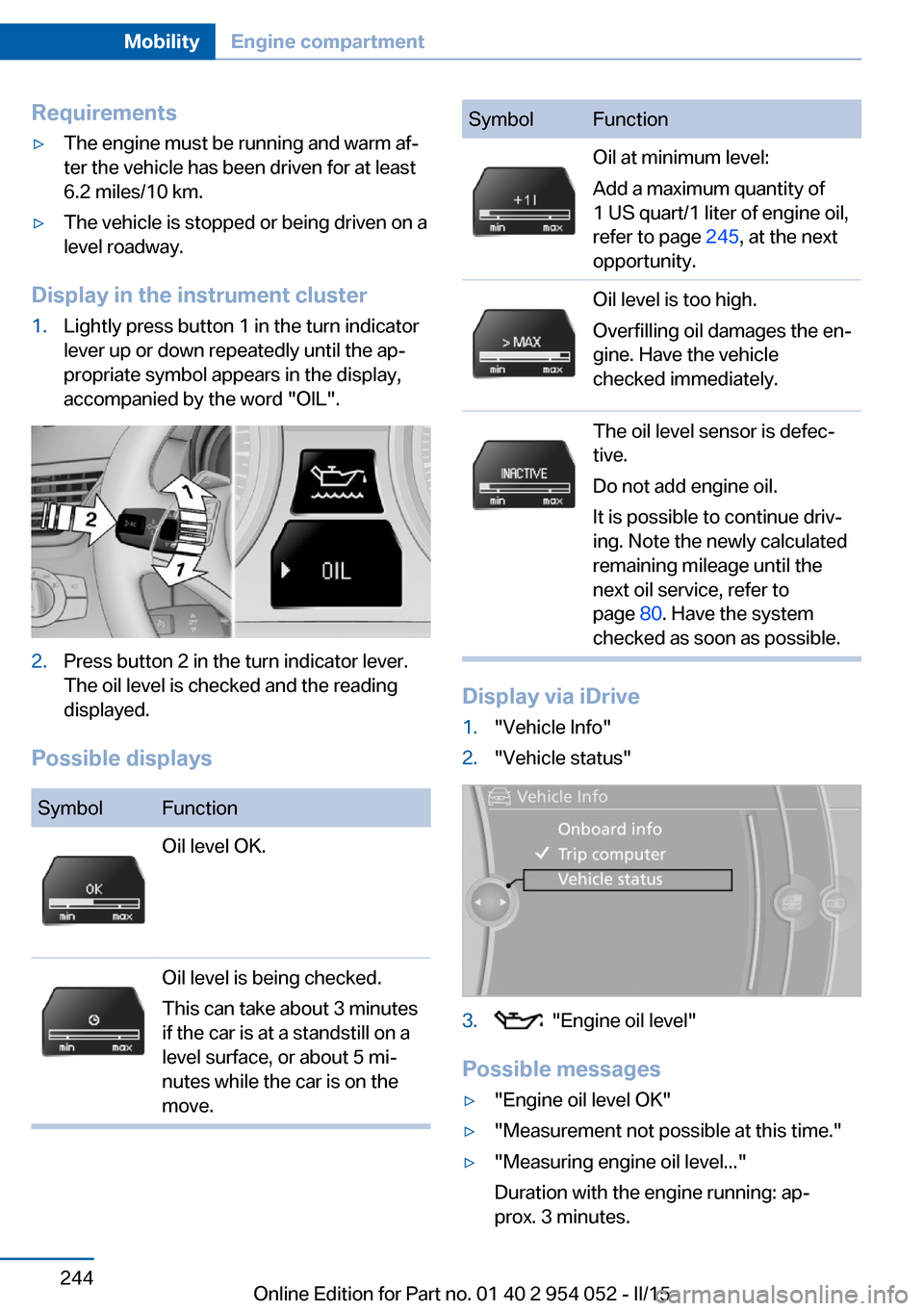
Requirements▷The engine must be running and warm af‐
ter the vehicle has been driven for at least
6.2 miles/10 km.▷The vehicle is stopped or being driven on a
level roadway.
Display in the instrument cluster
1.Lightly press button 1 in the turn indicator
lever up or down repeatedly until the ap‐
propriate symbol appears in the display,
accompanied by the word "OIL".2.Press button 2 in the turn indicator lever.
The oil level is checked and the reading
displayed.
Possible displays
SymbolFunctionOil level OK.Oil level is being checked.
This can take about 3 minutes
if the car is at a standstill on a
level surface, or about 5 mi‐
nutes while the car is on the
move.SymbolFunctionOil at minimum level:
Add a maximum quantity of
1 US quart/1 liter of engine oil,
refer to page 245, at the next
opportunity.Oil level is too high.
Overfilling oil damages the en‐
gine. Have the vehicle
checked immediately.The oil level sensor is defec‐
tive.
Do not add engine oil.
It is possible to continue driv‐
ing. Note the newly calculated
remaining mileage until the
next oil service, refer to
page 80. Have the system
checked as soon as possible.
Display via iDrive
1."Vehicle Info"2."Vehicle status"3. "Engine oil level"
Possible messages
▷"Engine oil level OK"▷"Measurement not possible at this time."▷"Measuring engine oil level..."
Duration with the engine running: ap‐
prox. 3 minutes.Seite 244MobilityEngine compartment244
Online Edition for Part no. 01 40 2 954 052 - II/15
Page 267 of 297
If they are very dirty, e.g., beverage stains, use
a soft sponge or microfiber cloth with a suita‐
ble interior cleaner.
Clean the upholstery down to the seams using
large sweeping motions. Avoid rubbing the
material vigorously.
Damage from Velcro® fasteners
Open Velcro® fasteners on pants or
other articles of clothing can damage the seat
covers. Ensure that any Velcro® fasteners are
closed.◀
Caring for special components
Light-alloy wheels When cleaning the wheels on the vehicle, only
use a neutral wheel rim cleaner with a pH value
of 5 to 9. Do not use abrasive cleaners or a
steam jet hotter than 140 ℉/60 ℃; otherwise,
damage may result. Adhere to the manufac‐
turer instructions.
Aggressive, acidic, or alkaline cleaners may
destroy the protective coating of neighboring
components such as the brake disc.
Chrome surfaces
Carefully clean components such as the radia‐
tor grille or door handles with an ample supply
of water, possibly with shampoo added, partic‐
ularly when they have been exposed to road
salt.
Rubber components
Aside from water, treat only with rubber
cleansers.
When cleaning rubber seals, do not use any
silicon-containing car care products in order to
avoid damage or reduced noise damping.
Fine wood parts Clean fine wood facing and fine wood compo‐
nents only with a moist rag. Then dry with a
soft cloth.Plastic components
These include:▷Imitation leather surfaces.▷Headliner.▷Lamp lenses.▷Instrument cluster cover.▷Matte black spray-coated components.▷Painted parts in the interior.
Clean with a microfiber cloth.
Moisten the cloth lightly with water if neces‐
sary.
Do not soak the headliner.
Do not use cleansers that contain alcohol
or solvents
Do not use cleansers that contain alcohol or
solvents, such as lacquer thinners, heavy-duty
grease removers, fuel, or such; this could lead
to surface damage.◀
Safety belts
Dirty belt straps impede the reeling action and
thus have a negative impact on safety.
No chemical cleaning
Do not clean chemically; this can destroy
the webbing.◀
Use only a mild soapy solution, with the safety
belts clipped into their buckles.
Do not allow the reels to retract the safety
belts until they are dry.
Carpets and floor mats No objects in the area around the pedals
Keep floor mats, carpets, and any other
objects out of the area of motion of the pedals;
otherwise, the function of the pedals could be
impeded while driving
Do not place additional floor mats over existing
mats or other objects.
Seite 265CareMobility265
Online Edition for Part no. 01 40 2 954 052 - II/15
Page 284 of 297

Cargo floor panel, foldingup 123
Cargo floor panel, raising 123
Cargo net, refer to Partition net 121
Cargo straps, securing cargo 137
Car key, refer to Integrated key/remote control 32
Carpet, care 265
Car phone, installation loca‐ tion, refer to Center arm‐
rest 126
Car phone, refer to Tele‐ phone 198
Car vacuum cleaner, connect‐ ing, refer to Connecting
electrical devices 119
Car wash 263
Catalytic converter, refer to Hot exhaust system 133
CBS Condition Based Serv‐ ice 247
CD/DVD 176
CD notes 180
CDs, storing 181
Cell phone, installation loca‐ tion, refer to Center arm‐
rest 126
Center armrest, front 126
Center armrest, rear 126
Center brake lamp, bulb re‐ placement 255
Center console, refer to Around the center con‐
sole 18
Central locking, Comfort Ac‐ cess 39
Central locking from the in‐ side 37
Central locking from the out‐ side 33
Central locking, setting the unlocking characteristics 34
Central screen, refer to Con‐ trol Display 20 Changes, technical, refer to
Safety 7
Changing wheels/tires 239
Check Control 82
Children, transporting 54
Child restraint fixing system LATCH 55
Child restraint fixing sys‐ tems 54
Child restraint fixing systems, mounting 54
Child safety locks 57
Child seat, mounting 54
Child seats, refer to Trans‐ porting children safely 54
Chrome parts, care 265
Cigarette lighter, connecting electrical devices 119
Cigarette lighter, refer to Lighter 119
Cigarette lighter socket 119
Circulation of air, refer to Re‐ circulated air mode 112
Cleaning, displays 266
Cleaning your BMW, refer to Care 263
Clock 73
Clock, 12h/24h format 78
Clock, setting the time and date 78
Clock, setting the time zone 78
Closing from the inside 37
Closing from the outside 34
Clothes hooks 127
Cockpit 14
Cold start, refer to Starting the engine 60
Combination instrument, refer to Instrument cluster 16
Combination switch, refer to Turn signal/high beams/
headlamp flasher 64
Combination switch, refer to Washer/wiper system 64
Comfort Access 39 Comfort Access, battery re‐
placement 41
Comfort area, refer to Around the center console 18
Compact wheel, inflation pressure 232
Compartment for remote control, refer to Ignition
lock 59
Compartment in floor 123
Compartments, refer to Stor‐ age compartments 125
Compass, digital 117
Computer 75
Computer, displaying infor‐ mation 75
Computer, displays on the Control Display 76
Concierge service 221
Condensation under the vehi‐ cle 134
Condition Based Service CBS 247
Confirmation signals 35
Connecting, mobile phone, refer to Pairing the mobile
phone 199
Consumption, refer to Aver‐ age fuel consumption 75
Contacts 210
Control Display 20
Control Display, care 266
Control Display, settings 79
Controller 21
Controls and displays 14
Control systems, driving sta‐ bility 99
Convenient operation, glass sunroof 34
Convenient operation, win‐ dow 34
Coolant 246
Coolant, checking the level 246
Coolant temperature 74 Seite 282ReferenceEverything from A to Z282
Online Edition for Part no. 01 40 2 954 052 - II/15
Page 285 of 297

Cooling function, switchingon and off 112
Cooling, maximum 111
Cooling system, refer to Cool‐ ant 246
Corrosion on brake discs 134
Courtesy lights, refer to Inte‐ rior lights 89
Cradle for telephone or mo‐ bile phone, refer to Snap-in
adapter 207
Cruise control 103
Cruise control, malfunc‐ tion 105
Cupholder 127
Curb weight, refer to Weights 270
Current fuel consumption 74
Current location, storing 148
Curve lights, refer to Adaptive Light Control 86
D
Dashboard lighting, refer to Instrument lighting 89
Dashboard, refer to Cock‐ pit 14
Data, technical 270
Date, date format 79
Date, setting 78
Daytime running lights 86
Daytime running lights, bulb replacement 253
Defroster, rear window 113
Destination entry via the ad‐ dress book 148
Destination guidance 155
Destination guidance with in‐ termediate destinations 153
Destination input, naviga‐ tion 146
Digital clock 73
Digital compass 117
Digital radio 169
Dimming mirrors 52 Directional indicators, refer to
Turn signals 64
Display lighting, refer to In‐ strument lighting 89
Displays and controls 14
Displays, care 266
Displays, cleaning 266
Displays, refer to Instrument cluster 16
Disposal, coolant 246
Disposal, vehicle battery 256
Distance warning, refer to Park Distance Control
PDC 105
Divided rear seat backrest, re‐ fer to Cargo area, enlarg‐
ing 121
Divided screen view, split screen 24
Door key, refer to Remote control with integrated
key 32
Door lock 36
Doors, manual operation 37
Doors, unlocking and locking, confirmation signals 35
Doors, unlocking and locking from the inside 37
Doors, unlocking and locking from the outside 34
DOT Quality Grades 238
Downhill control 101
Draft-free ventilation 113
Drive-off assistant 102
Driving away on inclines, refer to Drive-off assistant 102
Driving notes, breaking in 132
Driving notes, general 132
Driving on poor roads 134
Driving stability control sys‐ tems 99
Driving through water 133
Driving tips, refer to Driving notes 132 Dry air, refer to Cooling func‐
tion 112
DSC Dynamic Stability Con‐ trol 99
DTC Dynamic Traction Con‐ trol 100
DTMF suffix dialing 204
DVD/CD 176
DVDs, storing 181
DVD, video 178
Dynamic destination guid‐ ance 162
Dynamic Stability Control DSC 99
Dynamic Traction Control DTC 100
E ECO PRO 140
ECO PRO display 140
ECO PRO driving mode 140
ECO PRO mode 140
EfficientDynamics, refer to Saving fuel 139
Electrical malfunction, door lock 37
Electrical malfunction, driver's door 37
Electrical malfunction, fuel filler flap 229
Electrical malfunction, tail‐ gate 38
Electric seat adjustment 47
Electronic brake-force distri‐ bution 99
Electronic engine oil level check 243
Electronic Stability Program ESP, refer to Dynamic Sta‐
bility Control DSC 99
Emergency operation, auto‐ matic transmission, refer to
Overriding selector lever
lock 69 Seite 283Everything from A to ZReference283
Online Edition for Part no. 01 40 2 954 052 - II/15
Page 288 of 297

IIce warning, refer to External temperature warning 73
Icy roads, refer to External temperature warning 73
Identification marks, tires 237
Identification number, refer to Engine compartment 242
iDrive 20
iDrive, changing settings 79
iDrive, changing the date and time 78
iDrive, changing the lan‐ guage 79
iDrive, changing the units of measure and display for‐
mat 77
iDrive, setting the bright‐ ness 80
Ignition 60
Ignition key position 1, refer to Radio ready state 59
Ignition key position 2, refer to Ignition on 60
Ignition key, refer to Remote control with integrated
key 32
Ignition lock 59
Ignition, switched off 60
Ignition, switched on 60
Indication of a flat tire 94, 96
Indicator and warning lights 17
Individual settings, refer to Personal Profile 32
Inflation pressure monitor, re‐ fer to Flat Tire Monitor 93
Inflation pressure, refer to Tire inflation pressure 232
Information on the navigation data 144
Initialization after power fail‐ ure 256
Initializing– Refer to Setting the time
and date 78Initializing, compass, refer to
Calibrating 118
Initializing, Flat Tire Monitor FTM 93
Initializing panoramic glass sunroof 45
Initializing, Tire Pressure Monitor TPM 96
Inside brake lamps, bulb re‐ placement 254
Installation location, tele‐ phone 126
Instrument cluster 16
Instrument lighting 89
Instrument panel, refer to In‐ strument cluster 16
Instruments, refer to Cock‐ pit 14
Integrated key 32
Integrated universal remote control 115
Interactive map 151
Interior equipment 115
Interior lights 89
Interior lights, remote con‐ trol 35
Interior mirror 52
Interior motion sensor 42
Interior rearview mirror, auto‐ matic dimming 52
Interior rearview mirror, com‐ pass 117
Interior temperature, setting, automatic climate con‐
trol 110
Interlock, refer to Disengag‐ ing the remote control 67
Intermediate destina‐ tions 153
Internet page 6
Intersection, entering for navi‐ gation 147 J
Jacking points for the vehicle jack 255
Jack, refer to Vehicle jack 255
Joystick, refer to Selector lever 70
Jump-starting 258
K
Keyless Go, refer to Comfort Access 39
Keyless opening and closing, refer to Comfort Access 39
Key Memory, refer to Per‐ sonal Profile 32
Key, refer to Integrated key/ remote control 32
Kickdown, automatic trans‐ mission with Step‐
tronic 68, 70
Knee airbag 90
Knocking control 230
L Label, run-flat tire 241
Lamp and bulb replacement, light replacement 250
Lamps 85
Lamps, automatic headlight control 86
Lamps, High-beam Assis‐ tant 87
Lamps, replacing, refer to Lamp and bulb replace‐
ment 250
Language, changing on the Control Display 79
Lap-and-shoulder belt, refer to Safety belts 48
Lashing eyes, securing cargo 137 Seite 286ReferenceEverything from A to Z286
Online Edition for Part no. 01 40 2 954 052 - II/15