2015 BMW 5 SERIES SEDAN automatic
[x] Cancel search: automaticPage 19 of 277
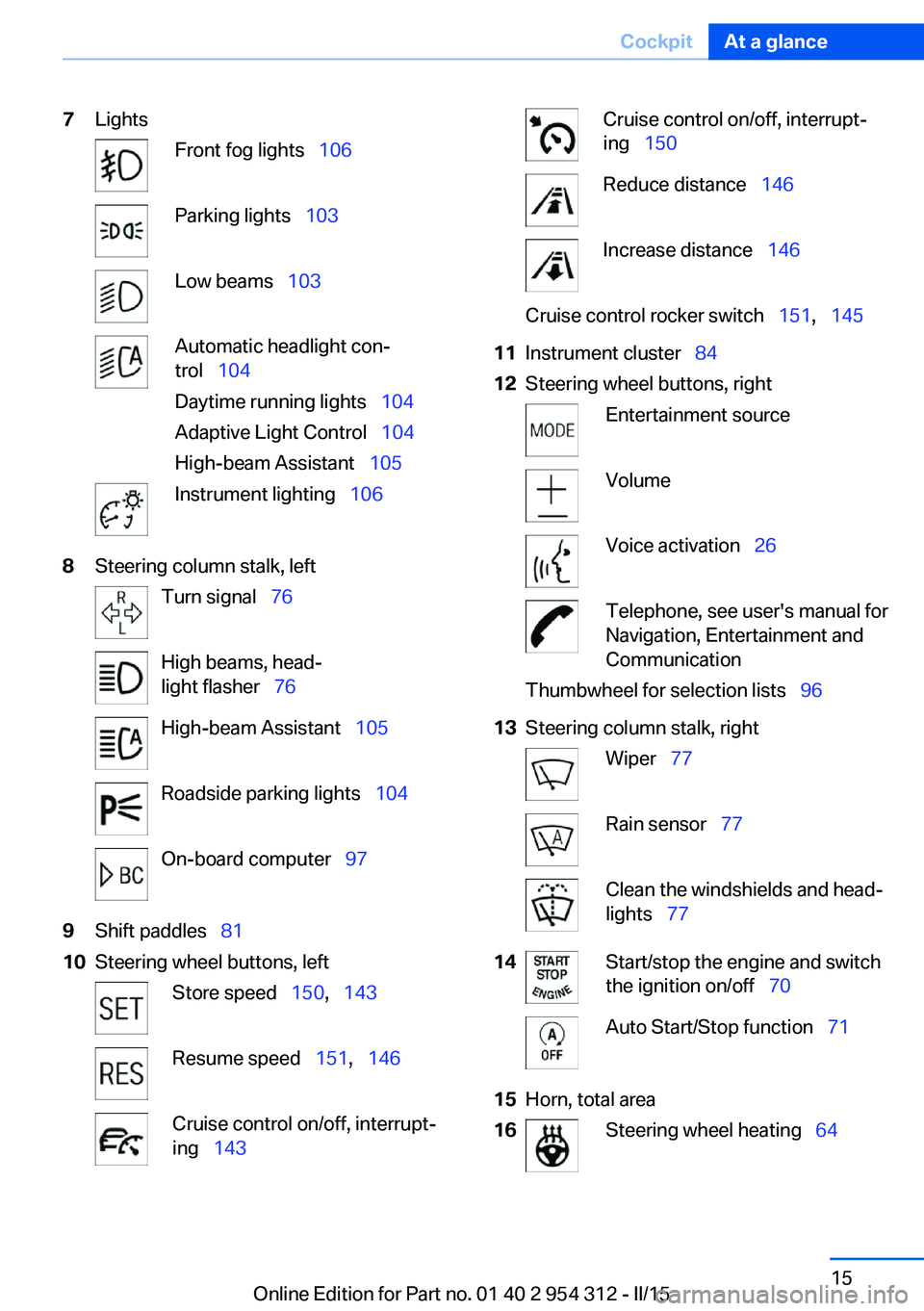
7LightsFront fog lights 106Parking lights 103Low beams 103Automatic headlight con‐
trol 104
Daytime running lights 104
Adaptive Light Control 104
High-beam Assistant 105Instrument lighting 1068Steering column stalk, leftTurn signal 76High beams, head‐
light flasher 76High-beam Assistant 105Roadside parking lights 104On-board computer 979Shift paddles 8110Steering wheel buttons, leftStore speed 150, 143Resume speed 151, 146Cruise control on/off, interrupt‐
ing 143Cruise control on/off, interrupt‐
ing 150Reduce distance 146Increase distance 146Cruise control rocker switch 151, 14511Instrument cluster 8412Steering wheel buttons, rightEntertainment sourceVolumeVoice activation 26Telephone, see user's manual for
Navigation, Entertainment and
CommunicationThumbwheel for selection lists 9613Steering column stalk, rightWiper 77Rain sensor 77Clean the windshields and head‐
lights 7714Start/stop the engine and switch
the ignition on/off 70Auto Start/Stop function 7115Horn, total area16Steering wheel heating 64Seite 15CockpitAt a glance15
Online Edition for Part no. 01 40 2 954 312 - II/15
Page 20 of 277

17Adjust the steering wheel 6418Open the trunk lid 4019Unlocking the hood
All around the center console
1Control Display 182Glove compartment 1813Ventilation 1684Hazard warning system 245Central locking system 405Radio/CD/Multimedia, see user's manual
for Navigation, Entertainment and Commu‐
nication6Automatic climate control 1657Controller with buttons 188Parking brake 73Auto Hold 749PDC Park Distance Control 152
Top View 158
Rearview camera 154
Parking assistant 160Side View 157HDC Hill Descent Control 137Seite 16At a glanceCockpit16
Online Edition for Part no. 01 40 2 954 312 - II/15
Page 28 of 277
Deleting personal in the
vehicle
The concept
Depending on the usage, the vehicle saves
personal data, such as stored radio stations.
These personal data can be permanently de‐
leted through iDrive.
General information
Depending on the equipment package, the fol‐
lowing data can be deleted:▷Personal Profile settings.▷Stored radio stations.▷Stored Favorites buttons.▷Travel and computer information.▷Music collection.▷Navigation, e.g. stored destinations.▷Phone book.▷Online data, e.g. Favorites, cookies.▷Voice notes.▷Login accounts.▷RemoteApp smartphone tethering.
Altogether, the deletion of the data can take up
to 30 minutes.
Functional requirement Data can only be deleted while stationary.
Deleting data Heed and follow the instructions on the Con‐
trol Display.
1.Switch on the ignition.2."Settings"3.Open "Options".4."Delete personal data"5."Continue"6."OK"Entering letters and numbers
General information
On the Control Display:1.Turn the controller: select letters or num‐
bers.2.Select additional letters or numbers if
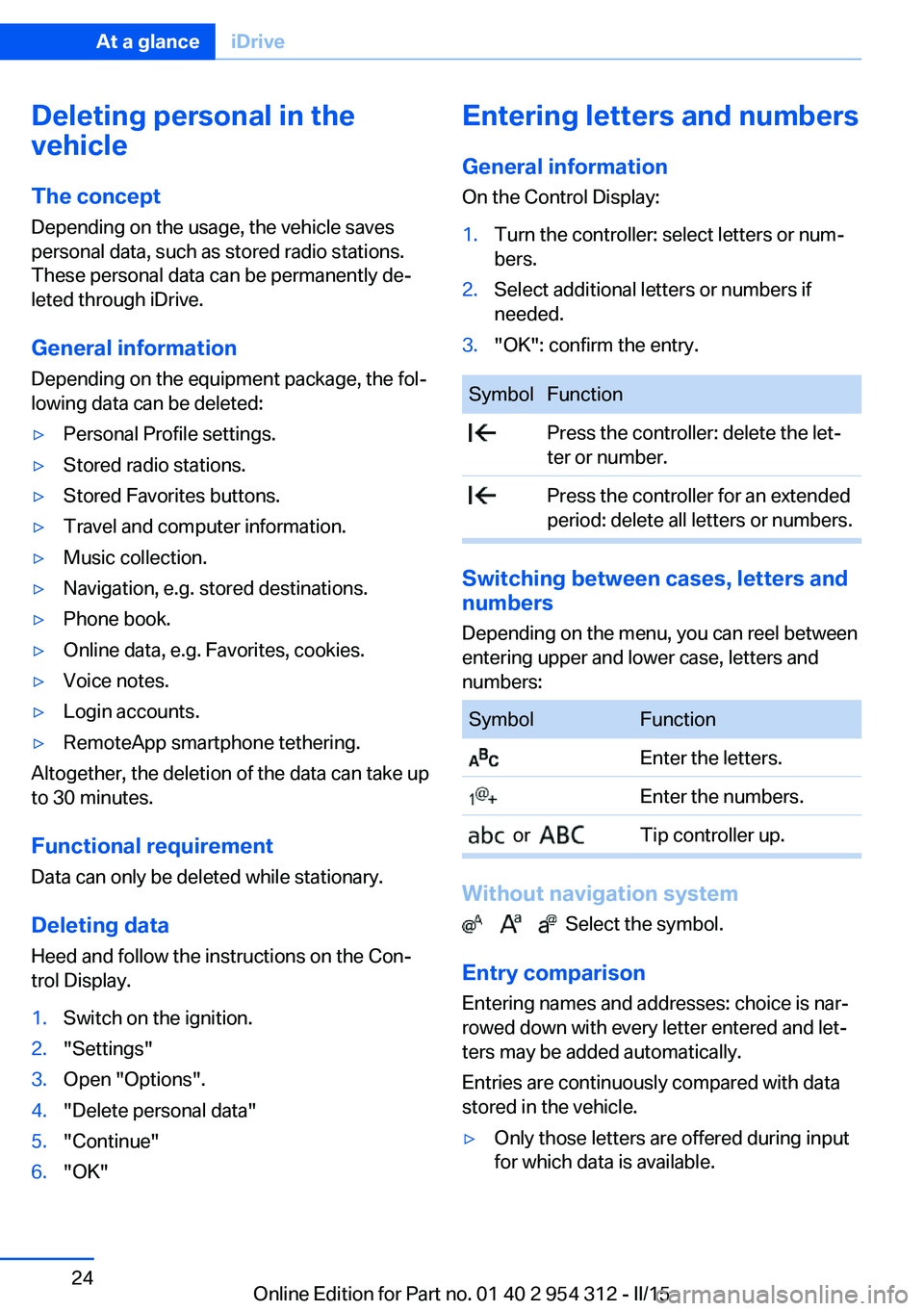
needed.3."OK": confirm the entry.SymbolFunction Press the controller: delete the let‐
ter or number. Press the controller for an extended
period: delete all letters or numbers.
Switching between cases, letters and
numbers
Depending on the menu, you can reel between
entering upper and lower case, letters and
numbers:
SymbolFunction Enter the letters. Enter the numbers. or Tip controller up.
Without navigation system
Select the symbol.
Entry comparison Entering names and addresses: choice is nar‐
rowed down with every letter entered and let‐
ters may be added automatically.
Entries are continuously compared with data
stored in the vehicle.
▷Only those letters are offered during input
for which data is available.Seite 24At a glanceiDrive24
Online Edition for Part no. 01 40 2 954 312 - II/15
Page 40 of 277

vated. All settings stored in the profile are au‐
tomatically applied.
If several drivers use their own remote control,
the vehicle will adjust the personal settings
during unlocking. These settings are also re‐
stored, if the vehicle has been used in the
meantime by a person with a different remote
control.
Changes to the settings are automatically
saved in the personal profile.
Three personal profiles and a guest profile can
be created.
Adjusting
The settings for the following systems and
functions are saved in the active profile. The
scope of storable settings is country- and
equipment-dependable.▷Unlocking and locking.▷Lights.▷Climate control.▷Radio.▷Instrument cluster.▷Programmable memory buttons.▷Volumes, tone.▷Control Display.▷Navigation.▷Park Distance Control PDC.▷Rearview camera▷Side View.▷Head-up Display.▷Driving Dynamics Control.▷Driver's seat position, exterior mirror posi‐
tion, steering wheel position.▷Cruise control.▷Intelligent Safety.▷Active Blind Spot Detection.▷Night vision.Profile management
Opening profiles Regardless of the remote control in use a dif‐
ferent profile may be activated.1."Settings"2."Profiles"3.Select a profile.▷All settings stored in the called-up profile
are automatically applied.▷The called-up profile is assigned to the re‐
mote control being used at the time.▷If the profile is already assigned to a differ‐
ent remote control, this profile will apply to
both remote controls. It cannot be differen‐
tiated anymore between the settings for
the two remote controls.
Renaming profiles
A personal name can be assigned to every pro‐
file to avoid confusion between the profiles.
1."Settings"2."Profiles"3."Options"4."Rename current profile"
Resetting profiles
The settings of the active profile are reset to
their default values.
1."Settings"2."Profiles"3."Options"4."Reset current profile"
Exporting profiles
Most settings of the active profile can be ex‐
ported.
This can be helpful for securing and retrieving
personal settings, before delivering the vehicle
to a workshop, e.g. Profiles can be taken to an‐
Seite 36ControlsOpening and closing36
Online Edition for Part no. 01 40 2 954 312 - II/15
Page 44 of 277

From the inside
Unlocking and locking
Pressing the central locking system button
locks or unlocks the vehicle with the front
doors closed.
The vehicle is not secured against theft when
locking.
The fuel filler flap remains unlocked.
In the event of a severe accident, the vehicle is
automatically unlocked. The hazard warning
system and interior lights come on.
Unlocking and opening
▷Press the central locking system button to
unlock the doors together, and then pull
the door handle above the armrest.▷On the door to be opened, pull the door
handle twice: the first time unlocks the
door, the second time opens it. The other
doors remain locked.Doors
Automatic Soft Closing
To close the doors, push lightly.
It is closed automatically.
Danger of jamming
Make sure that the closing path of the
doors is clear; otherwise, injuries may result.◀
Trunk lidOpening
During opening, the trunk lid pivots back and
up.
Ensure that adequate clearance is available
before opening.
Opening from the outside▷Press button on the trunk lid.▷Press button on the remote con‐
trol for approx. 1 second.
As the case may be, the doors are also un‐
locked. Unlocking with the remote control,
refer to page 38.
The trunk lid opens.
Opening from the inside With the vehicle is stationary, press
the button in the driver's footwell.
The trunk lid opens.
Seite 40ControlsOpening and closing40
Online Edition for Part no. 01 40 2 954 312 - II/15
Page 45 of 277

Locking and closing
Hints Keep the closing path clear
Make sure that the closing path of the
trunk lid is clear; otherwise, injuries may re‐
sult.◀
Do not place the remote control in the
cargo area
Take the remote control with you and do not
leave it in the cargo area; otherwise, the re‐
mote control is locked inside the vehicle when
the trunk lid is closed.◀
Locking
Press the button on the inside of the trunk lid
to lock the vehicle prior to closing.
The driver's door must be closed for this pur‐
pose.
Closing
Recessed grips in the interior trim of the trunk
lid make it easier to pull down the lid.
Automatic tailgate operation
Opening
During opening, the trunk lid pivots back and
up. Ensure that adequate clearance is available
before opening.▷Press button on the exterior of the trunk
lid.▷Press button on the remote con‐
trol for approx. 1 second.
As the case may be, the doors are also un‐
locked. Opening with the remote control,
refer to page 38.▷Push the button in the driver's
footwell.
Pressing the button again stops the motion.
The opening procedure is likewise interrupted:
▷When starting the engine.▷When the vehicle starts moving.▷By pressing the button in the driver's foot‐
well.▷By pressing the button on the inside of the
trunk lid.
Provide edge protection
Sharp objects or those with edges can
hit the rear window while driving and damage
the heat conductors of the rear window. Pro‐
vide edge protection.◀
Closing Without Comfort Access:
Seite 41Opening and closingControls41
Online Edition for Part no. 01 40 2 954 312 - II/15
Page 46 of 277

▷Press button on the inside of the trunk lid.
The trunk lid closes automatically.
Pressing the button again stops the mo‐
tion.
With Comfort Access:
▷Press button, arrow 1, on the inside of the
trunk lid.
Pressing the button again stops the mo‐
tion.▷Press button, arrow 2.
The vehicle will be locked after closing the
tailgate. The driver's door must be closed
for this purpose and the remote control
must be outside of the vehicle in the area
of the trunk lid.
Pressing the button again stops the mo‐
tion.▷Press button on the exterior of the trunk
lid.
Pressing the button again stops the mo‐
tion.
The closing operation is interrupted:
▷When starting the engine.▷The vehicle starts off with jerks.
Keep the closing path clear
Make sure that the closing path of the
trunk lid is clear; otherwise, injuries may re‐
sult.◀
Do not place the remote control in the
cargo area
Take the remote control with you and do not
leave it in the cargo area; otherwise, the re‐
mote control is locked inside the vehicle when
the trunk lid is closed.◀
Manual operation In the event of an electrical fault, manually op‐
erate the unlocked trunk lid slowly and
smoothly.
To close it completely, push the trunk lid down
lightly. It is closed automatically.
Keep the closing path clear
Make sure that the closing path is clear;
otherwise, injuries may result.◀
Locking separatelyThe trunk lid can be locked separately using
the switch in the center armrest. If the center
Seite 42ControlsOpening and closing42
Online Edition for Part no. 01 40 2 954 312 - II/15
Page 47 of 277

arm rest is locked, the trunk lid cannot be
opened.▷Trunk lid secured, arrow 1.▷Trunk lid not secured, ar‐
row 2.
Slide the switch into the arrow 1 position. This
secures the trunk lid and disconnects it from
the central locking system.
This is beneficial when the vehicle is parked
using valet service. The infrared remote con‐
trol can be handed out without the key.
Emergency unlocking
Pull the handle inside the cargo area.
The trunk lid unlocks.
Comfort Access
The concept The vehicle can be accessed without activat‐
ing the remote control.
All you need to do is to have the remote con‐ trol with you, such as in your pants pocket.
The vehicle automatically detects the remote
control when it is in close proximity or in the
car's interior.
Comfort Access supports the following func‐
tions:
▷Unlocking/locking of the vehicle.▷Convenient closing.▷Open the trunk lid individually.▷Open trunk lid with no-touch activation.▷Open/close trunk lid with no-touch activa‐
tion.▷Start the engine.
Functional requirements
▷There are no external sources of interfer‐
ence nearby.▷To lock the vehicle, the remote control
must be located outside of the vehicle.▷The next unlocking and locking cycle is not
possible until after approx. 2 seconds.▷The engine can only be started if the re‐
mote control is in the vehicle.
Unlocking
Grasp the handle of a vehicle door completely,
arrow.
This corresponds with pressing the button on
the remote control.
Seite 43Opening and closingControls43
Online Edition for Part no. 01 40 2 954 312 - II/15