2015 BMW 5 SERIES profile
[x] Cancel search: profilePage 157 of 277

Automatic deactivation during forward
travel
The system switches off when a certain driving
distance or speed is exceeded.
Switch the system back on if needed.
With front PDC: switching on/off
manually
Press button.▷On: the LED lights up.▷Off: the LED goes out.
The rearview camera image is displayed when
the reverse gear is engaged by pressing the
button.
Display
Signal tones When approaching an object, an intermittent
sound indicates the position of the object. E. g.
if an object is detected to the left rear of the
vehicle, a signal tone sounds from the left rear
speaker.
The shorter the distance to the object, the
shorter the intervals.
If the distance to a detected object is less than
approx. 10 in/25 cm, a continuous tone is
sounded.
With front PDC: if objects are located both in
front of and behind the vehicle, an alternating
continuous signal is sounded.
An interval tone is interrupted with the appro‐
priate equipment after about 3 seconds:
▷If the vehicle stops in front of an object that
is detected by only one of the corner sen‐
sors.▷If moving parallel to a wall.
The signal tone is switched off, when selector
lever position P is engaged on vehicles with
Steptronic transmission.
Volume
The volume of the PDC signal tone can be ad‐
justed similar to the sound and volume set‐
tings of the radio.
Settings are stored for the profile currently in
use.
Visual warning
The approach of the vehicle to an object can
be shown on the Control Display. Objects that
are farther away are already displayed on the
Control Display before a signal sounds.
A display appears as soon as Park Distance
Control (PDC) is activated.
The range of the sensors is represented in the
colors green, yellow and red.
When the image of the rearview camera is dis‐
played, the reel can be made to PDC:
"Rear view camera"
System limits
Limits of ultrasonic measurement
Ultrasonic measuring might not function under
the following circumstances:
▷For small children and animals.▷For persons with certain clothing, e.g.
coats.▷With external interference of the ultra‐
sound, e.g. from passing vehicles or loud
machines.▷When sensors are dirty, iced over, dam‐
aged or out of position.▷Under certain weather conditions such as
high relative humidity, rain, snowfall, ex‐
treme heat or strong wind.▷With tow bars and trailer couplings of other
vehicles.▷With thin or wedge-shaped objects.▷With moving objects.Seite 153Driving comfortControls153
Online Edition for Part no. 01 40 2 954 312 - II/15
Page 181 of 277

Center armrest
Remove the cover.
Rear center console
Remove the cover or cigarette lighter.
In the front passenger footwell
Socket is located below the glove compart‐
ment.
To access the socket: fold open the cover.
In the cargo area The socket is located in the cover of the load‐
ing lip.
To access the socket: fold open the cover.
USB interface for data
transfer
The concept Connection for importing and exporting data
on USB devices, e.g.:▷Personal Profile settings, refer to page 35.▷Music collection, see user's manual for
Navigation, Entertainment and Communi‐
cation.
Hints
Observe the following when connecting:
▷Do not use force when plugging the con‐
nector into the USB interface.▷Do not connect devices such as fans or
lights to the USB interface.▷Do not connect USB hard drives.▷Do not use the USB interface for recharg‐
ing external devices.
With navigation system Professional
or TV: at a glance
The USB interface is located in the center arm‐
rest.
Through-loading system The concept The cargo area can be enlarged by folding
down the rear seat backrest.
Seite 177Interior equipmentControls177
Online Edition for Part no. 01 40 2 954 312 - II/15
Page 203 of 277
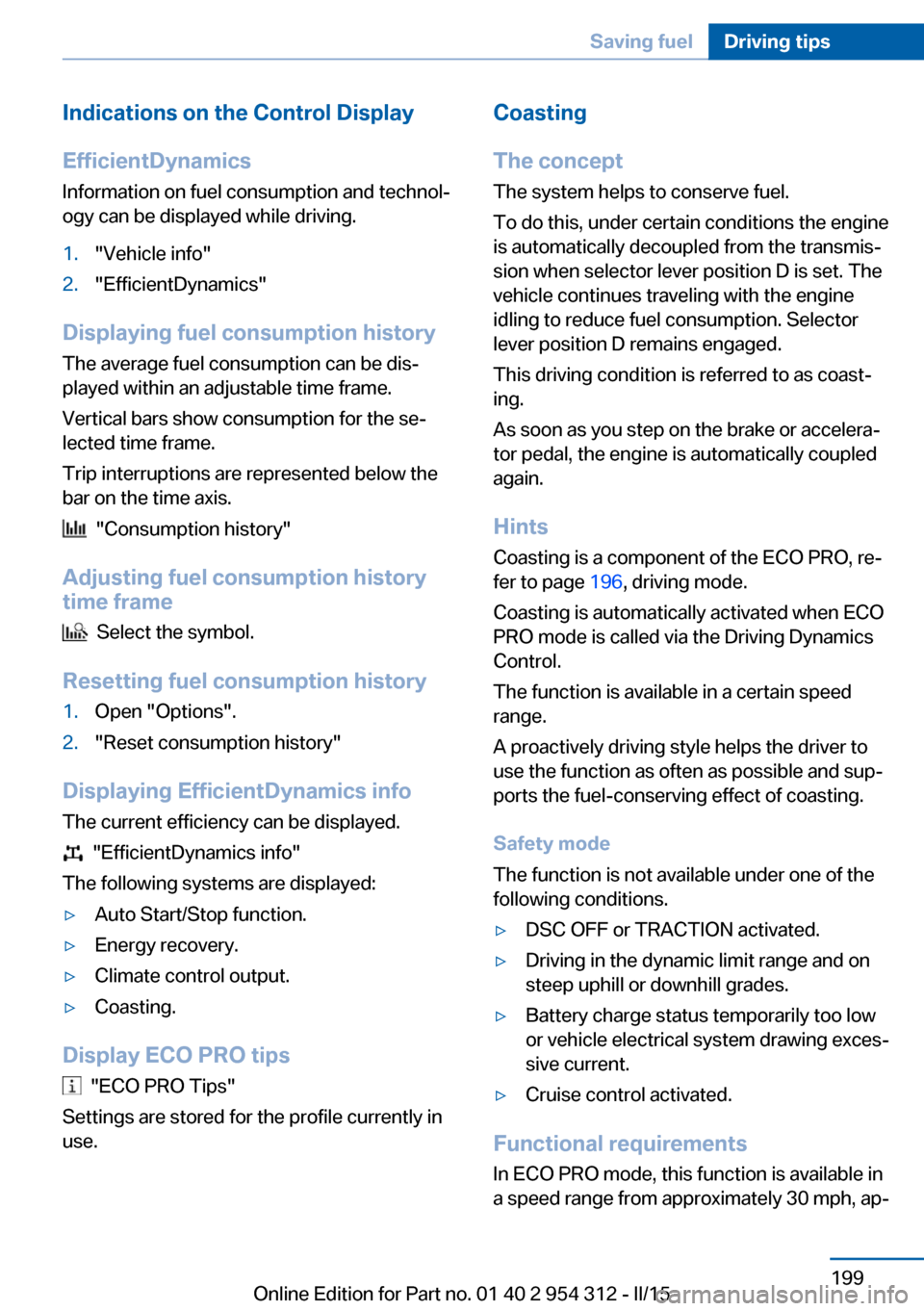
Indications on the Control DisplayEfficientDynamics Information on fuel consumption and technol‐
ogy can be displayed while driving.1."Vehicle info"2."EfficientDynamics"
Displaying fuel consumption history
The average fuel consumption can be dis‐
played within an adjustable time frame.
Vertical bars show consumption for the se‐
lected time frame.
Trip interruptions are represented below the
bar on the time axis.
"Consumption history"
Adjusting fuel consumption history time frame
Select the symbol.
Resetting fuel consumption history
1.Open "Options".2."Reset consumption history"
Displaying EfficientDynamics info
The current efficiency can be displayed.
"EfficientDynamics info"
The following systems are displayed:
▷Auto Start/Stop function.▷Energy recovery.▷Climate control output.▷Coasting.
Display ECO PRO tips
"ECO PRO Tips"
Settings are stored for the profile currently in
use.
Coasting
The concept The system helps to conserve fuel.
To do this, under certain conditions the engine
is automatically decoupled from the transmis‐
sion when selector lever position D is set. The
vehicle continues traveling with the engine idling to reduce fuel consumption. Selector
lever position D remains engaged.
This driving condition is referred to as coast‐
ing.
As soon as you step on the brake or accelera‐
tor pedal, the engine is automatically coupled
again.
Hints
Coasting is a component of the ECO PRO, re‐
fer to page 196, driving mode.
Coasting is automatically activated when ECO
PRO mode is called via the Driving Dynamics
Control.
The function is available in a certain speed
range.
A proactively driving style helps the driver to
use the function as often as possible and sup‐
ports the fuel-conserving effect of coasting.
Safety mode
The function is not available under one of the
following conditions.▷DSC OFF or TRACTION activated.▷Driving in the dynamic limit range and on
steep uphill or downhill grades.▷Battery charge status temporarily too low
or vehicle electrical system drawing exces‐
sive current.▷Cruise control activated.
Functional requirements
In ECO PRO mode, this function is available in
a speed range from approximately 30 mph, ap‐
Seite 199Saving fuelDriving tips199
Online Edition for Part no. 01 40 2 954 312 - II/15
Page 204 of 277

prox. 50 km/h to 100 mph, approx. 160 km/h, if
the following conditions are met:▷Accelerator pedal and brake pedal are not
operated.▷The selector lever is in selector lever posi‐
tion D.▷Engine and transmission are at operating
temperature.
The driving status Coast can be influenced
with the shift paddles.
Display Display in the instrument cluster The mark in the efficiency dis‐
play below the tachometer is
backlit in blue and is located at
the zero point. The tachometer
approximately indicates idle
speed.
The coasting point indicator is illuminated at
the zero point during coasting.
Display in the instrument display The mark in the efficiency dis‐
play is backlit in blue and is lo‐
cated at the zero point.
The coasting point indicator is il‐
luminated at the zero point dur‐
ing coasting.
Indications on the Control Display
The Coasting driving condition is displayed in
EfficientDynamics Info while this driving mode
is active.Color code blue, arrow 1, and symbol, arrow 2:
driving condition Coasting.
Displaying EfficientDynamics info
1."Vehicle info"2."EfficientDynamics"3. "EfficientDynamics info"
Deactivating the system manually The function can be deactivated in the Config‐
ure ECO PRO, refer to page 197, menu, e.g., to
use the braking effect of the engine when trav‐
eling downhill.
Settings are stored for the profile currently in
use.
Seite 200Driving tipsSaving fuel200
Online Edition for Part no. 01 40 2 954 312 - II/15
Page 226 of 277

Temperature grade for this tire
The temperature grade for this tire is es‐
tablished for a tire that is properly inflated and
not overloaded. Excessive speed, underinfla‐
tion, or excessive loading, either separately or
in combination, can cause heat buildup and
possible tire failure.
If necessary, have the vehicle towed.◀
RSC – Run-flat tires
Run-flat tires, refer to page 224, are labeled
with a circular symbol containing the letters RSC marked on the sidewall.
M+S
Winter and all-season tires with better cold
weather performance than summer tires.
Tire treadSummer tires
Do not drive with a tire tread depth of less than
0.12 in/3 mm.
There is an increased danger of hydroplaning if
the tire tread depth is less than 0.12 in/3 mm.
Winter tires
Do not drive with a tire tread depth of less than
0.16 in/4 mm.
Below a tread depth of 0.16 in/4 mm, tires are
less suitable for winter operation.Minimum tread depth
Wear indicators are distributed around the
tire's circumference and have the legally re‐
quired minimum height of 0.063 in/1.6 mm.
They are marked on the side of the tire with
TWI, Tread Wear Indicator.
Tire damage
General information
Inspect your tires often for damage, foreign
objects lodged in the tread, and tread wear.
Hints
Driving over rough or damaged road surfaces,
as well as debris, curbs and other obstacles
can cause serious damage to wheels, tires and
suspension parts. This is more likely to occur
with low-profile tires, which provide less cush‐
ioning between the wheel and the road. Be
careful to avoid road hazards and reduce your
speed, especially if your vehicle is equipped
with low-profile tires.
Indications of tire damage or other vehicle de‐
fects:
▷Unusual vibrations while driving.▷Unusual handling such as a strong ten‐
dency to pull to the left or right.
Damage can, e. g., be caused by driving over
curbs, road damage, or similar things.
Seite 222MobilityWheels and tires222
Online Edition for Part no. 01 40 2 954 312 - II/15
Page 240 of 277

MaintenanceVehicle features and options
This chapter describes all standard, country-
specific and optional features offered with the
series. It also describes features that are not
necessarily available in your car, e. g., due to
the selected options or country versions. This
also applies to safety-related functions and
systems. The respectively applicable country
provisions must be observed when using the
respective features and systems.
BMW maintenance system The maintenance system indicates required
maintenance measures, and thereby provides
support in maintaining road safety and the op‐
erational reliability of the vehicle.
In some cases scopes and intervals may vary
according to the country-specific version. Re‐
placement work, spare parts, fuels and lubri‐
cants and wear materials are calculated sepa‐
rately. Additional information is available from
the service center.
Condition Based Service
CBS
Sensors and special algorithms take into ac‐
count the driving conditions of your vehicle.
Based on this, Condition Based Service recog‐
nizes the maintenance requirements.
The system makes it possible to adapt the
amount of maintenance corresponding to your
user profile.
Detailed information on service requirements,
refer to page 94, can be displayed on the Con‐
trol Display.Service data in the remote control
Information on the required maintenance is
continuously stored in the remote control. Your service center will read out this data and
suggest the right array of service procedures for your vehicle.
Therefore, hand your service specialist the re‐
mote control with which the vehicle was driven
most recently.
Storage periods Storage periods during which the vehicle bat‐
tery was disconnected are not taken into ac‐
count.
If this occurs, have a service center update the
time-dependent maintenance procedures,
such as checking brake fluid and, if needed,
changing the engine oil and the microfilter/
activated-charcoal filter.
Service and Warranty
Information Booklet for US
models and Warranty and
Service Guide Booklet for
Canadian models
Please consult your Service and Warranty In‐
formation Booklet for US models and Warranty
and Service Guide Booklet for Canadian mod‐
els for additional information on service re‐
quirements.
Maintenance and repair should be performed
by your service center. Make sure to have reg‐
ular maintenance procedures recorded in the
vehicle's Service and Warranty Information
Booklet for US models, and in the Warranty
and Service Guide Booklet for Canadian mod‐
els. These entries are proof of regular mainte‐
nance.Seite 236MobilityMaintenance236
Online Edition for Part no. 01 40 2 954 312 - II/15
Page 270 of 277
H
Handbrake, refer to Parking brake 73
Hand-held transmitter, alter‐ nating code 173
Hazard warning flashers 245
HDC Hill Descent Con‐ trol 137
Head airbags 108
Headlight control, auto‐ matic 104
Headlight courtesy delay fea‐ ture 104
Headlight courtesy delay fea‐ ture via remote control 38
Headlight flasher 76
Headlight glass 239
Headlights 239
Headlights, care 252
Headlight washer system 77
Head restraints 53
Head restraints, front 58
Head restraints, rear 60
Head-up Display 101
Head-up Display, care 254
Heavy cargo, stowing 193
Height, vehicle 258
High-beam Assistant 105
High beams 76
High beams/low beams, refer to High-beam Assistant 105
Hill Descent Control HDC 137
Hills 190
Hill start assistant, refer to Drive-off assistant 135
Hints 6
Holder for beverages 183
Homepage 6
Hood 229
Horn 14
Hotel function, trunk lid 42
Hot exhaust system 189
HUD Head-up Display 101
Hydroplaning 189 I
Ice warning, see External temperature warning 93
Icy roads, see External tem‐ perature warning 93
Identification marks, tires 220
Identification number, see ve‐ hicle identification num‐
ber 9
iDrive 18
Ignition key, refer to Remote control 34
Ignition off 69
Ignition on 69
Indication of a flat tire 112 , 115
Indicator and alarm lamps, see Check Control 88
Indicator lamp, see Check Control 88
Individual air distribution 166
Individual settings, refer to Personal Profile 35
Inflation pressure, tires 211
Inflation pressure warning FTM, tires 115
Info display, refer to On- Board computer 97
Initialization, Integral Active Steering 139
Initialize, Tire Pressure Moni‐ tor TPM 112
Initializing, Flat Tire Monitor FTM 115
Instrument cluster 84
Instrument cluster, electronic displays 84
Instrument display, multifunc‐ tional 85
Instrument lighting 106
Integral Active Steering 139
Integrated key 34
Integrated Owner's Manual in the vehicle 29 Intelligent Emergency Re‐
quest 245
Intelligent Safety 117
Intensity, AUTO pro‐ gram 166
Interior equipment 172
Interior lights 106
Interior lights during unlock‐ ing 37
Interior lights with the vehicle locked 38
Interior motion sensor 48
Interior rearview mirror, auto‐ matic dimming feature 63
Interior rearview mirror, man‐ ually dimmable 63
Internet page 6
Interval display, service re‐ quirements 94
Interval mode 77
J
Jacking points for the vehicle jack 243
Joystick, Steptronic transmis‐ sion 80
Jump-starting 246
K
Key/remote control 34
Keyless Go, refer to Comfort Access 43
Key Memory, refer to Per‐ sonal Profile 35
Kickdown, Steptronic trans‐ mission 80
Knee airbag 109
L Lamp replacement 238
Lamp replacement, front 239
Lamp replacement, rear 241
Lane departure warning 129 Seite 266ReferenceEverything from A to Z266
Online Edition for Part no. 01 40 2 954 312 - II/15
Page 272 of 277

Neutral cleaner, see wheelcleaner 253
New wheels and tires 223
Night Vision 126
Night Vision device, see Night Vision 126
Nylon rope for tow-starting/ towing 249
O OBD Onboard Diagnosis 237
OBD, see OBD Onboard Di‐ agnosis 237
Object detection, see Night Vision 126
Obstacle marking, rearview camera 156
Octane rating, refer to Rec‐ ommended fuel grade 206
Odometer 92
Office, see user's manual for Navigation, Entertainment
and Communication
Oil 231
Oil, adding 232
Oil additives 233
Oil change 233
Oil change interval, service requirements 94
Oil filler neck 232
Oil types, alternative 233
Oil types, approved 233
Old batteries, disposal 244
On-board computer 97
Onboard monitor, refer to Control Display 18
Onboard vehicle tool kit 238
Opening/closing via door lock 39
Opening and closing 34
Opening and closing, without remote control 39
Opening and closing, with re‐ mote control 37 Opening the trunk lid with no-
touch activation 44
Operating concept, iDrive 18
Optional equipment, standard equipment 6
Outside air, refer to Auto‐ matic recirculated-air con‐
trol 167
Overheating of engine, refer to Coolant temperature 92
P Paint, vehicle 252
Parallel parking assistant 160
Park Distance Control PDC 152
Parked-car ventilation 171
Parked vehicle, condensa‐ tion 191
Parking aid, refer to PDC 152
Parking assistant 160
Parking brake 73
Parking lights 103
Parking with Automatic Hold 74
Particulate filter 189
Parts and accessories 7
Passenger side mirror, tilting downward 62
Pathway lines, rearview cam‐ era 156
PDC Park Distance Con‐ trol 152
Pedestrian detection, see Night Vision 126
Pedestrian warning with city braking function 123
Personal Profile 35
Personal Profile, exporting profiles 36
Pinch protection system, glass sunroof 51
Pinch protection system, win‐ dows 49
Plastic, care 253 Power failure 243
Power sunroof, glass 50
Power windows 48
Pressure, tire air pres‐ sure 211
Pressure warning FTM, tires 115
Profile, refer to Personal Pro‐ file 35
Programmable memory but‐ tons, iDrive 23
Protective function, glass sunroof 51
Protective function, win‐ dows 49
Push-and-turn switch, refer to Controller 18
R Radiator fluid 234
Radio-operated key, refer to Remote control 34
Radio ready state 69
Radio, see user's manual for Navigation, Entertainment
and Communication
Rain sensor 77
Rear automatic climate con‐ trol 169
Rear axle steering 139
Rear lights 241
Rear socket 177
Rearview camera 154
Rearview mirror 62
Rear window defroster 167
Recirculated-air mode 167
Recommended fuel grade 206
Recommended tire brands 223
Refueling 204
Remaining range 93
Remote control/key 34
Remote control, malfunc‐ tion 38 Seite 268ReferenceEverything from A to Z268
Online Edition for Part no. 01 40 2 954 312 - II/15