2015 BMW 5 SERIES trip
[x] Cancel search: tripPage 215 of 277

Wheels and tiresVehicle features and options
This chapter describes all standard, country-
specific and optional features offered with the
series. It also describes features that are not
necessarily available in your car, e. g., due to
the selected options or country versions. This
also applies to safety-related functions and
systems. The respectively applicable country
provisions must be observed when using the
respective features and systems.
Tire inflation pressure Safety information
The tire characteristics and tire inflation pres‐
sure influence the following:▷The service life of the tires.▷Road safety.▷Driving comfort.
Checking the tire inflation pressure
Check the tire inflation pressure regularly
Regularly check the tire inflation pres‐
sure, and correct it as needed: at least twice a
month and before a long trip. If you fail to ob‐
serve this precaution, you may be driving on
tires with incorrect tire pressures, a condition
that may not only compromise your vehicle's
driving stability, but also lead to tire damage
and the risk of an accident.◀
Tires have a natural, consistent loss of tire in‐
flation pressure.
Tires heat up while driving, and the tire infla‐
tion pressure increases along with the tire's
temperature. The tire inflation pressure speci‐
fications relate to cold tires or tires with the
ambient temperature.
Only check the tire inflation pressure when the
tires are cold. This means after driving no more
than 1.25 miles/2 km or when the vehicle has
been parked for at least 2 hours.
The displays of inflation devices may under-
read by up to 1.45 psi/0.1 bar.
For Flat Tire Monitor: after correcting the tire
inflation pressure, reinitialize the Flat Tire
Monitor.
For Tire Pressure Monitor: after correcting the
tire inflation pressure, reset the Tire Pressure
Monitor.
Tire inflation pressure specifications
The tire inflation pressure table, refer to
page 212, contains all tire inflation pressure
specifications for the specified tire sizes at the
ambient temperature. Tire inflation pressure
specifications apply to approved tire sizes and
recommended tire brands. This information
can be obtained from your service center.
To identify the correct tire inflation pressure,
please note the following:▷Tire sizes of your vehicle.▷Maximum permitted driving speed.
Tire inflation pressures up to
100 mph/160 km/h
For speeds of up to 100 mph/160 km/h and for
optimum driving comfort, note the pressure
values in the tire inflation pressure table, refer
to page 212, and adjust as necessary.
Seite 211Wheels and tiresMobility211
Online Edition for Part no. 01 40 2 954 312 - II/15
Page 231 of 277
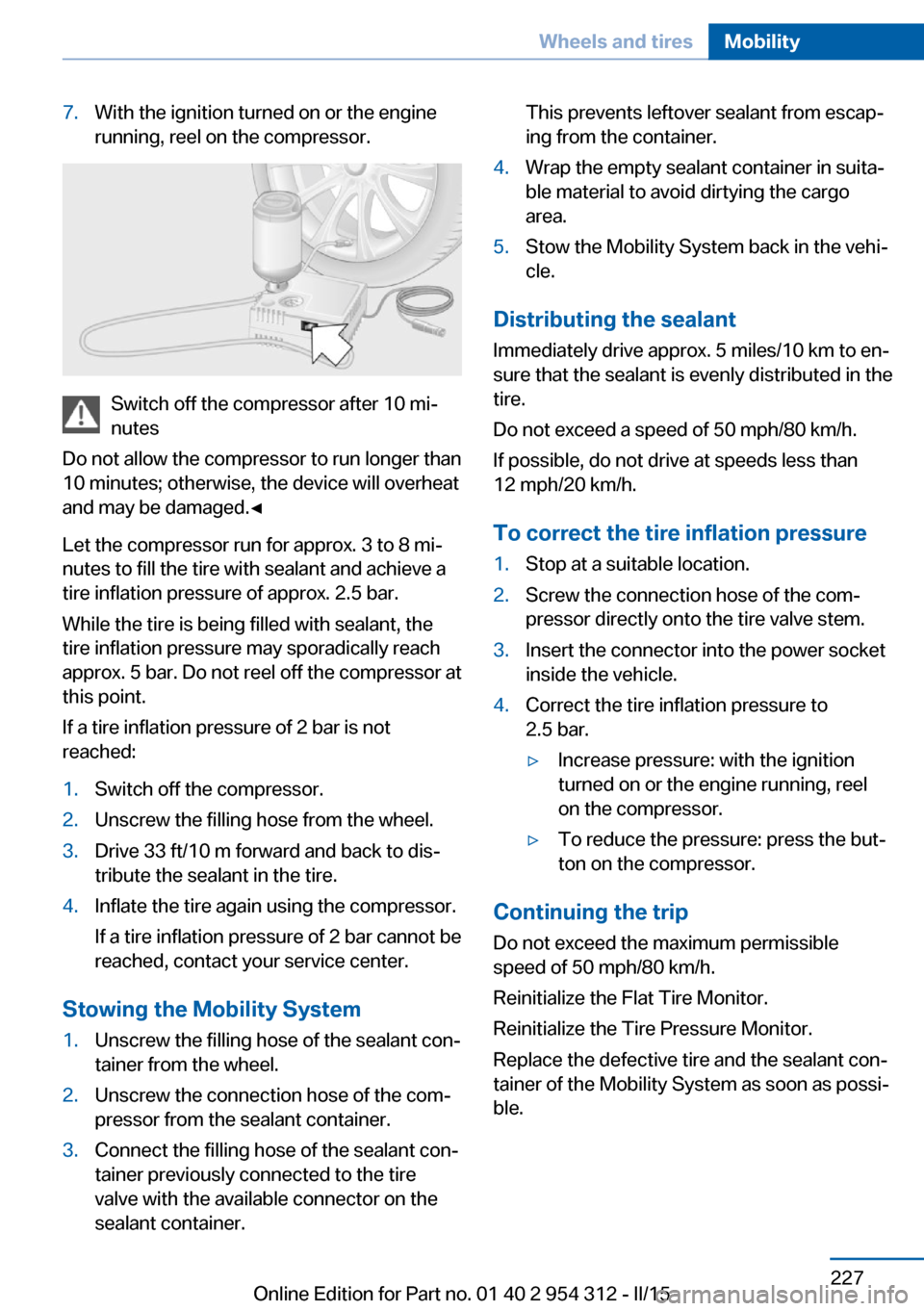
7.With the ignition turned on or the engine
running, reel on the compressor.
Switch off the compressor after 10 mi‐
nutes
Do not allow the compressor to run longer than
10 minutes; otherwise, the device will overheat
and may be damaged.◀
Let the compressor run for approx. 3 to 8 mi‐
nutes to fill the tire with sealant and achieve a
tire inflation pressure of approx. 2.5 bar.
While the tire is being filled with sealant, the
tire inflation pressure may sporadically reach
approx. 5 bar. Do not reel off the compressor at
this point.
If a tire inflation pressure of 2 bar is not
reached:
1.Switch off the compressor.2.Unscrew the filling hose from the wheel.3.Drive 33 ft/10 m forward and back to dis‐
tribute the sealant in the tire.4.Inflate the tire again using the compressor.
If a tire inflation pressure of 2 bar cannot be
reached, contact your service center.
Stowing the Mobility System
1.Unscrew the filling hose of the sealant con‐
tainer from the wheel.2.Unscrew the connection hose of the com‐
pressor from the sealant container.3.Connect the filling hose of the sealant con‐
tainer previously connected to the tire
valve with the available connector on the
sealant container.This prevents leftover sealant from escap‐
ing from the container.4.Wrap the empty sealant container in suita‐
ble material to avoid dirtying the cargo
area.5.Stow the Mobility System back in the vehi‐
cle.
Distributing the sealant
Immediately drive approx. 5 miles/10 km to en‐
sure that the sealant is evenly distributed in the
tire.
Do not exceed a speed of 50 mph/80 km/h.
If possible, do not drive at speeds less than
12 mph/20 km/h.
To correct the tire inflation pressure
1.Stop at a suitable location.2.Screw the connection hose of the com‐
pressor directly onto the tire valve stem.3.Insert the connector into the power socket
inside the vehicle.4.Correct the tire inflation pressure to
2.5 bar.▷Increase pressure: with the ignition
turned on or the engine running, reel
on the compressor.▷To reduce the pressure: press the but‐
ton on the compressor.
Continuing the trip
Do not exceed the maximum permissible
speed of 50 mph/80 km/h.
Reinitialize the Flat Tire Monitor.
Reinitialize the Tire Pressure Monitor.
Replace the defective tire and the sealant con‐
tainer of the Mobility System as soon as possi‐
ble.
Seite 227Wheels and tiresMobility227
Online Edition for Part no. 01 40 2 954 312 - II/15
Page 235 of 277

Engine oilVehicle features and options
This chapter describes all standard, country-
specific and optional features offered with the
series. It also describes features that are not
necessarily available in your car, e. g., due to
the selected options or country versions. This
also applies to safety-related functions and
systems. The respectively applicable country
provisions must be observed when using the
respective features and systems.
General information The engine oil consumption is dependent on
the driving style and driving conditions.
The engine oil consumption can increase in
case of, for example:▷Sporty driving.▷Break-in the engine.▷Idling of the engine.▷Usage of non-approved engine oil grades.
Therefore, regularly check the engine oil level
after refueling.
Depending on its engine, the vehicle is equip‐
ped with electronic oil measurement or oil
measuring is done with a dipstick.
The electronic oil measurement has two meas‐
uring principles:
▷Status display▷Detailed measurementElectronic oil measurement
Status display
The concept
The engine oil level is monitored electronically
while driving and shown on the Control Dis‐
play.
If the engine oil level reaches the minimum
level, a check control message is displayed.
Requirements
A current measured value is available after ap‐
prox. 30 minutes of driving. During a shorter
trip, the status of the last, sufficiently long trip
is displayed.
With frequent short-distance trips, regularly
perform a detailed measurement.
Displaying the engine oil level
On the Control Display:1."Vehicle info"2."Vehicle status"3. "Engine oil level"
Engine oil level display messages
Different messages appear on the display de‐
pending on the engine oil level. Pay attention
to these messages.
If the engine oil level is too low, within the next
125 miles/200 km Add engine oil, refer to
page 232.
Engine oil level too low
Add engine oil immediately; otherwise,
an insufficient amount of engine oil could re‐
sult in engine damage.◀
Take care not to add too much engine oil.
Seite 231Engine oilMobility231
Online Edition for Part no. 01 40 2 954 312 - II/15
Page 244 of 277

Hints
Because of the long life of these bulbs, the
likelihood of failure is very low. Switching the
lights on and off frequently shortens their life.
If a bulb fails, reel on the front fog lights and
continue the trip with great care. Comply with
local regulations.
Do not perform work/bulb replacement
on xenon headlights
Have any work on the xenon lighting system,
including bulb replacement, performed only by
a service center. Due to the high voltage
present in the system, there is a danger of fatal
injuries if work is carried out improperly.◀
For checking and adjusting headlamp aim,
please contact your BMW center.
Parking lights and roadside parking lamp
Follow general instructions, refer to page 238.
These lights feature LED technology.
Contact your service center in the event of a
malfunction.
Accessing the bulbs
Remove the screws and fold down the lid.
Turn signal
Follow general instructions, refer to page 238.
The illustration shows the left side of the en‐
gine compartment.
24-watt bulb, PY.
Unscrew the lid, remove it, and change the
bulb.
Corner-illuminating lights
Follow general instructions, refer to page 238.
The illustration shows the left side of the en‐
gine compartment.
55-watt bulb, H7.
1.Fold open the cover in the engine compart‐
ment.2.Unscrew the lid and remove it.Seite 240MobilityReplacing components240
Online Edition for Part no. 01 40 2 954 312 - II/15
Page 245 of 277

3.Unscrew the bulb holder counterclockwise.4.Remove the bulb and replace it.5.Insert the new bulb and attach the cover in
the reverse order.
LED headlights
At a glance
1Corner-illuminating lights2Low beams/high beams3Parking lamp, daytime running lights4Turn signal5Side marker lights
Light-emitting diodes (LEDs)
With LED headlights, all front lights and side
indicators are designed with LED technology.
If an LED fails, switch on the front fog lights
and continue the trip with great care. Comply
with local regulations.
Contact your service center in the event of a
malfunction.
LED front fog lights
These front fog lights are made using LED
technology. Contact your service center in the
event of a malfunction.
Turn signal in exterior mirror The turn signals in the exterior mirrors feature
LED technology. Contact your service center in the event of a malfunction.
Tail lights, bulb replacement
At a glance1Turn signal2Reversing lamp3Inside brake lamp4Rear lamp5Outside brake lamp6Rear reflector
Turn signal, outer brake, tail, and
license plate lights
Follow general instructions, refer to page 238.
These lights feature LED technology.
Contact your service center in the event of a
malfunction.
Seite 241Replacing componentsMobility241
Online Edition for Part no. 01 40 2 954 312 - II/15
Page 274 of 277

Stability control systems 135
Start/stop, automatic func‐ tion 71
Start/Stop button 69
Start function during malfunc‐ tion 35
Starting the engine 70
Status control display, tires 112
Status information, iDrive 22
Status of Owner's Manual 7
Steering, Integral Active Steering 139
Steering wheel, adjusting 63
Steering wheel heating 64
Steering wheel memory 61
Steptronic Sport transmis‐ sion, refer to Steptronic
transmission 79
Steptronic transmission 79
Stopping the engine 71
Storage compartment, re‐ mote control 184
Storage compartments 181
Storage compartments, loca‐ tions 181
Storage, tires 224
Storing the vehicle 254
Suitable engine oils 233
Summer tires, tread 222
Sun visor 174
Supplementary text mes‐ sage 91
Surround View 154
Suspension settings 139
Switch for Dynamic Driving Control 139
Switch-on times, parked-car ventilation 171
Switch, refer to Cockpit 14
Symbols 6
Symbols in the status field 22
SYNC program, automatic cli‐ mate control 167 T
Tachometer 92
Tail and brake lights 241
Tail lights 241
Tail lights, bulb replace‐ ment 241
Technical changes, refer to Safety 7
Technical data 258
Telephone, see user's manual for Navigation, Entertain‐
ment and Communication
Temperature, automatic cli‐ mate control 166
Temperature display for ex‐ ternal temperature 93
Temperature, engine oil 92
Terminal, starting aid 247
Text message, supplemen‐ tary 91
Theft alarm system, refer to Alarm system 47
Thermal camera, see Night Vision 126
Thigh support 55
Through-loading system 177
Tilt alarm sensor 47
Time of arrival 98
Tire damage 222
Tire identification marks 220
Tire inflation pressure 211
Tire inflation pressure moni‐ tor, refer to FTM 115
Tire Pressure Monitor TPM 111
Tires, changing 223
Tire sealant 224
Tires, everything on wheels and tires 211
Tires, run-flat tires 224
Tire tread 222
Tone, see user's manual for Navigation, Entertainment
and Communication
Tool 238 Top View 158
Total vehicle weight 259
Touchpad 21
Tow fitting 249
Towing 248
Tow lug, see Tow fitting 249
Tow-starting 248
Tow truck 249
TPM Tire Pressure Moni‐ tor 111
Traction control 136
TRACTION, driving dynam‐ ics 136
Transmission lock, electronic unlocking 82
Transmission, manual trans‐ mission 79
Transmission, see Steptronic transmission 79
Transporting children safely 65
Tread, tires 222
Trip computer 98
Triple turn signal activa‐ tion 76
Trip odometer 92
Truck for tow-starting/ towing 249
Trunk lid, automatic 41
Trunk lid closing 41
Trunk lid, closing with no- touch activation 44
Trunk lid, emergency unlock‐ ing 43
Trunk lid, hotel function 42
Trunk lid opening 40
Trunk lid, opening with no- touch activation 44
Trunk lid via remote con‐ trol 38
Turning circle 258
Turning circle lines, rearview camera 156
Turn signals, operation 76
Turn signals, rear, bulb re‐ placement 241 Seite 270ReferenceEverything from A to Z270
Online Edition for Part no. 01 40 2 954 312 - II/15