2015 BMW 428I CONVERTIBLE 132
[x] Cancel search: 132Page 20 of 247
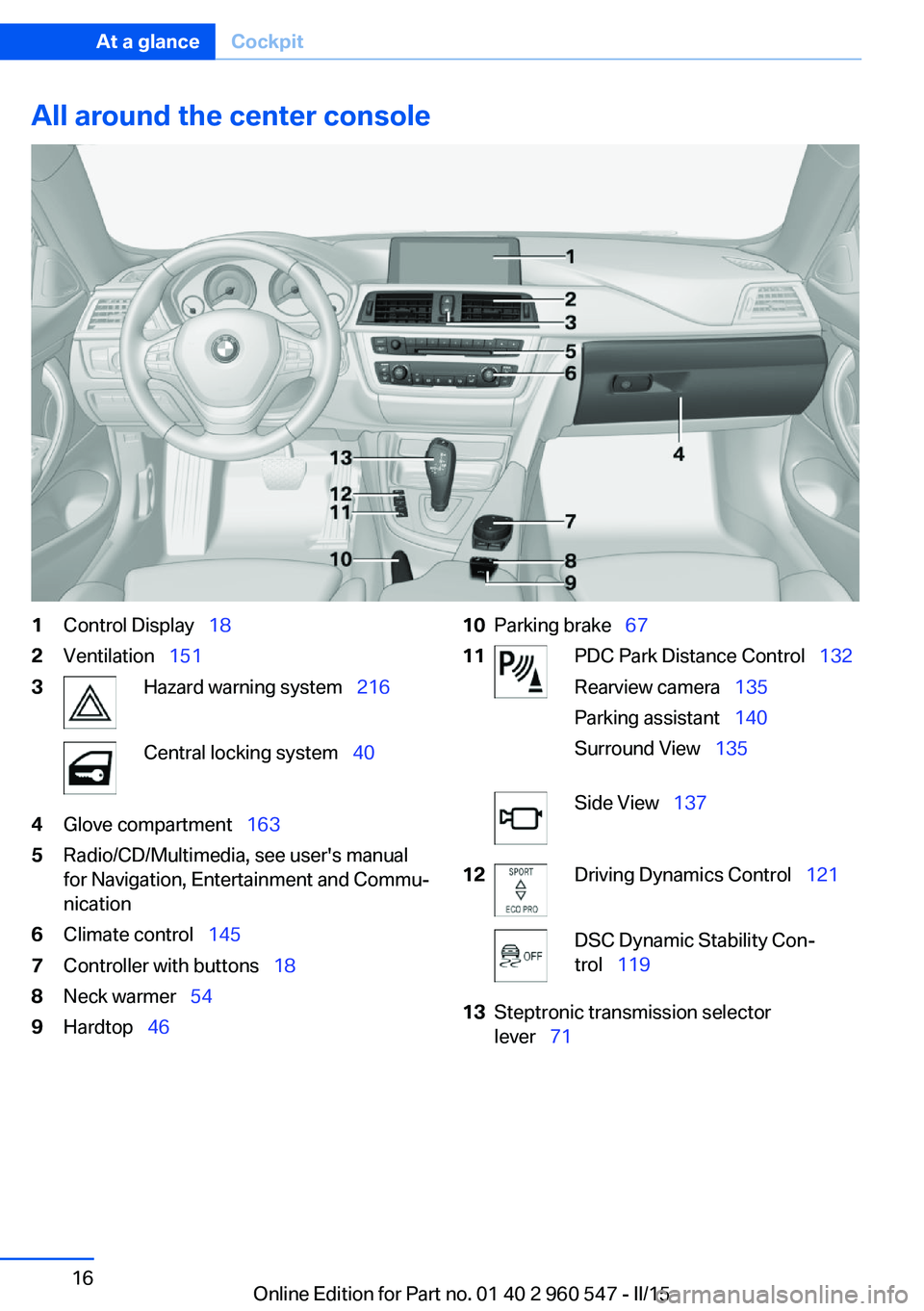
All around the center console1Control Display 182Ventilation 1513Hazard warning system 216Central locking system 404Glove compartment 1635Radio/CD/Multimedia, see user's manual
for Navigation, Entertainment and Commu‐
nication6Climate control 1457Controller with buttons 188Neck warmer 549Hardtop 4610Parking brake 6711PDC Park Distance Control 132
Rearview camera 135
Parking assistant 140
Surround View 135Side View 13712Driving Dynamics Control 121DSC Dynamic Stability Con‐
trol 11913Steptronic transmission selector
lever 71Seite 16At a glanceCockpit16
Online Edition for Part no. 01 40 2 960 547 - II/15
Page 135 of 247
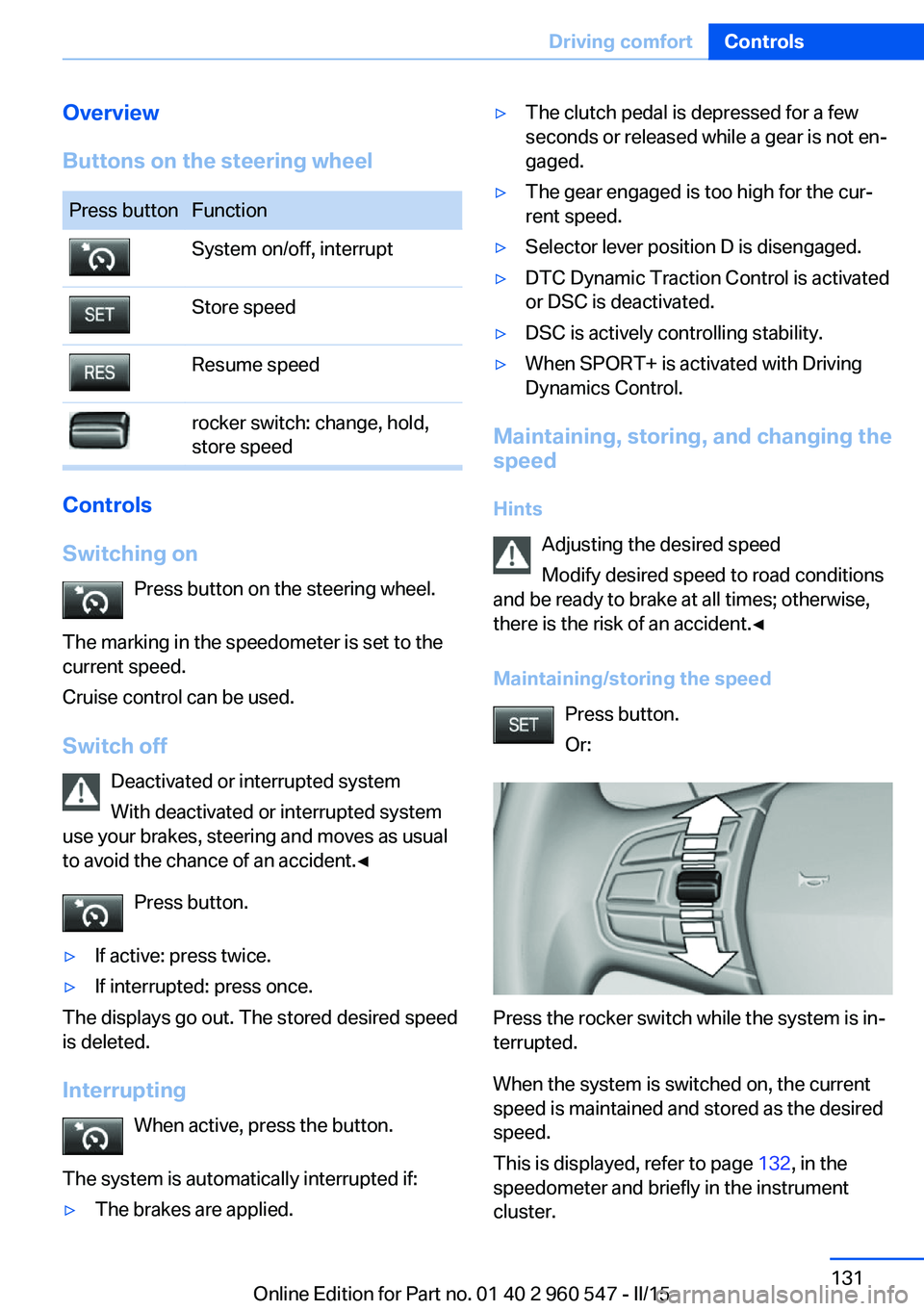
Overview
Buttons on the steering wheelPress buttonFunctionSystem on/off, interruptStore speedResume speedrocker switch: change, hold,
store speed
Controls
Switching on Press button on the steering wheel.
The marking in the speedometer is set to the
current speed.
Cruise control can be used.
Switch off Deactivated or interrupted system
With deactivated or interrupted system
use your brakes, steering and moves as usual
to avoid the chance of an accident.◀
Press button.
▷If active: press twice.▷If interrupted: press once.
The displays go out. The stored desired speed
is deleted.
Interrupting When active, press the button.
The system is automatically interrupted if:
▷The brakes are applied.▷The clutch pedal is depressed for a few
seconds or released while a gear is not en‐
gaged.▷The gear engaged is too high for the cur‐
rent speed.▷Selector lever position D is disengaged.▷DTC Dynamic Traction Control is activated
or DSC is deactivated.▷DSC is actively controlling stability.▷When SPORT+ is activated with Driving
Dynamics Control.
Maintaining, storing, and changing the
speed
Hints Adjusting the desired speed
Modify desired speed to road conditions
and be ready to brake at all times; otherwise,
there is the risk of an accident.◀
Maintaining/storing the speed Press button.
Or:
Press the rocker switch while the system is in‐
terrupted.
When the system is switched on, the current
speed is maintained and stored as the desired
speed.
This is displayed, refer to page 132, in the
speedometer and briefly in the instrument
cluster.
Seite 131Driving comfortControls131
Online Edition for Part no. 01 40 2 960 547 - II/15
Page 136 of 247
When cruise control is maintained or stored,
DSC Dynamic Stability Control will be turned
on if needed.
Changing the speed
Press the rocker switch up or down repeatedly
until the desired speed is set.
If active, the displayed speed is stored and the
vehicle reaches the stored speed when the
road is clear.▷Each time the rocker switch is pressed to
the point of resistance, the desired speed
increases or decreases by approx.
1 mph/1 km/h.▷Each time the rocker switch is pressed
past the point of resistance, the desired
speed increases or decreases by a maxi‐
mum of 5 mph/10 km/h.
The maximum speed that can be set de‐
pends on the vehicle.▷Pressing the rocker switch to the resist‐
ance point and holding it accelerates or de‐
celerates the vehicle without requiring
pressure on the accelerator pedal.
After the rocker switch is released, the ve‐
hicle maintains its final speed. Pressing the
switch beyond the resistance point causes
the vehicle to accelerate more rapidly.
Resuming the desired speed
Press button.
The stored speed is reached and maintained. Displays in the instrument cluster
Indicator lamp Depending on how the vehicle is equip‐
ped, the indicator lamp in the instru‐
ment cluster indicates whether the sys‐
tem is switched on.
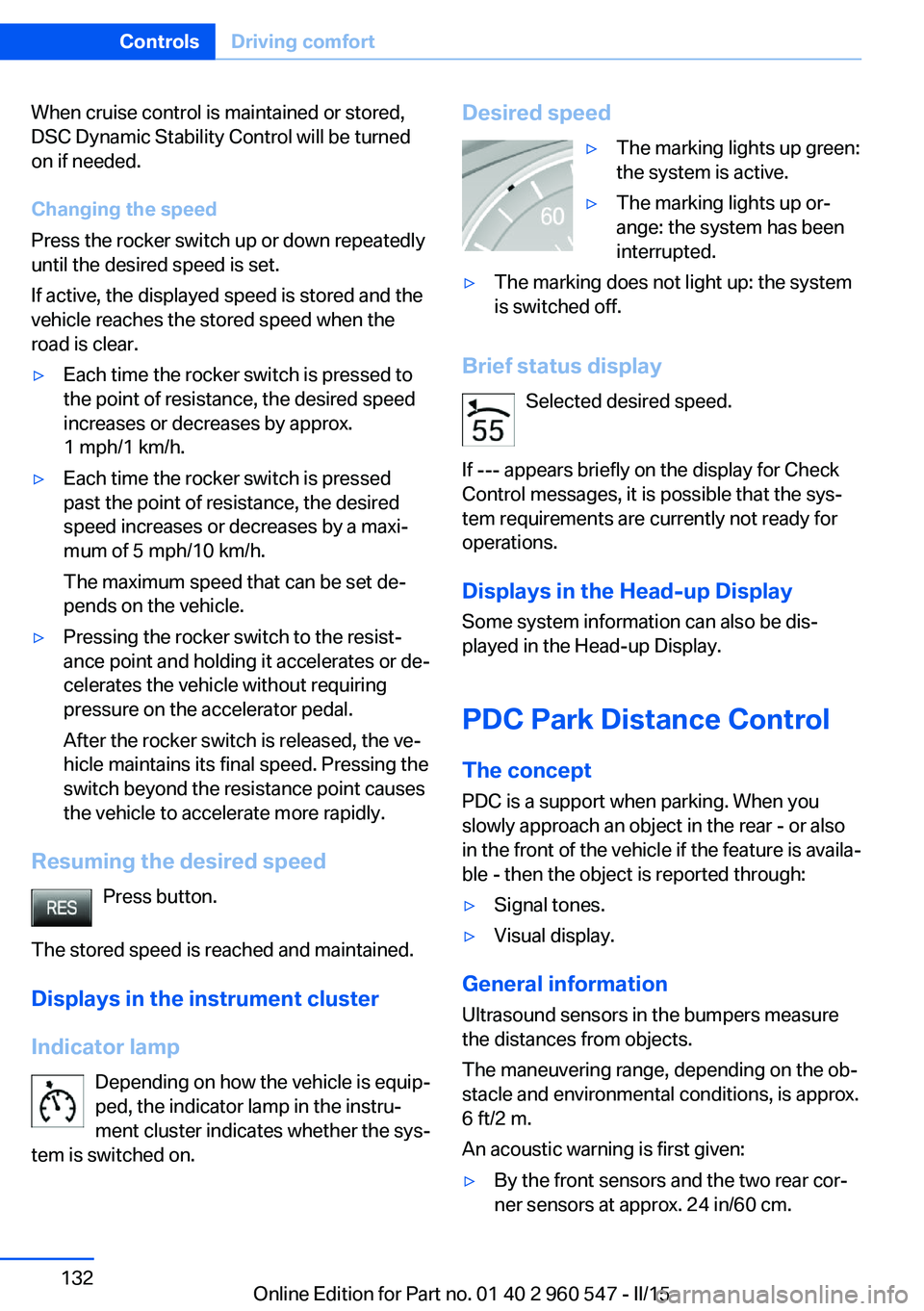
Desired speed▷The marking lights up green:
the system is active.▷The marking lights up or‐
ange: the system has been
interrupted.▷The marking does not light up: the system
is switched off.
Brief status display
Selected desired speed.
If --- appears briefly on the display for Check
Control messages, it is possible that the sys‐
tem requirements are currently not ready for
operations.
Displays in the Head-up Display Some system information can also be dis‐played in the Head-up Display.
PDC Park Distance Control
The concept PDC is a support when parking. When you
slowly approach an object in the rear - or also
in the front of the vehicle if the feature is availa‐
ble - then the object is reported through:
▷Signal tones.▷Visual display.
General information
Ultrasound sensors in the bumpers measure
the distances from objects.
The maneuvering range, depending on the ob‐
stacle and environmental conditions, is approx.
6 ft/2 m.
An acoustic warning is first given:
▷By the front sensors and the two rear cor‐
ner sensors at approx. 24 in/60 cm.Seite 132ControlsDriving comfort132
Online Edition for Part no. 01 40 2 960 547 - II/15
Page 141 of 247
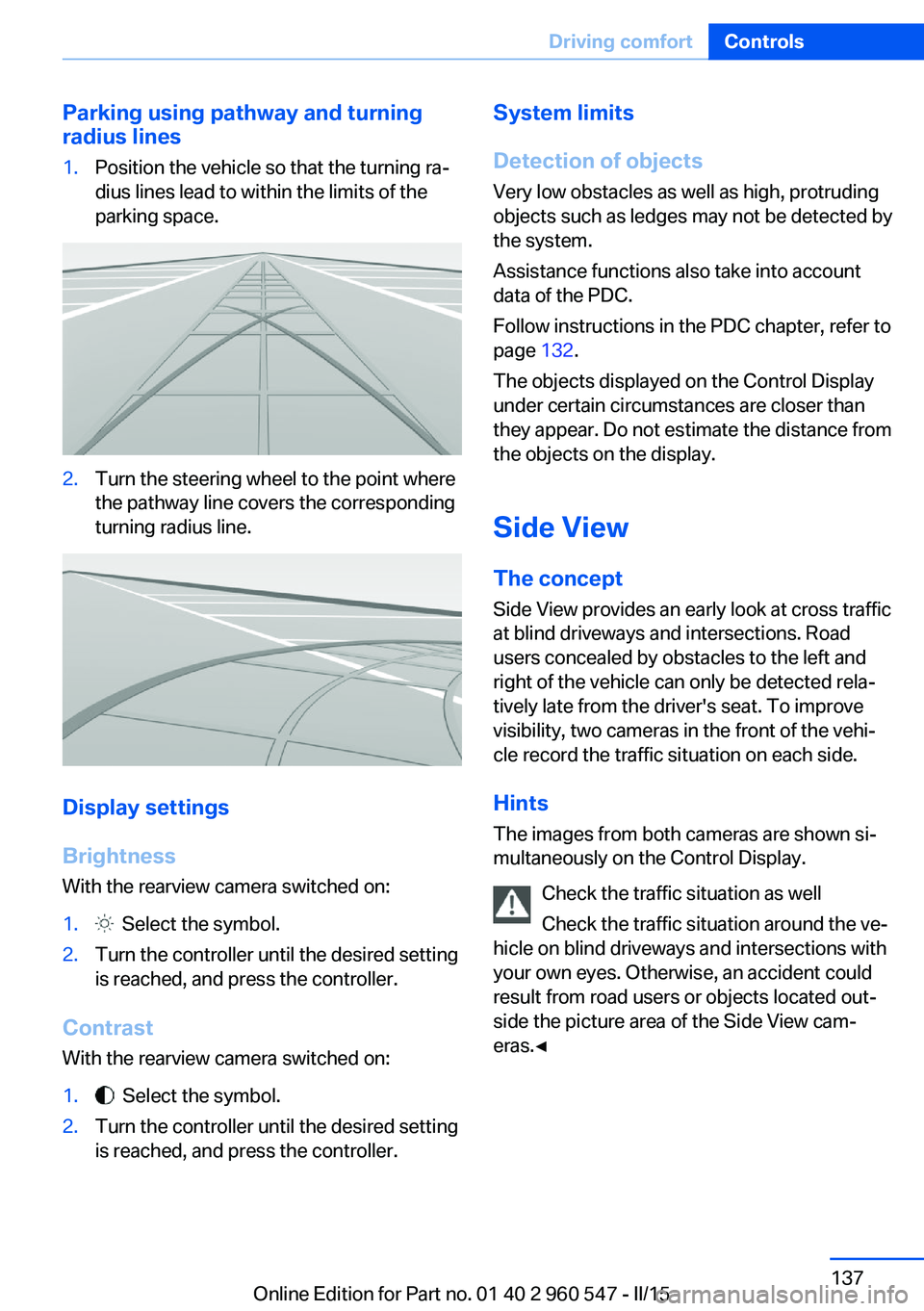
Parking using pathway and turning
radius lines1.Position the vehicle so that the turning ra‐
dius lines lead to within the limits of the
parking space.2.Turn the steering wheel to the point where
the pathway line covers the corresponding
turning radius line.
Display settings
Brightness
With the rearview camera switched on:
1. Select the symbol.2.Turn the controller until the desired setting
is reached, and press the controller.
Contrast
With the rearview camera switched on:
1. Select the symbol.2.Turn the controller until the desired setting
is reached, and press the controller.System limits
Detection of objects
Very low obstacles as well as high, protruding
objects such as ledges may not be detected by
the system.
Assistance functions also take into account
data of the PDC.
Follow instructions in the PDC chapter, refer to
page 132.
The objects displayed on the Control Display
under certain circumstances are closer than
they appear. Do not estimate the distance from
the objects on the display.
Side View The concept Side View provides an early look at cross traffic
at blind driveways and intersections. Road
users concealed by obstacles to the left and
right of the vehicle can only be detected rela‐
tively late from the driver's seat. To improve
visibility, two cameras in the front of the vehi‐
cle record the traffic situation on each side.
Hints
The images from both cameras are shown si‐
multaneously on the Control Display.
Check the traffic situation as well
Check the traffic situation around the ve‐
hicle on blind driveways and intersections with
your own eyes. Otherwise, an accident could
result from road users or objects located out‐
side the picture area of the Side View cam‐
eras.◀Seite 137Driving comfortControls137
Online Edition for Part no. 01 40 2 960 547 - II/15
Page 144 of 247
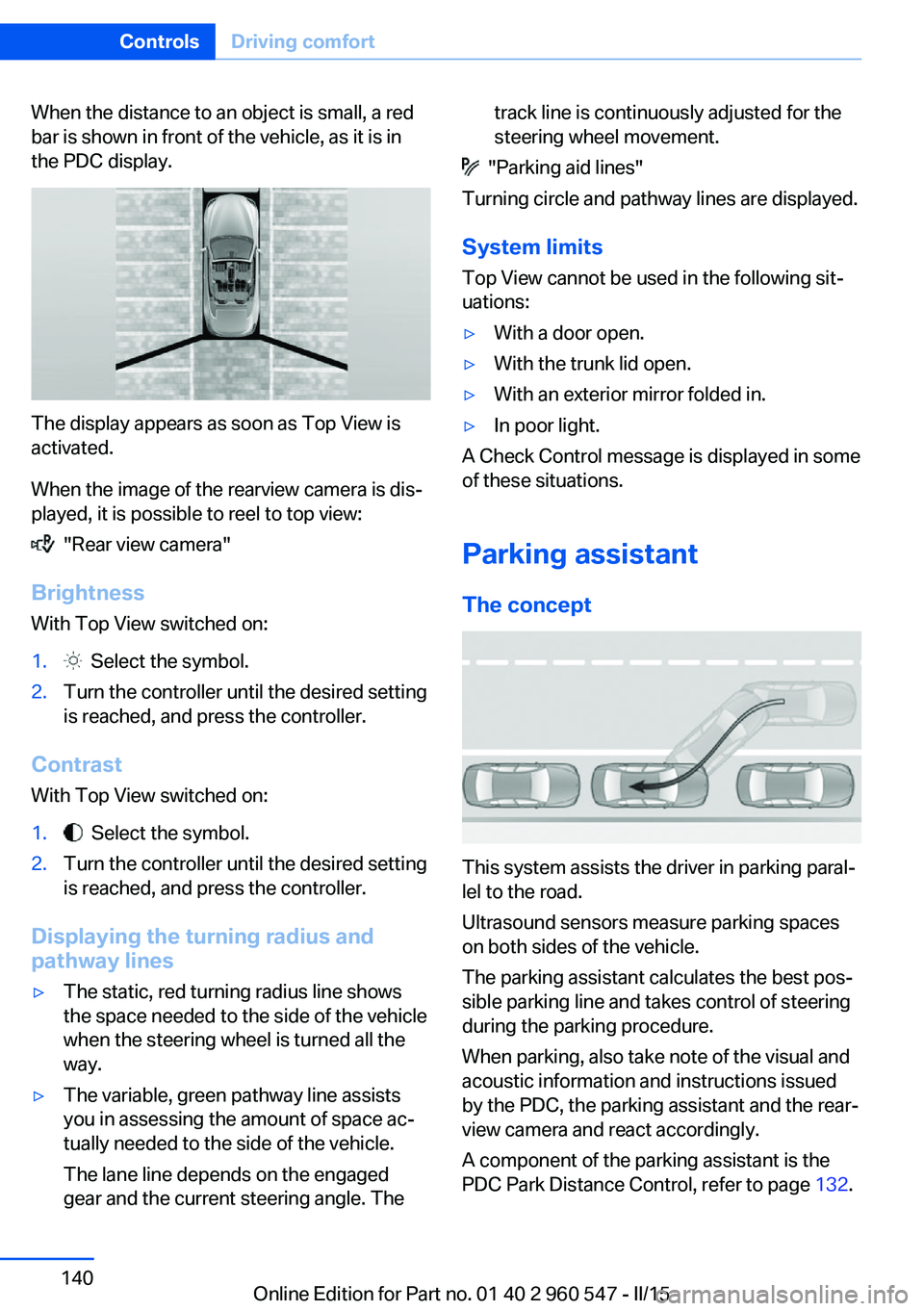
When the distance to an object is small, a red
bar is shown in front of the vehicle, as it is in
the PDC display.
The display appears as soon as Top View is
activated.
When the image of the rearview camera is dis‐
played, it is possible to reel to top view:
"Rear view camera"
Brightness
With Top View switched on:
1. Select the symbol.2.Turn the controller until the desired setting
is reached, and press the controller.
Contrast
With Top View switched on:
1. Select the symbol.2.Turn the controller until the desired setting
is reached, and press the controller.
Displaying the turning radius and
pathway lines
▷The static, red turning radius line shows
the space needed to the side of the vehicle
when the steering wheel is turned all the
way.▷The variable, green pathway line assists
you in assessing the amount of space ac‐
tually needed to the side of the vehicle.
The lane line depends on the engaged
gear and the current steering angle. Thetrack line is continuously adjusted for the
steering wheel movement.
"Parking aid lines"
Turning circle and pathway lines are displayed.
System limits
Top View cannot be used in the following sit‐
uations:
▷With a door open.▷With the trunk lid open.▷With an exterior mirror folded in.▷In poor light.
A Check Control message is displayed in some
of these situations.
Parking assistant The concept
This system assists the driver in parking paral‐
lel to the road.
Ultrasound sensors measure parking spaces
on both sides of the vehicle.
The parking assistant calculates the best pos‐
sible parking line and takes control of steering
during the parking procedure.
When parking, also take note of the visual and
acoustic information and instructions issued
by the PDC, the parking assistant and the rear‐
view camera and react accordingly.
A component of the parking assistant is the
PDC Park Distance Control, refer to page 132.
Seite 140ControlsDriving comfort140
Online Edition for Part no. 01 40 2 960 547 - II/15
Page 238 of 247
Control Display, settings 88
Controller 18, 19
Control systems, driving sta‐ bility 119
Convenient closing with the remote control 38
Convenient opening with the remote control 37
Convertible, hardtop 46
Convertible mode, automatic climate control 146, 149
Convertible program, auto‐ matic climate con‐
trol 146 , 149
Coolant 204
Coolant level 204
Coolant temperature 81
Cooling function 146, 149
Cooling, maximum 149
Cooling system 204
Cornering light 92
Corrosion on brake discs 170
Cosmetic mirror 157
Courtesy lamps during un‐ locking 37
Courtesy lamps with the vehi‐ cle locked 38
Cruise control 130
Cruise control, active with Stop & Go 124
Cruising range 81
Cupholders 165
Current fuel consumption 82
D
Damage, tires 192
Damping control, dy‐ namic 121
Data, technical 228
Date 81
Daytime running lights 92
Defrosting, refer to defrosting the windows 146
Defrosting, refer to Windows, defrosting 150 Defrosting the windows 146
Dehumidifying, air 146, 149
Deleting personal data 25
Deletion of personal data 25
Destination distance 86
Digital clock 81
Digital compass 155
Dimensions 228
Dimmable exterior mirrors 59
Dimmable interior rearview mirror 59
Direction indicator, refer to Turn signals 68
Display, electronic, instru‐ ment cluster 76
Display in windshield 89
Display lighting, refer to In‐ strument lighting 94
Displays, cleaning 224
Disposal, coolant 204
Disposal, vehicle battery 214
Distance control, refer to PDC 132
Distance to destination 86
Divided screen view, split screen 23
Door lock 39
Door lock, refer to Remote control 34
Drive-off assistant 123
Drive-off assistant, refer to DSC 119
Driver assistance, refer to In‐ telligent Safety 106
Driving Assistant, refer to In‐ telligent Safety 106
Driving Dynamics Con‐ trol 121
Driving instructions, break- in 168
Driving mode 121
Driving notes, general 168
Driving stability control sys‐ tems 119
Driving style analysis 178
Driving tips 168 DSC Dynamic Stability Con‐
trol 119
DTC Dynamic Traction Con‐ trol 120
Dynamic Damping Con‐ trol 121
Dynamic Stability Control DSC 119
Dynamic Traction Control DTC 120
E
ECO PRO 174
ECO PRO, bonus range 175
ECO PRO display 174
ECO PRO driving mode 174
ECO PRO driving style analy‐ sis 178
ECO PRO mode 174
ECO PRO Tip - driving in‐ struction 176
EfficientDynamics 176
Electronic displays, instru‐ ment cluster 76
Electronic oil measure‐ ment 201
Electronic Stability Program ESP, refer to DSC 119
Emergency detection, remote control 35
Emergency release, fuel filler flap 182
Emergency Request 216
Emergency start function, en‐ gine start 35
Emergency unlocking, trans‐ mission lock 74
Emergency unlocking, trunk lid 41
Energy Control 82
Energy recovery 82
Engine, automatic Start/Stop function 66
Engine, automatic switch- off 66 Seite 234ReferenceEverything from A to Z234
Online Edition for Part no. 01 40 2 960 547 - II/15
Page 242 of 247
Outside air, refer to Auto‐matic recirculated-air con‐
trol 149
Overheating of engine, refer to Coolant temperature 81
P Paint, vehicle 222
Parallel parking assistant 140
Park Distance Control PDC 132
Parked-car ventilation 151
Parked vehicle, condensa‐ tion 170
Parking aid, refer to PDC 132
Parking assistant 140
Parking brake 67
Parking lights 91
Parts and accessories 7
Passenger side mirror, tilting downward 58
Pathway lines, rearview cam‐ era 136
PDC Park Distance Con‐ trol 132
Pedestrian warning with city braking function 112
Personal Profile 35
Personal Profile, exporting profiles 36
Personal Profile, importing profiles 37
Pinch protection system, win‐ dows 46
Plastic, care 223
Power failure 214
Power windows 45
Pressure, tire air pres‐ sure 186
Pressure warning FTM, tires 104
Profile, refer to Personal Pro‐ file 35
Programmable memory but‐ tons, iDrive 24 Protective function, win‐
dows 46
Push-and-turn switch, refer to Controller 18, 19
R Radiator fluid 204
Radio-operated key, refer to Remote control 34
Radio ready state 64
Radio, see user's manual for Navigation, Entertainment
and Communication
Rain sensor 70
Rear lights 212
Rear socket 158
Rear turn signal, bulb replace‐ ment 210
Rearview camera 135
Rearview mirror 58
Rear window de‐ froster 146, 150
Recirculated-air filter 150
Recirculated-air mode 147, 149
Recommended fuel grade 184
Recommended tire brands 193
Refueling 182
Remaining range 81
Remote control/key 34
Remote control, malfunc‐ tion 39
Remote control, univer‐ sal 153
Replacement fuse 214
Replacing parts 207
Replacing wheels/tires 192
Reporting safety defects 9
RES button 127
RES button, see Active Cruise Control, ACC 124
RES button, see Cruise con‐ trol 130 Reserve warning, refer to
Range 81
Reset, Tire Pressure Monitor TPM 101
Retaining straps, securing cargo 172
Retreaded tires 193
Roadside parking lights 92
Rollover protection sys‐ tem 99
RON recommended fuel grade 184
Roofliner 17
Rope for tow-starting/ towing 219
RSC Run Flat System Com‐ ponent, refer to Run-flat
tires 194
Rubber components, care 223
Run-flat tires 194
S Safe braking 169
Safety 7
Safety belt reminder for driv‐ er's seat and front passen‐
ger seat 56
Safety belts 55
Safety belts, care 223
Safety systems, airbags 96
Saving fuel 173
Screen, refer to Control Dis‐ play 18
Screwdriver, see Onboard ve‐ hicle tool kit 207
Screw thread, see screw thread for tow fitting, screw
thread for tow fitting 220
Sealant 194
Seat and mirror memory 57
Seat belts, refer to Safety belts 55
Seat heating, front 54 Seite 238ReferenceEverything from A to Z238
Online Edition for Part no. 01 40 2 960 547 - II/15